
On this page
Start here
Quick answer
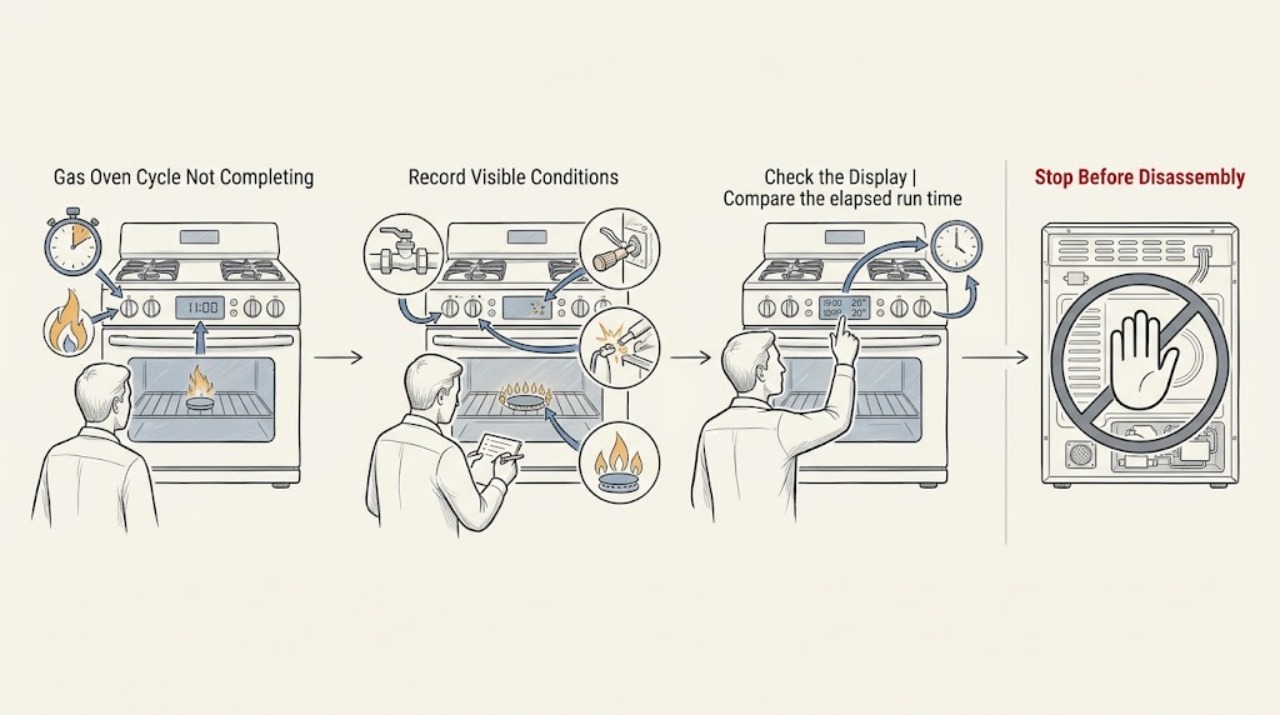
First determine whether the oven is actually ending the cooking program or simply cycling its burner normally to hold temperature. Check whether Cook Time, Time Bake, Delay Bake, or another automatic stop was set, and confirm the clock and controls match the model's instructions. If the oven stops heating early, check only the accessible electrical and gas-supply conditions with the oven off and with no gas odor. Do not bypass an ignition or gas safety control. If a correctly started gas cycle still ends early, shows an error, loses ignition, or leaves food undercooked, stop using it and arrange qualified appliance service.
Work through in order
Diagnostic checks
Use only checks that match the exact appliance or system and its official guide.
-
Check 1
With the oven cool enough to handle safely, record the selected mode, target temperature, start time, displayed message, and the point at which the cycle appears to stop; distinguish a canceled or completed program from a burner pause while the display still shows Bake or another active mode.
Expected result: The display still shows an active cooking mode while heat pauses, or the display cancels, returns to the clock, beeps, or shows an unexpected status before cooking is complete.
Next step: If the mode remains active, continue to the temperature and airflow observations; if the program ends unexpectedly, check the automatic settings before repeating the cook cycle.
Stop if: Stop immediately for gas odor, hissing, smoke, scorching, uncontrolled heating, or a damaged door or control panel.
Why this matters
Why: An active display with intermittent heat can be normal temperature regulation, whereas an unexpected program end points toward a timer setting, power/control interruption, ignition or gas-supply problem, or an internal fault.
-
Check 2
Inspect the clock and control panel for Cook Time, Time Bake, Stop/Start, Delay Bake, an automatic-oven indicator, Sabbath mode, or another special setting, then cancel or reset it only by following the exact GE model manual.
Expected result: An automatic stop or delayed program is active, its stop time is wrong, the clock is incorrect, or the oven is in an ordinary manual Bake or Broil state with no automatic stop shown.
Next step: Clear the unintended program according to the manual, set a normal manual cycle, and supervise one test. Do not assume the Kitchen Timer controls oven power; GE distinguishes the ordinary timer from Cook Time on supported models.
Stop if: Stop if the controls are cracked, wet, intermittently activating, or would require opening the console to diagnose.
Why this matters
Why: A programmed stop can intentionally end the oven before the user expects; a normal manual state shifts attention to power, gas, ignition, and temperature regulation instead of timer programming.
-
Check 3
Compare the elapsed run time with the model's automatic-shutoff information, especially if the oven was left on for many hours; use the Owner's Manual to determine whether the model has a 12-hour shutoff and whether an override is supported.
Expected result: The oven stopped only after a very long continuous run and the model has a 12-hour automatic shutoff, or it stopped much sooner than that or has no such feature.
Next step: For a supported long-duration use case, follow the model manual for any permitted setting; otherwise do not repeatedly restart the oven and arrange service if the cutoff occurs unexpectedly.
Stop if: Stop if the oven shuts off and restarts unpredictably, cannot be canceled, or continues heating after being turned off.
Why this matters
Why: A long-run safety shutoff may explain a late stop without identifying a defect; an early stop is not explained by that feature and needs the normal timer, supply, ignition, or control path investigated.
-
Check 4
Turn the oven controls off and, only when there is no gas odor or other hazard, check the accessible household breaker or fuse status and the accessible gas shutoff identified by the installation instructions; do not remove covers or work on the regulator.
Expected result: A breaker or fuse is open, the range was recently installed or moved, the gas shutoff may be closed, or the accessible supply appears normal while the cycle still stops early.
Next step: Correct only an obvious external setting described by the manual. Do not repeatedly reset a breaker, alter gas piping, or infer a failed internal part from this check; arrange an appliance technician or qualified electrician when supply is uncertain.
Stop if: Stop and leave the area for gas odor or hissing; stop for repeated breaker trips, a hot outlet, exposed wiring, scorching, or an uncertain gas connection.
Why this matters
Why: A gas oven still relies on electrical controls and ignition, and an oven-specific gas path can differ from the cooktop path; a normal external supply does not prove that the internal ignition or safety circuit works.
-
Check 5
From a safe position and only as described by the model instructions, start a normal Bake cycle and observe through the intended viewing area whether the oven begins its normal ignition and heat sequence; do not put hands inside, reach near the burner, repeatedly open the door, or manually light the oven.
Expected result: The oven ignites and cycles heat normally, the igniter does not show the expected indication, the flame or heat drops out and does not return, or an error appears.
Next step: Cancel the cycle, record the exact display and whether the cooktop works, and arrange qualified appliance service for any abnormal ignition or repeat failure.
Stop if: Stop immediately for gas odor, delayed ignition, a flash, smoke, unusual flame, scorching, or any need to remove a panel or bypass a safety control.
Why this matters
Why: A normal on-and-off heat pattern can be regulation, but absent ignition, repeated failed ignition, an error, or a cycle that stops cold points to an ignition, control, sensor, gas-safety, or related fault that cannot be assigned to one part from observation alone.
-
Check 6
Arrange qualified appliance service when a correctly configured GE gas-oven cycle still ends early, repeatedly loses heat, shows an error, or cannot be canceled normally; provide the model number, selected mode, target temperature, elapsed time, display message, whether the cooktop works, and the results of the safe external checks.
Expected result: The failure is repeatable or intermittent, only one mode fails, the oven remains cold after stopping, or a gas, control, sensor, ignition, or temperature problem is suspected.
Next step: Keep the oven out of service until it is diagnosed, preserve any displayed error, and tell the technician whether the cycle ended at a consistent time or only under certain modes.
Stop if: Stop using the appliance for gas odor, uncontrolled heating, smoke, scorching, repeated ignition failure, repeated electrical trips, or a damaged door or wiring.
Why this matters
Why: The remaining diagnosis may involve a gas or electrical safety circuit, control, sensor, igniter, or burner system. These components require model-specific testing and are not safely identified by replacing a random part.
Use your observations
Decision map
Find the observation that best matches what you see, then follow the next safe action.
-
PATH 01Next step
What you see
The display remains in Bake or another active mode and the burner pauses before returning to heat.
Do this next
Arrange qualified service and follow the exact model guidance.
Why this path and its safety boundary
Why it matters: Treat the pause as possible temperature regulation; monitor the full cycle and investigate only if the oven fails to regain heat, the food remains undercooked, or the control ends unexpectedly.
-
PATH 02Next step
What you see
Cook Time, Time Bake, Delay Bake, or a Stop/Start program is active or incorrectly set.
Do this next
Arrange qualified service and follow the exact model guidance.
Why this path and its safety boundary
Why it matters: Clear or correct it using the exact model manual, then test a normal manual cycle; do not confuse the Kitchen Timer with a cooking-time shutoff.
-
PATH 03Next step
What you see
The stop occurred only after a long continuous run on a model with automatic shutoff.
Do this next
Arrange qualified service and follow the exact model guidance.
Why this path and its safety boundary
Why it matters: Use the model manual to understand the documented safety behavior and do not infer a component failure solely from that late stop; arrange service if it occurs early or repeats unexpectedly.
-
PATH 04Next step
What you see
A breaker, fuse, recent installation, or accessible gas shutoff is abnormal or uncertain.
Do this next
Arrange qualified service and follow the exact model guidance.
Why this path and its safety boundary
Why it matters: Stop repeated resets and obtain qualified electrical or appliance service; do not open electrical or gas compartments.
-
PATH 05Next step
What you see
The oven does not ignite normally, loses heat repeatedly, shows an error, or ends the program while cold.
Do this next
Arrange qualified service and follow the exact model guidance.
Why this path and its safety boundary
Why it matters: Cancel the cycle, record the display and mode, and arrange qualified appliance service for ignition, gas-safety, sensing, or control diagnosis.
-
PATH 06Next step
What you see
There is gas odor, hissing, smoke, scorching, delayed ignition, an uncontrolled flame, exposed wiring, or repeated breaker trips.
Do this next
Arrange qualified service and follow the exact model guidance.
Why this path and its safety boundary
Why it matters: Stop using the oven, leave the area for a gas hazard, and obtain the appropriate qualified emergency or appliance help according to local guidance.
Helpful context
Understand the symptom
A pause is different from an ended cycle
A GE gas oven normally cycles its burner as temperature changes. A cooling or convection fan may also run or change state during cooking. Treat the problem as a failed cycle when the control cancels or reaches an unexpected end, the oven stops responding before the selected program is done, or food remains undercooked after the oven has had a reasonable opportunity to heat. Note what the display says and whether the cooktop burners still operate; those observations keep the diagnosis specific.
Use the model manual for timer and gas details
GE control layouts vary. The model manual is the authority for canceling a programmed cook time, delay, Sabbath setting, or special cycle and for identifying an accessible gas shutoff. Do not remove panels, test live wiring, disassemble the regulator, or attempt to light a gas oven manually. If there is gas odor, hissing, smoke, scorching, or an uncontrolled flame, leave the appliance off and obtain qualified help.
Safety boundary
Stop conditions
- Gas odor, hissing, delayed ignition, an unusual flame, smoke, or scorching is present.
- The oven continues heating after cancellation or cannot be controlled normally.
- A breaker trips repeatedly, an outlet or connection is hot, or wiring is exposed or damaged.
- Diagnosis would require opening a gas regulator, live electrical compartment, or safety control.
- The oven repeatedly ends a valid cycle early, loses ignition, or displays an unresolved error.
- The door, latch, gasket, burner area, or control panel is damaged.
Only after diagnosis
Potential parts
- oven igniter
Consider this category only if a qualified diagnosis confirms an ignition fault; an early-ending cycle alone does not identify the igniter.
Confirm the exact GE model and manufacturer fit information before ordering any component. - oven temperature sensor or control
Consider this category only after model-specific testing links the early stop or temperature problem to sensing or control; do not replace it from the symptom alone.
Use the exact model documentation and qualified diagnosis to verify compatibility. - gas safety or burner component
Consider this category only when a qualified technician confirms a gas-path or burner fault and the appliance is safe to work on.
Gas components require exact model fitment and qualified installation; never bypass a safety device.
When checks do not resolve it
Need a professional?
A normal GE gas-oven cycle ends before the selected cooking period despite correct manual settings., Cook Time or other automatic settings are not active, but the program still cancels or becomes unresponsive., The oven will not ignite, repeatedly loses heat, or works in one mode but not another., The gas-supply or electrical connection is uncertain, especially after installation or movement., An error returns after the model-specific reset or safe external checks.
Common questions
FAQ
Why does my GE gas oven stop before the food is done?
A programmed Cook Time or Time Bake stop, an incorrect control state, a supply or ignition interruption, or an internal sensing or control fault can produce that symptom. First determine whether the burner is merely cycling while the display remains active; then check the model's automatic settings and safe external supply conditions.
Is it normal for a GE gas oven burner to turn off during a cycle?
Yes. GE says gas ovens cycle on and off to maintain the selected temperature. It is not normal if the display ends unexpectedly, heat never returns, the food remains undercooked, or the oven shows an error or unsafe symptom.
Can the GE oven timer turn the oven off?
The ordinary Kitchen Timer is separate from Cook Time on the documented controls. Cook Time or Time Bake can turn the oven off at its programmed end, so check which timer function is displayed and follow the exact model manual.
What should I do if my GE gas oven loses heat and smells like gas?
Do not continue testing or try to relight it manually. Turn controls off if safe, leave the area, and obtain the appropriate qualified gas or appliance help according to local guidance. Do not open the regulator or bypass an ignition safety control.
Read the exact guide
Official sources
- Range & Wall Oven - Setting the TimerGE Appliances · States that the ordinary Timer can beep while the oven continues operating; model controls vary.
- Range & Wall Oven - Setting Cook TimeGE Appliances · Shows how supported GE controls use Cook Time to end a programmed cooking period; exact control sequence varies by model.
- Gas Range - Oven Does Not Heat, But The Burners HeatGE Appliances · Supports the distinction between cooktop and oven gas paths, control settings, self-clean latch, and safe igniter observation; unresolved cases require service.
- Range & Wall Oven - Fan Noise and Normal OperationGE Appliances · Explains that convection and cooling fans can cycle during operation and that gas-model convection fans have model-specific timing.
- Range & Wall Oven- Timed Bake and Delayed Bake OptionsGE Appliances · Documents that automatic Start and Stop or Time Bake settings can begin and turn off an oven; electronic controls require the model manual.
- Gas Range & Wall Oven - Oven Will Not Come OnGE Appliances · Supports checking control settings, breaker or fuse, accessible gas shutoff, safe igniter observation, a one-minute control reset, and the service boundary.
- Range & Wall Oven - 12 Hour Automatic Oven Shut OffGE Appliances · Explains that most clock-controlled ranges and wall ovens shut off after 12 hours and that model-specific manuals describe any override.
- Range & Wall Oven - "Special Features" SettingsGE Appliances · Supports model-specific special-feature settings, including automatic shutoff and Sabbath mode; not all settings are present on every model.
- Range & Wall Oven - Oven Temperature Fluctuation / Cycling On and OffGE Appliances · Explains that gas and electric ovens cycle on and off during cooking to maintain the selected temperature; model behavior can vary.
Community feedback
Share a repair observation
Share a plain-text repair observation. Accepted observations are published automatically; this page may take a moment to update.