
On this page
Start here
Quick answer
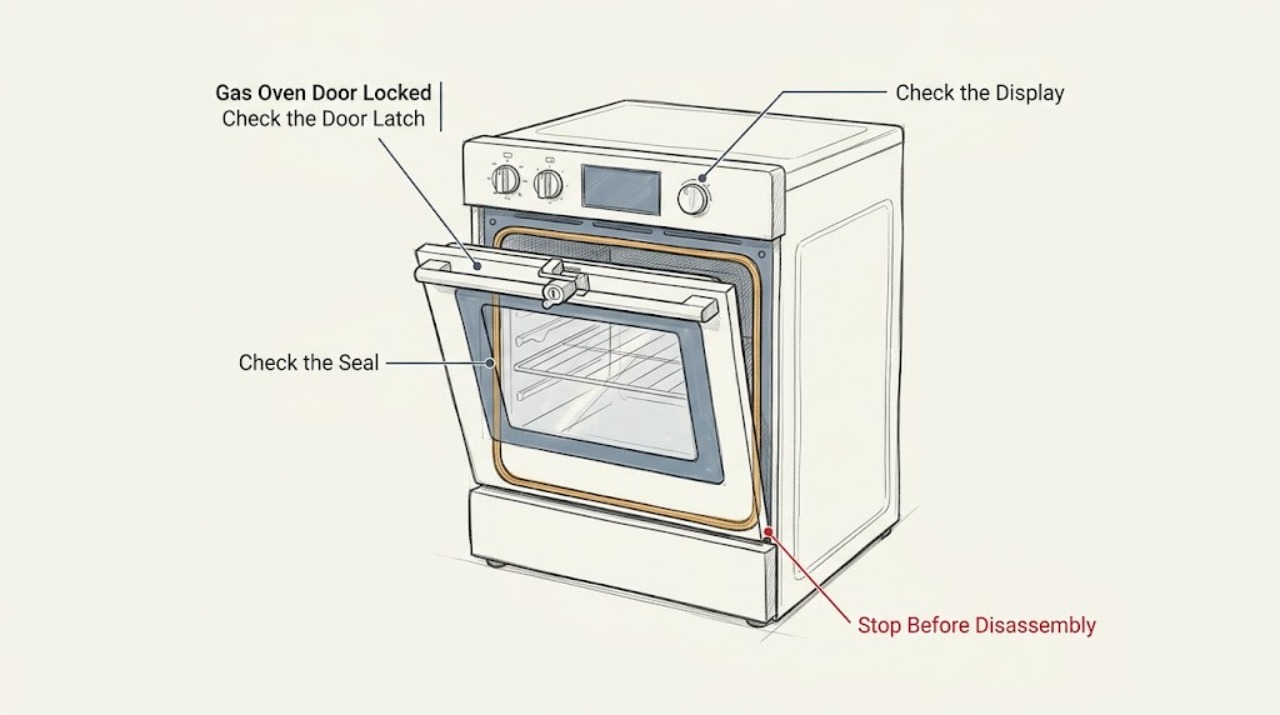
A GE gas oven door can remain locked normally during Self-Clean or while the oven is still hot. Turn the oven off, keep the door closed, and let it cool to room temperature before trying the model's normal unlatch action. If the lock engaged during baking, use CLEAR/OFF and then wait for the oven to cool; an electronic model may allow one safe breaker reset when the oven is cool. Older models may use a manual latch, while newer models may use an automatic lock, so do not force the handle or pry the door. Stop immediately for gas odor, smoke, flames outside the oven, scorching, a damaged door or glass, or a latch that remains stuck after the documented cool-down and reset steps; arrange qualified appliance or gas service.
Work through in order
Diagnostic checks
Use only checks that match the exact appliance or system and its official guide.
-
Check 1
Leave the door closed, turn the oven controls off if they respond, and identify what happened immediately before the lock appeared: Self-Clean, baking or broiling, a power interruption, or an accidental latch movement. From outside the appliance, check for a lock light or message, smoke, gas odor, external flame, scorching, broken glass, a loose hinge, or a door that is visibly out of alignment.
Expected result: The oven is cooling after Self-Clean; it locked during baking; it is cool but still locked; or a gas, fire, burn, glass, hinge, or electrical hazard is present.
Next step: If there is gas odor, smoke, an external flame, scorching, damaged glass, a loose hinge, or another hazard, stop using the oven, avoid unsafe switches if gas may be present, leave the area as appropriate, and contact emergency, gas, or qualified service help. If the oven is safe, keep it closed and continue with the matching cool-down or control check.
Why this matters
Why: A lock during Self-Clean or cool-down can be designed behavior, while a lock during ordinary baking or on a cool oven needs a separate latch or control branch. A safety symptom overrides every unlocking attempt.
-
Check 2
If the door is locked after Self-Clean or recent high-temperature use, wait until the oven has cooled to room temperature and the model's lock or clean indication has cleared. Do not touch the door glass to estimate temperature, and do not pull the latch while the lock remains engaged.
Expected result: The lock releases after cool-down; the lock light or message remains on while the oven is still hot; or the oven is cool but the lock remains engaged.
Next step: If the lock clears, open the door normally and use the oven only according to the model manual. If the oven is cool and the lock remains, continue only with the documented control or manual-latch branch; never force the door.
Why this matters
Why: GE describes a cool-down period before an automatic lock unlatches. A lock that clears after cooling is expected operation; a lock that remains after the oven is cool is a possible control or latch fault.
-
Check 3
If the automatic lock engaged during baking rather than Self-Clean, press the model's CLEAR/OFF control once and allow the oven to cool completely before testing the door. If the exact model has electronic controls and the oven is cool, use only the user-accessible breaker reset described by GE or the owner manual; do not remove panels or disconnect gas.
Expected result: The door unlocks after CLEAR/OFF and cool-down; the display or lock remains unchanged; or the oven is not cool enough to safely retry.
Next step: If the lock clears, leave the oven off until you confirm normal operation from the manual. If it does not clear after the documented cool and reset sequence, stop and arrange qualified appliance service.
Why this matters
Why: GE says an automatic self-clean lock should not normally engage during Bake and may reset after CLEAR/OFF and cooling. A persistent lock after a model-appropriate reset points to service rather than a reason to force the latch.
-
Check 4
For an older GE model with a visible mechanical latch, wait until the oven is cool, set controls to the model's specified position, and move the latch only in the direction described in the owner manual. Keep the door closed while moving the latch and stop if it binds; do not use tools, pry the door, or reach through the gap.
Expected result: The manual latch moves and the door opens normally; the handle or latch binds; or the oven is not actually cool.
Next step: If the latch does not move freely with the oven cool and controls in the manual-directed position, leave it alone and arrange qualified service. Never force the latch or remove the door to gain access.
Why this matters
Why: Mechanical latch designs have model-specific positions and release actions. Binding after the oven is cool may indicate a bent latch, misalignment, or control problem; forcing it can damage the door and leave a hot oven unsecured.
-
Check 5
If the door remains locked after the correct cool-down, CLEAR/OFF or manual-latch check, record the model identity, lock message or light, the last cycle, whether the display responds, and whether the oven was hot or cool when the symptom occurred. Do not repeat Self-Clean as a trial when food, utensils, or unknown damage is present.
Expected result: The lock recurs on a cool oven, the control shows an error, the display is dead, the latch is physically damaged, or no safety symptom is present but the door still will not open.
Next step: Keep the oven off and arrange qualified GE appliance service. Provide the recorded cycle, temperature state, display behavior, and any error indication; do not bypass the lock or attempt internal diagnosis.
Why this matters
Why: A recurring lock or error after the model-directed user checks needs diagnosis of the latch, control, temperature sensing, or power system. The absence of an obvious hazard does not make internal gas or electrical work safe for a user.
Use your observations
Decision map
Find the observation that best matches what you see, then follow the next safe action.
-
PATH 01Next step
What you see
The door is locked during or immediately after Self-Clean and the oven is still hot or the lock indication has not cleared.
Do this next
Keep the door closed and allow the oven to complete its cool-down. Do not force the latch; try the normal opening action only after the model indication clears and the oven is cool.
-
PATH 02Next step
What you see
The automatic lock engaged during baking and the oven is safe to handle.
Do this next
Press CLEAR/OFF once, let the oven cool completely, and try the door normally. If it remains locked, follow only the exact model's user-accessible reset guidance and then request service.
-
PATH 03Next step
What you see
The oven is cool, has a manual latch, and the latch moves freely in the model-directed position.
Do this next
Return the latch to the normal cooking position and open the door without force. If the latch binds or the door remains shut, stop and arrange service.
-
PATH 04Next step
What you see
The oven is cool but the lock remains engaged after the documented cool-down, CLEAR/OFF, or electronic reset check.
Do this next
Stop using the oven and request qualified GE appliance service. Do not pry the door, remove panels, bypass the latch, or disconnect a gas line.
-
PATH 05Next step
What you see
Gas odor, smoke, an external flame, scorching, damaged glass, a loose hinge, or another fire, gas, burn, or electrical hazard is present.
Do this next
Stop immediately, keep clear of the appliance, avoid switches and flames if gas may be present, leave the area as appropriate, and contact emergency help, the gas provider, or qualified service.
Helpful context
Understand the symptom
A hot locked door may be normal
Self-Clean uses a high-temperature cycle, and the lock is meant to keep the door closed until the oven cools. A lock light or message that remains on immediately after Self-Clean does not by itself prove that the latch has failed. Do not pull on the handle while the oven is hot.
Identify the lock style and event
GE gas ovens may have a manual latch handle or an automatic lock controlled by the electronics. The correct next step depends on whether the door locked during Self-Clean, during baking, after a power interruption, or when the oven was already cool. Use the exact model manual for control names and latch movement; do not apply a generic latch trick to a different design.
Keep gas and heat hazards outside the troubleshooting path
A locked door is not a reason to disassemble a gas appliance. Keep controls off when the oven is not being used, keep clear of hot surfaces, and stop for gas odor, smoke, an external flame, scorching, damaged glass, or a damaged power connection. Never force the latch, bypass a thermal safety, or reach into a hot oven to retrieve food.
Safety boundary
Stop conditions
- Gas odor, smoke, an external flame, scorching, or an uncontrolled fire symptom
- Cracked glass, a loose hinge, a bent or binding latch, or a door that may fall
- The oven is still hot or the lock indication remains active
- The need to pry the door, remove panels, bypass the lock, or disconnect a gas connection
- A recurring lock or error after the documented model-directed steps
Only after diagnosis
Potential parts
- oven door latch or lock actuator
Consider this category only when qualified service confirms that the latch or actuator remains engaged after the oven is cool and the model-directed controls and reset steps have been completed.
Latch and actuator designs are model-specific and safety-related. Do not force, bypass, or replace the mechanism from the symptom alone. - oven temperature sensor or control module
Consider this category only when qualified service confirms a sensing or control fault that is keeping the automatic lock engaged or generating a recurring error.
Controls and sensors are model-specific and may involve electrical or hot-gas appliance access. Internal diagnosis belongs to qualified service. - oven door hinge or door assembly component
Consider this category only when inspection confirms a bent hinge, misaligned door, or damaged frame or glass that prevents safe latch release.
Door assemblies are heavy and glass can break. Confirm the exact model and have a qualified professional handle removal or alignment.
When checks do not resolve it
Need a professional?
Request qualified GE appliance service when the door remains locked after the model-specific cool-down and reset steps, a manual latch binds, the lock recurs on a cool oven, an error or dead display accompanies the lock, or the latch, hinge, glass, or frame is damaged. Contact the gas provider or emergency help for gas odor or an uncontrolled flame.
Have this ready
- Provide the full model identity, whether the lock is automatic or manual, the cycle that preceded it, whether the oven was hot or cool, lock lights or messages, display response, breaker or power history, and any latch, hinge, glass, gas, smoke, or flame observations. Do not force the latch, open panels, bypass a safety control, or disconnect gas fittings.
Common questions
FAQ
Why is my GE gas oven door locked after Self-Clean?
The lock may be normal while the oven cools. Keep the door closed and wait until the oven has cooled and the model's lock indication clears. Do not force the latch; if it remains locked after the documented cool-down, request service.
How do I unlock a GE oven door that locked during baking?
Press CLEAR/OFF if the controls respond, allow the oven to cool completely, and try the normal opening action. If the door remains locked, use only the exact model's user-accessible reset guidance and arrange service rather than forcing the latch.
What if the GE oven has a manual door latch?
Wait until the oven is cool and follow the owner manual's latch position and release action. If the handle binds or the door will not release freely, stop and request service; do not pry or use tools.
When should I stop troubleshooting a locked GE gas oven door?
Stop for gas odor, smoke, an external flame, scorching, damaged glass, a loose hinge, a binding latch, or a lock that remains after the oven is cool and the model-directed steps are complete. Avoid switches if gas may be present and contact the appropriate emergency, gas, or appliance professional.
Read the exact guide
Official sources
- Range & Wall Oven - Explanation of Self-Clean Oven Cool DownGE Appliances · GE ranges and wall ovens; Self-Clean cool-down behavior, lock indication, and escalation when the cycle cannot terminate
- Frequently Asked Questions About GE Ranges and Wall OvensGE Appliances · GE ranges and wall ovens; locked-door FAQ, cool-down, circuit-breaker reset, fault-code and service guidance
- Range & Wall Oven - Oven Door Locked During BakingGE Appliances · GE ranges and wall ovens; automatic lock engaged during baking, CLEAR/OFF, cool-down, and service boundary
- Range - Oven Door Won't UnlockGE Appliances · GE ranges and wall ovens; accidentally locked doors, post-Self-Clean release, electronic reset, mechanical latch, and do-not-force boundary
- Range & Wall Oven - Locking the Oven Door for Self CleanGE Appliances · GE ranges and wall ovens; mechanical and automatic door locks during Self-Clean and release after cool-down
Community feedback
Share a repair observation
Share a plain-text repair observation. Accepted observations are published automatically; this page may take a moment to update.