
On this page
Start here
Quick answer
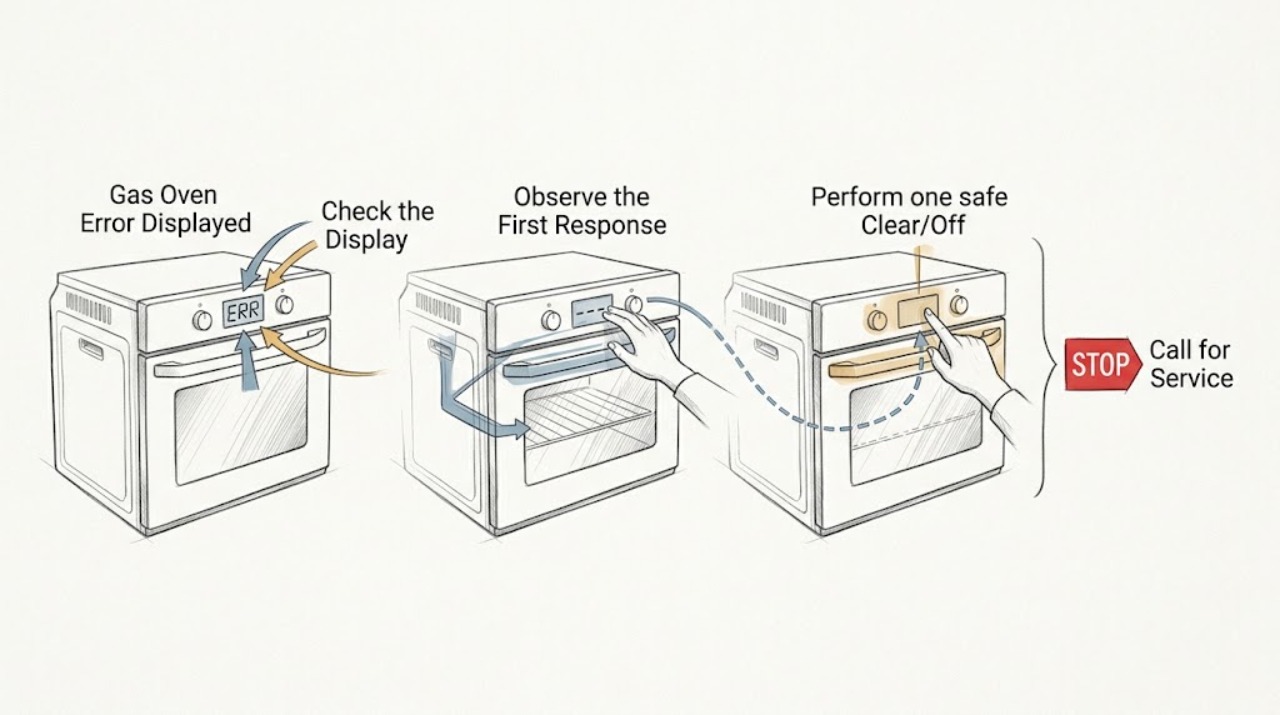
When a GE gas oven displays an error, record the exact letters, numbers, and symbols before touching the controls. A function code that starts with F, a keypanel or control message, LOC or LOC DOOR, ERR, OFF, or a power-related message can have a different meaning. Follow the exact model manual, press Clear/Off when the guide permits, and perform one model-appropriate power reset only when there is no gas, smoke, or electrical hazard. If the code returns, the oven will not operate, the door remains locked, or the display indicates a wiring or internal-component fault, leave the range out of service and arrange qualified GE appliance service.
Before you begin
Safety first
- User diagnosis is limited to recording the display, model-guided control-state handling, one safe reset when permitted, external observations, and waiting for documented cool-down. A qualified technician must diagnose internal controls, door-lock circuits, gas valves, ignition, sensors, and wiring.
Work through in order
Diagnostic checks
Use only checks that match the exact appliance or system and its official guide.
-
Capture the exact display and operating state
Write down the complete code exactly as shown, including any F prefix, letters, numbers, LOC, ERR, OFF, door wording, or unusual symbols. Note whether the oven was baking, broiling, self-cleaning, starting, cooling, or idle when the message appeared, and photograph the display only if it is safe to do so.
Expected result: The message is a repeating F-style function code, LOC or LOC DOOR, ERR, OFF, a power or wiring message, or an unfamiliar model-specific code.
Next step: Use the model manual and GE's fault-code guide to classify the message. Do not erase the display before recording it unless the manual specifically directs a clear operation.
Why this matters
Why: GE uses different messages for internal component faults, lock states, invalid entries, self-clean temperature conditions, and wiring problems. Guessing from a partial code can send the repair down the wrong path.
-
Check whether the message is a control-state notice
Compare the display with the exact model manual. If it shows LOC, check the manual's child-lock procedure; if it shows LOC DOOR or Unlock Door, check whether self-clean was selected and whether the oven has cooled. If it shows ERR, review whether an invalid sequence or temperature entry was made. Do not force the latch or start self-clean to test it.
Expected result: The message clears after the model-guided unlock, cool-down, or valid control entry, or it remains after the state is corrected.
Next step: If the message clears and the oven operates normally, monitor it. If it remains, record the recurrence and arrange service rather than forcing the door or repeating self-clean.
Why this matters
Why: A lock, temperature-state, or invalid-entry message may not be a failed part. A persistent state message after its documented condition is gone can indicate a latch, keypanel, or electronic-control problem.
-
Perform one safe Clear/Off or power reset when allowed
If the manual and display instructions allow it, press Clear/Off once. If the fault remains and there is no gas, smoke, burning odor, arcing, or damaged cord, turn the range's household breaker Off using normal panel procedure, wait the interval specified by the model guidance, and restore power once. Do not repeatedly cycle the breaker.
Expected result: The code clears and stays away, returns immediately, or the breaker trips or will not hold.
Next step: If the code returns or the breaker trips, leave the range out of service and arrange qualified diagnosis. Keep the exact code and reset result for the technician.
Why this matters
Why: A temporary control state can clear after a documented reset, but an immediate or repeating fault indicates a condition that the reset did not repair. A repeated breaker trip is an electrical stop, not a reset invitation.
-
Separate gas heating from electronic control symptoms
After a cleared message and only if the appliance is safe, note whether the display and controls work, whether the surface burners ignite normally, and whether the gas oven ignites and heats. Do not test gas pressure, remove panels, or use an open flame. Turn all controls Off after the observation.
Expected result: The display works but the oven does not heat, the surface burners work while the oven does not, no burner ignites, or the code returns during heating.
Next step: Keep the oven Off and request qualified gas-appliance service for ignition, sensor, valve, control, or wiring diagnosis. If no gas burner ignites or gas supply is uncertain, contact the gas provider or qualified installer as appropriate.
Why this matters
Why: Working surface burners do not prove the oven ignition, sensor, valve, control, or safety circuit is healthy. A no-heat or recurring-code condition narrows the handoff but does not identify a part for user replacement.
-
Check door-lock and self-clean context without forcing it
If the message appeared during or after self-clean, leave the oven undisturbed while it cools and check the latch position only from the user side. Do not pry the door, insert tools into the latch, or start another high-heat cycle. If the oven is not in self-clean but reports a locked-door state, use only the manual's documented reset.
Expected result: The door unlocks after the documented cool-down and reset, or it remains locked or the lock message returns.
Next step: Keep the range out of service if the latch does not release normally or a lock fault repeats. Arrange qualified service for the latch and control circuit.
Why this matters
Why: GE uses lock messages for self-clean and for door-lock circuit conditions. A latch that remains locked when the oven is cool can require service and may not be safe to force.
-
Prepare the error-code service handoff
Record the model and serial information, exact code, time and cycle, whether the display cleared, reset result, breaker behavior, oven and surface-burner behavior, door-latch position, gas odor or flame observations, and any recent cleaning, power, installation, or service event. Do not open panels or disconnect gas lines.
Expected result: The code repeats, controls or heating fail, the door remains locked, or any gas, fire, or electrical symptom is present.
Next step: Leave the range out of service and contact GE support or a qualified appliance technician. For gas odor, leave the area and contact the gas provider or emergency service from a safe location.
Why this matters
Why: A complete code and context record lets a technician use the model-specific fault table and distinguish a control-state message from a sensor, lock, ignition, valve, wiring, or gas-supply issue.
Use your observations
Decision map
Find the observation that best matches what you see, then follow the next safe action.
-
PATH 01Next step
What you see
The display shows LOC, ERR, OFF, or a lock message that matches a documented control state.
Do this next
Follow the exact model manual for unlock, valid-entry, or cool-down handling. If the message persists after the condition is corrected, request service.
-
PATH 02Next step
What you see
An F-style function code or an unfamiliar code returns after Clear/Off or one documented reset.
Do this next
Keep the range out of service and arrange qualified GE appliance diagnosis; do not guess or replace a part from the code alone.
-
PATH 03Next step
What you see
The display works but the gas oven does not ignite or heat, or surface burners and oven behave differently.
Do this next
Turn the oven Off and request qualified gas-appliance service for ignition, sensor, valve, control, and wiring diagnosis. Do not test gas pressure or open panels.
-
PATH 04Next step
What you see
The door remains locked after the oven is cool or a lock message appears outside self-clean.
Do this next
Do not force the door or latch. Use only the documented reset and arrange service if it remains locked or the message returns.
-
PATH 05Next step
What you see
Gas odor, smoke, fire, arcing, burning electrical odor, damaged wiring, or a repeated breaker trip is present.
Do this next
Stop immediately. Do not operate switches, relight burners, or reset the breaker again; leave the area for gas odor and seek appropriate emergency or qualified help from a safe location.
Helpful context
Understand the symptom
An error on a GE gas oven is a symptom label, not a universal diagnosis. The same display area may show a true function fault, a child lock, a door-lock state, an invalid control entry, a self-clean temperature state, or a wiring message. The model number and the exact display text determine which instructions apply.
Do not open the control panel, test live wiring, force a locked door, adjust a gas valve, or relight a burner repeatedly while troubleshooting a display. Stop for gas odor, smoke, arcing, burning odor, damaged wiring, or a breaker that trips again.
Safety boundary
Stop conditions
- Stop for gas odor, smoke, fire, arcing, burning electrical odor, damaged cord or wiring, uncontrolled heat, or a breaker that trips again.
- Do not force a locked door, bypass a safety circuit, open control panels, test live wiring, adjust gas pressure, or remove gas components.
- Do not repeatedly reset a function code, keep running self-clean, or continue heating while an error returns.
- Do not relight a gas burner or continue testing if gas supply is uncertain or the flame is abnormal.
Only after diagnosis
Potential parts
- electronic control or keypanel assembly
Consider only when qualified diagnosis maps the repeating code or unresponsive controls to the exact control or keypanel fault.
The exact GE model and revision are required; an error display alone does not establish part fit. - oven sensor, igniter, or ignition component
Consider only after a technician confirms a no-heat, ignition, or sensor fault and rules out supply, control, and safety conditions.
Match the exact GE model and fuel configuration; gas and electrical work require qualified service. - door-lock, gas valve, regulator, or wiring component
Consider only when a technician confirms a lock, fuel-delivery, or wiring fault corresponding to the code and observed behavior.
Verify the exact model and professional diagnosis before ordering or replacing any internal safety component.
When checks do not resolve it
Need a professional?
Request qualified GE appliance service when an F-style or model-specific code returns, the display cannot be cleared, the oven will not ignite or heat, the door remains locked, or the message indicates a keypanel, sensor, control, lock, wiring, or internal-component fault. Contact the gas provider for an uncertain gas supply. Treat gas odor, smoke, fire, arcing, and repeated breaker trips as immediate safety stops.
Safety scope: User diagnosis is limited to recording the display, model-guided control-state handling, one safe reset when permitted, external observations, and waiting for documented cool-down. A qualified technician must diagnose internal controls, door-lock circuits, gas valves, ignition, sensors, and wiring.
Common questions
FAQ
What should I do first when my GE gas oven displays an error?
Record the complete code and the cycle state first. Then use the exact model manual and GE's error-code guide to determine whether it is a lock, invalid entry, temperature state, or function fault.
Can I reset a GE gas oven error by turning off the breaker?
A single model-appropriate power reset may clear a temporary electronic state when no safety hazard is present. If the code returns or the breaker trips again, leave the range out of service and request service.
What does an F code mean on a GE oven?
An F-style display is a function fault, but the exact meaning varies by model and code. Record the complete display and use the model-specific guide; do not choose a part from the F prefix alone.
Why does my GE oven show LOC or LOC DOOR?
LOC can indicate a child-lock state, while LOC DOOR can relate to a self-clean or door-lock state. Follow the exact manual and cool-down instructions. Never force the latch; a persistent lock message needs service.
Read the exact guide
Official sources
- GE Gas Range Use and Care ManualGE Appliances · GE gas-oven automatic ignition, error-message, and problem-solver safety guidance
- Range & Wall Oven - Oven Will Not Come OnGE Appliances · GE range and wall-oven control settings, power reset, door latch, and service guidance
- Range & Wall Oven - Oven Error, Fault or Function CodesGE Appliances · GE range and wall-oven display codes, control-state messages, reset, and service guidance
- Frequently Asked Questions About GE Ranges and Wall OvensGE Appliances · GE range and gas-oven fault-code context, controls, burners, and service guidance
Community feedback
Share a repair observation
Share a plain-text repair observation. Accepted observations are published automatically; this page may take a moment to update.