
On this page
Start here
Quick answer
When a Thermador gas oven displays an error, photograph or write down the complete code, model, fuel configuration, cooking mode, and stage at which it appeared before clearing anything. Thermador's oven and range support pages describe an E followed by a number with beeping as a fault/error code: press a key to stop the beeping, reset only as the model instructions allow, and turn the oven off and arrange service if the code returns. Do not apply a code meaning from another Thermador model or from a cooktop. If there is gas odour, delayed ignition, an abnormal flame, smoke, arcing, uncontrolled heat, or a hot electrical connection, stop using the appliance, leave the area when needed, and seek qualified gas or appliance help from a safe location.
Before you begin
Safety first
- Do not repeatedly relight, search for a leak with a flame, open a gas path, bypass an interlock, remove covers, perform energized electrical checks, or keep operating after gas odour, delayed ignition, soot, a boom, smoke, arcing, severe overheating, or a hot connection.
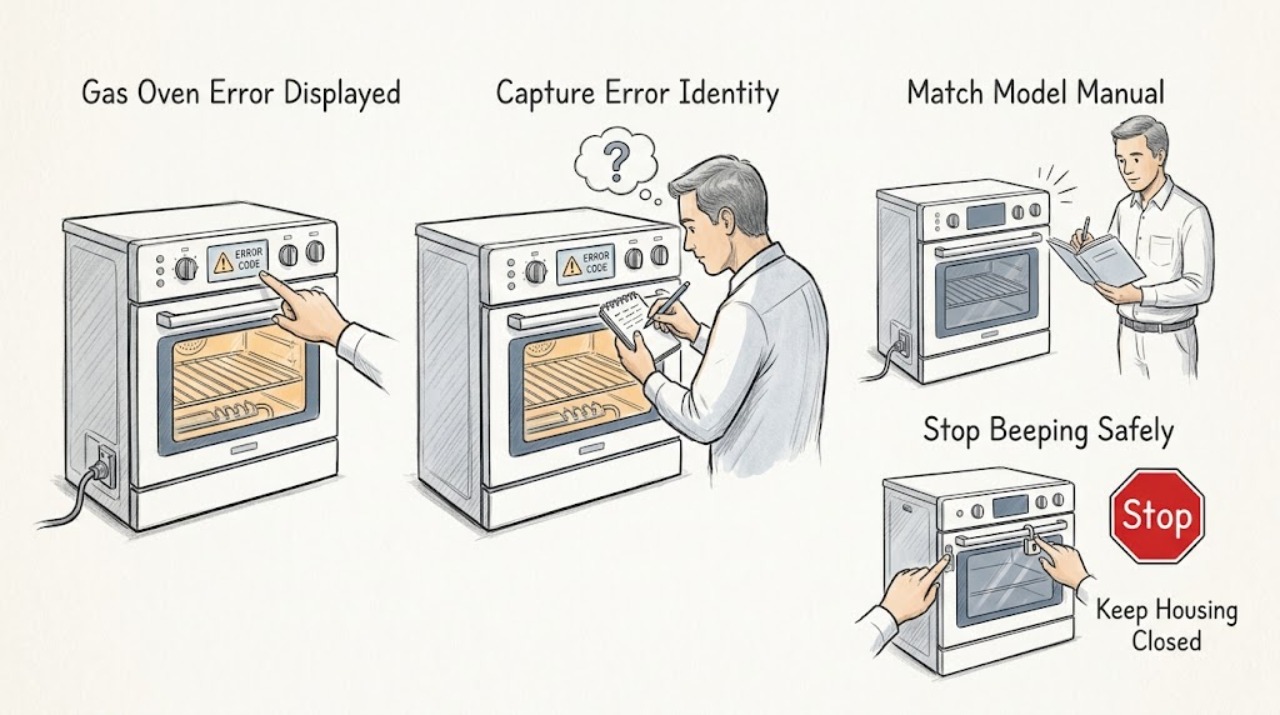
Work through in order
Diagnostic checks
Use only checks that match the exact appliance or system and its official guide.
-
Check 1
From a safe position, photograph or transcribe every character on the display, count any beeps, and record the Thermador model or product code, fuel configuration, cavity, selected mode, target temperature, and whether the code appeared at start, during heating, after cancellation, or during cool-down.
Expected result: Classify the display as E plus a number, another exact code, a lock or door message, a blank display, or a message associated with a connected feature; note whether the burner or heat was active when it appeared.
Next step: Keep the image and model identity, then use the Thermador error-code category and model support documents that match the appliance.
Stop if: Stop immediately for gas odour, delayed ignition, an abnormal flame, smoke, soot, a boom, arcing, uncontrolled heat, or a hot or scorched electrical connection.
Why this matters
Why: An E-number is treated by Thermador as a fault/error code, but the exact meaning and safe response depend on the appliance category, model, and stage. A code from a cooktop, steam oven, or another range must not be transferred to this gas oven.
-
Check 2
If there is no gas or electrical hazard and the oven control responds normally, press the TIMERS key or another documented control key once to stop the alert, as Thermador's oven error guidance describes; do not press keys near smoke or a gas event.
Expected result: Record whether the beeping stops, the code stays visible, the display changes to a lock or mode message, or the controls remain unresponsive.
Next step: Save the code and display behavior, and do not begin a cooking cycle merely because the beeping stopped.
Stop if: Do not continue touching controls when there is gas odour, smoke, arcing, severe heat, liquid at the controls, or a hot connection.
Why this matters
Why: Stopping the alert only silences the notification; it does not identify or repair the fault. A persistent code or unresponsive control requires the next model-specific step or service.
-
Check 3
Use the exact model or product code from the appliance label to open the matching Thermador user manual and installation instructions; confirm that the appliance is a gas oven or gas range oven and check the documented error-code and control sections.
Expected result: Confirm whether the code is listed for that model, whether the manual specifies a door-lock, ignition, heating, control, or power response, and whether the displayed event belongs to an oven or a different appliance category.
Next step: Follow only the listed low-risk instruction; otherwise give qualified service the exact code, model, and stage.
Stop if: Do not remove a panel, open a gas path, bypass a door lock, or use a manual for a different model or fuel type.
Why this matters
Why: A matching document can establish the model-specific meaning and permitted reset. An unlisted code, uncertain model, or mismatch between the document and the appliance is evidence to stop guessing, not to try a neighboring model's repair sequence.
-
Check 4
With the oven cool or in a documented safe state, check the visible mode, timer, delayed-start, control-lock, Sabbath, self-clean, and door-lock indicators against the matching manual; cancel or exit a state only with the documented control sequence.
Expected result: Record whether the door closes normally, the lock indicator clears after a permitted cool-down, Start is accepted, the error returns, or the oven remains unavailable.
Next step: Make at most one normal start attempt only when the manual permits it and no hazard is present; otherwise leave the oven off and arrange service.
Stop if: Never pry or bypass the door lock. Stop for cracked glass, damaged seal, smoke, abnormal heat, or a lock that does not release as documented.
Why this matters
Why: A lock or programmed state can prevent a cycle or make the oven appear not to heat, while a recurring code after the documented sequence points to a fault needing service. A hot or locked door must never be forced.
-
Check 5
From a dry, safe position, note whether the display, interior light, and controls have power and whether the visible breaker or isolator has tripped; restore a tripped breaker only once if there is no damage and the circuit is safely reachable.
Expected result: Record a blank display, partial power, a repeat trip, sparks, a hot connection, discolouration, or normal power with a recurring code; do not perform energized electrical checks.
Next step: Leave the breaker or isolator off after a repeat trip or any sign of heat or damage, and arrange qualified electrical or appliance service with the recorded code.
Stop if: Stop for sparks, smoke, water near electrical parts, a hot or scorched connection, repeated tripping, or any need to remove a cover.
Why this matters
Why: A blank display or repeat trip places supply, wiring, or an internal electrical fault in scope. Normal display power with an E-number keeps the control, sensor, lock, ignition, or heating path in scope according to the model manual.
-
Check 6
Only if the model documentation confirms a gas oven, record safe external observations about ignition and heat without opening the appliance: whether a normal start produces no ignition, a delayed whoosh, an unstable flame, or no heat after ignition.
Expected result: Record only what can be seen or heard without leaning into the cavity or repeating an ignition attempt; distinguish a code with no gas smell from a code accompanied by gas odour, soot, an abnormal flame, or a boom.
Next step: For any gas odour or abnormal combustion sign, stop, avoid switches and ignition sources, leave the area if needed, and contact the local gas utility or emergency service from safety; otherwise provide the code and safe observations to qualified service.
Stop if: Do not relight repeatedly, search for a leak with a flame, probe an orifice, remove a burner, or continue operation after gas odour, delayed ignition, a boom, soot, an unstable flame, smoke, or suspected carbon-monoxide symptoms.
Why this matters
Why: No ignition or no heat may require qualified gas-appliance diagnosis, while delayed ignition, abnormal flame, soot, a boom, or gas odour is an urgent stop condition. An error code does not make it safe to test the burner repeatedly.
-
Check 7
Only when the exact manual permits a reset and no hazard is present, turn the oven off normally, isolate it from power using the safe external control, wait for the manual's stated interval, restore power once, and observe the display without starting repeated cooking cycles.
Expected result: Record whether the code clears, returns immediately, returns when a gas heating mode is selected, or is replaced by a lock, supply, or other message.
Next step: Turn the oven off and arrange qualified Thermador or appliance service with the code, model, fuel type, stage, reset result, and safe power observations.
Stop if: Do not reset after smoke, gas odour, arcing, severe overheating, water ingress, a hot connection, or a damaged power control; do not open the appliance to continue diagnosis.
Why this matters
Why: A cleared code can be a transient control event but does not prove the appliance is repaired. A returning code, no heat, repeat trip, abnormal ignition, or uncontrolled heat requires service.
Use your observations
Decision map
Find the observation that best matches what you see, then follow the next safe action.
-
PATH 01Next step
What you see
There is gas odour, delayed ignition, an abnormal or unstable flame, soot, a boom, smoke, suspected carbon-monoxide exposure, arcing, uncontrolled heat, or a hot electrical connection.
Do this next
Stop using the oven. Avoid electrical switches and ignition sources for a gas event, leave the area if needed, and contact the local gas utility or emergency service from a safe location; arrange qualified appliance service before reuse.
-
PATH 02Next step
What you see
The display shows an exact code but there is no immediate hazard.
Do this next
Record the complete code, model, fuel type, mode, and stage, then use the matching Thermador oven or range support category and model documents.
-
PATH 03Next step
What you see
The display shows E followed by a number and the control beeps.
Do this next
Stop the alert with a documented key, reset only as the exact model permits, and turn the oven off and arrange service if the code returns.
-
PATH 04Next step
What you see
The code is not listed for the exact appliance or the model identity is uncertain.
Do this next
Do not infer a meaning from another Thermador product. Stop repeated tests and arrange service with the display image, product code, fuel configuration, and stage.
-
PATH 05Next step
What you see
The display is blank or the visible breaker trips again.
Do this next
Leave the appliance isolated when safe and arrange qualified electrical or appliance service. Do not remove panels or perform live electrical testing.
-
PATH 06Next step
What you see
A door-lock message remains after the model's documented cool-down or unlock sequence.
Do this next
Do not pry or bypass the lock. Keep the oven off and arrange service with the temperature, display, and door behavior recorded.
-
PATH 07Next step
What you see
A confirmed gas model shows no ignition, delayed ignition, no heat after ignition, or an abnormal flame.
Do this next
Do not repeat ignition or inspect the gas path. Arrange qualified gas-appliance service; any gas smell, delayed ignition, soot, boom, or abnormal flame follows the hazard-stop path.
-
PATH 08Next step
What you see
The code returns after the one permitted reset or the oven still will not heat normally.
Do this next
Turn the oven off and arrange qualified service. Give the technician the exact code, model, fuel type, mode, stage, reset result, and any safe power or door observations.
Helpful context
Understand the symptom
An error code is a model and stage clue, not a diagnosis
A code can appear during a start attempt, heating, ignition, door-lock operation, or a connected-feature update. Thermador publishes separate code pages for ovens, ranges, steam ovens, and other categories. Record the complete display and do not borrow a meaning from a cooktop or a different model.
Keep gas safety separate from code clearing
A gas-oven error can be a control fault, but a gas smell, delayed ignition, unstable flame, soot, or a boom is an immediate safety boundary. Do not keep resetting or relighting to see whether the code clears. Leave gas-path work, combustion checks, and internal electrical diagnosis to qualified professionals.
Model documents determine the safe next step
Thermador's gas-range product support pages provide manuals and installation documents for the identified product. Use the model and revision from the appliance label, not a similar-looking range, before using a reset, door-lock, ignition, or heating procedure.
Only after diagnosis
Potential parts
- control board or display module
Consider only after a qualified diagnosis links the recurring code or unresponsive control to the control or display assembly after model, power, door, and mode checks.
Match the exact Thermador product code and revision; do not select a part from another oven, range, or cooktop by appearance. - temperature sensor or thermostat
Consider only when qualified service confirms that temperature sensing or regulation is responsible for the code or heating symptom.
Confirm the exact model, cavity, fuel configuration, and approved fit information before ordering or fitting. - ignition or burner-control assembly
Consider only after qualified gas-appliance service confirms an ignition or burner-control fault and rules out unsafe supply or combustion conditions.
Gas components require exact model matching and qualified installation; do not bypass safety controls or alter the gas path.
When checks do not resolve it
Need a professional?
Arrange qualified service when the exact code returns after the permitted reset, the code is unlisted, the oven will not heat or ignite normally, a door lock remains, the display is blank, a breaker trips again, or any gas, smoke, arcing, burning-smell, or uncontrolled-heat condition occurs.
Safety scope: Do not repeatedly relight, search for a leak with a flame, open a gas path, bypass an interlock, remove covers, perform energized electrical checks, or keep operating after gas odour, delayed ignition, soot, a boom, smoke, arcing, severe overheating, or a hot connection.
Common questions
FAQ
What should I record when my Thermador gas oven displays an error?
Record every character, the model or product code, gas configuration, cavity, cooking mode, target temperature, and the stage when the code appeared. Include whether the control beeped and whether ignition or heat was active.
Can I reset a Thermador gas oven error code?
Only use the reset sequence allowed by the exact model instructions. Thermador says to stop the alert, reset if necessary, and turn the oven off and arrange support if the code continues. A reset does not justify repeated ignition or heating tests.
Why should I not use another Thermador model's error-code meaning?
Thermador publishes separate support categories and model documents. Gas ranges, ovens, steam ovens, and cooktops can use different code meanings and controls, so match the exact product code and appliance category first.
When is a Thermador gas-oven error an emergency stop?
Stop for gas odour, delayed ignition, a boom, soot, an abnormal flame, smoke, suspected carbon-monoxide exposure, arcing, uncontrolled heat, a hot connection, or repeated power trips. Leave the area when needed and seek gas or appliance help from a safe location.
Read the exact guide
Official sources
- Ranges - Error CodesThermador · Thermador range and range-oven error-code category and response guidance
- Appliance Information - Gas freestanding range | PRG486GDH/03Thermador · Thermador gas freestanding range model support, user manuals, installation instructions, and owner-support routing
- Error CodesThermador · Thermador support category selection for model-appropriate error-code instructions
- Ovens - Error CodesThermador · Thermador oven error-code behavior and the documented response to a recurring E-number fault
Community feedback
Share a repair observation
Share a plain-text repair observation. Accepted observations are published automatically; this page may take a moment to update.