
On this page
Start here
Quick answer
Do not diagnose an LG gas-oven code by its number alone. Photograph or write the exact code, the full model, which oven function was selected, and when the code appeared; LG says error meanings and steps vary by range type and model. If the oven is safe and cool, cancel the function once, check the accessible breaker and normal control settings, and consult the exact LG manual or error-code entry. A persistent code, failed ignition, abnormal flame, door-lock fault, repeated breaker trip, or a code that returns after the permitted reset needs service. If you smell gas, hear escaping gas, see smoke or flame, detect carbon monoxide symptoms, or see an electrical fault, stop operating the appliance, leave the area when appropriate, and contact emergency or gas professionals from a safe location.
Before you begin
Safety first
- This article supports code recording, model lookup, cool external observations, normal control use, and one exact manual-approved reset only. A qualified professional should handle gas fittings, regulators, valves, ignitors, burners, sensors, door interlocks, wiring, control boards, and any hot, damaged, or wet appliance.
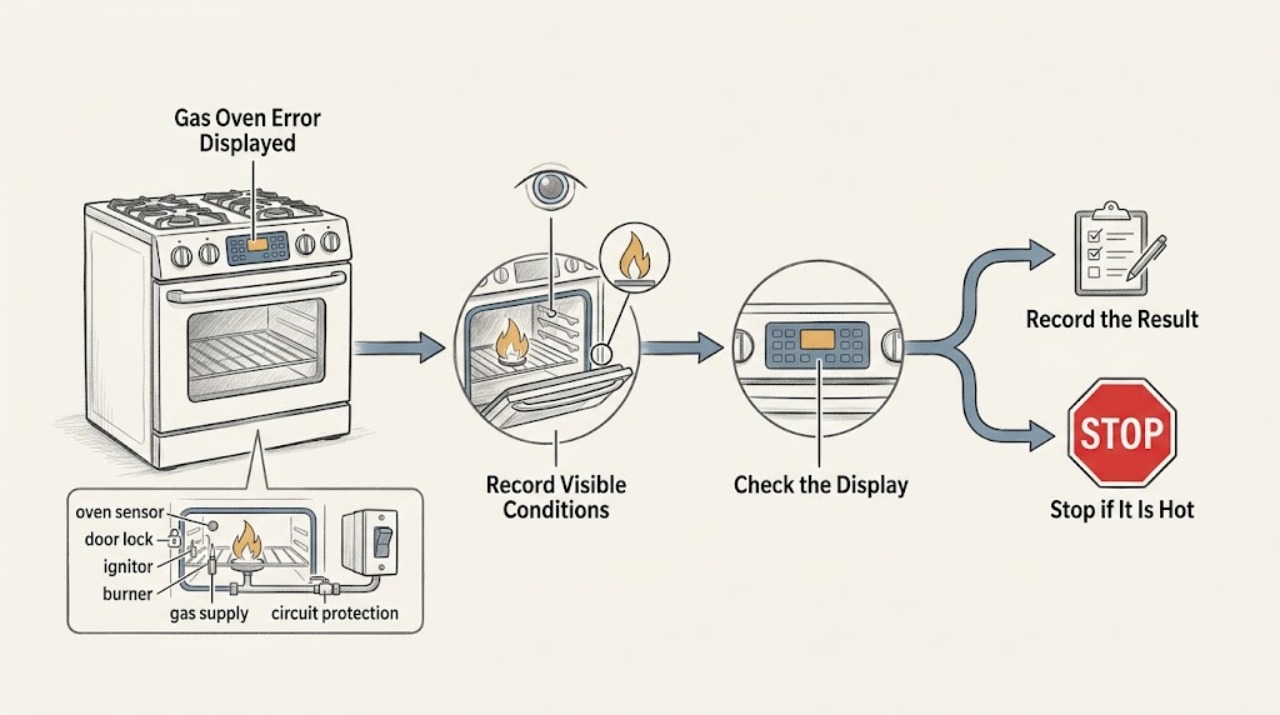
Work through in order
Diagnostic checks
Use only checks that match the exact appliance or system and its official guide.
-
Check 1
Stop the current oven function and, if the appliance is cool and there is no gas or electrical hazard, record the exact displayed characters, model number, selected function, and moment the error appeared; take a clear photo without opening the control panel.
Expected result: Note whether the display is blank, flashing, or steady; whether the code appears at power-up, during preheat, during bake or broil, during self-clean, after a door action, or after a power event; and whether there is smoke, gas odor, unusual flame, carbon-monoxide alarm or symptoms, heat, water, arcing, or a breaker trip.
Next step: For gas odor or suspected carbon monoxide, leave the area and contact emergency or gas professionals from a safe location. For smoke or fire, leave and use local emergency help. Otherwise keep the code and E-Nr. or model details for the next check.
Stop if: Do not press controls, light burners, unplug the range, or use a phone in the odor area when gas is suspected; do not restart to reproduce smoke, flame, arcing, or uncontrolled heat.
Why this matters
Why: The exact code and stage are the evidence needed for LG's model-specific lookup. A hazard symptom overrides code lookup and turns this into an immediate stop; a code without a hazard can proceed to a controlled identification check.
-
Check 2
Use the LG error-code page and the owner's manual for the exact gas-range model, selecting Gas Range when the page asks for the range type; do not substitute a code meaning from another LG model or from an electric range.
Expected result: Confirm the code spelling, model, oven cavity if there is more than one, and whether the published entry gives a user action, a service-only direction, or no matching entry.
Next step: Follow only the displayed model's documented action. If the code is missing, unclear, or not listed, keep the oven off if it cannot operate normally and arrange LG or qualified appliance service.
Stop if: Do not infer that an F-code means the same sensor, heater, lock, or board across models, and do not order a part from the code alone.
Why this matters
Why: LG states that error codes communicate diagnostic messages and that the error varies by model. A matching entry can define one permitted next step; an unlisted or mismatched entry cannot safely identify a component.
-
Check 3
With no gas odor, smoke, heat damage, or active cooking hazard, verify from outside the appliance that the breaker is on and that the control display responds normally; do not remove covers or test live wiring.
Expected result: Record whether the display returns after a prior power interruption, whether the breaker is off, whether it trips again, whether the cord or outlet is hot or damaged, and whether the error returns immediately or only after a specific function.
Next step: If the breaker is safely off and there is no damage, restore it only once as the model guidance permits and observe without starting a heat cycle. If it trips again or a connection is hot, wet, loose, discolored, or damaged, stop and obtain qualified electrical or appliance service.
Stop if: Do not repeatedly reset a breaker, use an extension cord, touch a hot connection, or perform live electrical measurements.
Why this matters
Why: A power interruption or off breaker can create a power-related code or a non-running control. A repeat trip, damaged connection, or immediate return indicates an electrical or internal fault rather than a setting issue.
-
Check 4
If the display is active and there is no hazard, cancel the current function once, confirm the intended oven mode and temperature, check that the door is fully closed, and look for OVEN LOCKOUT, CHILD LOCK, DELAY START, or a door-lock indication; use only the model's documented control sequence.
Expected result: Note whether the code clears, the display accepts controls, the door aligns and latches, a lock or delay message remains, or the same code returns before heating begins.
Next step: Apply one manual-approved cancel, unlock, delay-cancel, or setting-confirmation action and make no more than one normal start attempt. If the door cannot close or lock, the display remains unresponsive, or the code returns, arrange service.
Stop if: Do not force the door, bypass a lock, run self-clean with a door fault, or repeatedly press controls to defeat an error.
Why this matters
Why: A lock, delayed start, unconfirmed setting, or door condition can make a powered range appear not to run. A normal unlocked door and controls with a returning code shift concern to a model-specific sensor, lock, control, or heating fault.
-
Check 5
Only when there is no gas odor, no smoke, no abnormal flame, no carbon-monoxide warning, and the exact LG manual permits an external check, observe whether a surface burner ignites normally; do not disassemble the oven or deliberately trigger a bake ignition fault.
Expected result: Record whether the surface burner lights normally, whether ignition clicks continue, whether the flame is yellow or unstable, whether the oven error occurs with surface burners working, and whether any odor or delayed ignition is present.
Next step: If surface ignition is normal but the oven code or heating fault remains, keep the oven off and use the model-specific service path. If any abnormal flame, odor, clicking without ignition, or delayed ignition appears, stop all gas-appliance testing and leave the area as appropriate.
Stop if: Do not light a burner when gas is suspected, keep retrying ignition, adjust a regulator, inspect gas fittings, or remove a burner or oven panel.
Why this matters
Why: LG uses surface-burner behavior as an external clue for gas-range power or control diagnosis, but a surface burner result does not prove that the oven ignitor, burner, valve, or sensor is healthy. A delayed ignition, abnormal flame, or odor is a gas-safety stop.
-
Check 6
If the code appeared during heating and the oven is now cool and safe, note the selected temperature, whether the oven ever heated, whether the door remained closed, and whether the error appeared during preheat, bake, broil, or self-clean; do not open a hot oven or touch an ignitor or burner.
Expected result: Record no heat, delayed heat, overheat, a door-lock message, a fan or sensor message, a code that appears only in one mode, or a code that returns immediately at power-up.
Next step: Attach the stage and symptom record to the exact LG lookup or service request. Keep the oven off for any abnormal heat, smoke, flame, odor, damaged door, or control behavior.
Stop if: Do not bypass a door lock, operate with a damaged seal, reach into the oven cavity while hot, or continue a self-clean or bake cycle after an error.
Why this matters
Why: The stage narrows the model-specific path: temperature or ignitor symptoms differ from a door lock, control, fan, or power message. A code that returns across functions or at startup is not a reason to repeat heating tests.
-
Check 7
When the exact LG code entry expressly permits a cancel or power reset, and the range is cool, dry, and free of hazard signs, perform that one documented reset; then make at most one normal function attempt while staying nearby.
Expected result: Record whether the code clears, whether the oven starts and heats normally, whether the same code returns, whether the breaker trips, or whether the display becomes blank or unresponsive.
Next step: Keep the range off and arrange qualified LG appliance service, giving the exact model, code, function, reset performed, and all safety observations.
Stop if: Do not repeat the reset, keep cycling the ignitor, run unattended, bypass a sensor or lock, or continue after smoke, gas odor, carbon-monoxide warning, arcing, or uncontrolled heat.
Why this matters
Why: A single recovery may clear a transient interruption but does not prove the appliance is repaired. A returning code, failed ignition, repeat trip, no display, or abnormal heat requires professional diagnosis.
Use your observations
Decision map
Find the observation that best matches what you see, then follow the next safe action.
-
PATH 01Safety boundary
What you see
There is a strong or persistent gas odor, hissing, delayed ignition, abnormal flame, carbon-monoxide alarm or symptoms, or suspected combustion exhaust.
Do this next
Do not operate appliance controls, flames, switches, phones, or vehicles in the odor area. Leave the area and contact emergency or gas professionals from well away from the suspected leak; do not re-enter until cleared.
Why this path and its safety boundary
Why it matters: Treat this as a gas or combustion emergency, not as a code-lookup problem.
Safety stop: Do not test ignition, search for the leak, adjust gas fittings or regulators, or try to relight the oven.
-
PATH 02Safety boundary
What you see
Smoke, flame outside the intended burner area, a burning or melting odor, arcing, a hot or damaged cord or outlet, water near electrical parts, or a repeated breaker trip is present.
Do this next
Stop use and leave for active smoke or fire, then use local emergency help from a safe location. For a safe inactive appliance, arrange qualified electrical or appliance service before further testing.
Why this path and its safety boundary
Why it matters: The appliance has a fire, electrical, or water-contact hazard that overrides normal troubleshooting.
Safety stop: Do not reset the breaker again, touch a hot connection, pull a damaged plug, or return to an unsafe area.
-
PATH 03Safety boundary
What you see
The exact code, gas-range type, model, and oven stage match an entry in LG's official error-code or model-manual guidance.
Do this next
Follow the listed cancel, reset, inspection, or service direction once as written, then stop if the code returns or the action cannot be performed safely.
Why this path and its safety boundary
Why it matters: Only that model-specific entry supplies a defensible user action; a similar code from another model is not interchangeable.
Safety stop: Do not invent a component diagnosis, substitute an electric-range instruction, or order a part from the code alone.
-
PATH 04Safety boundary
What you see
The code is not listed, the characters are ambiguous, the model is unknown, or the display does not match the selected gas-range category.
Do this next
Keep the exact photo, model, stage, and symptoms and request LG or qualified appliance service; do not continue heating tests merely to obtain another code.
Why this path and its safety boundary
Why it matters: The evidence is insufficient for safe code interpretation.
Safety stop: Stop immediately if gas odor, abnormal flame, smoke, carbon-monoxide warning, heat damage, or electrical symptoms accompany the unclear code.
-
PATH 05Safety boundary
What you see
The display works, no hazard is present, and the oven shows a lock, delay, unconfirmed setting, door indication, or refuses a normal start.
Do this next
Use the exact manual for one cancel, unlock, delay-cancel, setting-confirmation, or normal door-closure action. If the indication remains, arrange service.
Why this path and its safety boundary
Why it matters: A control state or door-recognition condition may be blocking the cycle without proving an internal component failure.
Safety stop: Do not force or bypass the door lock, run with a damaged seal, or repeatedly press buttons to defeat the indication.
-
PATH 06Safety boundary
What you see
The code returns after the permitted one-time reset, or the oven does not heat, overheats, locks incorrectly, loses display, or trips power after safe external checks.
Do this next
Keep the LG gas oven off and arrange qualified appliance service with the exact code, model, function, timing, and safety observations.
Why this path and its safety boundary
Why it matters: A sensor, ignitor, burner, valve, door-lock, control, wiring, or power fault remains possible and cannot be confirmed safely by a household check.
Safety stop: Do not open panels, adjust gas pressure, bypass a sensor or interlock, or continue ignition or heat tests.
Helpful context
Understand the symptom
Capture the exact code before interpreting it
LG gas ranges can show different F-codes or other messages for sensor, heating, door-lock, communication, fan, or power conditions, and the same-looking code cannot safely be generalized across models. Write the exact characters, whether the code flashes or stays on, the model number, and the function in progress. Use the LG error-code page and the manual for that model; if the code is not listed, treat that as a reason to request model-specific help rather than guessing.
Keep gas and electrical checks external
A cool, inactive oven allows low-risk observations of the display, control settings, accessible breaker position, door position, and visible burner or ignitor behavior only when there is no gas odor or other hazard. Never remove panels, probe wiring, adjust gas pressure, test for a leak, or repeatedly ignite an oven that failed to light. Smoke, a strong or persistent gas odor, abnormal flame, carbon-monoxide alarm or symptoms, hot wiring, arcing, or a repeated breaker trip ends troubleshooting.
A returning code is a service decision
LG's published code instructions commonly allow a cancel or power reset for a particular code, then direct the owner to service when the code returns. That reset is a diagnostic boundary, not permission to keep cycling the appliance. Give the technician the code image, model, function, timing, gas and display behavior, and any heat, odor, flame, or power symptom.
Safety boundary
Stop conditions
- For suspected gas or combustion trouble, including gas odor, hissing, delayed ignition, abnormal flame, carbon-monoxide alarm or symptoms, stop operating controls and leave the area; contact emergency or gas professionals from a safe location.
- Stop immediately for smoke, flame outside the intended burner area, a burning or melting odor, arcing, a hot or damaged cord or outlet, water near electrical parts, uncontrolled heat, or a repeated breaker trip.
- Do not open panels, probe live wiring, adjust gas valves or regulators, search for a leak, bypass a door or thermal safety, or order a part from an error code alone.
- Do not substitute an error meaning or reset sequence from another LG model, range type, or oven cavity; record the exact model and code first.
- Arrange qualified LG appliance service when the code is unlisted or returns after the single model-approved action, or when settings, door, power, gas, or ignition symptoms remain abnormal.
Only after diagnosis
Potential parts
- gas-oven ignitor or burner assembly
Consider this category only if the exact model code and a qualified diagnosis confirm a failed ignition or burner component.
Confirm the exact LG model, gas type, and technician diagnosis; do not inspect or replace a gas or hot-surface component as a code-only repair. - oven temperature sensor or thermal device
Consider this category only when the exact error entry and professional testing identify a sensor or thermal-device fault.
Confirm the exact model and diagnosis; do not infer sensor failure from a generic F-code or bypass thermal protection. - oven door-lock or control component
Consider this category only after a qualified diagnosis links the exact code and door or control symptom to an internal component.
Confirm the exact model, cavity, code, and diagnosis; interlock and control access require qualified service.
When checks do not resolve it
Need a professional?
Arrange qualified LG appliance service when an error code is unlisted, unclear, model-mismatched, or returns after the exact one-time action; when the oven will not heat, overheats, has a door-lock or control fault, loses its display, or trips the breaker. Use qualified electrical service for hot wiring, arcing, or repeated trips. For gas odor, hissing, delayed ignition, abnormal flame, carbon-monoxide alarm or symptoms, leave the area and contact emergency or gas professionals from a safe location; for smoke or active fire, leave and use local emergency help.
Safety scope: This article supports code recording, model lookup, cool external observations, normal control use, and one exact manual-approved reset only. A qualified professional should handle gas fittings, regulators, valves, ignitors, burners, sensors, door interlocks, wiring, control boards, and any hot, damaged, or wet appliance.
Common questions
FAQ
What should I do first when my LG gas oven shows an error?
Record the exact code, full model, oven function, and stage when it appeared. Use LG's gas-range error-code lookup and the exact model manual; do not apply a code meaning from another model. Stop immediately for gas odor, abnormal flame, smoke, carbon-monoxide warning, or electrical danger.
Can I reset an LG gas-oven error code?
Only if the exact LG entry or model manual permits a cancel or power reset, and only when the range is cool and free of hazard signs. Make one documented attempt. If the code returns, keep the oven off and arrange service.
Why is the LG oven code different from a code I found for another range?
LG says the range type and model matter. Error meanings and actions can differ between gas and electric ranges, oven cavities, and models, so use the exact model and displayed characters instead of a generic code chart.
What if the display works but the LG gas oven will not run?
Check the model's normal settings, Start confirmation, door closure, OVEN LOCKOUT or CHILD LOCK, DELAY START, and safe breaker status. If the gas range still will not run or the code returns, arrange service. Do not bypass a lock or repeat ignition attempts.
When is an LG gas-oven error an emergency?
Treat gas odor, hissing, delayed ignition, abnormal flame, carbon-monoxide alarm or symptoms, smoke, flame outside the intended burner area, arcing, burning odor, hot wiring, or repeated breaker trips as stop conditions. Leave when appropriate and contact emergency or gas professionals from a safe location.
Read the exact guide
Official sources
- LG Range - Error Codes ListLG USA Support · Official LG range support; code meanings and actions depend on range type, exact model, and listed code.
- Oven Not Heating - Gas RangesLG USA Support · Official LG gas-range support; gas-valve and ignitor details are model-dependent and are not a substitute for the exact manual.
- Recognizing and Responding to Pipeline EmergenciesU.S. Department of Transportation, Pipeline and Hazardous Materials Safety Administration · U.S. federal gas-emergency safety guidance; local emergency and utility procedures may vary.
- LG Range, Oven, Electric Cooktop: Powers On, Won't RunLG USA Support · Official LG range support that separates gas and electric guidance; exact model manual controls where controls differ.
Community feedback
Share a repair observation
Share a plain-text repair observation. Accepted observations are published automatically; this page may take a moment to update.