
On this page
Start here
Quick answer
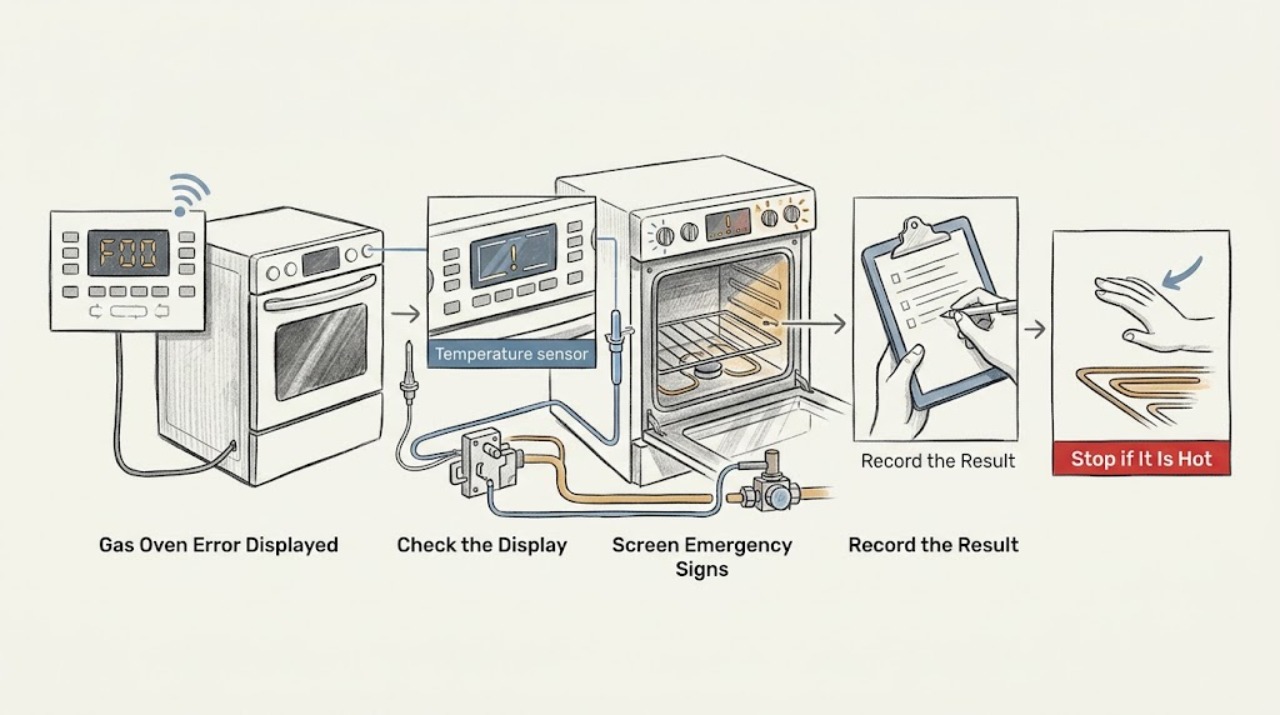
A Whirlpool gas oven error message is a symptom, not a universal diagnosis. Before clearing it, write down the complete code exactly as shown, the model, oven cavity, fuel configuration, selected mode, and what the oven was doing when it appeared. Whirlpool's own error-code pages use model-specific reset and service guidance; an F0 E0 or F6 example can point to the oven control system, but that does not make every code interchangeable. If there is gas odor, delayed ignition, a boom, abnormal flame, smoke, carbon-monoxide alarm, electrical arcing, uncontrolled heat, or a repeated breaker trip, stop immediately and use the gas or emergency safety route. Otherwise, perform only the single power reset permitted by the exact Whirlpool manual, monitor the display, and arrange qualified service if the code returns.
Work through in order
Diagnostic checks
Use only checks that match the exact appliance or system and its official guide.
-
Check 1
From a safe position, record the complete display exactly, including every letter, number, dash, or alternating screen; record the Whirlpool model, serial information, gas or dual-fuel configuration, oven cavity, selected mode, and the stage when the message appeared.
Expected result: The display is a single code, alternates between code parts, shows a control message such as PUSH or SAb, flashes after a power loss, or cannot be read reliably.
Next step: Use the exact owner manual or Whirlpool Product Help page for that code. If the display cannot be captured, keep the oven off if the event was unsafe and arrange service rather than guessing.
Stop if: Do not keep pressing keys, open a hot door, or run another cooking cycle solely to make the display reappear.
Why this matters
Why: The full code and exact model select the applicable Whirlpool page. A partial code or a remembered code can lead to the wrong repair path.
-
Check 2
Before any reset, note from a safe position whether there is gas odor, hissing, delayed ignition, a boom, an abnormal or yellow flame, soot, smoke, a carbon-monoxide alarm, burning odor, electrical crackle, visible arcing, uncontrolled heat, or a hot connection.
Expected result: One or more gas, combustion, smoke, heat, or electrical warning signs is present, or the oven appears to be operating despite the error.
Next step: Stop using the oven. For gas odor or a suspected gas leak, leave immediately without operating switches or ignition sources and contact the gas utility or emergency service from a safe location. For smoke, flame, or electrical arcing, follow the local fire and electrical emergency route.
Stop if: Do not reset, relight, open the door near a delayed flame, search for a leak, or remain nearby to observe the code.
Why this matters
Why: A code cannot make an active gas or electrical hazard safe. Delayed ignition can allow unburned gas to accumulate, and arcing or uncontrolled heat can indicate a fire or shock hazard.
-
Check 3
If no hazard sign is present and the oven is cool enough to handle normally, compare the display with the exact manual for a control lock, Sabbath mode, delayed start, open-door, or Start prompt; confirm only that the door is fully closed and the selected mode is intentional.
Expected result: The display is a documented control message, the door is not fully closed, the mode or timer is unexpected, or the display is a letter-number fault code that returns after a normal control action.
Next step: Use only the manual's documented control action. If the message is a fault code or the door, lock, or control does not respond normally, stop and arrange service.
Stop if: Do not force the door, bypass a lock, enter service diagnostics, or remove panels.
Why this matters
Why: A control state can prevent a cycle without a failed component, while a returning letter-number code needs the model-specific fault path rather than repeated key presses.
-
Check 4
Without moving the range or opening its panels, verify whether the display and other household equipment show a power interruption, and confirm from a safe accessible position that the gas supply has not been intentionally shut off; do not disturb the regulator or connector.
Expected result: The display is blank or clock-flashing, the breaker has tripped, the outlet is not known to be grounded and operational, the gas valve is off, or the same code remains with normal power and gas supply.
Next step: If safe and accessible, follow the manual for a single breaker reset. If power supply or grounding is uncertain, use a qualified electrician. If gas supply status is abnormal or the oven still fails, use qualified gas-appliance service.
Stop if: Do not use an extension cord or adapter, move the range to inspect gas hardware, or perform internal electrical checks.
Why this matters
Why: Whirlpool separates electrical supply and gas supply checks. A control code may be related to power or wiring, while an oven that has power but no heat may have a gas or ignition issue; the code alone does not identify which part failed.
-
Check 5
Search the Whirlpool Product Help library using the complete code and the exact range model, then compare the listed component or condition only with the assigned model family; do not substitute an F0, F6, F9, or another code because it looks similar.
Expected result: Whirlpool provides a matching page, provides only a broader code family, or has no matching result for the complete display.
Next step: Follow only the matching page's low-risk step. If no exact page exists, provide the complete display and model to qualified service and do not claim a part from the code alone.
Stop if: Do not enter hidden diagnostic modes, short terminals, test a valve or igniter, or replace a control based only on a code.
Why this matters
Why: Whirlpool's pages show that different codes can call for different explanations or the same limited reset boundary. No matching result is evidence to preserve the code and escalate, not to invent a definition.
-
Check 6
Only when the exact Whirlpool guidance allows it and no gas, fire, heat, or electrical hazard is present, remove range power at the circuit breaker for the documented one-minute interval, restore power, and watch the display without starting a risky test cycle.
Expected result: The code clears and stays away, returns immediately, returns after a control action, or the display does not recover.
Next step: If the code returns or operation is abnormal, leave the oven off and arrange qualified service. If it clears, record that result and use only a normal supervised operation permitted by the manual.
Stop if: Do not repeat resets, defeat a breaker, or restart the oven when there is odor, smoke, arcing, uncontrolled heat, or abnormal flame.
Why this matters
Why: A one-time reset can clear a transient control state, but a returning code points to a control, sensor, wiring, lock, or related condition that needs the exact model's service path.
-
Check 7
If the code has cleared and the exact manual permits a normal check, observe from outside the hot zone whether the display remains clear, the door and controls respond, the oven heats in the selected mode, and gas ignition is brief and stable if applicable; do not open the door to inspect a suspected delayed flame.
Expected result: The display stays clear with normal operation, the code returns, the oven remains cold, the burner does not ignite normally, the flame is unstable, or heating continues after cancellation.
Next step: Stop the check and arrange service for any abnormal result. Keep the appliance off after a gas or combustion event until qualified service clears it.
Stop if: Do not perform repeated ignition attempts, remove the oven bottom, adjust burner air or gas parts, or continue a cycle with abnormal heat or flame.
Why this matters
Why: A clear display does not prove safe heating. A returning code, no heat, abnormal flame, or uncontrolled heating shifts the problem to qualified diagnosis of controls, sensor, igniter, burner, valve, wiring, or supply.
-
Check 8
For a returning, unexplained, or unsafe code, leave the range off and prepare the exact model and serial information, complete display, fuel type, cavity, selected mode, timing, reset result, power or gas observations, and any sound, odor, flame, smoke, heat, or trip history for qualified service.
Expected result: The code is reproducible, intermittent, tied to one mode or cavity, follows a power event, or cannot be safely reproduced.
Next step: Keep the oven out of service until qualified service identifies the cause and confirms safe operation. Use the gas utility or emergency service first if a gas or combustion event occurred.
Stop if: Do not remove panels, bypass an interlock, adjust gas pressure, or order a component based only on the displayed code.
Why this matters
Why: Stage and history help service distinguish the control, display, sensor, door lock, igniter, burner, gas valve, wiring, and supply branches without making the user open a hazardous appliance.
Use your observations
Decision map
Find the observation that best matches what you see, then follow the next safe action.
-
PATH 01Next step
What you see
The code appears with gas odor, hissing, delayed ignition, a boom, abnormal flame, soot, smoke, carbon-monoxide alarm, or symptoms.
Do this next
Stop using the oven. Leave immediately for suspected gas or combustion danger without operating switches or ignition sources, and contact the gas utility or emergency service from a safe location. Arrange qualified service before reuse.
-
PATH 02Next step
What you see
The code appears with smoke, arcing, electrical crackle, burning plastic or wire odor, a hot connection, uncontrolled heat, or repeated breaker trips.
Do this next
Stop use and isolate power only from a dry safe position. Keep clear and arrange qualified appliance or electrical service; do not reset and retest.
-
PATH 03Next step
What you see
The display is a documented control message such as a Start prompt, lock state, Sabbath state, or flashing time after power loss.
Do this next
Use the exact owner's manual to apply the documented control or clock action. Escalate if the message persists or controls do not respond normally.
-
PATH 04Next step
What you see
The complete code matches a Whirlpool Product Help page that permits a one-minute power reset and no hazard sign is present.
Do this next
Perform that reset once, monitor the display, and arrange service if the code returns or operation remains abnormal.
-
PATH 05Next step
What you see
The complete code returns after the documented reset, appears in multiple modes, or the exact code has no matching Whirlpool explanation.
Do this next
Keep the oven off and give qualified service the complete code, exact model, stage, and reset result. Do not substitute another code definition or enter hidden diagnostics.
-
PATH 06Next step
What you see
The display is blank or clock-flashing, power is interrupted, the outlet or grounding is uncertain, or the breaker trips.
Do this next
Follow the manual for a safe, single breaker check. Use qualified electrical service for uncertain supply or grounding and do not continue testing a tripping range.
-
PATH 07Next step
What you see
The display is clear or reset but the gas oven remains cold, clicks without stable ignition, or shows an abnormal flame.
Do this next
Stop the ignition check. Confirm only the model-appropriate safe control state and arrange qualified gas-appliance service; use emergency gas guidance first for odor, delayed ignition, or a boom.
-
PATH 08Next step
What you see
The code clears once and the exact manual permits normal supervised operation with no odor, smoke, arcing, abnormal flame, or uncontrolled heat.
Do this next
Record the reset result and use the oven only as directed. Stop and request service if the code or abnormal behavior returns.
Helpful context
Understand the symptom
Do not guess from the first letter
Whirlpool publishes several range code families and separate pages for particular codes. The same-looking display can have different meanings on different controls, cavities, or generations. Record every character, including a second letter or number, before pressing Cancel or removing power. A code that returns after the documented reset is a service clue, not permission to keep cycling the appliance.
Gas and electrical symptoms override code lookup
A display code does not make gas odor, a delayed whoosh, abnormal flame, smoke, crackling, or a hot connection safe. Do not open the oven to look for a flame, move the range to inspect the connector, or repeat ignition attempts. Leave the area for a suspected gas leak and use qualified appliance, gas, or electrical service as appropriate.
A reset is a diagnostic boundary
For selected Whirlpool range codes, the official product-help procedure is to remove power at the circuit breaker for one minute, restore it, watch for the code, and verify operation. Apply that sequence only when the exact model's manual or matching Whirlpool page supports it and no hazard is present. A reset that clears a code briefly does not prove the underlying fault is fixed.
Only after diagnosis
Potential parts
- electronic oven control or display assembly
Consider only after qualified diagnosis links the exact returning code and behavior to the control or display system.
Confirm the exact Whirlpool model, control generation, and cavity before ordering; a code alone does not establish fit. - oven temperature sensor or wiring
Consider only when the exact code and qualified testing identify a sensor or harness concern rather than a supply, control, or ignition issue.
Match the exact model and wiring configuration. Do not test energized wiring or replace a sensor from a generic code list. - gas oven igniter or burner ignition assembly
Consider only for a confirmed gas model after qualified diagnosis links no heat, repeated ignition, or delayed ignition to the model-specific ignition assembly.
Gas-path and ignition work requires qualified service and exact model matching. Do not relight repeatedly or replace this part after an odor or delayed-ignition event by guesswork.
When checks do not resolve it
Need a professional?
Contact qualified Whirlpool appliance service for a returning or unexplained code, a code without an exact model-specific explanation, no heat after a safe control check, repeated ignition, abnormal flame, door-lock or control failure, or any code with unusual sound or behavior. Use gas-utility or emergency assistance first for strong gas odor, delayed ignition, a boom, smoke, a carbon-monoxide alarm, or symptoms.
Have this ready
- Provide the exact model and serial information, complete display including alternating characters, fuel type, cavity, selected mode, stage, reset result, power and gas observations, and safe notes about flame, odor, smoke, heat, sound, or circuit trips.
Common questions
FAQ
What should I do first when my Whirlpool gas oven displays an error?
Write down the complete code, exact model, cavity, mode, and stage before clearing it. Screen for gas odor, delayed ignition, smoke, arcing, abnormal flame, or uncontrolled heat. If none is present, use only the exact Whirlpool manual or matching Product Help page.
Can I reset a Whirlpool gas-oven error code?
Some Whirlpool range code pages permit one power reset, including a one-minute breaker reset for selected examples. Follow the matching model-specific page once, monitor the display, and arrange service if the code returns. Do not reset during a gas, fire, smoke, arcing, or uncontrolled-heat event.
Does an F code identify one Whirlpool oven part?
No. Whirlpool has multiple code families, and a code may indicate a control, sensor, wiring, door, or another condition depending on the model. Record the full code and use the exact model page instead of ordering a part from the first letter or number.
Why does a Whirlpool gas oven show a code but still have power?
The electronic control can detect a fault while the display and some functions still work. Check only the model-appropriate control state and safe power or gas conditions; a returning code, no heat, or abnormal ignition needs qualified service.
When should I stop using a Whirlpool gas oven with an error?
Stop immediately for gas odor, hissing, delayed ignition, a boom, abnormal flame, smoke, carbon-monoxide alarm, electrical crackle or arcing, burning odor, uncontrolled heat, a hot connection, or repeated circuit trips. Leave for suspected gas danger and use qualified service before reuse.
Read the exact guide
Official sources
- Starts with F - Product HelpWhirlpool Corporation · Use to locate the exact code page; do not treat the family index as a universal diagnosis.
- Oven Not Working - GasWhirlpool Corporation · General Whirlpool gas-range Product Help; exact model instructions take precedence.
- Owners ManualWhirlpool Corporation · Use only for the documented Whirlpool range family and confirm the exact model before applying code or control guidance.
- F0 E0 - Error Code - RangeWhirlpool Corporation · F0 E0 page only; do not generalize its definition or reset to another code or model.
- Certain Older Gas Connectors May Be DangerousU.S. Consumer Product Safety Commission · General gas-appliance safety guidance; not a Whirlpool model diagnosis.
- Oven Not Working - Cooktop Working - ClickingWhirlpool Corporation · Whirlpool gas-range guidance for the described clicking symptom; confirm exact model and do not use it to decode unrelated codes.
- F6 - Error Code - RangeWhirlpool Corporation · F6 page only; do not generalize its definition or reset to another code or model.
- Gas Range Delayed Ignitions - Tests and Examinations of RangesU.S. Consumer Product Safety Commission · General gas-range safety evidence, not a Whirlpool diagnosis or recall notice.
Community feedback
Share a repair observation
Share a plain-text repair observation. Accepted observations are published automatically; this page may take a moment to update.