
On this page
Start here
Quick answer
When a Kenmore gas oven displays an error, do not guess the meaning from the code alone: record the complete code exactly as shown, the full model number, and what the oven was doing when it appeared. Cancel the cycle only if the controls respond normally and the model manual permits that reset; do not keep restarting a gas appliance that smells of gas, ignites late, shows an abnormal flame, smokes, sparks, or trips a breaker. Kenmore's official manual finder is model-number based, so use it to locate the correct instructions. A code that returns after the permitted reset, a code linked to temperature or door sensing, or an oven that will not heat needs qualified appliance service rather than a guessed sensor, igniter, valve, or control part.
Before you begin
Safety first
- Owner checks stop at recording the code and model, using documented user controls once, observing external door and display behavior, and making one safe accessible supply check. No gas-train, live electrical, panel, or bypass work is included.
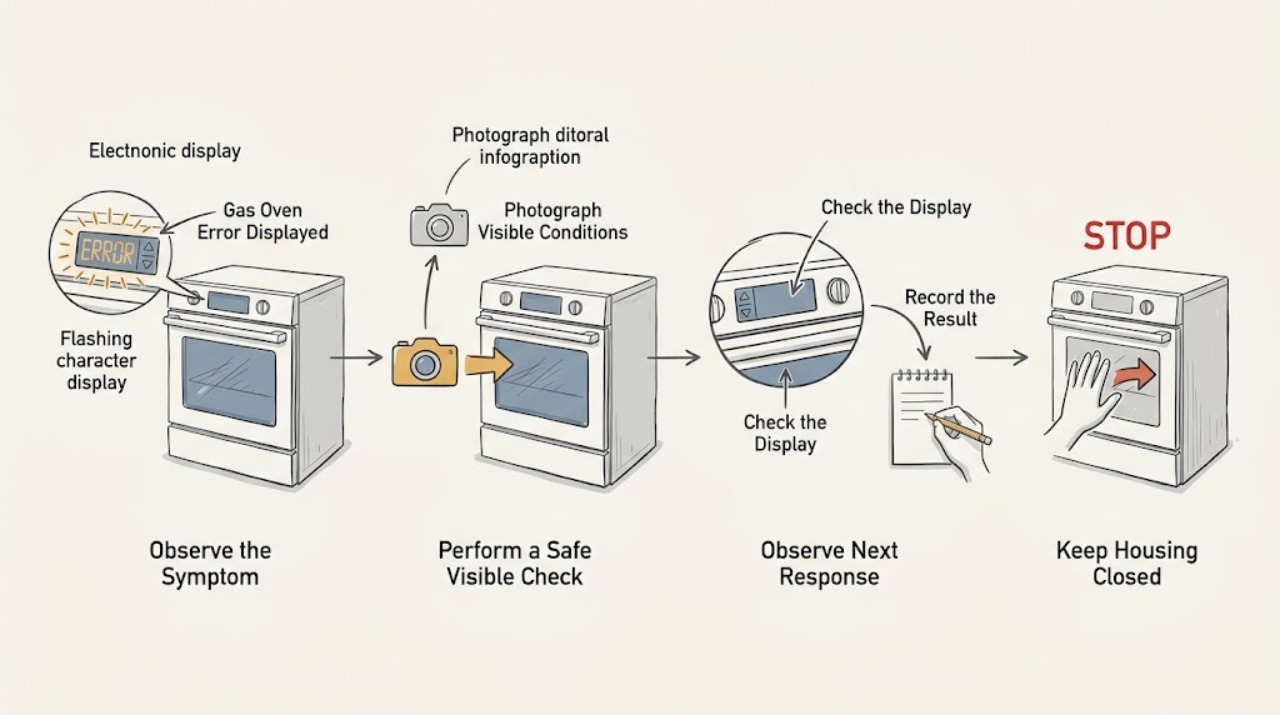
Work through in order
Diagnostic checks
Use only checks that match the exact appliance or system and its official guide.
-
Check 1
Photograph the full display and write the exact error text, letter-number combination, punctuation, and whether it is steady or flashing. Record the complete Kenmore model number, fuel type, and whether the message appeared during bake, broil, preheat, cleaning, or idle time.
Expected result: The code is complete and repeatable, only part of it is visible, or the display changes after a control is pressed.
Next step: Keep the oven out of service until the identity is clear if the code is accompanied by a gas, heat, smoke, or electrical warning. Otherwise use the Kenmore manual finder with the model number and continue only with its user-level instructions.
Why this matters
Why: The exact model, code, and stage are required to select the correct manual instructions. A partial or changing message should not be converted into a guessed code meaning or replacement part.
-
Check 2
From a safe position, check whether the display, clock, oven light, surface burners, and mode buttons respond. Do not remove a cover or touch wiring while making this observation.
Expected result: The whole range is blank, the display works but the oven will not accept a function, or the controls accept a function and the message returns.
Next step: If the range is blank, make only the safe accessible supply check in the next action. If a code returns with responsive controls, preserve the code and arrange service if the manual's user reset does not clear it.
Why this matters
Why: A blank range points to an accessible supply or control problem. A responsive display with a recurring message points to a model-specific fault or lock state rather than a simple loss of power.
-
Check 3
If the manual identifies a user reset for the displayed code, follow that exact procedure once with the oven cool. If it permits clearing the message with a normal cancel/off control, do that once; do not repeatedly cycle a gas oven to test the result.
Expected result: The message clears and stays away, clears but returns on the next cycle, or cannot be cleared by the documented user control.
Next step: If the code returns or the manual does not provide a user reset, stop using the oven and give the technician the code, model, cycle, and any heating symptom. Do not bypass the displayed safety state.
Why this matters
Why: A one-time clear may indicate a temporary control state, but a returning or uncleared message is evidence of an unresolved fault. The code's model-specific meaning controls whether the issue concerns temperature feedback, a door lock, ignition, or the control system.
-
Check 4
If the controls are dead and the area is dry and free of burning odor, inspect the accessible dedicated breaker or fused connection. Reset a tripped breaker only once; do not use an extension cord or open the range.
Expected result: The control returns and the code is gone, the breaker trips again, or the display remains blank.
Next step: Do not reset again after a repeat trip. Keep the appliance off and arrange qualified electrical or appliance service, especially if there is smoke, heat damage, moisture, or a damaged outlet or cord.
Why this matters
Why: A single restored display can follow a temporary supply interruption. A repeat trip or persistent blank display suggests an electrical, installation, or control fault that is not safe to investigate inside the appliance.
-
Check 5
For a gas-specific code or a no-heat complaint, observe only one normal start described by the exact model manual from a safe position. Note whether ignition is prompt and stable, whether the bake burner remains lit, and whether the code appears before or after ignition.
Expected result: There is prompt stable ignition, repeated clicking or no flame, delayed ignition, an abnormal flame, or a gas smell.
Next step: For any gas odor or unsafe flame behavior, stop and follow the gas-emergency branch. For no flame or a returning gas-related code without odor, stop after the single observation and arrange qualified gas-appliance service.
Why this matters
Why: The observation separates a user-setting or control indication from a fuel, ignition, flame-sensing, or temperature-control fault, but it does not identify a failed internal part. Delayed ignition, an abnormal flame, or gas odor is a hazard, not a reason for another test.
-
Check 6
With the oven cool, inspect only external door closure and the visible gasket for an obstruction, torn section, or door that sits out of square. Then compare the reported symptom: cold cavity, slow preheat, or normal heat with a persistent message.
Expected result: The door closes normally and the gasket looks intact; the seal or closure is visibly compromised; or the oven heats but the code remains.
Next step: Remove only a loose external obstruction while the oven is cool. Do not force the door or remove its hinges. If the door, glass, gasket, or code remains abnormal, stop using the oven and request model-specific service.
Why this matters
Why: A closure problem can affect heat retention or a door-sensing state. Normal closure with a persistent code keeps the fault in the model-specific control, sensor, ignition, or temperature path rather than proving that a part should be replaced.
Use your observations
Decision map
Find the observation that best matches what you see, then follow the next safe action.
-
PATH 01Next step
What you see
The exact code, full model number, and cycle stage are not known.
Do this next
Do not guess the meaning. Photograph the display, locate the model number, and retrieve the matching Kenmore manual before attempting any reset.
-
PATH 02Next step
What you see
The code clears once using the exact documented user control and does not return.
Do this next
Run no additional repair test. Monitor one normal use cycle and keep the recorded code; arrange service if it returns or the oven remains cold.
-
PATH 03Next step
What you see
The code returns, cannot be cleared, or the oven is cold or will not start.
Do this next
Stop using the oven and arrange qualified appliance service with the code, model, cycle stage, and heating observations. Do not select a part from the code alone.
-
PATH 04Next step
What you see
A gas model has no prompt stable ignition, delayed ignition, or an abnormal flame but no gas odor.
Do this next
Turn the control off and stop testing. Arrange qualified gas-appliance service; do not open the burner or gas controls.
-
PATH 05Next step
What you see
Gas odor is present or there is hissing, smoke, fire, arcing, scorching, or uncontrolled heating.
Do this next
Leave the area and keep away from ignition sources. From a safe location away from the odor, contact local emergency or gas utility help; do not operate switches or re-enter until cleared.
-
PATH 06Next step
What you see
The breaker trips again or the control area, cord, or outlet shows heat or moisture damage.
Do this next
Stop resetting and keep the appliance out of service. Arrange qualified electrical or appliance service; do not open the range or use a bypass.
Helpful context
Understand the symptom
Why the exact code and model matter
Kenmore gas ovens span different control layouts and generations. The same-looking letter or number can have different instructions across models, and a display alert may concern the temperature-sensing circuit, door lock, control input, or a temporary control state. Treat the code as an observation, not as a diagnosis. Photograph the display before clearing it and copy the model number from the rating label or the model manual. Kenmore's official manual finder is designed around that model number and lists oven and range manuals.
Separate a code from a heating symptom
Note whether the gas oven is cold, slow to preheat, able to broil but not bake, or heating normally while the message remains. That distinction changes the next step. A code that appears before a cycle starts points toward controls, supply, door sensing, or a stored fault; a code that appears while heating may involve temperature feedback or ignition supervision. Without the exact model instructions, do not assign a universal meaning to an unrecognized code.
Gas and electrical safety come first
Stop immediately for a gas smell, delayed ignition, a flame that is lifting or otherwise abnormal, smoke, fire, arcing, scorching, a wet control area, or a repeated breaker trip. Do not open the control area, work on the gas train, defeat a door or thermal safety, or continue cycling the oven to make the message disappear. The U.S. Department of Transportation's pipeline-safety guidance says to leave an area with a suspected gas leak and avoid switches or other ignition sources; call emergency help from well away from the odor.
Safety boundary
Stop conditions
- Stop immediately for gas odor, delayed ignition, hissing, an unstable or abnormal flame, smoke, fire, arcing, scorching, or an oven that continues heating after the control is off.
- Do not repeat ignition attempts, open the gas train or control area, defeat a door or thermal safety, or perform internal electrical testing.
- Stop after a repeated breaker trip, wet controls, damaged cord or outlet, cracked door glass, or a door that cannot close safely.
- Do not resume normal cooking until a qualified technician has assessed a returning error, unresolved no-heat condition, gas fault, or electrical trip.
Only after diagnosis
Potential parts
- oven temperature sensor
Consider this category only when the exact model manual and a qualified diagnosis connect the recurring code or heating symptom to the temperature-sensing circuit.
Confirm the complete model and revision before ordering; do not infer fit from an error code shared by another model. - gas oven igniter
Consider this category only after qualified diagnosis of a confirmed no-ignition or weak-ignition fault on the exact gas model.
Gas appliance parts require exact model confirmation and qualified installation; no gas-system work is included here. - oven door lock or latch
Consider this category only if the model manual identifies the displayed code as a door-lock or latch condition and a technician confirms the fault.
Verify the complete model and door-lock design before selecting any part. - oven electronic control
Consider this category only after a qualified diagnosis rules out settings, supply, door sensing, ignition, and temperature-sensor causes for a returning code.
Control compatibility is model-specific; a display code does not establish board fit or failure.
When checks do not resolve it
Need a professional?
Arrange qualified appliance service when the error returns, cannot be cleared by the exact model manual's user procedure, is accompanied by no heat, or points to ignition, temperature sensing, door locking, controls, or the gas supply. Use emergency gas or fire assistance for an active gas odor, smoke, fire, or suspected leak.
Safety scope: Owner checks stop at recording the code and model, using documented user controls once, observing external door and display behavior, and making one safe accessible supply check. No gas-train, live electrical, panel, or bypass work is included.
Common questions
FAQ
What should I write down when my Kenmore gas oven displays an error?
Record the complete code exactly, the full model number, whether it is flashing, the selected cycle, and whether the oven was cold, heating slowly, or heating normally. A photo of the display is useful because a partial code cannot be mapped safely.
Can I reset a Kenmore gas-oven error?
Only use a reset or cancel procedure that the exact model manual documents, and use it once with the oven in a safe state. If the code returns or cannot be cleared, stop using the oven and arrange service rather than repeatedly cycling it.
Does an error code prove that the igniter or sensor is bad?
No. The same symptom can involve settings, supply, door sensing, ignition, temperature feedback, or controls depending on the model. A qualified technician should use the exact model documentation and the recorded behavior before selecting a part.
What if the Kenmore gas oven error appears with a gas smell?
Treat the odor as an emergency. Turn the gas appliance off only if safe, leave the area, avoid flames and electrical switches, and contact emergency or gas utility help from a location well away from the odor. Do not try another ignition cycle.
Can I keep cooking if the oven still heats but shows an error?
Do not assume it is safe because the cavity gets warm. If the message returns, concerns temperature control, door sensing, ignition, or safety locking, or the oven behaves abnormally, stop use and arrange model-specific service.
Read the exact guide
Official sources
- Customer Care & Support | Kenmore AppliancesKenmore · Kenmore customer care, product manuals, safety and compliance, and repair-service pathways
- Ranges | Cooking | KenmoreKenmore · Kenmore cooking range product identity and range support context
- Recognizing and Responding to Pipeline EmergenciesU.S. Department of Transportation, Pipeline and Hazardous Materials Safety Administration · Government natural-gas emergency guidance applicable to suspected gas odor or leak near an appliance
- Find Your Manual | Kenmore Appliance Manuals & GuidesKenmore · Kenmore owner manuals and resources for ovens, ranges, and other appliances
Community feedback
Share a repair observation
Share a plain-text repair observation. Accepted observations are published automatically; this page may take a moment to update.