
On this page
Start here
Quick answer
Start by identifying the exact Kenmore model and its owner's manual because Kenmore gas ovens use different controls and ignition arrangements. Confirm that the clock or control state, Bake or Broil function, temperature setting, and any lock or special mode are correct, and check power at the appliance without repeatedly resetting a breaker. A gas oven also needs an available gas supply and an ignition system; Department of Energy material explains that, in common automatic systems, ignition is energized before gas is allowed to the main burner. Do not open the gas line, adjust a regulator, test live wiring, relight a pilot by guesswork, or repeatedly start the oven. If there is any gas odor, delayed ignition, abnormal flame, smoke, carbon-monoxide alarm, burning smell, arcing, repeated electrical trip, or a burner that will not shut off, leave the area or shut the appliance down only as safely directed and contact the gas supplier, fire department, or qualified service from a safe location. If controls, power, gas availability, and the model-approved operating sequence look normal but the oven stays cold, the igniter, valve, sensor, control, or wiring needs qualified diagnosis.
Before you begin
Safety first
- This article covers model identification, control checks, and safe external observation only. Do not open gas lines, move the range, adjust pressure or air mixture, bypass ignition or safety controls, test live wiring, relight by guesswork, or continue operation with gas odor, delayed ignition, abnormal flame, smoke, carbon-monoxide alarm, repeated trips, or uncontrolled heat.
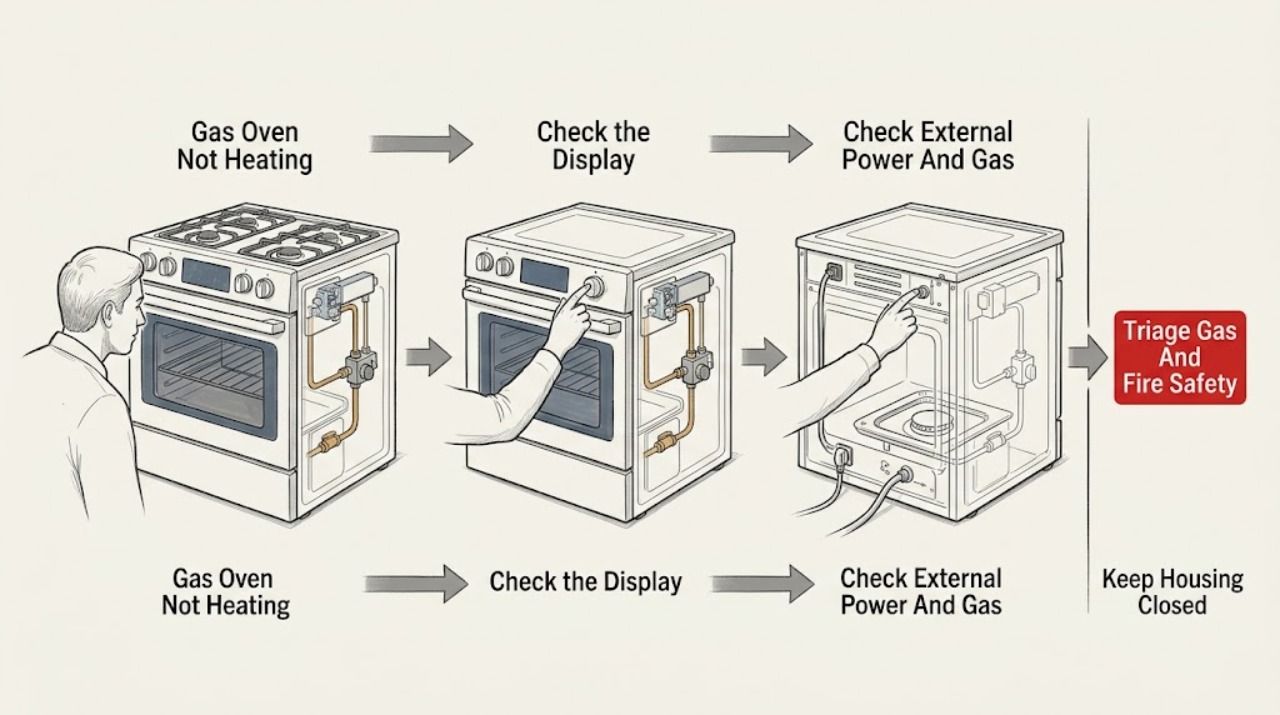
Work through in order
Diagnostic checks
Use only checks that match the exact appliance or system and its official guide.
-
Check 1
Before trying Bake or Broil again, stop and classify any safety symptom: smell for gas only from where you already are, note alarms or visible smoke from a safe location, and do not approach the oven to reproduce the symptom.
Expected result: Record whether there is gas odor, a carbon-monoxide alarm, smoke, flame outside the intended area, delayed ignition or a loud pop, burning smell, arcing, or a repeated breaker trip; otherwise record that none was observed.
Next step: For a hazard, stop using the oven, leave the area, and contact the gas supplier, fire department, or emergency service from a safe location; for no hazard, continue with model identification and controls.
Stop if: Do not light a match, use a lighter, touch electrical switches, use a phone inside, operate the oven, or move the range when gas odor or suspected leakage is present.
Why this matters
Why: Any gas, fire, combustion, or electrical warning changes this from a no-heat diagnosis to an emergency or qualified-service condition. A cold oven without those warnings may proceed to low-risk control checks.
-
Check 2
Read the Kenmore model and serial label from a safe location and use the matching Kenmore manual to verify the Bake/Broil control path, clock or time-of-day requirement, lock or special mode, and the documented ignition type; do not guess from another Kenmore model.
Expected result: Record the exact model, whether the display or clock is active, the selected function and set temperature, any lock or fault indication, and whether the manual describes automatic, spark, or another ignition arrangement.
Next step: Correct only a plainly documented control or mode issue, then follow the manual's normal start sequence once; if the display is dead or a fault returns, continue to power/service triage rather than opening the control area.
Stop if: Do not remove the console, bypass a lock, alter settings not documented for the model, or continue if the manual cannot be matched to the appliance.
Why this matters
Why: A wrong function, unset control state, lock, or model mismatch can prevent a cycle from calling for heat. The model record determines which later observations and service instructions are valid.
-
Check 3
With no gas odor and no water or fire hazard, check the appliance's external power indications and the accessible gas shutoff position without moving the range, disconnecting tubing, or opening a panel; do not repeatedly reset a tripped breaker.
Expected result: Record whether the display or oven light has power, whether the breaker or fuse is open, whether the accessible gas shutoff is visibly on, and whether surface burners work only if the model's normal use and the area are clearly safe; do not use surface-burner operation as proof that the oven is safe.
Next step: Restore only a clearly tripped external supply once if safe and allowed by the manual; if it trips again, gas availability is uncertain, or the supply is behind the range, leave the oven off and arrange qualified service.
Stop if: Do not open a gas connection, move the range, probe an outlet or wire, reset a breaker repeatedly, or touch equipment while standing in water or near smoke, odor, or exposed conductors.
Why this matters
Why: Automatic ignition and controls need the model's required electrical supply, while the oven also needs gas. A dead display or open breaker points to an electrical supply issue; a closed gas valve points to supply configuration. A normal external check does not prove that the igniter, regulator, valve, or control works.
-
Check 4
Only if the exact manual permits a normal user-level observation, the area is free of gas odor and other hazards, and all controls are set correctly, start one ordinary heating cycle from a safe position; do not remove the oven bottom, reach toward the burner, or repeat the attempt.
Expected result: Record only what is visible or audible without disassembly: a documented ignition indication and heat, no ignition response, repeated clicking, a delayed pop, a flame that goes out, an abnormal flame, or a gas odor after the command.
Next step: Turn the normal control off and arrange qualified service for no ignition, no heat, repeated clicking, flame loss, or any abnormal result; if gas odor appears, leave and follow the gas-emergency branch.
Stop if: Do not keep trying, relight manually, inspect under the burner, adjust the air shutter or regulator, test the igniter with a meter, or continue after gas odor, delayed ignition, smoke, flame abnormality, or a loud pop.
Why this matters
Why: No response can involve power, control, or ignition; a response without heat can involve gas flow, valve, burner, or safety control; an abnormal flame, delayed ignition, or odor is a stop condition. These observations do not identify a replaceable part without model-specific testing.
-
Check 5
If the oven ignites normally and remains free of hazards, record the selected cycle, set temperature, preheat indication, rack position, time, and food result using the exact Kenmore manual; do not diagnose temperature with an improvised gas or electrical test.
Expected result: Classify the result as no ignition/no heat, burner lights but temperature remains low or unstable, preheat completes but food is consistently underdone, or a fault appears during heating.
Next step: Provide the model, cycle, set point, preheat result, timing, and symptom pattern to a qualified technician; use only a model-documented calibration procedure if the manual and safe test specifically support it.
Stop if: Stop using the oven for smoke, odor, abnormal flame, over-temperature, repeated trips, uncontrolled heating, a damaged door or glass, or any need to access the burner, sensor, valve, or wiring.
Why this matters
Why: A burner that never lights points toward the ignition, gas, valve, or control path; a lit burner with inaccurate results points toward temperature sensing, calibration, airflow, or control. A recurring fault is a service boundary rather than a reason to change gas settings.
-
Check 6
After the model, controls, external power/gas, and one model-approved operating observation, stop user troubleshooting if the Kenmore gas oven still does not heat and prepare a service record.
Expected result: Record the exact model, control state, display or code, power symptoms, gas-supply observations, ignition response, flame or odor symptoms, preheat result, and any recent installation, conversion, movement, or repair.
Next step: Keep the oven off and arrange qualified Kenmore or gas-appliance service; if there was gas odor, a carbon-monoxide alarm, fire symptom, or repeated electrical trip, use the emergency or gas-supplier path first.
Stop if: Do not open the gas line, move the range, remove panels, bypass safety controls, test live wiring, repeatedly retry ignition, or use the oven for heating the room.
Why this matters
Why: Persistent no heat after safe external checks can involve an igniter, safety valve, burner, regulator, temperature sensor, control, wiring, or installation condition. These require qualified gas-appliance diagnosis and cannot be confirmed by replacing a guessed part.
Use your observations
Decision map
Find the observation that best matches what you see, then follow the next safe action.
-
PATH 01Safety boundary
What you see
Gas odor, delayed ignition, abnormal flame, smoke, a carbon-monoxide alarm, or symptoms of carbon-monoxide exposure are present.
Do this next
Leave immediately, do not operate electrical or ignition devices, and contact the gas supplier, fire department, or emergency services from a safe location.
Why this path and its safety boundary
Why it matters: The oven is not safe to troubleshoot or repeatedly ignite; unburned gas or combustion products can create fire, explosion, or health risk.
Safety stop: Do not use a phone inside, turn lights or breakers on or off, light a match, relight a pilot, or re-enter to inspect the burner or connector.
-
PATH 02Safety boundary
What you see
The display or clock is active but the wrong cycle, temperature unit, time-of-day state, lock, or special mode prevents a normal heating call.
Do this next
Use the exact Kenmore manual to restore the documented Bake or Broil and control state, then try the normal sequence once.
Why this path and its safety boundary
Why it matters: The oven may not be requesting heat even though the appliance has power.
Safety stop: Do not guess a lock sequence, run a cycle not supported by the manual, or proceed when a fault returns.
-
PATH 03Safety boundary
What you see
The display is dead, the breaker is open, the accessible gas shutoff is closed, or supply status cannot be confirmed without moving the range or opening a connection.
Do this next
Restore only a clearly tripped external supply once if safe and manual-approved; arrange qualified service for repeat trips, uncertain gas supply, or an inaccessible shutoff/connector.
Why this path and its safety boundary
Why it matters: The oven lacks a required external input or the supply condition is unresolved; a normal surface burner does not prove the oven path is sound.
Safety stop: Do not move the appliance, open the gas connection, repeatedly reset protection, or inspect live wiring.
-
PATH 04Safety boundary
What you see
Controls and external supply appear normal, but the model-approved one-time observation shows no ignition, no burner heat, repeated clicking, flame loss, or a return of the fault.
Do this next
Keep the oven off and provide the precise observation to qualified gas-appliance service.
Why this path and its safety boundary
Why it matters: The ignition, safety valve, burner, control, wiring, or gas path may be faulty; automatic safety sequencing must not be bypassed.
Safety stop: Do not replace a guessed igniter or valve, measure live circuits, adjust pressure, or repeat ignition after no-light or odor symptoms.
-
PATH 05Safety boundary
What you see
The burner ignites and cycles, but the oven remains consistently too cool, unstable, or undercooks after a correct model-specific setup.
Do this next
Record the cycle, set point, preheat indication, timing, and food result and arrange model-specific service; use calibration only if the exact manual supports it.
Why this path and its safety boundary
Why it matters: The symptom may involve temperature sensing, calibration, control, airflow, door sealing, or a heating-system fault rather than a lack of gas alone.
Safety stop: Do not change gas pressure, bypass a sensor, use the oven with uncontrolled temperature, or continue if smoke, odor, over-temperature, or electrical faults appear.
-
PATH 06Safety boundary
What you see
The range was recently installed, converted, moved, or serviced, or the suspected gas connector or regulator is behind/below the appliance.
Do this next
Leave the range in place and have the gas supplier or qualified technician verify the connector, fuel configuration, regulator, supply, and installation.
Why this path and its safety boundary
Why it matters: The gas configuration and connector require qualified inspection; moving the appliance can damage an older connector.
Safety stop: Do not pull the range out, bend tubing, adjust the regulator, or attempt a connector or gas-line repair.
Helpful context
Understand the symptom
Make the gas-safety decision before troubleshooting heat
A cold oven is not a reason to keep attempting ignition. If you smell gas, hear a delayed ignition or loud pop, see an abnormal flame, or a carbon-monoxide alarm sounds, stop using the oven and leave the area. Do not use a phone or electrical switch inside. Contact the gas supplier, fire department, or qualified service from a safe location and follow their instructions.
Start with the exact Kenmore controls
Kenmore has many oven and range designs, so identify the model before assuming that a clock, lock, pilot, igniter, or temperature-sensor procedure applies. Confirm the correct Bake or Broil function and temperature, the time-of-day or control state if the manual requires it, and that a special mode has not disabled heating. Do not infer that a working cooktop proves that the oven gas or ignition path is healthy.
Understand the ignition sequence without opening the appliance
In common automatic gas-oven systems, an ignition device is energized before gas is permitted to reach the main burner. Therefore, a cold oven can result from no electrical power, an ignition problem, a gas-supply or valve problem, a control fault, or a safety condition. The sequence is useful for a technician's diagnosis; it is not permission to measure live wiring, force a valve, or repeatedly release unburned gas.
Treat temperature complaints differently from no ignition
If the burner lights but the food remains undercooked, record the cycle, set temperature, preheat indication, time, and result instead of changing gas components. A temperature-sensing or control problem may need service, and different Kenmore models specify different calibration or test methods. If the oven never lights, do not run a long preheat or keep trying to force ignition.
Do not move the range to inspect the connector
The gas connector and shutoff may be behind or below the range. CPSC warns that moving an appliance to inspect an older connector can cause it to fail. Leave the range in place and let the gas supplier or qualified technician inspect the connector, regulator, valve, burner, ignition system, and wiring.
When checks do not resolve it
Need a professional?
Safety scope: This article covers model identification, control checks, and safe external observation only. Do not open gas lines, move the range, adjust pressure or air mixture, bypass ignition or safety controls, test live wiring, relight by guesswork, or continue operation with gas odor, delayed ignition, abnormal flame, smoke, carbon-monoxide alarm, repeated trips, or uncontrolled heat.
Common questions
FAQ
Why is my Kenmore gas oven not heating when the display works?
A working display proves only that some power reaches the appliance. The oven still needs the correct cycle and control state, gas availability, and a functioning ignition and safety sequence. Use the exact Kenmore manual for low-risk checks; do not open gas lines or test live parts.
Does a Kenmore gas oven need electricity to heat?
Many gas ovens use electricity for controls and automatic ignition even though the heat comes from gas. Department of Energy material describes common systems in which ignition is energized before gas is allowed to the main burner. The exact Kenmore model manual determines the actual arrangement.
Can I relight the Kenmore gas oven pilot or keep trying Bake?
Do not relight a pilot or repeatedly retry ignition by guesswork. If you smell gas, leave immediately and avoid phones and electrical switches inside. If there is no odor and the exact manual documents a normal user-level sequence, make at most one safe observation and arrange service for no ignition, delayed ignition, or a returning fault.
What if the Kenmore oven lights but does not reach temperature?
Record the cycle, set temperature, preheat indication, timing, and food result. The issue may involve temperature sensing, calibration, control, door sealing, airflow, or the heating system. Use calibration only when the exact manual supports it; do not adjust gas pressure or bypass a sensor.
When should I stop troubleshooting a Kenmore gas oven?
Stop immediately for gas odor, delayed ignition, abnormal flame, smoke, a carbon-monoxide alarm, burning smell, arcing, repeated breaker trips, uncontrolled heating, damaged glass or door, or any need to move the range or open gas or electrical parts. Leave for gas or combustion symptoms and contact qualified help from a safe location.
Read the exact guide
Official sources
- Certain Older Gas Connectors May Be DangerousU.S. Consumer Product Safety Commission · U.S. CPSC consumer safety notice; local gas-supplier and emergency instructions control an active incident.
- Protect Your Family from Carbon Monoxide PoisoningU.S. Consumer Product Safety Commission · CPSC consumer carbon-monoxide safety guidance; it does not diagnose a particular Kenmore oven.
- Energy Conservation Standards for Residential Conventional Cooking ProductsU.S. Department of Energy · DOE technical rulemaking material describing conventional gas-oven ignition technologies; it is not a substitute for a Kenmore model manual or service procedure.
- Customer Care & Support | Kenmore AppliancesKenmore · Kenmore official support navigation; use the exact model for product-specific troubleshooting and repair.
- Find Your Manual | Kenmore Appliance Manuals & GuidesKenmore · Kenmore official manual portal; exact controls, ignition, and safety instructions depend on the appliance model.
Community feedback
Share a repair observation
Share a plain-text repair observation. Accepted observations are published automatically; this page may take a moment to update.