
On this page
Start here
Quick answer
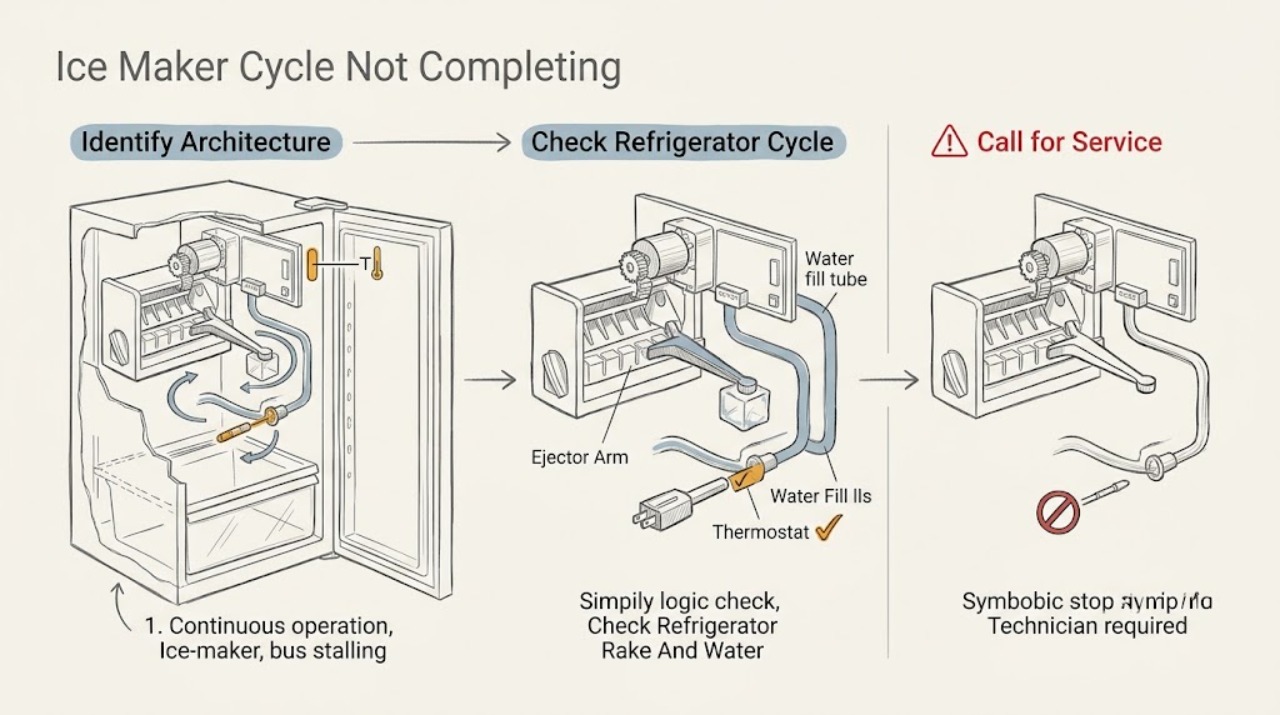
First identify the architecture: a GE refrigerator icemaker uses the freezer, a water supply and an ejector rake, while a GE Profile Opal is a separate countertop ice maker with a reservoir, bin and model-specific display or app behavior. On a refrigerator, confirm the icemaker is on, the freezer is cold enough for a cycle, water flow is available if the model uses it, and no cube is visibly blocking the ejector rake. GE says a stuck rake can keep a refrigerator icemaker from completing its cycle; do not reach into a hot mold or force the mechanism. On an Opal, allow the documented startup/flush time, read the display state, add water only when requested, make sure the bin is fully inserted, and check that Cleaning, Defrosting or a SmartHQ schedule is not stopping production. Opal models differ: some have a round front button and others show text. Do not bridge a switch, remove screens or covers, probe wiring, or use live electrical tests. Stop for smoke, burning odor, damaged cord, water near electricity or abnormal heat, and arrange qualified service or Opal support when the correct architecture-specific checks do not restore a complete cycle.
Before you begin
Safety first
- The owner may identify the architecture, read status, use normal controls, check temperature/settings, keep a bin fully inserted, and make only model-approved external cleaning or filter checks with power disconnected. Qualified personnel must handle ejectors, molds, pumps, valves, sensors, switches, wiring, controls and internal electrical or refrigeration work.
Work through in order
Diagnostic checks
Use only checks that match the exact appliance or system and its official guide.
-
Check 1
Identify whether the ice maker is built into a GE refrigerator/freezer or is a separate GE Profile Opal countertop unit. Record the full model number and, for an Opal, whether it has a round front button, a text display, a water reservoir and a SmartHQ connection.
Expected result: The unit is a refrigerator icemaker; an Opal with a round front button; an Opal with a text display; or the model cannot be identified.
Next step: Follow only the matching branch and locate the exact owner's manual. Arrange service if identifying the model would require removing a panel or cover.
Stop if: Do not use refrigerator instructions on an Opal or Opal instructions on a refrigerator, and do not open either appliance to identify it.
Why this matters
Why: The architecture determines which cycle, sensor, water path and user-visible status are relevant. An unidentified model is not a reason to apply a different family's procedure.
-
Check 2
For a refrigerator icemaker, confirm the icemaker's model-specific ON/OFF control is on and observe externally whether the freezer is cold enough for ice production. Do not change settings repeatedly; record the freezer temperature and whether other freezer contents are frozen normally.
Expected result: The icemaker is off; the freezer is warmer than expected; the freezer is stable and cold; or the cycle begins but does not eject cubes.
Next step: Use the exact manual to enable the icemaker and correct only the model-approved temperature setting. If it is cold and still stalls, continue with the visible obstruction and water checks.
Stop if: Do not bypass a thermostat, force an ejector, or reach into a mold or moving mechanism.
Why this matters
Why: GE says an off icemaker will not produce ice and that the icemaker must reach about 16°F before a cycle begins. A warm freezer can delay or prevent ice formation; a cold freezer with a stalled harvest shifts attention to the ejector, obstruction or service diagnosis.
-
Check 3
With the refrigerator icemaker switched off using its normal control, make only a visual check for cubes blocking the ejector/rake and record whether the water filter or supply condition is known to restrict flow. Do not pull the rake, remove the mold or disconnect tubing.
Expected result: A cube is visibly in the rake path; no obstruction is visible; the filter is overdue or water flow is poor; or the mold appears hot or damaged.
Next step: Remove only an ordinary loose obstruction if the exact manual explicitly allows it and the mechanism is cool and stationary; otherwise arrange service. Follow the model's filter replacement guidance when flow is the confirmed issue.
Stop if: Do not touch a hot mold, insert tools, force the rake, bypass the feeler arm, or perform a live test.
Why this matters
Why: GE says a stuck ejector rake can prevent a refrigerator icemaker from completing its cycle, and a clogged water filter can restrict flow. A hot or damaged mold or a stall with no visible cause needs service rather than force.
-
Check 4
For an Opal, read the visible status before changing anything. On round-button models, note white, yellow or another ring state; on text-display models, note Making Ice, Add Water, Cleaning or Defrosting. Confirm the reservoir has potable water to the model's fill line and allow the documented startup/flush phase.
Expected result: The Opal is flushing or starting; Add Water is shown; Cleaning or Defrosting is shown; the display indicates Making Ice but no ice follows the expected startup period; or the display is not responding.
Next step: Use the exact model control to leave Cleaning or Defrosting only when the manual permits, add only potable water when requested, and allow the startup period. Escalate if the correct state remains stalled or the display is unresponsive.
Stop if: Do not fill with liquids other than water, remove the inlet screen/approved filter, bypass a display or switch, or open the housing.
Why this matters
Why: GE says round-button Opals may flush for about five minutes, text models distinguish Making Ice/Add Water/Cleaning/Defrosting, and production may begin in 15 to 30 minutes. A status is a state clue, not proof that a pump, sensor or control has failed.
-
Check 5
For an Opal that starts and then stops, push the ice bin fully into place without forcing it, check whether the SmartHQ schedule is enabled, and look for the model's clean/defrost indication. If the exact manual calls for cleaning, use only that external cleaning procedure with power disconnected.
Expected result: The bin was not fully engaged; the unit stops at about five minutes; a schedule turns it off at an hourly check; minerals or a blocked ice chute are evident; or it stops with the bin correctly installed and no schedule.
Next step: Fully install the bin, disable the schedule through the app or the model-approved power procedure, and clean only as directed. If it still stops, contact Opal support rather than opening the unit.
Stop if: Do not hold the bin switch, bypass the bin, scrape internal ice, or remove the pump, screen or cover.
Why this matters
Why: GE links a five-minute Opal shutdown to the bin switch/engagement and says a SmartHQ schedule can turn the unit off at its hourly check. Mineral buildup or a blocked chute can also make Opal behave as if full. A correctly installed bin with no schedule makes a service fault more likely.
-
Check 6
Record the architecture, full model and serial number, status or control state, water and filter condition, freezer or room temperature as applicable, time to stop, sounds, visible obstruction, bin position, schedule and any safety signs. Keep observations external.
Expected result: The cycle completes after the matching external correction; it remains incomplete with the correct state and conditions; or smoke, odor, water near electricity, heat or cord damage is present.
Next step: Use the exact manual or arrange qualified appliance service for a refrigerator unit. For Opal, contact Opal support with the model and status. Stop using the appliance and arrange qualified electrical/appliance service for a hazard.
Stop if: Do not restore power to reproduce smoke or arcing, test wiring or capacitors, bridge switches, or disassemble the ice maker.
Why this matters
Why: A corrected state supports a settings, temperature, water, bin or obstruction explanation. A persistent incomplete cycle with those conditions requires diagnosis of a motor, pump, valve, sensor, control or wiring fault; safety signs require immediate stop-use.
Use your observations
Decision map
Find the observation that best matches what you see, then follow the next safe action.
-
PATH 01Next step
What you see
The unit is a refrigerator icemaker and it is off, the freezer is too warm, or the freezer has a low load and unstable temperature.
Do this next
Use the exact model control and temperature guidance; allow the freezer to stabilize. If a cold, enabled icemaker still cannot complete a cycle, use service rather than forcing it.
Why this path and its safety boundary
Why it matters: The cycle may not have started rather than failing during harvest. GE identifies icemaker power and freezer temperature as prerequisites for production.
-
PATH 02Safety boundary
What you see
A refrigerator icemaker begins but a cube visibly blocks the ejector/rake, or water flow is poor and the filter/supply is implicated.
Do this next
With the normal control off and mechanism stationary, follow the exact manual for a permitted loose-cube removal or filter change. Escalate a hot, damaged, forced or unexplained mechanism.
Why this path and its safety boundary
Why it matters: A stuck rake can directly stop a cycle; restricted water flow can prevent the next fill. The two symptoms need different model-specific remedies.
Safety stop: Do not touch a hot mold, force the rake, disconnect tubing or bypass a sensor.
-
PATH 03Next step
What you see
The unit is an Opal and shows a documented startup, water flush, Making Ice, Cleaning or Defrosting state, or has been running for less than the model's stated startup period.
Do this next
Supply potable water when requested, leave the correct mode selected and allow the documented phase to finish. Escalate if the state never changes after the expected period.
Why this path and its safety boundary
Why it matters: This can be a normal phase, not a failed cycle. Opal model families expose different visual states and production timing.
-
PATH 04Next step
What you see
An Opal stops after about five minutes, the bin is not fully inserted, or a connected schedule turns the unit off at an hourly check.
Do this next
Fully insert the bin and disable the schedule through the app/model procedure. If it still stops with a correct bin and no schedule, contact Opal support.
Why this path and its safety boundary
Why it matters: GE associates these patterns with bin-switch engagement or schedule state, not necessarily a refrigeration or pump failure.
-
PATH 05Safety boundary
What you see
The correct architecture-specific state, water, temperature, bin and obstruction checks are normal but the cycle remains incomplete, or there is smoke, burning odor, water near electricity, abnormal heat or damaged power hardware.
Do this next
Stop using the appliance for a hazard and isolate power only from a safe accessible point. Otherwise arrange qualified refrigerator service or Opal support with the model and cycle record.
Why this path and its safety boundary
Why it matters: The remaining possibilities include a pump, valve, ejector, sensor, control, motor or wiring fault, and cannot be safely identified by bypassing the mechanism.
Safety stop: Do not open the housing, perform live tests, bridge switches, or restore power to reproduce a hazard.
Helpful context
Understand the symptom
Architecture changes the diagnosis
A refrigerator icemaker harvests cubes in the freezer and normally depends on freezer temperature, an ejector/rake, water delivery and the refrigerator's controls. An Opal countertop unit uses a reservoir, pump, bin, display modes and, on connected models, a schedule. A refrigerator ice-maker symptom cannot be diagnosed with an Opal procedure, and an Opal display cannot be interpreted with a refrigerator manual.
A pause may be a documented phase
Opal can flush its system for about five minutes, take 15 to 30 minutes to begin producing ice, and show Cleaning or Defrosting while it is not making ice. A refrigerator icemaker may wait for the freezer to reach the required temperature. Record the phase, timing and model before calling a normal pause a failed cycle.
Protect the mechanism while checking it
Use only visible, model-approved controls. Do not hold a rake, feeler arm, bin switch or front button in a false position, and do not reach into a refrigerator mold that may be hot. Keep the Opal's inlet screen or approved filter in place. Internal water, motor, control and electrical diagnosis belongs to qualified service.
Safety boundary
Stop conditions
- Stop using the ice maker for smoke, burning or electrical odor, arcing, a hot or damaged cord/plug, water near electrical parts, abnormal heat or repeated breaker trips.
- Do not reach into a refrigerator ice mold, force an ejector/rake or feeler arm, bridge a bin or door switch, remove an Opal screen during operation, or open either appliance.
- Do not perform live electrical tests, probe wiring or capacitors, bypass a temperature or level sensor, add refrigerant, or disconnect water tubing as a cycle test.
- Use the exact manual for the full model: refrigerator icemakers and Opal models have different cycles, status indicators, water systems and reset/service paths.
Only after diagnosis
Potential parts
- refrigerator icemaker assembly or ejector mechanism
Consider only after a qualified diagnosis confirms a stuck or failed refrigerator icemaker mechanism after temperature, power and visible obstruction checks.
Refrigerator icemaker assemblies and connectors are model-specific; do not order or force one based only on an incomplete cycle. - refrigerator water filter or inlet valve
Consider a filter first only when the exact refrigerator model has one and restricted water flow is confirmed; an inlet valve requires qualified diagnosis after the water path is verified.
Filter and valve fit, plumbing and controls vary by refrigerator model. Confirm the full model and manufacturer fit information before ordering. - Opal bin switch or circulation pump
Consider only after Opal-specific checks show a fully inserted bin yet a five-minute stop, or show a persistent water-circulation fault after correct water and mode conditions.
Opal model families use different bins, displays and internal assemblies; do not bypass the switch or order a pump without model-specific diagnosis.
When checks do not resolve it
Need a professional?
Arrange qualified refrigerator service when an enabled, cold refrigerator icemaker still stalls without a visible loose obstruction, when the mold/ejector is hot or damaged, or when a water/filter correction does not restore the cycle. For an Opal, contact Opal support when the correct display mode, potable water, fully inserted bin, schedule state and documented startup period do not restore production. Stop immediately for electrical, water or heat hazards.
Safety scope: The owner may identify the architecture, read status, use normal controls, check temperature/settings, keep a bin fully inserted, and make only model-approved external cleaning or filter checks with power disconnected. Qualified personnel must handle ejectors, molds, pumps, valves, sensors, switches, wiring, controls and internal electrical or refrigeration work.
Common questions
FAQ
How do I know whether this is a GE refrigerator icemaker or an Opal?
A refrigerator icemaker is built into the freezer and uses the freezer, a water path and an ejector. An Opal is a separate countertop unit with a reservoir, bin and its own button or display. Record the full model before using any troubleshooting procedure.
Why does a GE refrigerator icemaker start but not complete its cycle?
Check that it is on, the freezer is at the model-appropriate temperature, water flow is available, and no cube is visibly blocking the ejector rake. GE says a stuck rake can prevent completion. Do not force the mechanism or reach into a hot mold; persistent stalls need service.
Is an Opal taking several minutes before making ice normal?
Often. GE says some Opal units flush water for about five minutes and production can begin in 15 to 30 minutes. Read the model-specific display, add potable water when requested, and distinguish Making Ice from Cleaning or Defrosting before declaring a failed cycle.
Why does my Opal stop after about five minutes?
GE links this pattern to a bin that is not fully engaged and also documents SmartHQ schedules that can turn the unit off at an hourly check. Fully insert the bin and check the schedule. If it still stops with the correct bin and no schedule, contact Opal support.
Can I force or bypass the ice-maker switch to finish a cycle?
No. Do not bridge an ejector, feeler arm, bin switch, door switch or display control, and do not perform a live test. Those mechanisms protect against heat, moving parts, water and electrical hazards. Arrange model-specific service when safe external checks do not resolve the stall.
Read the exact guide
Official sources
- Opal Ice Maker - TroubleshootingGE Appliances · Use for Opal countertop status and normal-state interpretation; exact button/display behavior remains model-specific.
- Opal Ice Maker - Not Making IceGE Appliances · Use for the listed Opal model families only; do not generalize a round-button state to text-display models.
- Refrigerator - Icemaker Not Producing IceGE Appliances · Use only for GE refrigerator/freezer-mounted icemakers; it does not describe Opal countertop architecture.
- Opal Ice Maker - Steps for Making IceGE Appliances · Use for Opal countertop setup and cycle-start interpretation; follow the exact model's manual.
- Opal Ice Maker - Shutting Off After 5 MinutesGE Appliances · Use only for Opal countertop models; do not apply to refrigerator icemakers.
- Opal Ice Maker - Ice Maker Turns Off RandomlyGE Appliances · Use only for Opal units that stop unexpectedly; schedule and bin controls do not apply to refrigerator icemakers.
Community feedback
Share a repair observation
Share a plain-text repair observation. Accepted observations are published automatically; this page may take a moment to update.