
On this page
Start here
Quick answer
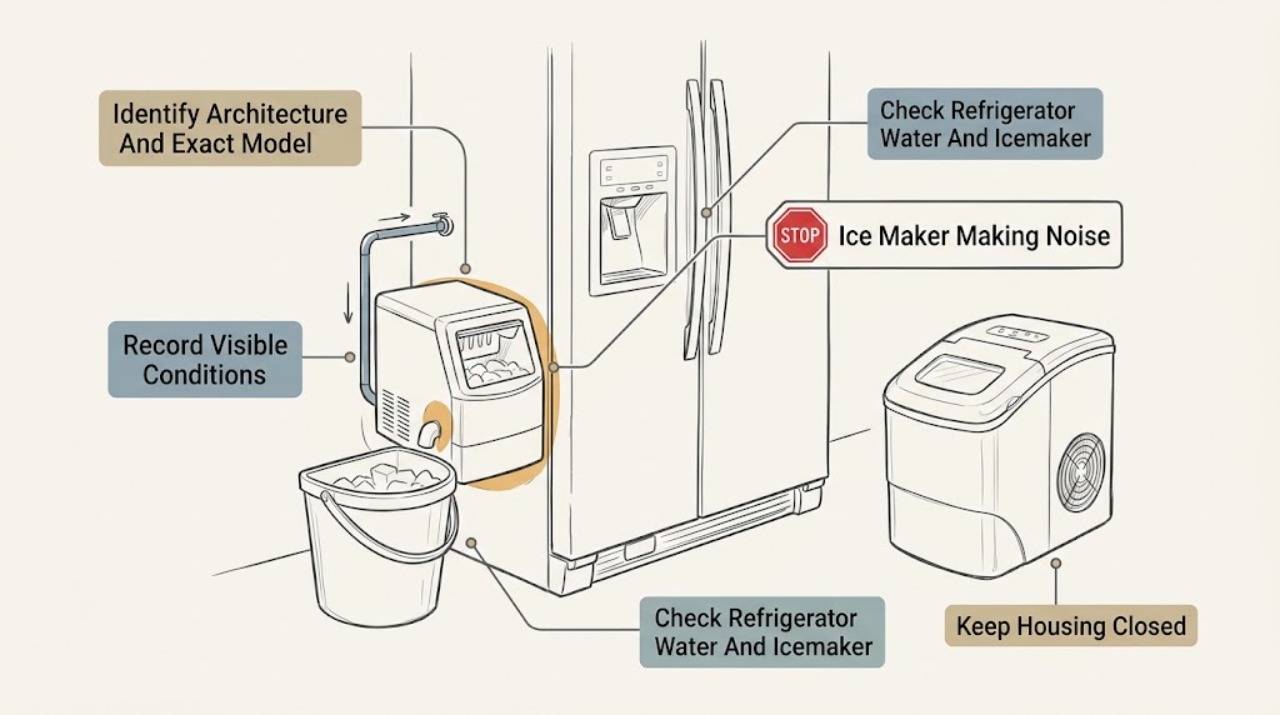
First identify the machine: a refrigerator-installed icemaker, a standalone GE ice maker, or a GE Profile Opal nugget-ice maker. For a refrigerator icemaker, GE describes ice dropping into the bucket, a brief fill hum or click, and a buzz about every 15 minutes when the icemaker is on but its water supply is off as possible operating patterns; turn the installed icemaker off using its documented control if water is unavailable. For a standalone Opal, GE describes startup fan whir, pump buzz, refrigerant rattle or gurgle, compressor hum, gear-motor chugging, ice-drop clicks, and several minutes of water flushing as cycle sounds that should reduce as the cycle stabilizes. A continuous grinding noise from an Opal is not normal. A freezer sound like a fan blade striking something, a persistent new tap, or a noise that remains after an applicable icemaker is disabled needs service. Check only visible water level, bin or drawer seating, loose items, and external vibration. Do not reach into an auger, fan, gear motor, or water valve, remove covers, open the sealed system, or run a live test. Stop for smoke, burning or electrical odor, sparks, abnormal heat, water near electrical parts, a hot or damaged cord or outlet, or repeated breaker trips.
Before you begin
Safety first
- Do not reach into an icemaker, auger, fan, pump, gear motor, or valve; remove covers; pull a refrigerator by its cord or tubing; open the sealed system; perform live electrical tests; or continue through a leak or continuous grinding. Stop for smoke, burning or electrical odor, sparks, abnormal heat, water near electrical parts, a hot or damaged cord or outlet, or repeated breaker trips.
Work through in order
Diagnostic checks
Use only checks that match the exact appliance or system and its official guide.
-
Check 1
Identify whether the ice maker is inside a GE refrigerator, a standalone GE ice maker, or a GE Profile Opal unit. Record the exact model from the refrigerator label, ice maker rating plate, or Opal documentation without moving a wet or built-in appliance or removing a cover.
Expected result: The unit is a refrigerator icemaker; a standalone non-Opal ice maker; an Opal nugget-ice maker; or the appliance identity cannot be confirmed.
Next step: Follow only the branch for the confirmed architecture and exact model. If the label is inaccessible without pulling a built-in appliance or touching water or wiring, stop and arrange service.
Stop if: Stop immediately for smoke, burning or electrical odor, sparks, abnormal heat, water near electrical parts, a hot or damaged cord or outlet, or repeated breaker trips.
Why this matters
Why: The architecture determines the components, normal sound cycle, water path, bin design, and service route. GE's standalone article specifically excludes refrigerator icemakers, while Opal guidance describes a separate compressor, pump, motors, and fans.
-
Check 2
Listen from outside the appliance and record whether the sound comes from a refrigerator freezer or door, a water connection, an ice bucket, an Opal bin, or underneath the cabinet. Note whether it occurs at startup, fill, harvest, ice drop, defrost, shutdown, or a repeating interval, and whether it reduces after the cycle progresses.
Expected result: The sound is a brief click, hum, buzz, gurgle, rattle, chug, whir, water-pump sound, ice drop, scraping, blade-contact sound, or continuous grinding, with or without a clear cycle trigger.
Next step: Continue with the built-in refrigerator or Opal timing branch. If the sound cannot be located safely, document it and arrange service rather than opening the unit.
Stop if: Do not reproduce a dangerous sound, reach through a grille, or operate with smoke, odor, sparks, heat, or water near electrical parts.
Why this matters
Why: GE's normal sound descriptions are architecture- and cycle-specific. Brief fill, refrigerant, fan, compressor, water-flush, or ice-drop sounds can be expected; a persistent contact or grinding pattern is not explained by a normal cycle.
-
Check 3
Only for a refrigerator-installed icemaker, confirm whether the exact model has an active water connection and whether the icemaker is enabled. If water is intentionally unavailable, turn the installed icemaker off using its documented user control or feeler-arm position when the model permits; do not touch the ejector, mold, heater, or valve.
Expected result: A brief hum or click occurs during a normal fill; buzzing repeats about every 15 minutes while water is off; a rattling or vibrating sound occurs with the icemaker on but no water; or the sound remains after the icemaker is disabled.
Next step: Leave an unconnected icemaker off and arrange qualified refrigerator service for persistent noise, leaking water, a faulty valve, or an uncertain control. Do not apply this branch to an Opal or standalone unit.
Stop if: Do not reach into the icemaker, force its arm, disconnect water tubing, or live-test a valve.
Why this matters
Why: GE links fill sounds to the refrigerator water valve and repeated buzzing or rattling to an enabled icemaker trying to fill without water. If the sound remains with the icemaker disabled, another refrigerator fan, compressor, installation, or internal fault becomes more likely.
-
Check 4
Only for a GE Profile Opal, confirm the bin or drawer is fully seated and the reservoir has the water required by the exact model. Observe from outside through one startup cycle whether the fan, pump, refrigerant, compressor, gear motor, ice drops, and initial water flush become quieter as production continues. Do not remove a powered cover or put fingers into the ice chute or mechanism.
Expected result: Startup whir, buzz, rattle, gurgle, hum, chugging, clicking, or water pumping reduces as the cycle stabilizes; the unit is loud with low water; the bin is not seated; or continuous grinding persists.
Next step: Correct only a visible bin-seating or water-level issue described by the exact manual and monitor once. Arrange Opal-specific service for continuous grinding, recurring abnormal noise, a blocked mechanism, or a fault that requires internal access.
Stop if: Do not reach into the auger or gear motor, use an unapproved tool to clear ice, remove the water inlet screen or filter while operating, or open the sealed system.
Why this matters
Why: GE says these Opal startup and production sounds can be normal and that hard surfaces can amplify them. Its troubleshooting guidance links loud initial pumping to the water flush and insufficient water, and says a continuous grinding noise is not normal.
-
Check 5
From a dry, safe position, check only visible causes of vibration: a bin or drawer touching the cabinet, loose items on or beside the appliance, a hard countertop amplifying vibration, or an installation obstruction. For a refrigerator, listen for freezer fan-blade contact or an underside card-like sound without removing a cover or pulling the unit.
Expected result: The sound changes when a loose external item is moved; an Opal sound is amplified by a hard surface; the refrigerator sound resembles a fan blade striking something; or the sound is unchanged and internal.
Next step: Remove only a loose external item and listen once. Arrange qualified service for fan contact, persistent scraping, an internal obstruction, or any inspection requiring a cover or appliance movement.
Stop if: Do not reach through grilles, pull a refrigerator over its water line or cord, remove rear covers, or operate with an exposed fan.
Why this matters
Why: External contact can amplify or create a vibration without proving a failed part. GE says freezer fan-blade contact is not normal, and an underside obstruction may require qualified service depending on the refrigerator design.
-
Check 6
After one applicable user-level correction, record the exact model, architecture, sound location, timing, water and bin state, whether the icemaker was disabled, whether a surface or item correction changed the sound, and whether cooling or ice production changed. Do not repeatedly restart a noisy mechanism to reproduce it.
Expected result: The sound matches a documented cycle and settles; it returns at the same interval; it continues with an icemaker disabled; Opal grinding remains continuous; or cooling, water, electrical, or mechanical symptoms appear.
Next step: Arrange qualified service for persistent, worsening, or internal noise and provide the model and recording. Keep the appliance off for electrical, leak, fan-contact, continuous-grinding, or sealed-system symptoms.
Stop if: Stop immediately for smoke, burning or electrical odor, sparks, abnormal heat, water near electrical parts, a hot or damaged cord or outlet, repeated breaker trips, or uncontrolled vibration.
Why this matters
Why: A cycle-linked sound that settles may be normal for that architecture, but a persistent or changed sound requires diagnosis. Noise alone does not identify a compatible motor, valve, fan, auger, compressor, or control part.
Use your observations
Decision map
Find the observation that best matches what you see, then follow the next safe action.
-
PATH 01Safety boundary
What you see
The noise is inside a refrigerator and is a brief ice drop, fill hum or click, or another sound that occurs during a confirmed icemaker cycle and then stops.
Do this next
Record the cycle and monitor once. Escalate if the sound becomes continuous, changes to scraping or blade contact, leaks, or remains after the installed icemaker is disabled.
Why this path and its safety boundary
Why it matters: GE lists ice dropping into the bucket and the water valve humming or clicking during fill as possible normal refrigerator operation. The exact refrigerator model determines the presence and control of the icemaker.
Safety stop: Do not reach into the icemaker, force its mechanism, or open a water-valve or fan cover.
-
PATH 02Safety boundary
What you see
A refrigerator-installed icemaker is enabled but its water supply is off or not connected, and buzzing or rattling repeats at an interval.
Do this next
Turn the installed icemaker off through its documented control or feeler-arm arrangement. Arrange service if noise, leaking, or an uncertain control remains; do not apply this explanation to an Opal.
Why this path and its safety boundary
Why it matters: GE explains that an enabled icemaker can buzz while attempting to fill without water and recommends turning it off when water is not supplied. This does not prove that the valve or icemaker has failed.
Safety stop: Do not connect or disconnect tubing under pressure, reach into the icemaker, or live-test the valve.
-
PATH 03Safety boundary
What you see
A GE Profile Opal makes fan, pump, refrigerant, compressor, gear-motor, ice-drop, or water-flush sounds at startup that reduce as the cycle stabilizes.
Do this next
Confirm the bin and water level using the exact model manual and monitor one cycle. Arrange Opal-specific service if the sound does not reduce, ice production fails, or a grinding pattern becomes continuous.
Why this path and its safety boundary
Why it matters: GE describes these Opal sounds as normal cycle behavior and notes that hard floors, walls, and countertops can amplify them. Loud initial pumping can also occur during the initial water flush or when more water is needed.
Safety stop: Do not open the housing, touch the auger or gear motor, or remove inlet components while powered.
-
PATH 04Safety boundary
What you see
A standalone Opal produces continuous grinding, or a refrigerator produces persistent scraping, a new tap, or a sound like a fan blade striking something.
Do this next
Stop the affected unit and arrange qualified service, providing the exact model, sound location, and recording if safe. Do not order a motor, auger, or fan from the symptom alone.
Why this path and its safety boundary
Why it matters: GE says continuous Opal grinding is not normal and identifies refrigerator fan-blade contact as an abnormal sound. These symptoms can involve a moving mechanism or obstruction and cannot be safely localized by reaching inside.
Safety stop: Do not remove covers, reach into the mechanism, run with an exposed fan, or open a sealed refrigeration system.
-
PATH 05Safety boundary
What you see
The sound changes when a visible bin, item, or countertop contact is corrected, or it is accompanied by smoke, electrical odor, sparks, abnormal heat, water near electrical parts, a damaged cord or outlet, or repeated breaker trips.
Do this next
Keep only a simple visible correction and monitor once if the unit is safe. Stop and arrange qualified appliance or electrical service for a hazard, unchanged internal noise, or recurring vibration.
Why this path and its safety boundary
Why it matters: A visible contact can amplify vibration, but hazard symptoms are not an installation diagnosis. Continuing to operate or repeatedly resetting protection can increase risk.
Safety stop: Do not touch wet electrical parts, pull a built-in refrigerator, bypass protection, or restart a dangerous mechanism.
Helpful context
Understand the symptom
Confirm which GE ice maker you have
A refrigerator's automatic icemaker shares the refrigerator's water valve, cabinet, and ice bucket. A standalone GE ice maker has its own pump, fan, compressor, and bin, while an Opal is a particular nugget-ice platform with its own water flush and gear motor. GE's standalone guidance explicitly says it is not discussing an icemaker inside a refrigerator. Record the exact model, whether the unit is built into a refrigerator, and where the sound starts before applying any sound description.
Use timing to separate cycle sounds from contact or failure
A refrigerator icemaker can click or hum during fill and make a loud drop when cubes fall into the bin. An Opal can whir, buzz, rattle, gurgle, hum, chug, click, or pump water during startup and should quiet as its cycle stabilizes. A buzz at a repeating interval with no water supply, a freezer fan-blade strike, or continuous Opal grinding is a different branch. The sound's interval, location, and relationship to filling, harvesting, startup, and defrost are more useful than loudness alone.
Keep moving and heated parts covered
Do not reach into a refrigerator icemaker, auger, fan, gear motor, pump, or water valve while powered. If an external inspection or cleaning is permitted by the exact manual, unplug from a dry, safe position first and keep water away from the base. Do not remove covers, pull a refrigerator by its tubing, open a refrigeration circuit, or use a tool to clear an internal ice obstruction. Stop for smoke, electrical odor, sparks, abnormal heat, water near electrical parts, a hot or damaged cord or outlet, or repeated breaker trips.
When checks do not resolve it
Need a professional?
Call qualified appliance service for continuous Opal grinding, refrigerator fan-blade contact, persistent scraping or tapping, noise that remains after the applicable icemaker is disabled, water or cooling problems, or any internal-access diagnosis. Stop immediately for smoke, burning or electrical odor, sparks, abnormal heat, damaged power parts, water near electrical parts, or repeated breaker trips.
Safety scope: Do not reach into an icemaker, auger, fan, pump, gear motor, or valve; remove covers; pull a refrigerator by its cord or tubing; open the sealed system; perform live electrical tests; or continue through a leak or continuous grinding. Stop for smoke, burning or electrical odor, sparks, abnormal heat, water near electrical parts, a hot or damaged cord or outlet, or repeated breaker trips.
Have this ready
- Exact model and architecture, sound location, sound description and timing, water connection and icemaker state, Opal bin and reservoir state when applicable, whether a visible correction changed the sound, cooling or ice-production symptoms, and a safe recording.
Common questions
FAQ
Is a loud click or hum from a GE refrigerator icemaker normal?
It can be. GE describes ice dropping into the bucket and a brief fill hum or click as possible normal refrigerator icemaker sounds. A buzz that repeats while the water supply is off can mean the icemaker is enabled without water; turn it off using the model's documented control.
Are Opal ice maker rattles and pumps supposed to be noisy?
Some startup noise is expected. GE describes Opal fan, pump, refrigerant, compressor, gear-motor, ice-drop, and water-flush sounds that should reduce as the cycle stabilizes. Continuous grinding is not normal and needs Opal-specific service.
Can I use refrigerator icemaker advice on a standalone GE or Opal ice maker?
No. GE explicitly distinguishes a standalone ice maker from an icemaker inside a refrigerator, and Opal has its own pump, fan, compressor, gear motor, bin, and water-flush behavior. Confirm the exact appliance before changing a water connection or control.
Read the exact guide
Official sources
- Refrigerator Noisy Water ValveGE Appliances · Refrigerator-installed icemaker water-valve configurations; not standalone or Opal systems
- Opal Ice Maker - Normal SoundsGE Appliances · GE Profile Opal ice-maker configurations; exact Opal model controls water, bin, and defrost details
- Refrigerator - Normal Sounds and Noises MadeGE Appliances · Refrigerator-installed icemaker guidance; do not apply to standalone or Opal mechanisms
- Refrigerator - Buzzing NoiseGE Appliances · Refrigerator configurations with an icemaker, dispenser, or applicable water filter; verify exact equipment
- Refrigerator - Unusual NoisesGE Appliances · GE refrigerator configurations; not a diagnosis for standalone or Opal ice makers
- Ice Maker - Normal NoiseGE Appliances · Standalone GE ice makers only; GE explicitly excludes icemakers inside refrigerators
- Opal Ice Maker - TroubleshootingGE Appliances · GE Profile Opal configurations; use the exact Opal manual for model differences
Community feedback
Share a repair observation
Share a plain-text repair observation. Accepted observations are published automatically; this page may take a moment to update.