
On this page
Start here
Quick answer
First identify the architecture: refrigerator-installed icemaker, standalone GE ice maker, or GE Profile Opal. For a refrigerator icemaker, confirm it is on, the freezer is cold enough for the model, the water supply and filter are not restricting flow, and no cube is blocking the mold or ejector. GE says a newly installed refrigerator icemaker can take up to 24 hours, and a mold must reach about 16°F before a cycle begins; use the exact model manual rather than assuming these settings fit every design. For a standalone GE ice maker, check its power, water indication, and auger or bin state. For Opal, read the front status: Making Ice, Add Water, Cleaning, or Defrosting each calls for a different model-specific next step; a fully seated bin and sufficient water are essential. GE says an Opal can flush water for about five minutes at startup and may need a model-specific long unplug reset if it still produces no ice. Do not mix refrigerator and Opal procedures, remove internal screens while operating, reach into an ejector or auger, or open the refrigeration system. Stop for water near electrical parts, smoke, burning or electrical odor, sparks, a hot or damaged cord or outlet, repeated breaker trips, or an uncontrolled leak.
Before you begin
Safety first
- Do not reach into ejectors, molds, augers, pumps, fans, or valves; remove covers or required screens while powered; chip ice with sharp tools; disconnect pressurized tubing; open the sealed system; bypass interlocks; or perform live electrical tests. Stop for smoke, burning or electrical odor, sparks, abnormal heat, water near electrical parts, a hot or damaged cord or outlet, repeated breaker trips, or uncontrolled leaks.
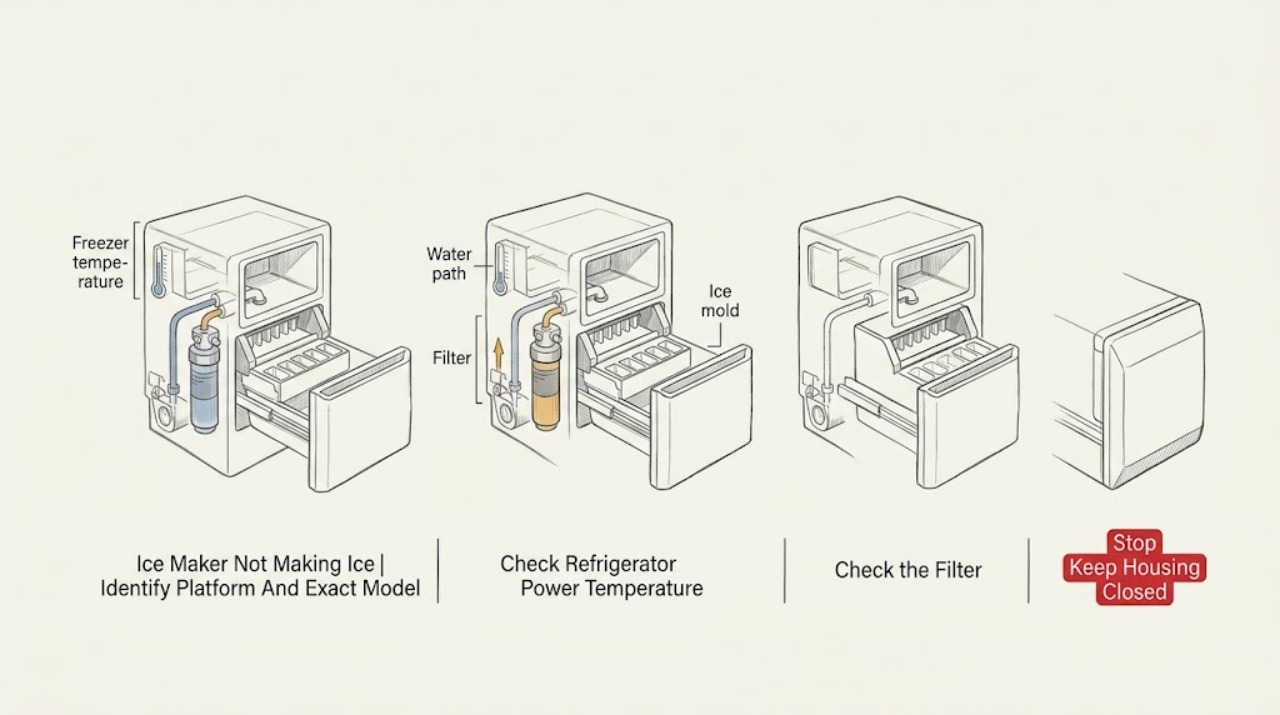
Work through in order
Diagnostic checks
Use only checks that match the exact appliance or system and its official guide.
-
Check 1
Identify whether the ice maker is installed inside a GE refrigerator, is a standalone GE ice maker, or is a GE Profile Opal. Record the exact model from the appliance label or manual without pulling a built-in refrigerator or touching a wet cord, outlet, or internal part.
Expected result: The unit is a refrigerator icemaker; a standalone non-Opal ice maker; an Opal with a round front button; an Opal without that button; or the identity cannot be confirmed.
Next step: Continue only with the confirmed platform and exact model manual. If the label requires unsafe movement or internal access, stop and arrange service.
Stop if: Stop for smoke, burning or electrical odor, sparks, abnormal heat, water near electrical parts, a hot or damaged cord or outlet, or repeated breaker trips.
Why this matters
Why: The platform determines the water source, controls, status indications, temperature requirements, bin interlock, and reset procedure. GE explicitly separates standalone ice makers from refrigerator icemakers, and Opal has its own status and cycle guidance.
-
Check 2
Only for a refrigerator-installed icemaker, confirm from the user-accessible control or icemaker switch that it is on. Check the freezer temperature display and whether the refrigerator is newly installed or recently powered down; do not place a thermometer or tool inside the mechanism or adjust hidden controls.
Expected result: The icemaker is off; the freezer is warmer than the model's target; the unit is newly installed or recovering; the freezer has normal temperature but no ice; or the display is absent or abnormal.
Next step: Turn the icemaker on only through the model's documented control and allow the stated recovery time. Arrange service for a persistent no-ice condition with normal temperature or a control that will not respond.
Stop if: Do not remove covers, force an icemaker switch or feeler arm, or touch a warm or heated mold.
Why this matters
Why: GE says the freezer and icemaker must reach the proper temperature, with a mold needing about 16°F before a cycle begins, and a new installation may take up to 24 hours. A normal-temperature freezer with no production moves the diagnosis toward water flow, filter, mold, ejector, or service.
-
Check 3
Only for a refrigerator model with water equipment, confirm that the household water supply is on and inspect the accessible filter indicator or filter seating according to the exact manual. Look only at the visible ice mold or bucket for a loose cube blocking harvest; do not reach into the ejector, heater, valve, or fill tube.
Expected result: The water supply is off; a filter is overdue, mis-seated, or restricting flow; the mold contains a stuck cube; water enters but no cubes are harvested; or no visible water or ice obstruction is found.
Next step: Restore a clearly off supply or replace a filter only if the exact model manual confirms its type and procedure. Leave a stuck or inaccessible mechanism for qualified service.
Stop if: Do not remove a heated mold, chip ice with a sharp object, disconnect water tubing, or reach into the ejector mechanism.
Why this matters
Why: GE lists a clogged filter as a possible restriction and a stuck cube or ejector as a reason the icemaker cannot complete its cycle. Water supply, valve, fill tube, and internal harvest faults cannot be distinguished safely by ordering a part from no ice alone.
-
Check 4
Only for a standalone non-Opal GE ice maker, confirm that its power is on, the water indication is normal, and the bin or auger is not visibly overloaded. If the exact manual permits a user reset, use the ON/OFF control once; do not remove an auger cover or reach into the bin while powered.
Expected result: The unit is off; Check Water is flashing; water has been restored; the auger is overloaded and lights are flashing; or the unit remains on but produces no ice.
Next step: Restore water or clear only a visible bin condition as the exact manual allows, then monitor one cycle. Arrange qualified service for a persistent no-ice condition or internal auger, pump, or refrigeration fault.
Stop if: Do not use a timer to cycle the machine, reach into a moving auger, remove guards while powered, or operate with water entering the base.
Why this matters
Why: GE's standalone guidance links no production to power, low water, and auger overload conditions. It says the water check runs periodically and the unit can reset when water is restored, while a persistent failure needs service.
-
Check 5
Only for a GE Profile Opal, read the status indication before changing anything. On round-button models, distinguish white ice-making status from yellow cleaning mode; on listed no-round-button models, distinguish Making Ice, Add Water, Cleaning, and Defrosting. Confirm the reservoir and bin or drawer are seated as the exact manual requires; do not remove the inlet screen or filter while operating.
Expected result: The Opal is flushing at startup; Add Water is shown; Cleaning or Defrosting is shown; the bin is not fully seated; Making Ice is shown but production does not begin; or a status remains stuck.
Next step: Use only the exact Opal model's documented mode, water, bin, and reset procedure. If the status remains stuck or no ice follows a normal cycle, arrange Opal-specific service.
Stop if: Do not bypass a bin interlock, touch the pump or water inlet while powered, remove a required screen or approved filter, or use sharp tools in the chute.
Why this matters
Why: GE says Opal cleaning and defrosting modes do not make ice, Add Water requires more water, and the bin must be fully inserted. Startup can include about five minutes of water flushing before ice production, so a brief delay is not proof of failure.
-
Check 6
After one applicable user-level correction, record the exact model, platform, power and water state, temperature or status indication, filter or screen state, bin seating, cycle time, and whether ice or water moved. Do not repeat resets or run the machine through a leak, grinding, or electrical symptom.
Expected result: Ice production resumes; the unit remains in a mode or status; water is present but no ice forms; a mold or auger remains blocked; or smoke, odor, heat, water, sparks, or breaker trips appear.
Next step: Arrange qualified refrigerator, standalone, or Opal service as appropriate and provide the platform and record. Keep the appliance disconnected for electrical, leak, continuous-grinding, or internal-access symptoms.
Stop if: Stop immediately for smoke, burning or electrical odor, sparks, abnormal heat, water near electrical parts, a hot or damaged cord or outlet, repeated breaker trips, or uncontrolled leaking.
Why this matters
Why: A recovered cycle supports a platform-specific setup or maintenance issue but does not identify a compatible part. Persistent no ice with correct setup points toward an internal valve, pump, sensor, motor, heater, control, or sealed system.
Use your observations
Decision map
Find the observation that best matches what you see, then follow the next safe action.
-
PATH 01Safety boundary
What you see
A refrigerator-installed icemaker is off, the freezer is too warm, or the refrigerator or icemaker was recently installed or powered down.
Do this next
Use the exact manual to turn the icemaker on and allow its recovery period. Arrange service if temperature is normal and no ice appears after the model's recovery time.
Why this path and its safety boundary
Why it matters: GE says ice production depends on freezer temperature, the mold must become cold enough to cycle, and a new installation can take up to 24 hours. This is different from a normal-temperature unit with a confirmed water path.
Safety stop: Do not adjust hidden controls, remove the mold, or reach into a powered icemaker.
-
PATH 02Safety boundary
What you see
The refrigerator is cold and the icemaker is on, but water does not fill the mold, a filter or supply restriction is visible, or a cube blocks the mold or ejector.
Do this next
Correct a clearly off water supply or model-approved filter issue once. Arrange service for a stuck or inaccessible ejector, persistent no-fill, leaks, or no ice after the visible correction.
Why this path and its safety boundary
Why it matters: GE lists a restricted filter, water-supply issue, stuck ice, or incomplete ejector cycle as possible causes. The water valve and internal fill or harvest path cannot be safely confirmed without model-specific service.
Safety stop: Do not chip ice, touch a heated mold, disconnect tubing, or reach into the ejector.
-
PATH 03Safety boundary
What you see
A standalone non-Opal GE ice maker is off, shows a low-water indication, or has a flashing condition associated with an overloaded auger.
Do this next
Restore water or use the exact ON/OFF reset once as documented, then monitor one cycle. Arrange service if the unit remains on but produces no ice or the auger does not recover.
Why this path and its safety boundary
Why it matters: GE's standalone guidance makes power, water, and auger overload the first branches and distinguishes this machine from a refrigerator icemaker.
Safety stop: Do not reach into the auger, remove guards, use a timer, or operate with a wet base.
-
PATH 04Safety boundary
What you see
An Opal shows Add Water, Cleaning, Defrosting, or Making Ice, or it has a not-fully-seated bin or an initial water flush.
Do this next
Use the exact Opal model procedure to add water, exit a mode, seat the bin, or wait through startup. Arrange Opal-specific service if the status remains stuck or no ice follows a normal cycle.
Why this path and its safety boundary
Why it matters: GE says these statuses select different actions: Add Water requires water, Cleaning and Defrosting do not make ice, Making Ice may need time, and startup flushing can run for about five minutes. A bin that is not fully inserted can stop operation.
Safety stop: Do not bypass the bin, remove inlet components while powered, or reach into the pump or ice mechanism.
-
PATH 05Safety boundary
What you see
The correct platform has power, water, temperature or status, and a clear bin, but still produces no ice, or it shows a leak, continuous grinding, smoke, electrical odor, abnormal heat, sparks, or repeat breaker trips.
Do this next
Stop the affected unit and arrange qualified platform-specific service. Provide the exact model, status, water and temperature observations, and a safe recording if useful.
Why this path and its safety boundary
Why it matters: An internal valve, pump, sensor, motor, heater, control, auger, compressor, or sealed-system problem may be present. Hazard symptoms make continued operation unsafe and no-ice alone cannot identify a compatible part.
Safety stop: Do not repeatedly reset, open covers, run with a leak or grinding fault, bypass interlocks, or perform live electrical or refrigeration tests.
Helpful context
Understand the symptom
Identify the ice-making platform first
A refrigerator icemaker depends on freezer temperature, a refrigerator water valve and filter when equipped, and a mold and ejector. A standalone GE ice maker has its own reservoir, water indication, power, auger, and bin. Opal has a different nugget-ice cycle with status indicators, a water flush, a pump, and a bin or drawer interlock. GE's refrigerator and standalone articles explicitly refer to different machines, so a refrigerator temperature check cannot substitute for an Opal status check.
No ice can mean no cycle, no water, or no harvest
On a refrigerator, no ice with a warm freezer points toward temperature or recovery time; no fill points toward supply, filter, valve, or installation; and a stuck cube can prevent the ejector from completing its cycle. On a standalone unit, a Check Water light, auger overload, or power state changes the path. On Opal, Making Ice, Add Water, Cleaning, and Defrosting are not interchangeable statuses. Read the exact model's indication before removing anything.
Keep hands out of harvest and water mechanisms
Do not reach into a refrigerator ejector or heated mold, a standalone auger, or an Opal pump, inlet, or ice chute while powered. If the exact manual permits cleaning or a screen or filter check, unplug first, keep the base dry, and reinstall every required guard before operation. Do not chip ice with a sharp tool, open the sealed system, disconnect pressurized tubing, or run a live electrical test. Stop for smoke, electrical odor, sparks, abnormal heat, water near electrical parts, a hot or damaged cord or outlet, or repeated breaker trips.
When checks do not resolve it
Need a professional?
Call qualified refrigerator, standalone ice-maker, or Opal service when the exact platform remains unable to make ice after its power, water, temperature, status, bin, filter, and model-specific reset checks, or when an internal mechanism is implicated. Stop immediately for smoke, burning or electrical odor, sparks, abnormal heat, damaged power parts, water near electrical parts, uncontrolled leaks, or repeated breaker trips.
Safety scope: Do not reach into ejectors, molds, augers, pumps, fans, or valves; remove covers or required screens while powered; chip ice with sharp tools; disconnect pressurized tubing; open the sealed system; bypass interlocks; or perform live electrical tests. Stop for smoke, burning or electrical odor, sparks, abnormal heat, water near electrical parts, a hot or damaged cord or outlet, repeated breaker trips, or uncontrolled leaks.
Have this ready
- Exact model and platform, power and water state, refrigerator temperature or Opal status, filter or screen state, bin and mold observations, installation or recovery time, any reset performed, and ice, water, leak, grinding, odor, heat, or breaker symptoms.
Common questions
FAQ
Why is my GE refrigerator icemaker not making ice?
Confirm the icemaker is on, the freezer is cold enough, the water supply and model-approved filter are available, and no cube blocks the mold or ejector. GE says a new installation can take up to 24 hours and the mold must reach about 16°F before cycling. If it remains cold and enabled but produces no ice, arrange service.
How do I troubleshoot a GE Opal that is not making ice?
Read the status first: Making Ice, Add Water, Cleaning, and Defrosting have different meanings. Confirm the reservoir and bin or drawer are seated and allow the startup water flush to complete. Use the exact Opal model procedure; do not apply refrigerator icemaker controls or reach into the pump or chute.
Can I use standalone ice-maker instructions on a refrigerator icemaker?
No. GE explicitly distinguishes standalone ice makers from refrigerator-installed icemakers, and Opal is a separate nugget-ice platform. Confirm the appliance and model before checking temperature, water, filters, bin seating, or resets.
Read the exact guide
Official sources
- Refrigerator - Buzzing NoiseGE Appliances · Refrigerator configurations with an icemaker, dispenser, or applicable water filter; verify exact equipment
- Opal Ice Maker - TroubleshootingGE Appliances · GE Profile Opal models; exact model manual controls screen, filter, reservoir, bin, and schedule details
- Refrigerator - New Icemaker Not Producing IceGE Appliances · Newly installed refrigerator or icemaker configurations; exact model controls switch and installation details
- Ice Maker - No Ice ProductionGE Appliances · Standalone GE ice makers; GE explicitly directs refrigerator icemakers to separate guidance
- Refrigerator - Icemaker Not Producing IceGE Appliances · Refrigerator-installed icemakers only; exact model controls temperature, filter, mold, and switch details
- Ice Maker - Normal NoiseGE Appliances · Standalone GE ice makers only; not a refrigerator-installed icemaker
- Opal Ice Maker - Not Making IceGE Appliances · GE Profile Opal models; round-button and no-round-button model families have different status indications
Community feedback
Share a repair observation
Share a plain-text repair observation. Accepted observations are published automatically; this page may take a moment to update.