
On this page
Start here
Quick answer
Write down the exact characters, punctuation, and timing on the display, then identify the microwave model before interpreting the message. Do not assume that a code from another GE model or from a wall oven applies. GE's general microwave code list associates F1/F2 with thermal-sensor faults, F3 with a shorted touch pad, F4/F5 with the humidity sensor, F6 with the temperature probe, F10 with the touch screen, Probe with an open or absent probe, and 18 with an electronic-control issue; GE also says some models show PF, 888, or 8888 after a power interruption. A drawer model can use the same-looking F3 for a key held more than 60 seconds, so the exact model manual controls the interpretation. If the model's instructions allow it and there is no hazard, clear the message with Cancel/Clear once or disconnect power for the documented reset interval. If the code returns, the panel is damaged or unresponsive, the door will not latch, or the unit has smoke, arcing, burning odor, abnormal heat, water near electrics, or repeat breaker trips, stop using it and arrange qualified microwave service. Never remove the cabinet or perform a live test: GE warns that a high-voltage capacitor can retain a dangerous charge after unplugging.
Before you begin
Safety first
- Do not remove the microwave cabinet, access the capacitor, magnetron, fuse, wiring, or control, defeat the door interlock, disconnect internal parts, or perform live electrical tests. Stop using and disconnect power when safe for smoke, burning or electrical odor, sparks or arcing, abnormal heat, water near electrical parts, a hot or damaged cord or outlet, failed door closure, or repeated breaker trips.
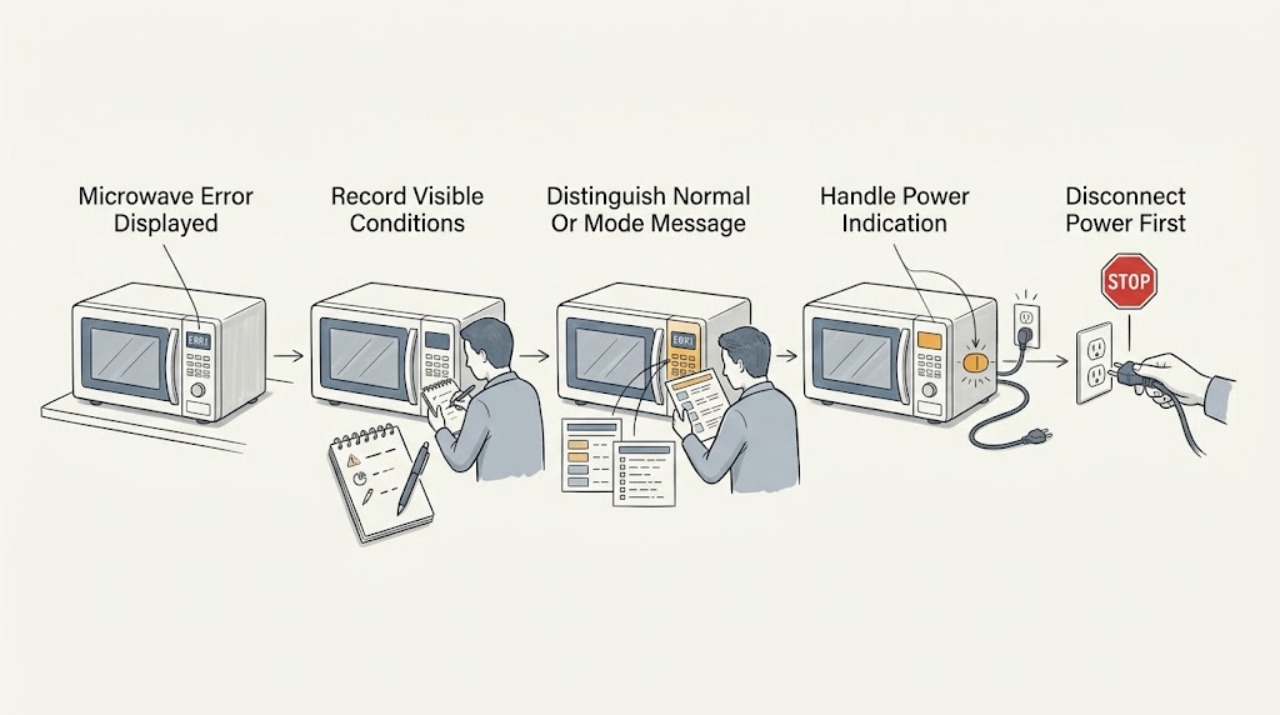
Work through in order
Diagnostic checks
Use only checks that match the exact appliance or system and its official guide.
-
Check 1
Photograph or transcribe the exact display, including letters, numbers, dashes, and whether it appears at startup, after a key press, during cooking, or after a power interruption. Record the microwave's full model from the visible rating label or owner manual without moving a built-in unit or opening any panel.
Expected result: The message is a repeatable code; PF/888/8888 appears after power was restored; a word such as ERR, LOC, or SENSOR ERROR appears; the characters are partial or fading; or the display is blank.
Next step: Continue only with the confirmed model family and its manual. If the model or message cannot be identified without unsafe access, stop and arrange service.
Stop if: Stop for smoke, sparks, arcing, burning or electrical odor, abnormal heat, a hot or damaged cord or outlet, water near electrical parts, or repeated breaker trips.
Why this matters
Why: Timing and exact characters separate a fault code from a power indication, lock or sensor message, or display hardware symptom. The model is required because GE says display features and code behavior vary by model.
-
Check 2
Compare the exact message with the model manual and check only user-accessible controls for Clear/Cancel, Control Lock, Demo or sensor-cooking status, and Display On/Off or Power Saver settings. Do not press random key combinations to guess at a reset.
Expected result: The manual identifies a normal mode or lock; a drawer shows ERR or SENSOR ERROR; LOC is present; the display is intentionally off; or no documented match exists.
Next step: Use the manual's single documented Clear/Cancel, unlock, or mode-exit procedure. If the message is not documented for the exact model, preserve the evidence and move to service rather than borrowing another model's code table.
Stop if: Do not defeat the lock or door interlock, remove controls, or continue if the panel is wet, cracked, hot, sparking, or electrically odorous.
Why this matters
Why: Some displayed messages call for a documented user action rather than a component repair. GE says a drawer can show ERR when sensor steam was not detected, LOC when controls are locked, and that some microwaves intentionally hide the clock through display or power-saving settings.
-
Check 3
If the message is PF, 888, or 8888 and there is no hazard, press the exact model's Clear, Clear/Off, or Cancel/Off control once, then reset the clock only as the manual directs. Note whether the message returns before any cooking attempt.
Expected result: The display returns to normal; the clock needs resetting; the power message immediately returns; or other functions are also dead.
Next step: For a one-time cleared message, monitor one normal operation. For a returning message, blank display, dead control, or tripped circuit, stop repeated resets and arrange service; only check the accessible breaker or grounded outlet as the manual permits.
Stop if: Do not repeatedly cycle a tripping breaker, open the fuse area, or operate with a hot cord, outlet, burning odor, smoke, sparks, or water near the appliance.
Why this matters
Why: GE says PF, 888, or 8888 can follow restored power or initial installation and may clear with Clear/Clear-Off. A returning message or wider loss of function suggests an unresolved power or control problem rather than a one-time notification.
-
Check 4
Only if the confirmed model is a microwave drawer or has the documented sensor message, check that the exterior control panel is dry, the door was not opened prematurely during sensor cooking, and the door closes normally. Use a soft dry cloth on the exterior with power disconnected if the manual permits; do not spray into seams.
Expected result: A wet or held key is present; the drawer's ERR follows an interrupted sensor cycle; the door does not close or latch; or the panel remains unresponsive when dry and closed.
Next step: Dry and clear only the documented user condition, then try one normal cycle after the message clears. Escalate an unresponsive panel, recurring code, damaged door, or failed latch to qualified service.
Stop if: Do not force the door, bypass interlocks, insert tools into the latch, or continue with arcing, smoke, odor, heat, or a damaged panel.
Why this matters
Why: GE links drawer F3 to a key held for more than 60 seconds, often liquid on the panel, and links ERR or SENSOR ERROR to sensor-cooking timing. A door that will not latch is a safety-interlock concern, not a reason to force the drawer.
-
Check 5
If the exact GE instructions call for a reset, disconnect the microwave using its plug or the accessible circuit breaker for the stated interval, with no active cooking and no hazard, then restore power once. Do not use a reset to conceal a persistent code or to test an unsafe unit.
Expected result: The code clears and functions return; the code returns immediately; the display is still blank or malformed; or the breaker trips again.
Next step: Document the result and arrange model-specific service for any returning code, abnormal display, or dead function. Keep the appliance disconnected for a repeat trip or any hazard symptom.
Stop if: Do not reset repeatedly, open the cabinet, replace internal electrical parts, or make a live measurement.
Why this matters
Why: GE says a 30-second power interruption can clear some microwave fault, error, or function codes, while a fading display may need a couple of minutes and service if it does not recover. A repeated code or repeat trip indicates service is needed.
-
Check 6
Prepare the exact model, code photograph, display timing, recent power event, control response, door/latch condition, and reset result for qualified microwave service. Keep the unit off if the code persists or any electrical, thermal, liquid, or mechanical hazard was observed.
Expected result: The message persists after the documented user check; the microwave will not start or heat; the display or touch panel is abnormal; the door does not latch; or smoke, odor, sparks, heat, liquid, or repeat breaker trips occurred.
Next step: Arrange qualified GE-compatible microwave service and provide the recorded evidence. Do not operate the appliance until it is assessed when a hazard, failed latch, repeat code, or repeat breaker trip is present.
Stop if: Stop immediately for smoke, burning or electrical odor, sparks, arcing, abnormal heat, water near electrical parts, a hot or damaged cord or outlet, a failed door latch, or repeated breaker trips.
Why this matters
Why: A persistent code can involve the control, touch panel, sensor, probe, or another internal circuit, and the visible code alone cannot identify a safe replacement part. GE directs users to trained service for microwave fault codes and warns against DIY high-voltage repair.
Use your observations
Decision map
Find the observation that best matches what you see, then follow the next safe action.
-
PATH 01Safety boundary
What you see
PF, 888, or 8888 appears immediately after installation, unplugging, or a known power interruption and the panel otherwise responds.
Do this next
Press the exact model's Clear/Clear-Off control once and reset the clock if directed. If it returns without another power event, arrange service.
Why this path and its safety boundary
Why it matters: This pattern is more consistent with GE's documented power-failure indication than with a component code; which one appears is model-dependent.
Safety stop: Do not keep resetting a unit that trips the breaker, smells hot, sparks, or has water near electrical parts.
-
PATH 02Safety boundary
What you see
The confirmed appliance is a GE microwave drawer and the display is ERR, SENSOR ERROR, LOC, FOOD, PF, or F3.
Do this next
Use the drawer model's documented Cancel/Off, unlock, dry-panel, or Cook Time step once. Escalate a recurring message, failed latch, or unresponsive panel.
Why this path and its safety boundary
Why it matters: The drawer-specific message table is more applicable than the general microwave table: sensor timing, control lock, reminder, power failure, and held-key conditions have different remedies.
Safety stop: Do not force the drawer, bypass its interlock, or continue with liquid ingress, arcing, smoke, odor, or heat.
-
PATH 03Safety boundary
What you see
A model manual confirms a fault such as a thermal, humidity, temperature-probe, touch-pad, touch-screen, or electronic-control code, and it returns after the permitted clear or reset.
Do this next
Stop user troubleshooting and arrange trained, model-specific service with the exact code and model. Keep the unit off if any heat, odor, arcing, or electrical symptom accompanies it.
Why this path and its safety boundary
Why it matters: A returning code makes an internal sensor, control, or panel fault more likely; the general GE list is not enough to select a part or distinguish every model revision.
Safety stop: Do not open the cabinet, replace a fuse, probe the high-voltage circuit, or defeat a door safety device.
-
PATH 04Safety boundary
What you see
The display is blank, fading, missing segments, or lit but the keys do not respond, and no exact fault code can be confirmed.
Do this next
Check the visible outlet/breaker and model-documented Display On/Off, Power Saver, Clear, or programming state. Use one safe reset if directed; arrange service if the display or panel remains abnormal.
Why this path and its safety boundary
Why it matters: GE distinguishes intentional clock/display settings from a fading or malformed display and recommends checking power, clock, programming, and model controls before service.
Safety stop: Do not operate through a damaged panel or investigate internal fuses and wiring.
-
PATH 05Safety boundary
What you see
The message persists, the door will not latch, the microwave will not start or heat, or smoke, burning odor, sparks, abnormal heat, water near electrical parts, or repeat breaker trips are present.
Do this next
Disconnect power when safe, do not operate the microwave, and arrange qualified service. Provide the exact model, code, timing, and observations.
Why this path and its safety boundary
Why it matters: The condition exceeds safe user-level diagnosis. A door interlock or internal high-voltage, control, sensor, or power fault may be involved, and the visible message cannot establish a safe repair.
Safety stop: Keep the unit disconnected and do not remove the cabinet or perform live tests.
Helpful context
Understand the symptom
An error display is a symptom, not a universal GE diagnosis
GE's common-code article is useful as an initial orientation, but it does not replace the manual for the exact microwave. Countertop, over-the-range, sensor, and drawer models can use different messages and controls. The drawer article demonstrates why appearance alone is unsafe: its F3 message is linked to a key held down for more than 60 seconds, while the general code list describes F3 as a touch-pad fault. Treat a code as model-conditioned until the model manual confirms its meaning.
Separate a normal message, a recoverable power indication, and a returning fault
A message that clears with the documented Cancel/Clear control after a power event is a different path from a code that returns immediately. PF, 888, and 8888 can follow restored power, while a drawer's ERR can result from opening the door before sensor steam is detected. A display that is blank, fading, or missing segments is a display/control symptom rather than proof that an error has cleared. Record what happened before choosing a reset or service path.
Keep the microwave cabinet closed
User-level checks are limited to the plug, breaker, visible controls, door closure, dry exterior panel, and the exact manual's reset or mode instructions. Do not remove the outer cover, defeat a door interlock, probe wiring, replace a fuse, access a magnetron or capacitor, or make a live voltage measurement. Stop immediately for smoke, sparks, arcing, burning or electrical odor, abnormal heat, a hot or damaged cord or outlet, water near electrical parts, or repeated breaker trips.
When checks do not resolve it
Need a professional?
Call qualified microwave service for any returning or undocumented code, persistent blank/fading display, unresponsive panel, failed door latch, no-start or no-heat condition after the documented user checks, or suspected internal control, sensor, or high-voltage fault. Stop immediately and keep the unit disconnected for smoke, odor, sparks, abnormal heat, water near electrical parts, damaged power parts, or repeat breaker trips.
Safety scope: Do not remove the microwave cabinet, access the capacitor, magnetron, fuse, wiring, or control, defeat the door interlock, disconnect internal parts, or perform live electrical tests. Stop using and disconnect power when safe for smoke, burning or electrical odor, sparks or arcing, abnormal heat, water near electrical parts, a hot or damaged cord or outlet, failed door closure, or repeated breaker trips.
Have this ready
- Exact model, exact displayed characters and a photo, when the message appears, any recent power interruption, whether the panel and door respond normally, the one documented reset attempted, and any smoke, odor, spark, heat, liquid, or breaker symptoms.
Common questions
FAQ
What does an error code on a GE microwave mean?
It depends on the exact model and display. GE's general list gives common meanings for F1 through F6, F10, Probe, 18, and power indications, but a drawer can use F3 for a held key. Record the exact code and confirm it in the model manual before ordering a part or repeating a reset.
How do I clear PF, 888, or 8888 on a GE microwave?
GE says these can appear after a power interruption or initial installation. With no hazard, press the model's Clear, Clear/Off, or Cancel/Off control once, then reset the clock if directed. If the indication returns or the breaker trips, stop resetting and arrange service.
Can I open a GE microwave to diagnose the error?
No. GE warns that an internal high-voltage capacitor can retain a dangerous charge even after unplugging and says specialized equipment may be needed. Limit checks to visible controls, the accessible power supply, the exterior panel, and the model's documented user reset; leave internal diagnosis to qualified service.
Read the exact guide
Official sources
- Microwave Drawer - Messages and Error Codes on the DisplayGE Appliances · GE microwave drawers only; do not generalize drawer messages to other microwave families
- Microwave - Power Failure (PF) CodeGE Appliances · GE microwaves where the applicable model displays these power indications
- Microwave - Touch Control Panel Not Operating CorrectlyGE Appliances · GE microwave control panels; exact model programming and reset behavior varies
- Microwave - Runs But Does Not HeatGE Appliances · GE microwave ovens; internal repair is not a user-level procedure
- Microwave - Error, Fault or Function CodesGE Appliances · General GE microwave guidance; exact model and control family remain authoritative
- Microwave - Will Not StartGE Appliances · GE microwave ovens with a door safety-interlock system; exact model controls vary
- Microwave - Display Goes Blank, Turns OffGE Appliances · Primarily over-the-range GE microwaves; display options vary by model
Community feedback
Share a repair observation
Share a plain-text repair observation. Accepted observations are published automatically; this page may take a moment to update.