
On this page
Start here
Quick answer
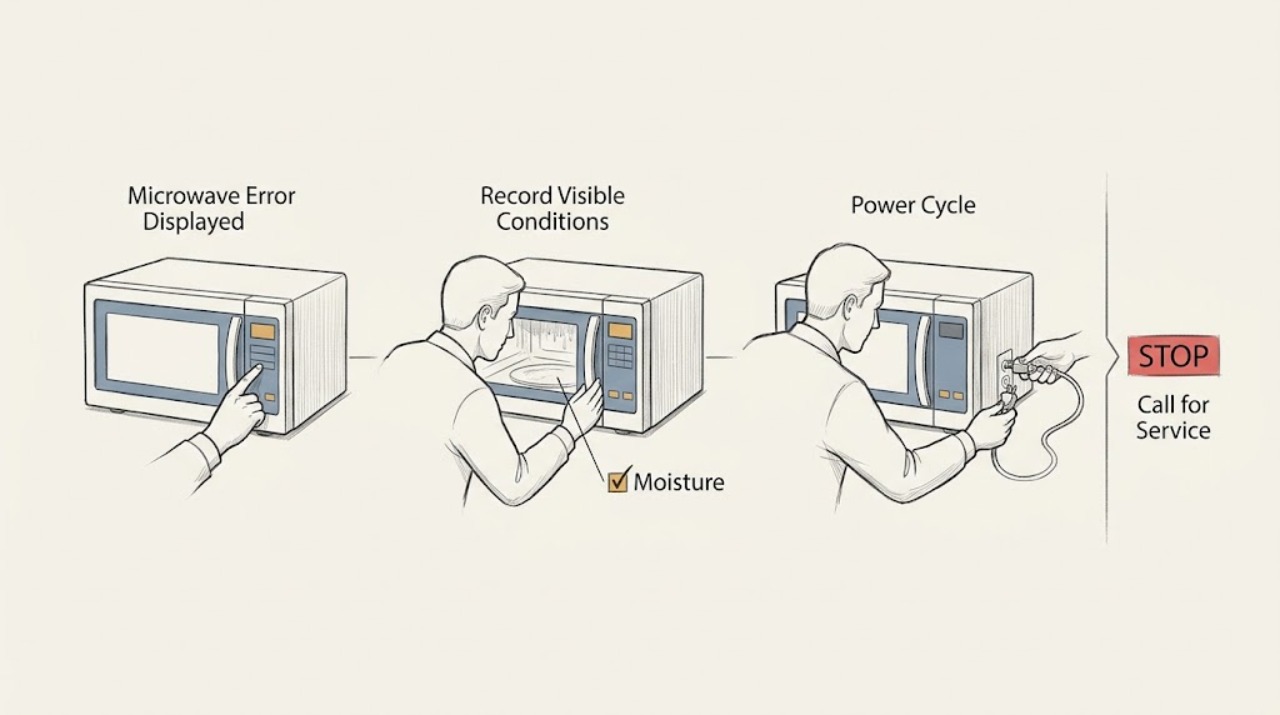
Write down the exact code, then switch the Samsung microwave off at its plug or circuit breaker for 60 seconds. If recent steam or a spill reached the controls, let the area dry before restoring power. A code that returns, or a door, sensor, temperature, or communication code that persists, needs Samsung service; do not remove the cabinet or test high-voltage parts.
Before you begin
Safety first
- External observation and one documented power cycle are the limit for the user; internal electrical diagnosis requires a qualified technician.
Work through in order
Diagnostic checks
Use only checks that match the exact appliance or system and its official guide.
-
Check 1
Photograph or write down every character on the display, including a leading letter, dash, or lowercase-looking character, and note whether the microwave still accepts Stop/Clear.
Expected result: The code is clear and repeatable, intermittent, or the display changes after a button press.
Next step: Use the exact model manual or Samsung's code list to identify the family, but do not infer a component replacement from the code alone.
Why this matters
Why: The exact code and behavior determine whether the issue is associated with a door/key, sensor, temperature, steam, or communication condition; a changing display may be a control-panel symptom instead.
-
Check 2
With no cooking cycle running, switch the microwave off at the plug or circuit breaker for 60 seconds, then restore power once.
Expected result: The code clears and does not return, or it reappears immediately or after the next use.
Next step: Record when the code returned and arrange service if it comes back. Do not keep cycling power to bypass a persistent warning.
Why this matters
Why: A one-time control-state fault may have cleared; a returning code is the condition Samsung directs to service rather than repeated resets.
-
Check 3
Check the outside of the control area, door, and nearby underside for recent steam, condensation, or a spill without spraying cleaner into vents or controls.
Expected result: There is visible moisture or the code appeared after steam or a spill, or the surfaces are dry.
Next step: Let accessible surfaces dry completely before one reset. If moisture entered the appliance or the code remains, stop using it and request service.
Why this matters
Why: Samsung notes that moisture around the electronics can trigger errors; dry surfaces with a returning code make a persistent fault more likely.
-
Check 4
If the display indicates a door/key family or the panel does not respond normally, wipe the door latch area and control panel with a lightly damp cloth, dry them, and test a normal command once.
Expected result: The panel responds normally and the code stays away, or a key remains stuck/unresponsive or the code returns.
Next step: Stop using the microwave and arrange service for a damaged latch, self-activating panel, or returning door/key code.
Why this matters
Why: Accessible residue or moisture can affect the door or touch interface; persistent behavior points beyond an external clean.
Use your observations
Decision map
Find the observation that best matches what you see, then follow the next safe action.
-
PATH 01Next step
What you see
The exact code disappears after one 60-second power cycle and does not return during a normal, supervised use.
Do this next
Keep the code and model number for reference and stop using the unit if any warning returns.
Why this path and its safety boundary
Why it matters: A transient control state is more likely than a confirmed component fault.
-
PATH 02Next step
What you see
The code returns immediately or after the same operation even though the external surfaces are dry.
Do this next
Request Samsung service with the model, exact code, and when it returns; do not open the cabinet.
Why this path and its safety boundary
Why it matters: Samsung treats a returning code as a service condition; the exact code family helps the technician but does not authorize internal repair.
-
PATH 03Next step
What you see
A key activates by itself, the panel needs excessive force, the latch is damaged, or the microwave starts without a command.
Do this next
Disconnect power when safe, do not use the microwave, and request service.
Why this path and its safety boundary
Why it matters: The control or door interlock behavior is unsafe to troubleshoot internally.
Helpful context
Understand the symptom
The code is the useful symptom
Samsung uses different code families for door or key, temperature, steam, sensor, communication, and other conditions. The same display can mean different next steps on different models, so preserve the exact characters and model number before resetting.
When checks do not resolve it
Need a professional?
Provide the exact model, the photographed code, what operation preceded it, and whether a single 60-second reset changed the display.
Safety scope: External observation and one documented power cycle are the limit for the user; internal electrical diagnosis requires a qualified technician.
Common questions
FAQ
Should I keep resetting a Samsung microwave error?
No. Samsung recommends one 60-second power cycle; if the code returns, preserve the exact code and request service.
Can steam cause a Samsung microwave error display?
Samsung says moisture around the electronics can cause errors. Let accessible surfaces dry, try one documented reset, and request service if the code returns or moisture entered the appliance.
Read the exact guide
Official sources
- How to clean a Samsung microwaveSamsung · Samsung microwave cleaning guidance
- Samsung microwave turns on by itselfSamsung · Samsung microwave door and automatic-operation symptoms
- Samsung microwave control panel does not respondSamsung · Samsung microwave control panels; exact model instructions govern controls
- What does the error code on my Samsung microwave mean?Samsung · Samsung microwave support guidance; exact model instructions govern code interpretation
Community feedback
Share a repair observation
Share a plain-text repair observation. Accepted observations are published automatically; this page may take a moment to update.