
On this page
Start here
Quick answer
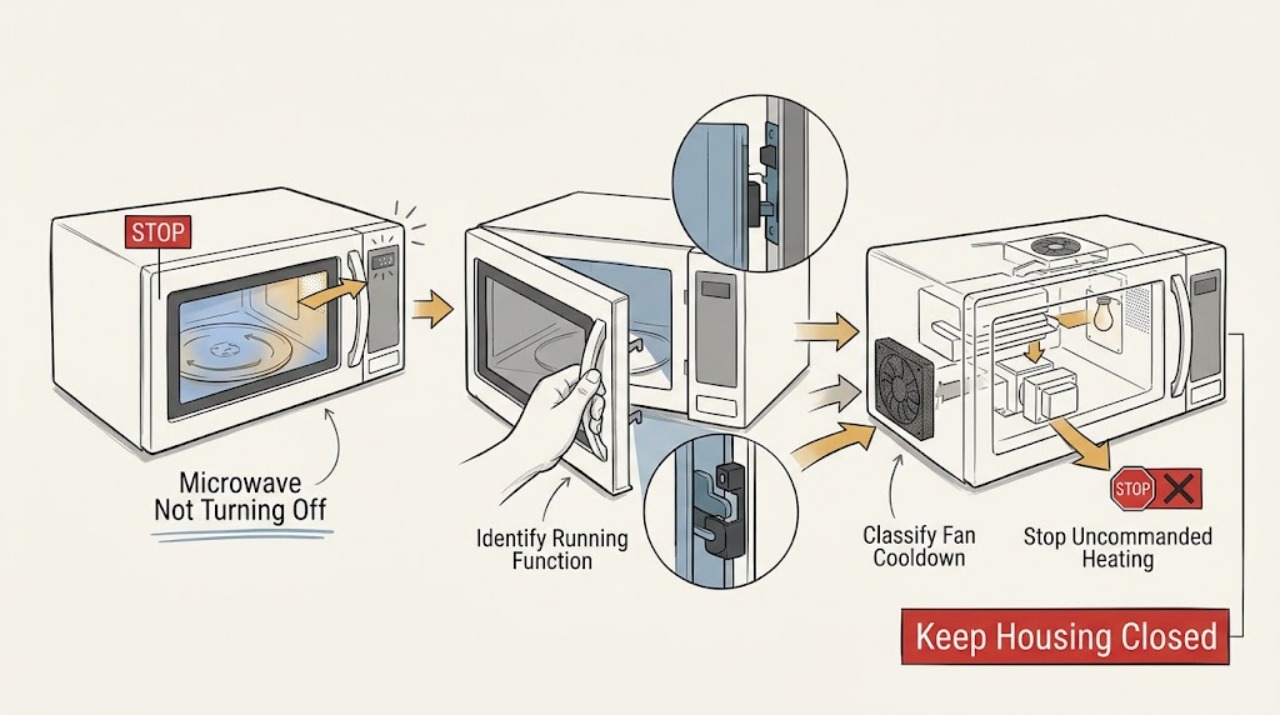
First identify what is still running. If the cavity is heating, the turntable is rotating, or the microwave starts or continues a cooking cycle without an intentional command, treat it as unsafe: stop the cycle if the controls respond, disconnect power from a dry, safe position, and arrange qualified GE microwave service. Do not open the cabinet; GE warns that its internal high-voltage capacitor can retain a dangerous charge even after unplugging. If only a vent or cooling fan remains after cooking, that may be normal: GE says an over-the-range fan can turn on automatically when heat reaches the microwave and will stop as the unit cools; another GE support page says a fan operating by itself may run for up to two hours. A fan and light with no heating can instead reflect a model-specific door-closure or vent-cover/filter issue, while a timer or unresponsive control can make the appliance appear not to stop. Use the exact Owner's Manual for Clear/Off or Cancel/Off, check only accessible door and filter/vent-cover conditions with power disconnected and the appliance cool, and stop if heating, smoke, sparks, burning odor, abnormal heat, door damage, or repeated operation remains.
Before you begin
Safety first
- This article covers observation and ordinary-access checks only. Do not open the cabinet, access high-voltage parts, bypass a door interlock, run live tests, or operate a heating or damaged microwave.
Work through in order
Diagnostic checks
Use only checks that match the exact appliance or system and its official guide.
-
Check 1
From outside the GE microwave, record the complete model and installation type, then observe exactly what remains on: turntable, cavity heating, interior light, surface light, vent fan, internal fan, display countdown, or an unexpected restart. Do not put hands inside while it is operating.
Expected result: Record actual heating or a rotating turntable, only a fan, fan plus light, a normal display with no motion, a timer display, or smoke, sparks, burning odor, abnormal heat, or door damage.
Next step: If heating, turntable motion, unexpected restarting, or a hazard is present, use the immediate-stop action and arrange service. Otherwise continue with the matching fan, light, or control branch.
Stop if: Stop immediately for smoke, sparks, burning odor, abnormal heat, a damaged door or seal, exposed parts, water near the appliance, or a repeatedly tripping breaker.
Why this matters
Why: Heating or turntable motion is materially different from a cooling fan or light delay. Hazard signs or door damage make this a stop-use problem rather than a settings problem.
-
Check 2
If the microwave is heating, the turntable is rotating, or it starts on its own, press the model's Clear/Off or Cancel/Off control once only if it responds normally. If operation continues or the control is not trustworthy, disconnect the plug or switch off the known circuit breaker from a dry, safe position.
Expected result: The cycle stops normally, only a fan remains, the controls do not stop heating, or power cannot be safely disconnected at the appliance.
Next step: Leave power disconnected when heating or turntable motion does not stop, and arrange qualified GE microwave service. If only a fan remains, use the cooling-fan branch.
Stop if: Do not repeatedly press controls, open the cabinet, defeat a door switch, reach into the cavity while running, or reconnect power to see whether an uncommanded heating symptom returns.
Why this matters
Why: A normal fan delay can remain after cooking, but GE treats a microwave that is heating while running on its own as a service condition and directs the owner to unplug it.
-
Check 3
If no heating or turntable motion is present, determine whether the sound is an over-the-range vent fan responding to cooktop or microwave heat, or an internal electronics fan that continues briefly after a cycle. Let the appliance cool without blocking its vents and note whether the fan stops.
Expected result: Only the fan remains after cooking, the fan started while the cooktop or microwave area was hot, the fan stops as the unit cools, or it runs continuously with no heat source or cooling trend.
Next step: For an over-the-range model, allow the documented cool-down and keep vents clear. If the fan does not stop after cooling, runs continuously at room temperature, or is accompanied by a light or other unexpected function, continue to the model-specific inspection and service branch.
Stop if: Do not cover vents, force the fan switch, remove the fan assembly, or continue using the microwave if the case becomes abnormally hot or smells burned.
Why this matters
Why: GE describes automatic fan operation as normal when heat is present; its support guidance says a fan operating by itself may run up to two hours, while an internal fan may continue for a few seconds after completion.
-
Check 4
Only after disconnecting power and allowing the appliance to cool, inspect from outside whether the door closes flush and whether an over-the-range charcoal filter or vent cover was recently replaced and is visibly seated as the exact model manual shows. Do not test or adjust the latch.
Expected result: The door is obstructed or misaligned, the vent cover has a gap or sits askew after filter service, the filter is not seated, or the closure and filter/cover look correct.
Next step: Correct only a clearly mis-seated accessible filter or vent cover according to the exact manual, then restore power once and observe without starting a cooking cycle. If the door remains abnormal or the fan/light returns, arrange service.
Stop if: Do not bend the door, alter the latch or interlock, remove inner door panels, operate with a damaged seal, or work on the filter or cover while power is connected.
Why this matters
Why: GE says an improperly seated charcoal filter can make the vent cover sit askew and slightly obstruct door closure, which can cause the fan and light to come on by themselves. This applies only to models with that filter and vent arrangement.
-
Check 5
Compare the display and controls with the exact Owner's Manual. Confirm that Timer rather than a cooking program is not active, then use the model's Clear/Off, Cancel/Off, or Timer On/Off procedure once; if the panel is unresponsive and no heating is occurring, perform only the manual-approved 30-second power reset.
Expected result: A timer clears, the display returns to standby, a delayed or incomplete program remains, the panel still ignores commands, or the microwave resumes a fan, light, turntable, or heating function unexpectedly.
Next step: If the panel behaves normally and only the timer was active, use the appliance normally. If the panel remains abnormal or any heating/turntable operation returns without command, disconnect power and arrange service.
Stop if: Do not guess hidden key sequences, enter service diagnostics, bypass control locks or interlocks, or reset power repeatedly while the microwave is heating or restarting.
Why this matters
Why: GE says timer-clearing and Cancel/Off behavior varies by model, and an incomplete programming sequence can make the panel appear nonresponsive. A return to uncommanded operation after a reset is not a user-level control adjustment.
-
Check 6
After the safe external checks, document whether the symptom is fan-only, fan plus light, control/display, turntable, or actual heating, and whether it returns after cooling or a single model-approved control reset.
Expected result: The fan stops after cooling, the light and fan recur, the microwave heats or rotates without a command, the door or controls are abnormal, or the symptom is accompanied by smoke, sparks, odor, heat, leak, or breaker trips.
Next step: Keep power disconnected for uncommanded heating or any hazard and arrange qualified GE microwave service. Provide the model, installation type, exact function that remained on, display state, cooling time, and any recent filter or door work.
Stop if: Do not open the cabinet, measure live voltage, discharge a capacitor, remove a magnetron or relay, bypass a door switch, or continue operating a smoking, sparking, overheating, or damaged microwave.
Why this matters
Why: A persistent symptom can involve a door interlock, relay, control, fan thermostat, light circuit, heating system, or wiring. GE's high-voltage warning means internal diagnosis is not safe to perform as an owner.
Use your observations
Decision map
Find the observation that best matches what you see, then follow the next safe action.
-
PATH 01Safety boundary
What you see
The cavity heats, water becomes warm in a permitted short observation, the turntable rotates, or the microwave starts a cooking cycle without an intentional command.
Do this next
Disconnect power from a dry, safe position and arrange qualified GE microwave service; give the technician the model and whether the door was closed or a cycle had ended.
Why this path and its safety boundary
Why it matters: This is not explained by a normal fan cool-down. GE identifies heating while the appliance runs on its own as a service condition and directs the owner to unplug it.
Safety stop: Do not reconnect power, open the cabinet, bypass the door interlock, or continue a heating test.
-
PATH 02Safety boundary
What you see
Only a vent or electronics fan remains, there is no heating or turntable motion, the unit or cooktop was recently hot, and the fan fades or stops as it cools.
Do this next
Keep vents clear and allow the appliance to cool. If the fan stops and no other symptom remains, no repair is indicated for that delay.
Why this path and its safety boundary
Why it matters: GE describes this as normal automatic or internal cooling behavior. The exact duration depends on model and heat load; an over-the-range fan may remain on until its thermostat sees a lower temperature.
Safety stop: Stop if the fan is accompanied by heating, smoke, burning odor, abnormal case temperature, or repeated restarting.
-
PATH 03Safety boundary
What you see
An over-the-range GE microwave has fan and light activity without heating, especially after charcoal-filter or vent-cover work, while the door may not close flush.
Do this next
With power disconnected and the unit cool, inspect and reseat only the accessible filter and vent cover as the exact manual shows. If the door, fan, or light remains abnormal, arrange service.
Why this path and its safety boundary
Why it matters: GE says an improperly seated charcoal filter can leave the vent cover askew and slightly obstruct closure, producing fan and light operation by themselves on applicable models.
Safety stop: Do not adjust the latch, hold a door switch, remove inner panels, or operate with damaged door hardware.
-
PATH 04Safety boundary
What you see
The display shows a timer or incomplete sequence, the panel is unresponsive, and there is no evidence of heating or turntable motion.
Do this next
Follow the exact manual to clear the timer or sequence; if the panel remains unresponsive, use one manual-approved power reset and then arrange service if the condition persists.
Why this path and its safety boundary
Why it matters: A timer does not cook, and GE says model-specific Clear/Off or Cancel/Off behavior and a programming sequence can affect apparent control response.
Safety stop: Do not use a control reset to keep operating a microwave that heats or rotates without a command.
-
PATH 05Safety boundary
What you see
The symptom returns after cooling or a safe user-control correction, or any heating, sparks, smoke, odor, abnormal heat, door damage, leak, or repeated breaker trip is present.
Do this next
Leave the appliance disconnected and arrange qualified appliance service; use qualified electrical service for outlet, cord, wiring, or repeated-breaker problems.
Why this path and its safety boundary
Why it matters: An internal control, relay, door-interlock, fan thermostat, heating assembly, or wiring fault may be involved. GE's microwave high-voltage safety boundary rules out owner disassembly.
Safety stop: Do not open the cabinet, perform live testing, discharge components, bypass protection, or resume use before qualified diagnosis.
Helpful context
Understand the symptom
Determine whether microwave energy is still on
A fan sound after a cycle is not the same symptom as continued microwave heating. Note whether the turntable rotates, the cavity or food gets hotter, the interior light is on, the display counts down, or only a vent fan is audible. GE's over-the-range guidance uses a short water or ice observation to distinguish heating from fan-only operation, but do not perform that check if there is smoke, arcing, burning odor, abnormal heat, door damage, or any other safety concern.
Fan and light behavior depends on the installation
Over-the-range GE microwaves can use a thermostat-controlled vent fan to remove cooktop heat and protect the electronics. GE says that fan may not turn off manually until the microwave cools. An internal electronics fan can also continue for a few seconds after a cycle or after the door is opened. A fan that persists for a normal cool-down is different from a turntable or heating mechanism that continues without a command.
Check only accessible controls, closure, and filter conditions
A Timer function is not a cooking cycle, and GE says Clear/Off or Cancel/Off behavior varies by model. On some over-the-range models, an improperly seated charcoal filter can leave the vent cover askew and slightly obstruct the door, which can make the fan and light come on by themselves. With the microwave disconnected, cool, and safe to handle, use only the exact manual's accessible filter and vent-cover procedure. Do not adjust a latch or interlock and do not work inside the cabinet.
A continuing heat symptom is a service boundary
If a microwave heats, turns the turntable, or restarts after a normal Clear/Off command, disconnect power and arrange qualified service. GE specifically warns against do-it-yourself microwave repair because the high-voltage capacitor can remain charged after unplugging. A technician must determine whether the cause is a door-interlock, relay, control, heating assembly, or another model-specific fault.
Safety boundary
Stop conditions
- Disconnect power and stop using the microwave if it heats, rotates, or starts without an intentional command, or if it does not stop after a normal Clear/Off or Cancel/Off command.
- Do not open the microwave cabinet or attempt to discharge, measure, replace, or bypass its high-voltage components or door interlocks.
- Do not operate with smoke, sparks, burning odor, abnormal heat, a damaged door or seal, exposed wiring, water near electrical parts, or repeated breaker trips.
- Do not force a door, latch, filter, vent cover, fan switch, or control, and do not restore power repeatedly to reproduce an unsafe symptom.
- Do not order a relay, control, fan motor, thermostat, interlock, lamp, magnetron, capacitor, or other part without the exact model and qualified diagnosis.
When checks do not resolve it
Need a professional?
Arrange qualified GE microwave service when the microwave heats, rotates, starts, or restarts without a command; when fan and light remain abnormal after the exact model's accessible filter, vent-cover, control, and cool-down checks; when the panel will not respond; or when any internal component, door interlock, relay, high-voltage system, or wiring would need access. Stop immediately for smoke, sparks, burning odor, abnormal heat, door damage, water near electricity, or repeated breaker trips.
Safety scope: This article covers observation and ordinary-access checks only. Do not open the cabinet, access high-voltage parts, bypass a door interlock, run live tests, or operate a heating or damaged microwave.
Read the exact guide
Official sources
- Microwave - Clearing the TimerGE Appliances · GE Appliances timer guidance; button names and whether one press, two presses, or a hold clears the timer vary by model.
- Microwave - Starting On Its OwnGE Appliances · GE Appliances explicitly frames this article for over-the-range microwaves; the exact door, vent cover, charcoal filter, and control arrangement is model-dependent.
- Microwave - Touch Control Panel Not Operating CorrectlyGE Appliances · GE Appliances general microwave touch-panel guidance; control locks, sequences, and reset behavior vary by model.
- Microwave - Runs But Does Not HeatGE Appliances · GE Appliances general microwave guidance; internal component and door-interlock layouts vary by model.
- Microwave - Normal Operational CharacteristicsGE Appliances · GE Appliances general microwave guidance; specific sounds, fans, lights, and door behavior vary by model and installation.
- Over-the-Range Microwave - Automatic Fan FeatureGE Appliances · GE Appliances over-the-range microwave guidance; exact thermostat behavior and installation details remain model-dependent.
- Microwave - Automatic Fan FeatureGE Appliances · GE Appliances over-the-range microwave automatic-fan guidance; the fan thermostat and controls are model-specific.
Community feedback
Share a repair observation
Share a plain-text repair observation. Accepted observations are published automatically; this page may take a moment to update.