
On this page
Start here
Quick answer
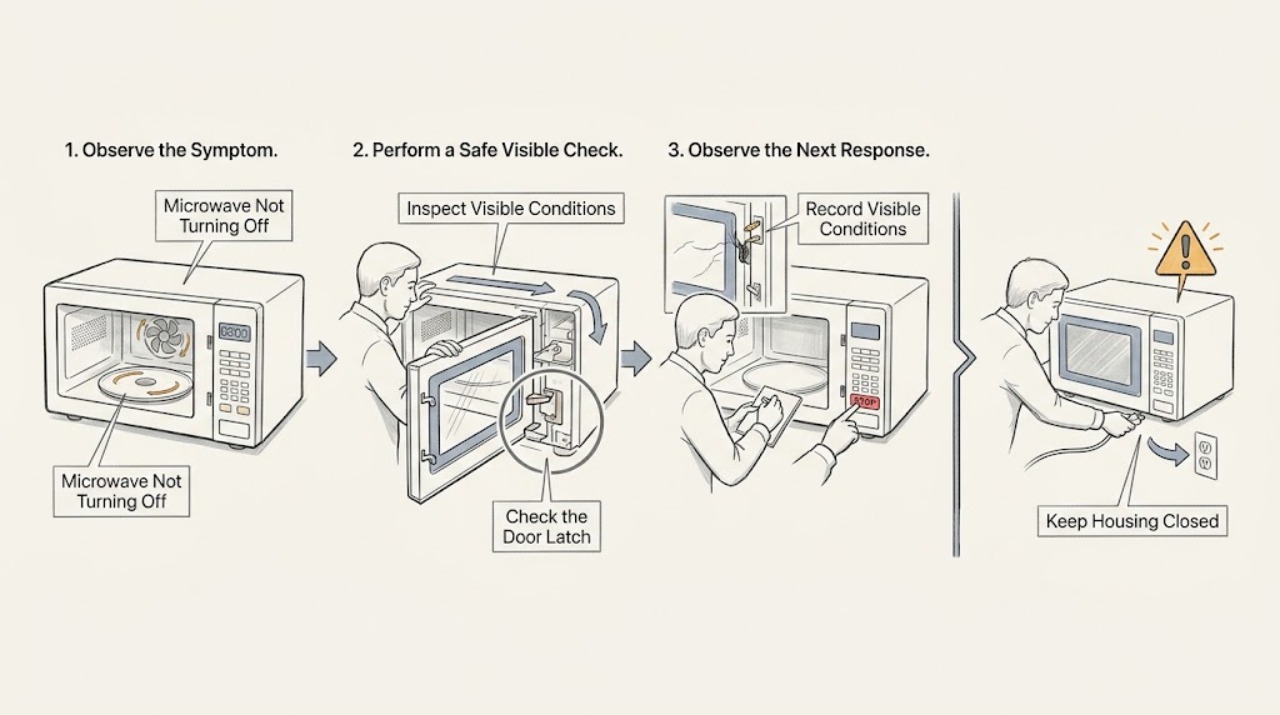
If a Panasonic microwave continues heating, sparking, or producing microwave-related activity after Stop/Reset, stop using it and disconnect power only if you can do so safely. A fan or light may have a model-specific after-run behavior, but operation with the door open is not normal. Check the door and controls externally; do not open the cabinet.
Before you begin
Safety first
- Do not open the cabinet, defeat door interlocks, or test microwave energy yourself.
Work through in order
Diagnostic checks
Use only checks that match the exact appliance or system and its official guide.
-
Check 1
Press Stop/Reset once and observe from outside whether heating, the turntable, and the fan stop. Do not open the door repeatedly as a test.
Expected result: Only the display or a cooling fan remains, or cooking/turntable activity continues.
Next step: Stop use and disconnect power safely for continued operation; arrange authorized service.
Why this matters
Why: A display or model-specific fan may remain after a cycle; continued cooking or turntable movement indicates a control or interlock concern.
-
Check 2
With power isolated only when safe, inspect the visible door edge, latch area, and control buttons for food debris, damage, or a stuck key. Do not remove the outer cover.
Expected result: The latch or key is damaged/stuck, the door is misaligned, or the exterior appears normal.
Next step: Do not lubricate or adjust hidden switches; provide the observations to an authorized Panasonic center.
Why this matters
Why: Door-interlock and control inputs determine whether operation is permitted; visible damage needs service even if the symptom temporarily stops.
-
Check 3
Note whether the symptom occurs only in Demo mode or after a power interruption, and record any display code without repeatedly restarting the oven.
Expected result: A Demo indication or error appears, or the unit runs uncontrollably without one.
Next step: Use the exact operating manual for Demo mode; service the unit if unsafe operation remains.
Why this matters
Why: Demo mode can change apparent operation, while an error or uncontrolled run requires model-specific service diagnosis.
-
Check 4
Check whether the microwave was empty, contained metal, or sparked before the symptom, and remove food or cookware only after the appliance is safe and powered off.
Expected result: Sparking, smoke, burning odor, or abnormal heat is present, or no warning occurred.
Next step: Leave the unit out of service and request authorized inspection.
Why this matters
Why: An empty cavity or arcing material can create abnormal heat and component damage; any smoke or odor overrides further testing.
Use your observations
Decision map
Find the observation that best matches what you see, then follow the next safe action.
-
PATH 01Next step
What you see
Only a fan or display remains after Stop/Reset and the cavity is not heating
Do this next
Consult the Panasonic manual and monitor; service any recurrence with heating or door-open operation.
Why this path and its safety boundary
Why it matters: This may be an after-run or display state, but exact behavior is model-specific.
-
PATH 02Next step
What you see
Heating, turntable, or fan continues with the door open
Do this next
Stop use, disconnect power only when safe, and arrange authorized service.
Why this path and its safety boundary
Why it matters: The door-interlock/control safety path is not behaving as expected.
-
PATH 03Next step
What you see
The oven sparked or smells burned before it would not stop
Do this next
Do not resume operation; have the unit inspected.
Why this path and its safety boundary
Why it matters: Arcing or internal damage may be involved.
Helpful context
Understand the symptom
Treat uncontrolled operation as a safety boundary
The important distinction is between a normal cooling fan or a display that remains lit and a unit that continues cooking or runs with the door open. Do not test that distinction by placing hands or food inside.
When checks do not resolve it
Need a professional?
Call authorized Panasonic service for continued heating or turntable operation, any operation with the door open, repeated uncontrolled runs, smoke, burning odor, or a damaged latch.
Safety scope: Do not open the cabinet, defeat door interlocks, or test microwave energy yourself.
Have this ready
- Provide model number, what continued after Stop/Reset, door-open behavior, display code, and any spark/odor history.
Common questions
FAQ
Is a microwave fan running after cooking always a failure?
Not necessarily; model-specific fan behavior can continue briefly. It is a service symptom if heating or turntable movement continues, or if the fan runs abnormally with the door open.
Can I repair a microwave door interlock myself?
No. Keep the cabinet closed and arrange authorized service for a latch or interlock concern.
Read the exact guide
Official sources
- Panasonic - Troubleshooting - Physical problem with your Microwave Door, Cavity, Cabinet, Tray (Turntable) or other physical pieces.Panasonic · Panasonic microwave ovens; procedures vary by model
- Panasonic - Troubleshooting - Microwave power, fan or motor problems.Panasonic · Panasonic microwave ovens; exact controls vary by model
- Panasonic - Troubleshooting Questions for Safe Usage and Operation of Microwave OvensPanasonic · Panasonic microwave ovens
Community feedback
Share a repair observation
Share a plain-text repair observation. Accepted observations are published automatically; this page may take a moment to update.