
On this page
Start here
Quick answer
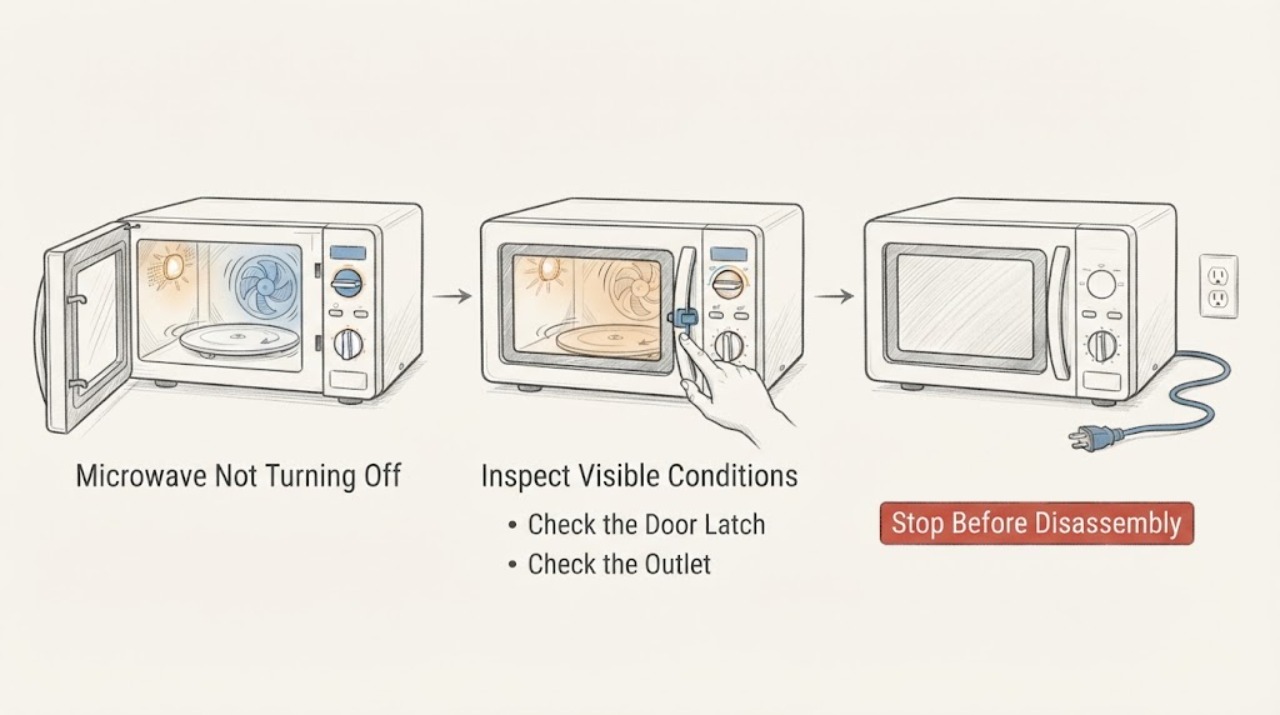
If a Whirlpool microwave keeps running or will not turn off, press Stop/Cancel once and open the door only if it opens normally; if the fan or light continues but microwave energy stops, identify that normal cooling behavior separately from a continuing cook cycle. Whirlpool warns that if a breaker or fuse trips again after reset, do not continue operating the microwave—disconnect its power or turn off its breaker and arrange service. Never defeat the door interlock or open the cabinet.
Work through in order
Diagnostic checks
Use only checks that match the exact appliance or system and its official guide.
-
Check 1
Press Stop/Cancel once from outside and observe whether heating stops while the fan or light continues. Do not reach inside or hold the door switch.
Expected result: The fan/light remains but heating stops, the cooking cycle continues, or Stop has no response.
Next step: If heating stops, follow the model manual for normal fan run-on. If heating continues or Stop fails, disconnect power when safe and arrange service.
Why this matters
Why: Fan or light after a cycle can be normal cooling behavior. Continued heating or an unresponsive Stop command is a control/door-interlock safety issue.
-
Check 2
Open the door normally and confirm the latch is unobstructed; do not force, tape, or bypass the interlock.
Expected result: The door opens and heating stops, the door is stuck/damaged, or heating continues with the door open.
Next step: Stop use, isolate power only if safe, and call qualified Whirlpool service. Do not test again.
Why this matters
Why: Opening the door should remove the microwave operation command. A damaged latch or continued operation with an open door is an immediate professional boundary.
-
Check 3
Check the accessible power cord, outlet, breaker/fuse status, and whether the unit is countertop, over-the-range, or drawer style. Do not open direct wiring.
Expected result: The breaker/fuse has tripped, the cord/outlet is damaged, or supply is stable while the symptom recurs.
Next step: Do not repeatedly reset protection. Disconnect or turn off the appliance circuit when safe and arrange service/electrical help.
Why this matters
Why: A supply interruption can stop an active cycle but does not explain a microwave that ignores Stop after power returns. Damaged electrical connections add a hazard.
-
Check 4
Record whether the symptom began after a power event, whether the display shows Door or an error, and whether the fan stops after the model's expected cooling period.
Expected result: The fan stops normally, an error repeats, heating continues, or the display/controls are abnormal.
Next step: Use only the matching manual for a documented control reset. Arrange service for recurring abnormal behavior.
Why this matters
Why: Timing and display behavior separate normal fan run-on from a control or interlock fault, but do not identify a replacement component.
-
Check 5
Read the model and serial information and provide the behavior to Whirlpool service.
Expected result: The model manual matches; the model is unknown; or the oven continues heating/ignores Stop.
Next step: Keep the microwave disconnected or its breaker off when safe until qualified service inspects it.
Why this matters
Why: Model-specific control and safety systems differ. Persistent operation is not a user-replaceable-part diagnosis.
Use your observations
Decision map
Find the observation that best matches what you see, then follow the next safe action.
-
PATH 01Next step
What you see
Only the fan or light remains after Stop and heating has ended normally.
Do this next
Wait for the model-documented run-on period and use the manual; seek service if heating resumes or the fan never stops.
Why this path and its safety boundary
Why it matters: This may be normal cooling/run-on behavior rather than continued microwave energy.
-
PATH 02Next step
What you see
Microwave heating continues after Stop or when the door is open, or the latch is damaged.
Do this next
Stop use, isolate power only if safe, and do not operate or bypass the door system.
Why this path and its safety boundary
Why it matters: The control or interlock is unsafe and requires immediate service.
-
PATH 03Next step
What you see
A breaker/fuse trips again after reset or the cord/outlet is hot or damaged.
Do this next
Disconnect power or turn off the appliance breaker when safe and arrange qualified appliance/electrical service.
Why this path and its safety boundary
Why it matters: Whirlpool treats this as a no-operate electrical boundary.
-
PATH 04Next step
What you see
The display shows Door/error or controls fail while the fan/heat symptom recurs.
Do this next
Record the code and model, then arrange Whirlpool service without opening the cabinet.
Why this path and its safety boundary
Why it matters: A model-specific control or door-sensing fault is more likely than normal fan behavior.
Helpful context
Understand the symptom
A microwave can sound as if it is still running because its cooling fan or light remains on after heating ends. The safety decision is whether microwave heating continues with the door open/closed and whether Stop responds, not whether every sound stops immediately.
Use the exact model manual for controls. Do not hold or tape the door switch, remove the cabinet, or test high-voltage components; a microwave that continues heating after Stop or with abnormal door behavior needs professional service.
When checks do not resolve it
Need a professional?
Arrange Whirlpool microwave service when heating continues after Stop, the door interlock or latch is abnormal, the fan/run-on behavior never resolves, or an error recurs. Provide model, installation style, Stop response, door result, display code, and breaker behavior. Do not replace a switch, relay, or control board yourself.
Common questions
FAQ
Is a Whirlpool microwave still running if the fan stays on after cooking?
Not necessarily. The fan or light may continue during cooling. Confirm that microwave heating stops and consult the model manual for normal run-on.
What if my Whirlpool microwave ignores Stop?
Open the door normally if safe. If heating continues, isolate power when safe and arrange service; do not hold, tape, or bypass the door switch.
Can I reset the Whirlpool microwave if it will not turn off?
Use only the exact model instructions. If a breaker or fuse trips again after reset, Whirlpool says not to continue operating the microwave.
Read the exact guide
Official sources
- TROUBLESHOOTINGWhirlpool · Whirlpool microwave owner-manual troubleshooting and model-specific operating guidance.
- Microwave is Not Starting or Operating - Countertop MicrowaveWhirlpool Product Help · Whirlpool microwave door, control, timer, Stop/Unlock, power-source, and service guidance.
- Not Powering On - Over-the-Range MicrowaveWhirlpool Product Help · Whirlpool microwave breaker-reset and stop-operating safety guidance.
Community feedback
Share a repair observation
Share a plain-text repair observation. Accepted observations are published automatically; this page may take a moment to update.