
On this page
Start here
Quick answer
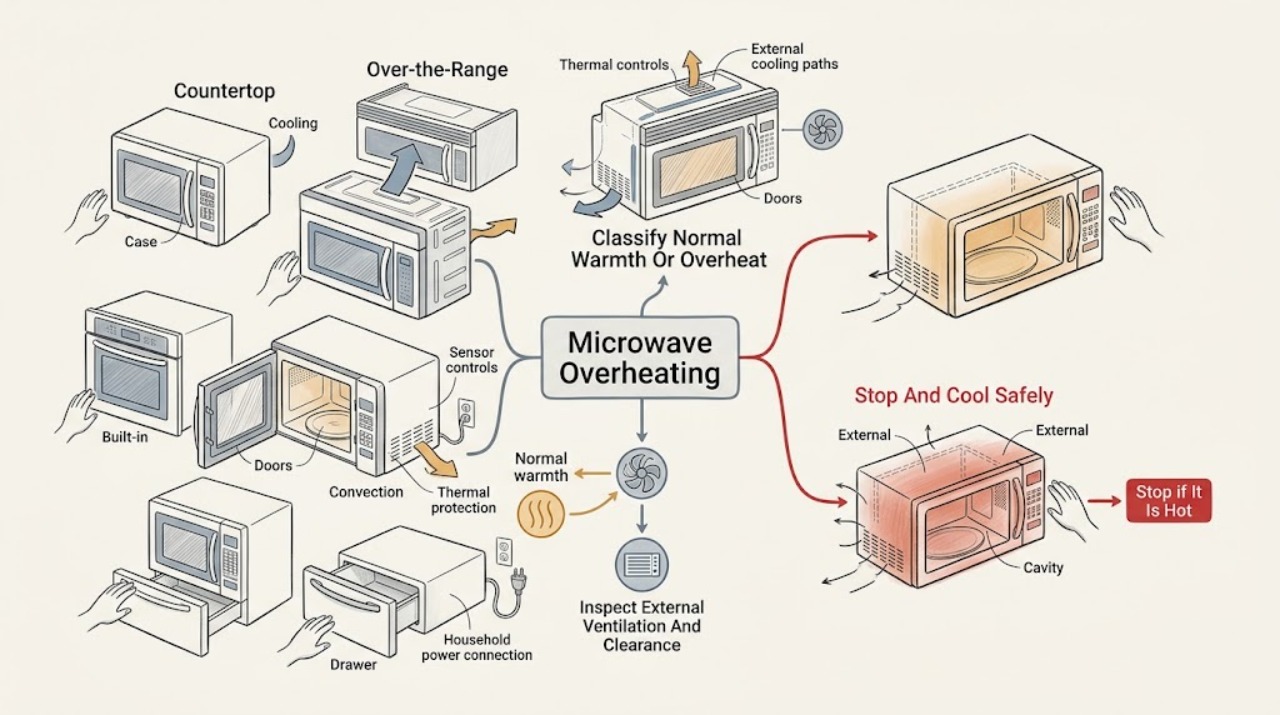
A warm cabinet, cavity floor, door steam, or a cooling fan after cooking can be normal on a GE microwave, especially after extended cooking, convection use, or heat from an over-the-range cooktop. Treat it as an overheating fault when the unit shuts off before the set time, the display goes dark, a vent is blocked, a HOT or over-temperature message prevents the expected mode, or the heat is accompanied by smoke, burning odor, sparks, arcing, a damaged cord, or repeated breaker trips. Stop cooking, keep the door closed until safe, and let the unit cool. Then check only the external vents, clearances, accessible breaker or fuse, and outlet or switch when dry and undamaged; follow the exact Owner's Manual for any model-specific HOT or sensor message. GE says an over-the-range fan may turn on automatically and stay on until the unit cools, while a microwave that does not recover after the recommended cooling interval or repeatedly shuts down needs qualified service. Never remove the cabinet or attempt high-voltage repair.
Before you begin
Safety first
- The user may record the installation and mode, stop and cool the appliance, inspect external vents and clearances, follow the exact model's HOT instructions, and check an accessible breaker, fuse, outlet, or switch when dry and undamaged. Qualified personnel must handle the cabinet, door and thermal interlocks, control housing, fan wiring, thermal components, heating system, high-voltage capacitor, live measurements, and repairs near damaged wiring or water.
Work through in order
Diagnostic checks
Use only checks that match the exact appliance or system and its official guide.
-
Check 1
Stop starting new long cycles and record where the heat is felt: external case, control-panel area, cavity floor, door, or the surrounding cabinet. Note whether the unit completed the timer, whether the display stayed on, whether a fan continued, and whether the microwave is countertop, over-the-range, built-in, convection, or drawer style.
Expected result: The case or cavity is warm but the cycle ends normally; the fan runs after cooking; the unit stops before the set time; the display goes dark; or heat is accompanied by smoke, odor, sparks, or arcing.
Next step: Use the normal-heat branch for a completed cycle, the mode branch for HOT or convection behavior, and the airflow/power branch for an early shutdown.
Stop if: Stop immediately for smoke, burning odor, sparks, arcing, abnormal heat, water, a damaged door or seal, or a repeated breaker trip.
Why this matters
Why: Normal warmth or post-cycle fan operation is more likely when the timer ends and no hazard appears. Early shutdown or loss of display points toward airflow, power, thermal protection, or an internal fault; smoke, arcing, or odor is an immediate stop condition.
-
Check 2
Cancel the cooking function if the controls respond, remove food only when the door and container can be handled safely, and leave the microwave off to cool. Do not cover the case, place anything on vents, or repeatedly restart it while it is hot.
Expected result: The fan runs and the unit cools without a fault message; the fan never starts; a HOT or over-temperature message remains; the display or power returns after cooling; or the unit remains dark or excessively hot.
Next step: Once cool, follow the exact model manual for a HOT or over-temperature message and then perform only the external vent and power checks. Arrange service if the unit does not cool or recover normally.
Stop if: Do not touch hot food or surfaces without appropriate caution, force a door, spray liquid into vents, or open the cabinet to investigate the thermal system.
Why this matters
Why: A fan and cooling period can be the microwave's normal protection response. A persistent HOT state, no recovery, or repeated early stop after cooling makes a thermal, airflow, power, or control fault more likely and cannot be diagnosed safely from the outside alone.
-
Check 3
When the microwave is cool and disconnected only by its normal user control, inspect the external ventilation openings and the space around the case for a cloth, cover, grease buildup, cabinet obstruction, or an installation change. For an over-the-range model, also note whether the cooktop or oven below has been producing prolonged heat; do not remove a grille, filter housing, or panel.
Expected result: A vent or clearance is visibly blocked; the over-the-range fan turns on automatically during cooktop heat; the vents are clear and the fan operates; or the vents are clear but the microwave still overheats or stops.
Next step: Remove only an obvious external obstruction and restore the model's documented clearance. If the fan does not behave normally or the overheating repeats with clear vents, leave the unit off and arrange service.
Stop if: Do not dismantle the vent, reach behind the unit, clean energized parts, or continue if grease is smoking, the cabinet is scorching, or wiring is exposed.
Why this matters
Why: GE links blocked vents and inadequate air clearance with overheating and identifies automatic over-the-range fan operation as a heat-protection response. Clear external airflow can rule out only an obvious obstruction; it does not prove the internal fan or thermal protector is sound.
-
Check 4
If the display went dark during cooking, and only when the area is dry and the cord, plug, and receptacle show no damage, check the appliance breaker or fuse and an accessible outlet or wall switch. Wait through GE's recommended cooling interval before one normal retry; do not repeatedly reset a protective device.
Expected result: The breaker or fuse was tripped; the outlet or switch was off; power returns after cooling; power is present but the display stays dark; or the microwave shuts down again with normal accessible power.
Next step: Restore only an accessible switch or breaker once. Leave the microwave off and use qualified appliance service for persistent no-power or repeat-overheat symptoms; use an electrician for a damaged or repeatedly tripping household supply.
Stop if: Stop for a hot, wet, loose, or damaged cord, plug, receptacle, smoke, odor, sparks, water, or repeated trips; never remove the microwave cabinet.
Why this matters
Why: A household supply issue or temporary thermal protection can make an overheating microwave appear dead. Persistent no recovery or repeat shutdown with clear vents and normal supply points toward an internal thermal, power, control, or heating fault.
-
Check 5
If the display says HOT or refuses Sensor Cook, identify whether the model was just used for convection, broil, or another high-heat function. Follow the displayed alternate method or the exact Owner's Manual instead of forcing sensor operation; if a normal microwave cycle runs but does not heat, confirm that Timer was not selected accidentally and that the door closes securely.
Expected result: The HOT message clears after cooling; the model switches to time cooking; sensor cooking works again when cool; or the microwave runs with no heat or shuts down despite a normal mode and secure door.
Next step: Use the model's alternate time-cooking instruction once when safe. Stop and arrange qualified service for no heat, repeated HOT messages in a normal microwave-only cycle, or any electrical or thermal warning.
Stop if: Do not run the microwave empty, defeat a temperature or door interlock, remove a waveguide cover, or attempt high-voltage testing.
Why this matters
Why: A temporary heat-related mode restriction is more likely after convection or broil. A microwave that runs without heating or continues to overheat after the mode is correct needs professional diagnosis; the symptom does not identify a magnetron, sensor, capacitor, or board.
Use your observations
Decision map
Find the observation that best matches what you see, then follow the next safe action.
-
PATH 01Safety boundary
What you see
The case, cavity floor, or door area is warm after extended cooking, but the timer completes normally and there is no smoke, odor, arcing, or repeated shutdown.
Do this next
Allow the microwave to cool, keep its external openings clear, and use the exact manual for installation clearances. Seek service if the warmth becomes abnormal, the unit loses power, or the symptom changes to a hazard.
Why this path and its safety boundary
Why it matters: Heat transfer from cooking, the interior lamp, magnetron, or an over-the-range cooktop can be normal. A fan that continues while the unit cools can also be normal protection behavior.
Safety stop: Stop for smoke, burning odor, sparks, arcing, a damaged door or seal, or a surface too hot to approach safely.
-
PATH 02Safety boundary
What you see
An over-the-range GE microwave's vent fan starts by itself or cannot be turned off after cooktop or microwave heat, while the controls and cooking cycle otherwise behave normally.
Do this next
Leave the external airflow clear and let the fan run until the microwave cools. Arrange service if it never shuts off after cooling, the fan is abnormal, or the microwave also stops early or loses power.
Why this path and its safety boundary
Why it matters: GE describes a thermostat-controlled automatic fan that protects the electronics and removes excess heat; this is not the same as a fan motor failure or a microwave that has stopped heating.
Safety stop: Stop using the appliance for smoke, odor, sparks, scorching, or a fan that is accompanied by electrical symptoms.
-
PATH 03Safety boundary
What you see
The microwave stops before the programmed time, the display goes dark, or power disappears after a long run or with a blocked or restricted vent.
Do this next
Clear only external obstructions, check the accessible supply when dry and safe, and allow the documented cooling interval. Leave the unit off and arrange qualified service for no recovery or a repeat shutdown.
Why this path and its safety boundary
Why it matters: GE identifies blocked ventilation, inadequate clearance, long cooking, household power, and possible overheating as the safe first causes. If accessible power and airflow are normal but the symptom repeats, an internal thermal or electrical fault is more likely.
Safety stop: Stop for a hot or damaged plug or receptacle, smoke, burning odor, sparks, water, or repeated breaker trips; do not remove the cabinet.
-
PATH 04Safety boundary
What you see
A GE convection microwave shows HOT or says the oven is too hot for Sensor Cook after convection or broil, but no smoke, arcing, or electrical damage is present.
Do this next
Follow the exact on-screen or Owner's Manual instruction and allow cooling. If HOT appears during an ordinary microwave-only cycle, persists after cooling, or is joined by early shutdown, arrange service.
Why this path and its safety boundary
Why it matters: The model may be protecting its sensor operation while the cavity remains hot; GE says the display may provide an alternate time-cooking method or sensor operation may return after cooling.
Safety stop: Do not force sensor controls, use materials that could stick to a hot cavity after convection, or operate with a damaged cavity, door, or seal.
-
PATH 05Safety boundary
What you see
Overheating is accompanied by smoke, burning odor, sparks, arcing, scorching, a damaged door or seal, repeated breaker trips, persistent no heat, or no recovery after safe external checks.
Do this next
Stop using the microwave, keep people away from hot or damaged parts, and arrange qualified appliance service; use an electrician for a household supply that is hot, damaged, or repeatedly tripping.
Why this path and its safety boundary
Why it matters: This pattern is not explained by normal warmth or an automatic cooling fan. GE reserves microwave internal diagnosis and repair for trained or qualified service personnel because dangerous high-voltage energy may remain after unplugging.
Safety stop: Do not re-energize the appliance to reproduce the fault, open the cabinet, touch internal parts, or bypass a safety device.
Helpful context
Understand the symptom
Warm is not automatically overheating
GE says heat can transfer to the cavity walls, floor, and outside cabinet during extended microwave use. Steam around the door and a fan that continues briefly can also be normal. The important change is whether the appliance loses power, stops before its set time, refuses a mode because it is too hot, or shows smoke, odor, sparks, or arcing.
Over-the-range and convection behavior needs model context
An over-the-range GE microwave can turn its vent fan on automatically when heat rises from the cooktop, and it may not let the user turn that fan off until the unit cools. A convection model may show HOT after baking or broiling and may temporarily change or block sensor cooking. These are different from a countertop microwave that goes dark during a normal microwave cycle, so record the installation type and mode before troubleshooting.
Use external checks only
If a GE microwave shuts down and appears to lose power, GE directs owners to check the supplied breaker or fuse, accessible outlet, and external ventilation, then allow a cooling interval. It specifically withholds internal repair instructions because microwave high-voltage parts can remain dangerous after unplugging.
Safety boundary
Stop conditions
- Stop immediately for smoke, burning odor, sparks, arcing, scorching, water, abnormal heat, a hot or damaged cord or receptacle, or a repeated breaker trip.
- Do not operate a microwave with a bent or loose door, damaged hinges or latches, damaged seals, a damaged cavity, or a safety-interlock concern.
- Do not remove the cabinet, control housing, door panel, waveguide cover, vent assembly, thermal part, capacitor, magnetron, or other internal component.
- Do not run the microwave empty, defeat an interlock or thermal protection, block ventilation, or repeatedly re-energize it to reproduce overheating.
- If external airflow, accessible power, cooling, and exact model instructions do not restore normal operation, leave the microwave off and arrange qualified service.
Only after diagnosis
Potential parts
- model-matched cooling fan or vent-fan assembly
Consider only when qualified diagnosis confirms an internal fan or fan-control fault after external vents and installation clearances are correct.
Fan design differs by countertop, over-the-range, built-in, convection, and drawer models; verify the exact GE model and fit information. - model-matched thermal protector or temperature sensor
Consider only when qualified testing links repeat early shutdown or a persistent temperature message to a thermal-sensing or protection fault rather than blocked airflow or normal mode behavior.
Do not infer a thermal part from a warm case alone; exact model diagnosis and service documentation are required. - model-matched control or keypad assembly
Consider only after qualified diagnosis confirms that a persistent HOT, fault, or shutdown symptom is caused by the control rather than the door, sensor, airflow, power, or heating system.
The symptom does not identify a control board or keypad; confirm the exact GE model, revision, and fit before any part decision. - model-matched heating-system component
Consider only when the microwave runs without heat or a qualified technician confirms a heating-system fault after the Timer, door closure, mode, and thermal branches are excluded.
Do not select a magnetron, capacitor, diode, or other high-voltage part from an overheating symptom; internal microwave repair is professional work.
When checks do not resolve it
Need a professional?
Arrange qualified GE microwave service when the microwave repeatedly overheats, shuts down before its set time, remains dark after the accessible power and cooling checks, shows a persistent HOT or fault message outside the documented mode, runs without heating, or has a fan or thermal symptom that does not resolve as the unit cools. Use an electrician for a hot, wet, loose, damaged, or repeatedly tripping household supply. Stop immediately for smoke, burning odor, sparks, arcing, scorching, water, abnormal heat, a bent or damaged door, damaged hinges or latches, or a damaged seal. Provide the exact model and serial information, installation type, mode, duration before the symptom, display message, timer state, fan behavior, vent and clearance observations, power status, and any odor, smoke, spark, or trip.
Safety scope: The user may record the installation and mode, stop and cool the appliance, inspect external vents and clearances, follow the exact model's HOT instructions, and check an accessible breaker, fuse, outlet, or switch when dry and undamaged. Qualified personnel must handle the cabinet, door and thermal interlocks, control housing, fan wiring, thermal components, heating system, high-voltage capacitor, live measurements, and repairs near damaged wiring or water.
Common questions
FAQ
Is it normal for a GE microwave to get hot on the outside?
It can be normal after extended cooking. GE says heat can transfer to the cavity, floor, and external cabinet, and over-the-range cooktop lights can warm the cavity floor. A warm case with normal completion is different from early shutdown, smoke, odor, sparks, or a display that goes dark.
Why does my GE over-the-range microwave fan keep running?
GE says the automatic vent fan can turn on when cooktop or microwave heat is high and may not turn off until the unit cools. Keep the external airflow clear. If the fan never settles after cooling, or the microwave also shuts down, smells hot, or loses power, arrange service.
What should I do if my GE microwave shuts off because it overheated?
Stop the cycle and let it cool. Afterward, check only the accessible breaker or fuse, outlet or switch, and external vents when dry and undamaged. GE says a blocked vent can cause an early stop and recommends an approximately 30-minute recovery wait; no recovery or a repeated stop needs service.
What does HOT mean on a GE convection microwave?
After convection or broil, HOT can indicate that the cavity is still too warm for a requested mode. GE says some models provide an alternate time-cooking method, while sensor cooking may return after cooling. Follow the exact display and Owner's Manual; HOT during ordinary microwave-only use needs service if it persists.
Can I replace a GE microwave thermal part myself?
No internal repair should be treated as a routine user check. GE states that a microwave's high-voltage capacitor can retain a charge after unplugging and provides no do-it-yourself internal repair advice. Use qualified service for thermal, fan, control, or heating diagnosis.
Read the exact guide
Official sources
- Microwave - Arcing or Making SoundsGE Appliances · Applies to GE microwaves with popping, sparking, arcing, or abnormal electrical or mechanical sounds.
- Microwave - Automatic Fan FeatureGE Appliances · Applies specifically to GE over-the-range microwaves with the automatic vent-fan feature.
- Microwave - Normal Operational CharacteristicsGE Appliances · Applies to GE microwave operating characteristics; exact heat transfer, sounds, and fan behavior vary by model and installation.
- Spacemaker Microwave OvenGE Appliances · Applies directly to the older Spacemaker model family covered by this manual; use only as conditional background for other GE models and defer to their exact manual.
- Microwave - Power is OffGE Appliances · Applies to GE microwaves that shut down during a cooking cycle and appear to lose power; clearances vary by model.
- Microwave - Reasons for the Exterior Case or Interior Floor to Feel HotGE Appliances · Applies to GE microwaves after extended cooking and to over-the-range models exposed to prolonged cooktop-light heat.
- Microwave - Error, Fault or Function CodesGE Appliances · Applies when a GE microwave displays a fault, function, or error code; code meanings and reset behavior are model-dependent.
- Microwave - Runs But Does Not HeatGE Appliances · Applies to GE microwaves that run but do not heat; model-specific door and control behavior still applies.
- Microwave - Says HOT on DisplayGE Appliances · Applies to GE convection microwaves and models with sensor cooking that display HOT after high-heat operation.
Community feedback
Share a repair observation
Share a plain-text repair observation. Accepted observations are published automatically; this page may take a moment to update.