
On this page
Start here
Quick answer
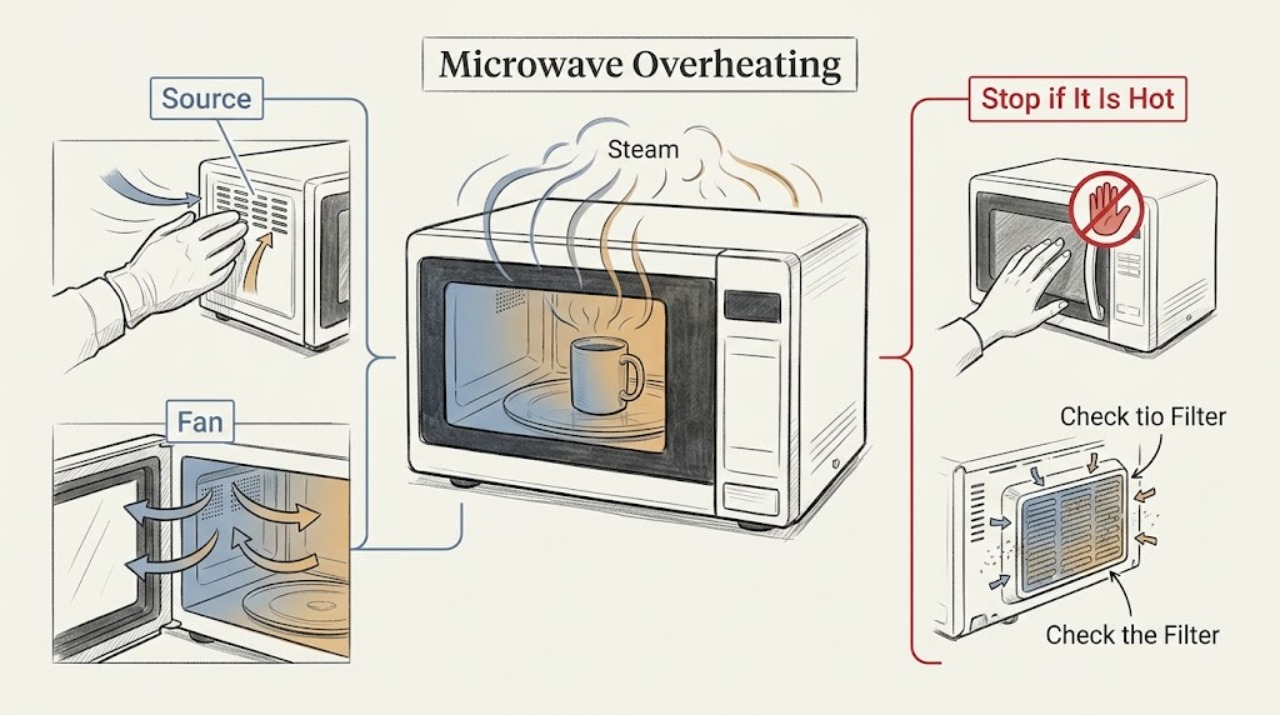
For an over-the-range Samsung microwave, first determine whether the heat is from the cooktop below, a normal cooling fan, or the microwave cavity itself. Samsung says the vent fan can start automatically to protect the microwave from excess cooktop heat and may continue until the area cools. Check the external vent/filter path and model-specific clearance, but stop immediately for smoke, burning odor, arcing, heat damage, or a fan that runs without a heat source; disconnect power when safe and request service.
Before you begin
Safety first
- Only external observation, approved filter care, and manual-based clearance checks are appropriate; electrical and thermal repairs require a qualified technician.
Work through in order
Diagnostic checks
Use only checks that match the exact appliance or system and its official guide.
-
Check 1
From outside the appliance, note whether the heat began during microwave cooking, during use of the cooktop below, after cooking stopped, or with no recent heat source.
Expected result: Heat follows hot cooktop use and the vent fan runs, heat follows a microwave cycle, or heat appears with no recent operation.
Next step: Stop any test if there is smoke, odor, arcing, or hot/damaged wiring. Otherwise continue only with the external vent and clearance checks.
Why this matters
Why: Samsung says an over-the-range vent can start automatically to protect the microwave from excess cooktop heat; unexplained heat without operation is not normal cooling behavior.
-
Check 2
If the vent fan is running, observe whether it changes or eventually stops as the cooktop and microwave cool; do not block the intake or exhaust.
Expected result: The fan runs after heat and later stops, or it runs with no heat, has abnormal noise, or never returns to normal.
Next step: Allow the appliance to cool with surrounding areas clear. Request service for unexplained or persistent fan operation.
Why this matters
Why: Automatic fan operation during heat dissipation can be normal; fan operation without heat or with abnormal noise needs service.
-
Check 3
For an over-the-range unit, inspect only the accessible grease/filter area and clean or reseat approved removable filters according to the exact model guidance; do not remove the mounted microwave.
Expected result: A filter is visibly clogged or misseated, or filters are clean and correctly installed.
Next step: Correct only the documented external filter condition, then allow cooling. Stop if the filter housing is damaged or heat persists.
Why this matters
Why: Samsung links filters and vent paths with airflow and noise; a restricted external path can reduce heat removal, while a clear path shifts suspicion to service.
-
Check 4
Compare visible spacing around the microwave and the external vent route with the exact installation manual, especially if the overheating began after installation or relocation.
Expected result: Clearance or vent routing differs from the manual, or the installation appears correct.
Next step: Arrange qualified installation correction rather than moving a mounted unit yourself. Request service for persistent overheating.
Why this matters
Why: Samsung says clearance requirements vary by model and inadequate clearance can prevent proper venting; a correct installation with persistent heat needs service.
Use your observations
Decision map
Find the observation that best matches what you see, then follow the next safe action.
-
PATH 01Next step
What you see
The fan starts during hot cooktop use and stops after the area cools, with no smoke, odor, or damage.
Do this next
Keep the external intake and filter area clear and use the exact installation guidance.
Why this path and its safety boundary
Why it matters: Samsung's automatic thermal-protection behavior is more likely than a failed stop control.
-
PATH 02Next step
What you see
A filter or visible vent path is clogged/misseated, or clearance does not match the model manual, and the heat improves after qualified correction.
Do this next
Maintain the approved filter and clearance condition; do not dismantle or remount the microwave yourself.
Why this path and its safety boundary
Why it matters: Restricted airflow or installation was the leading external contributor.
-
PATH 03Next step
What you see
Heat appears with no recent operation, the fan runs without a heat source, abnormal noise accompanies the heat, or heat continues after external checks.
Do this next
Disconnect power when safe, do not use the microwave, and request Samsung service.
Why this path and its safety boundary
Why it matters: An appliance-side thermal, fan, or electrical fault remains possible and is unsafe for user diagnosis.
Helpful context
Understand the symptom
Find the heat source first
Overheating can describe hot air around an over-the-range installation, a fan that stays on while cooling, or abnormal heat from the microwave itself. The source and timing determine whether the behavior is expected thermal protection or a fault.
When checks do not resolve it
Need a professional?
Provide the model, whether the heat came from microwave or cooktop use, fan behavior after cooling, filter/vent observations, and any odor, smoke, or visible damage.
Safety scope: Only external observation, approved filter care, and manual-based clearance checks are appropriate; electrical and thermal repairs require a qualified technician.
Common questions
FAQ
Is a Samsung microwave vent fan running after cooking always overheating?
No. On over-the-range models, Samsung says the fan may run automatically to protect the microwave from excess cooktop heat and stop after the area cools. Fan operation without heat needs service.
What should I do if my Samsung microwave gets hot with no cooktop or microwave use?
Disconnect power when safe, do not use it, and request service. Unexplained heat is not the normal automatic cooling behavior described by Samsung.
Read the exact guide
Official sources
- Samsung microwave turns on by itselfSamsung · Samsung over-the-range microwave thermal fan behavior
- How to clean a Samsung microwaveSamsung · Samsung microwave cleaning guidance
- Samsung microwave does not heatSamsung · Samsung microwave installation and venting
- Samsung microwave is making weird noisesSamsung · Samsung microwave operating noise
- Samsung Microwave FAQsSamsung · Samsung microwave FAQ
- Microwaves | Samsung Support USSamsung · Samsung microwave support hub
Community feedback
Share a repair observation
Share a plain-text repair observation. Accepted observations are published automatically; this page may take a moment to update.