
On this page
Start here
Quick answer
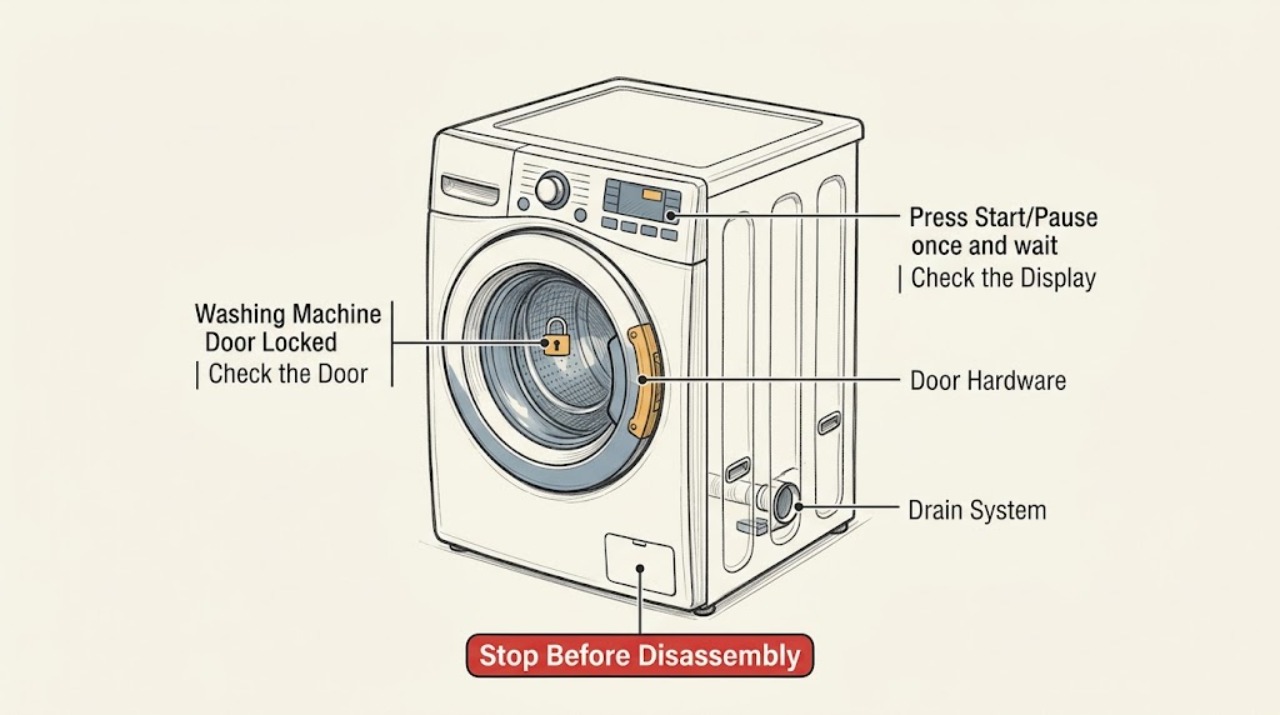
A GE washer door or lid normally locks during portions of a cycle for safety. Press Start/Pause once and wait for the basket to stop and the lock to open; a front-load model may drain before opening, while a top-load lid may remain locked briefly after spin. Do not pry, pull, or bypass the lock. If the controls are locked, use the exact model's Control Lock procedure. Look through the door or lid for standing water and check for a water-supply or error message. If water is at a critical level, there is active leaking, smoke, a burning smell, a damaged cord, or the lock will not open with water inside, stop using the washer, shut off water and power when safe, and arrange qualified service. A single model-approved reset may help after an interruption; persistent locking needs diagnosis of the drain path, lock, control, or hardware.
Work through in order
Diagnostic checks
Use only checks that match the exact appliance or system and its official guide.
-
Check 1
Stop the cycle and inspect from outside for active leaking, overflowing water, smoke, sparking, burning odor, a damaged power cord, or water visible behind a locked door or lid.
Expected result: A flooding or electrical hazard is present, or the washer is dry and shows no immediate hazard.
Next step: For active water, close the accessible supply valves. Disconnect power only if the plug and floor are dry and safe; otherwise keep clear and obtain qualified help. Protect the area from flooding and do not force the lock.
Stop if: Stop for fire, smoke, sparking, burning odor, water near electrical parts, uncontrolled overflow, or a wet or damaged cord.
Why this matters
Why: A hazard takes priority over unlocking; a dry washer can proceed to the model-specific pause and lock checks.
-
Check 2
Press Start/Pause once and wait without pulling the handle or lifting the lid; if the washer was spinning, wait until the basket has completely stopped before checking whether the lock releases.
Expected result: The door or lid releases after pausing, the washer drains first and then releases, or the lock remains engaged after the basket stops.
Next step: If it releases, remove laundry normally and inspect the display for the reason the cycle paused. If it remains locked, continue only with the external water and control checks; do not pry it open.
Stop if: Stop for a door or lid that flexes, a broken latch or hinge, a grinding lock, or a locked tub containing water.
Why this matters
Why: A lock that releases after a safe pause is normal cycle protection; a persistent lock points toward water level, lock sensing, control, or hardware trouble.
-
Check 3
Read the display or status lights and look through the door or from above for standing water; note H2O or water-supply messages, a critical-level indicator, CAnCELEd, or an indication that the washer is still draining or spinning.
Expected result: Water remains, the display reports a critical level or supply problem, the washer is in a lockout period, or no water and no relevant message are visible.
Next step: For critical water or overflow, turn off water and power only when safe and call service. For a supply or lockout message, follow the model manual and allow the documented period to finish instead of repeatedly unplugging.
Stop if: Stop for critical water level, active leak, a pump that only hums, or any need to remove panels to drain the tub.
Why this matters
Why: Water or a programmed lockout can intentionally keep the door or lid closed; a dry washer with no message shifts attention to controls and lock hardware.
-
Check 4
With the panel dry, check for a Control Lock icon or status light and use only the exact GE model manual's unlock procedure; do not repeatedly press random button combinations.
Expected result: Control Lock is active and clears, the panel responds but the physical lock remains closed, or the panel does not respond.
Next step: If controls unlock, press Start/Pause or cancel the cycle according to the manual and wait for the physical lock to release. If the panel stays unresponsive, proceed to one model-approved reset and then service if it persists.
Stop if: Stop for a wet, cracked, or intermittently activating control panel, or any need to access the lock wiring.
Why this matters
Why: Control Lock prevents selections but does not prove the physical lock is defective; persistent panel nonresponse after unlocking can be an electronic-control issue.
-
Check 5
Only when there is no hazard and the exact model instructions permit it, perform one control reset or power interruption; restore power, select the cycle again if required, and wait for the washer's safety checks to finish.
Expected result: The lock releases and controls return, the washer remains locked, or the same message returns after power is restored.
Next step: If the reset fails, stop repeating it and arrange service. If the door or lid releases, remove laundry safely and document the exact message and cycle stage before considering another wash.
Stop if: Stop for a repeated breaker trip, burning odor, water leak, a locked water-filled tub, or a lock that requires force to release.
Why this matters
Why: A pause or power interruption can leave electronic controls locked, but a failed or recurring reset points toward a drain, lock, control, or other internal fault.
-
Check 6
Record the washer model and serial information, front-load door or top-load lid type, full display or lights, cycle stage, water level, basket movement, and every safe check before arranging service.
Expected result: The lock remains engaged, the same fault returns, or the washer works only intermittently after the safe reset.
Next step: Keep the washer out of service and provide the recorded evidence to qualified appliance service. Do not cut the lock, remove the door, or replace a part based only on the locked-door symptom.
Stop if: Stop for any internal-access request, damaged lock hardware, persistent leak, electrical symptom, or unsafe stored water.
Why this matters
Why: A recurring lock symptom cannot identify a single part remotely; the technician needs the timing and water state to distinguish lock, drain, control, and hardware causes.
Use your observations
Decision map
Find the observation that best matches what you see, then follow the next safe action.
-
PATH 01Next step
What you see
Critical water level, active overflow or leak, smoke, sparking, burning odor, damaged cord, or a locked tub with water is present.
Do this next
Arrange qualified service and follow the exact model guidance.
Why this path and its safety boundary
Why it matters: Stop using the washer, close the water supply and disconnect power only when safe, do not force the lock, and obtain qualified service.
-
PATH 02Next step
What you see
The washer is paused or spinning and the door or lid is locked without a hazard.
Do this next
Arrange qualified service and follow the exact model guidance.
Why this path and its safety boundary
Why it matters: Press Start/Pause and wait for the basket to stop; a front-load cycle may drain first and a top-load lid may take time to release.
-
PATH 03Next step
What you see
A Control Lock icon or status light is active and the panel will not accept selections.
Do this next
Arrange qualified service and follow the exact model guidance.
Why this path and its safety boundary
Why it matters: Use the exact model manual to unlock controls; if the physical lock remains closed or the panel stays unresponsive, stop and arrange service.
-
PATH 04Next step
What you see
Water remains or the display shows a water-supply, critical-level, CAnCELEd, or other lockout indication.
Do this next
Arrange qualified service and follow the exact model guidance.
Why this path and its safety boundary
Why it matters: Follow the model-specific water and lockout guidance and do not bypass the timer. Critical water requires water and power shutoff when safe and service.
-
PATH 05Next step
What you see
A pause or power interruption may have left the electronic controls locked and no hazard is present.
Do this next
Arrange qualified service and follow the exact model guidance.
Why this path and its safety boundary
Why it matters: Perform the model-approved reset once; if controls or the door or lid remain locked, stop repeating it and request service.
-
PATH 06Next step
What you see
The lock does not release after safe pause, water-state, control, and one reset check.
Do this next
Arrange qualified service and follow the exact model guidance.
Why this path and its safety boundary
Why it matters: Keep the washer out of service and arrange qualified diagnosis of the lock, drain, control, or closure hardware; do not pry or bypass the interlock.
Helpful context
Understand the symptom
A lock can be normal during a cycle
Front-load doors lock once the cycle starts, and top-load lids lock during load sensing or high-speed spin. Pause the washer and allow the basket to stop before trying the handle. Some front-load cycles drain before the door releases. The exact timing and controls vary by model, so use the Owner's Manual rather than a generic release sequence.
Check whether water is keeping the lock engaged
Look through the front door or from above without reaching inside. Water left in the tub can indicate that the washer has not completed draining, and a critical-level message is a stop condition. Do not force a door open against water pressure or operate a pump with a panel removed.
Separate Control Lock from a physical door lock
Control Lock prevents selections; it does not mean the door hardware has failed. GE uses different button combinations by washer family and model. Keep the panel dry and follow the exact manual to unlock controls. If the controls remain unresponsive after a safe reset, service is the appropriate next step.
Protect against flooding and electrical hazards
Stop immediately for active leaking, overflow, smoke, sparking, burning odor, a damaged cord, or a locked water-filled tub. Close the washer's water valves and disconnect power only when it is safe to do so; never handle a wet plug or open live wiring. Keep the door or lid closed until qualified help arrives if doing so helps contain water.
Only after diagnosis
Potential parts
Only if qualified diagnosis confirms a failed lock or sensing circuit after safe pause and water checks; a locked door alone does not identify the correct assembly.
Only when retained water and model-specific diagnosis confirm a drain fault; do not remove panels or handle a wet pump as a user test.
Only after model-specific service diagnosis identifies the failed control or closure component; do not force or bypass a safety interlock.
When checks do not resolve it
Need a professional?
The door or lid remains locked after the basket has stopped and the model-specific pause procedure is complete., Water is visible in the tub, the washer will not drain, or a critical-level or overflow indication appears., Control Lock is cleared but the physical lock or controls remain unresponsive., The same lock, water, or control message returns after one model-approved reset., The latch, hinge, strike, lid, or door is damaged or requires force to close or open., Diagnosis would require opening panels, handling wet electrical parts, or bypassing the interlock.
Common questions
FAQ
Why is my GE washing machine door locked?
The lock may be normal while the washer is running, sensing the load, or spinning. Pause it and wait for the basket to stop. Water in the tub, a control lock, an error lockout, or a failed lock can keep it closed after that point.
How do I unlock a GE washer door safely?
Press Start/Pause once and wait. A front-load washer may drain before the door opens; a top-load lid may remain locked until the basket coasts to a stop. Never pry or pull the door or lid open.
What if there is water inside my locked GE washer?
Do not force the door. If the water level is critical or overflowing, close the supply valves and disconnect power only when safe, then call qualified service. A full tub can indicate a drain problem that needs controlled handling.
Can Control Lock cause my GE washer door to stay locked?
Control Lock prevents selections, but it is separate from the physical door or lid lock. Use the exact model manual to unlock controls, then use Start/Pause and wait for the physical lock to release.
Should I unplug a GE washer with a locked door?
Only follow the model's reset guidance when there is no water or electrical hazard. A single approved reset may clear controls after an interruption, but repeated unplugging can prolong a model-specific lockout and will not repair a failed lock or drain system.
Read the exact guide
Official sources
- Top Load Washer - Lid Lock FeatureGE Appliances Support · Opened official GE Appliances support page; top-load features vary by model and load-sensing configuration.
- Washer - Resetting the Electronic ControlsGE Appliances Support · Opened official GE Appliances support page; use the exact model instructions and do not repeat resets for a persistent lock.
- Washer - Control Lock FeatureGE Appliances Support · Opened official GE Appliances support page; button locations and combinations vary by washer model.
- Washer - Consumer Help IndicatorGE Appliances Support · Opened official GE Appliances support page; messages and remedies vary by model.
- Front Load Washer - Door LockGE Appliances Support · Opened official GE Appliances support page; exact model door behavior and controls remain manual-specific.
Community feedback
Share a repair observation
Share a plain-text repair observation. Accepted observations are published automatically; this page may take a moment to update.