
On this page
Start here
Quick answer
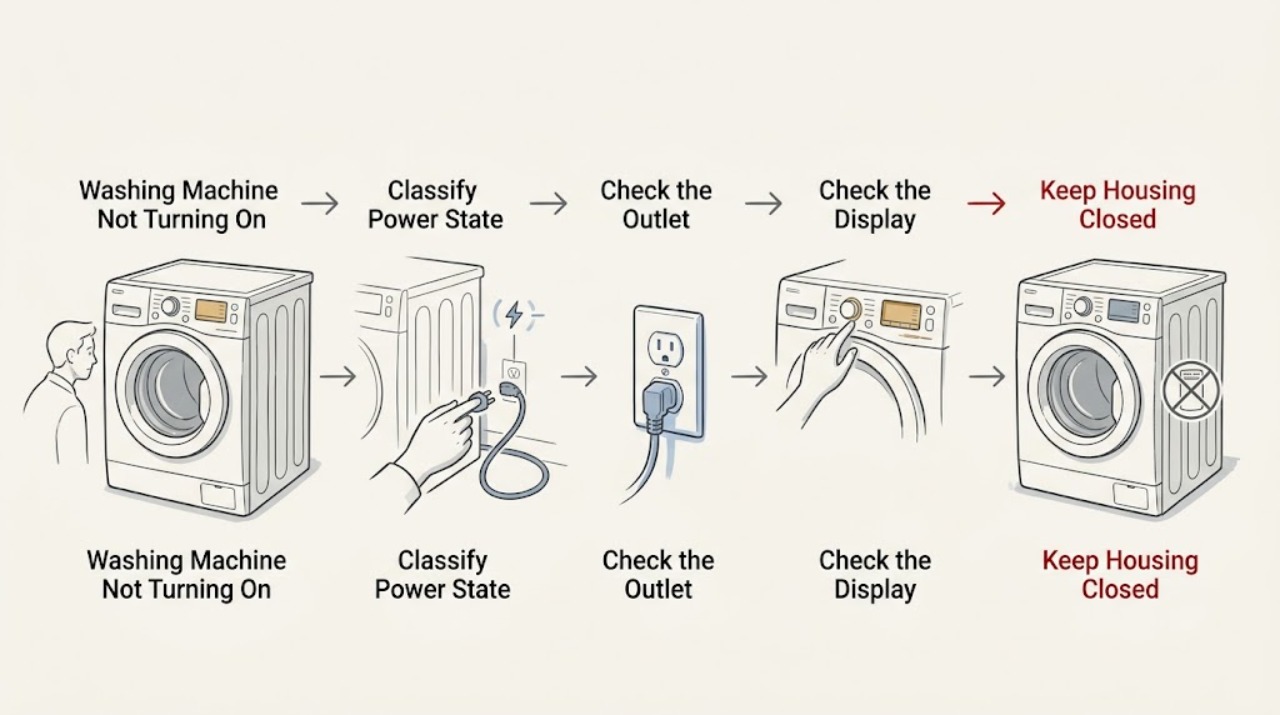
When a GE washing machine will not turn on, first decide whether the washer has no display or response at all, or has power but will not start a cycle. From a dry, stable position, check the dedicated outlet with a small lamp, inspect the breaker without repeatedly resetting it, and make sure the washer's controls are set and the Control Lock is not preventing inputs. Close the lid or door fully and press Start or Start/Pause as the model requires. If the display remains dead after a single safe reset, the lid or door does not register, a fault returns, or the washer has been wet, leaking, sparking, hot-smelling, or repeatedly tripping power, stop using it and arrange qualified service. Do not open the cabinet, bypass an interlock, or handle wiring.
Before you begin
Safety first
- This article covers ordinary controls and dry external observations only. Do not open the washer, access energized wiring, bypass a lid or door interlock, use an extension cord, repeatedly reset a breaker, or continue using the washer after a leak, spark, smoke, hot electrical smell, damaged cord, exposed wiring, or repeated trip.
Work through in order
Diagnostic checks
Use only checks that match the exact appliance or system and its official guide.
-
Check 1
From a dry, stable position, press the normal POWER or ON control once and note whether the display, indicator lights, sounds, or lock icon respond; do not repeatedly press controls or reach behind the washer.
Expected result: Record one of three states: completely blank and silent, display or lights present but no cycle response, or a fault/lock message or sound appears.
Next step: Follow the branch that matches the observed state, beginning with the outlet and breaker only if the washer is blank.
Stop if: Stop immediately for moisture at the plug or outlet, a hot or electrical smell, smoke, sparks, a damaged cord, or an active leak.
Why this matters
Why: A blank washer needs an external power check first. A lit display means the washer is powered and the next checks are controls, lock status, lid or door sensing, and the selected cycle rather than the wall outlet alone.
-
Check 2
If the washer is blank, confirm that its plug is fully seated and, without touching wet equipment, test the same outlet with a small lamp; inspect the household breaker or fuse position once.
Expected result: The lamp works and the breaker is on, the lamp is also dead, or the breaker trips again when the washer is connected or started.
Next step: If the outlet is dead, have the household circuit checked; if the outlet works but the washer remains blank, leave the washer unplugged and request appliance service.
Stop if: Do not keep resetting a tripped breaker, use an extension cord, open the outlet, touch a wet plug, or continue after any spark, crackle, heat, or burning odor.
Why this matters
Why: A dead test lamp points to the outlet, breaker, fuse, or household circuit rather than proving a washer failure. A working outlet with a blank washer shifts suspicion to the washer's cord, power entry, control, or another internal circuit. A repeated trip is an electrical stop condition.
-
Check 3
If the display is lit, check for the Control Lock icon or wording and use only the unlock gesture shown on the exact GE model's panel or owner manual; then select a normal cycle and press Start or Start/Pause once.
Expected result: The lock indicator clears and the controls accept input, the controls remain unresponsive, or the cycle is accepted but the washer does not begin.
Next step: Use the model-specific manual for a control reset or error meaning; if the controls remain unresponsive, arrange service without opening the console.
Stop if: Stop for erratic controls, a display that changes by itself, a hot smell, smoke, moisture, or any need to remove the console or handle wiring.
Why this matters
Why: GE says Control Lock prevents selections from responding, though the power control may still work. If unlocking restores input, the washer was not necessarily defective. If the controls remain dead or the washer will not begin after a valid selection, continue to lid or door and fault checks rather than guessing at a control board.
-
Check 4
Close the top-load lid or front-load door fully, checking only for an obvious garment, object, or misalignment at the visible seal or strike; then press Start or Start/Pause once as specified by the model.
Expected result: The washer registers the closed lid or door and starts, shows a lid/door or lock message, or remains powered but does nothing.
Next step: Remove only an obvious loose obstruction with the washer stopped; if the lock indication does not clear or the washer still will not start, keep it out of service and request model-specific diagnosis.
Stop if: Do not force the lid or door, reach into a moving tub, defeat the lock, remove a panel, or continue if the door, hinge, strike, seal, or lock area is damaged or wet.
Why this matters
Why: GE washers use the lid or door condition as a safety permission for operation. A visible obstruction or a lid/door that does not register can prevent starting; this does not justify holding, bypassing, or shorting the interlock.
-
Check 5
Record any exact display message or flashing lights and consult the matching GE owner manual; only when there is no leak, odor, spark, damaged cord, or repeated trip, perform the model-approved one-minute power reset once if GE's instructions call for it.
Expected result: The washer returns to normal controls and starts, the same message returns, or the display remains blank or unresponsive after the single reset.
Next step: Keep the model, message, prior observations, and reset result for the service request; do not apply a generic reset sequence from another GE model.
Stop if: Do not reset again after a trip, spark, burning smell, leak, water near electricity, or a fault that makes the washer unsafe to stop or operate.
Why this matters
Why: A reset can clear a transient interrupted-cycle or control state, but it does not repair a failed outlet, lock, control, motor, or wiring fault. A recurring message or dead display is evidence for service, not for repeated resets.
-
Check 6
Classify the result as an outlet or household-circuit issue, a corrected control or closure setup issue, or a persistent washer fault before another load is attempted.
Expected result: The outlet works but the washer is still blank, the controls or lid/door lock still fail, the same fault returns, or the washer has an electrical, water, or physical safety symptom.
Next step: Arrange qualified GE appliance service and provide the full model, power-test result, breaker behavior, display or lock message, closure result, reset result, and any safe photographs of external damage.
Stop if: Keep the washer out of service for a dead unit with a working outlet, repeated breaker trips, sparks, hot odor, leaks toward electricity, exposed wiring, or a lid/door interlock that does not operate normally.
Why this matters
Why: A persistent failure after external checks may involve the power entry, control, lid/door interlock, harness, or another internal component. Those possibilities require model-specific testing and are not established by a user-visible check.
Use your observations
Decision map
Find the observation that best matches what you see, then follow the next safe action.
-
PATH 01Safety boundary
What you see
The test lamp does not work at the washer outlet or the household breaker will not remain on.
Do this next
Stop using that outlet and have the circuit checked by a qualified electrician or appropriate household professional before reconnecting the washer.
Why this path and its safety boundary
Why it matters: The immediate problem is at the household circuit, outlet, fuse, or breaker; a dead outlet does not diagnose the washer.
Safety stop: Do not reset the breaker repeatedly, open the receptacle, use an extension cord, or work on electrical parts while wet.
-
PATH 02Safety boundary
What you see
The test lamp works and the breaker is on, but the GE washer remains blank and silent.
Do this next
Unplug the washer if safe and arrange model-specific appliance service.
Why this path and its safety boundary
Why it matters: The washer's plug, cord, power entry, control, or another internal circuit may be open; an external check cannot identify the failed part.
Safety stop: Do not open the cabinet, console, or power-entry area, and stop for heat, odor, smoke, sparks, water, or cord damage.
-
PATH 03Safety boundary
What you see
The display is lit, a lock icon is shown, or the washer accepts power but not normal cycle input.
Do this next
Use the exact GE manual's Control Lock and cycle-start instructions once, then request service if the controls remain unresponsive.
Why this path and its safety boundary
Why it matters: Control Lock or an interrupted/invalid cycle state may be preventing a start; the exact unlock or reset method varies by model.
Safety stop: Do not force a control, remove the console, or continue with erratic display behavior, odor, moisture, or sparks.
-
PATH 04Safety boundary
What you see
The lid or door is visibly closed but the washer shows a lock/door message or does not begin after Start.
Do this next
Remove only an obvious loose obstruction; if the message or no-start condition remains, keep the washer out of service and request qualified diagnosis.
Why this path and its safety boundary
Why it matters: A visible obstruction, alignment issue, or failed lid/door sensing path may be preventing the safety permission to run.
Safety stop: Never hold, bypass, short, or disassemble the lid/door interlock; stop if the hinge, strike, seal, lock, or surrounding area is damaged or wet.
-
PATH 05Safety boundary
What you see
The washer sparks, smells hot or electrical, leaks near electrical equipment, has exposed wiring or a damaged cord, or trips the circuit again.
Do this next
Stop operation from a safe, dry position, keep the washer disconnected when safe to do so, and arrange qualified service or the appropriate emergency response.
Why this path and its safety boundary
Why it matters: This is outside ordinary user setup checks and may present shock, fire, or flooding risk.
Safety stop: Do not touch wet electrical equipment, repeatedly reset power, move the washer across water, open panels, or run another test load.
Helpful context
Understand the symptom
Separate a dead washer from a washer that has power but will not start
A blank display and silent controls point first to the electrical supply or a control power issue. A lit display, a lock icon, a fault message, or a brief response after Start means the washer has a different decision path: the controls may be locked, the cycle may not be fully selected, or the lid or door interlock may not be satisfied. Identify the washer type and model before using a model-specific reset or interpreting a code. GE's support library is organized by model, and the exact owner manual takes precedence over a generic button combination.
Use only dry, external checks first
Keep the washer in place and do not pull it across a wet floor. Check the outlet and breaker from a safe, dry position, then inspect the visible plug and cord for damage without touching exposed conductors. Confirm the normal controls, Control Lock state, and lid or door closure. These checks do not prove that an internal control, lock, or harness is good; they only separate an obvious external setup issue from a fault that needs service.
Stop when the symptom is electrical, wet, or unsafe
A washer that smells hot or electrical, sparks, leaks toward the outlet, has a damaged cord, or trips the same circuit again is not a reset exercise. Stop the cycle if it is safe to do so, keep away from water and energized parts, and arrange qualified appliance service. If the washer cannot be stopped normally or there is an immediate electrical or flooding hazard, use the appropriate household emergency response from a safe location. Never bypass a lid or door lock and never open the cabinet to make a dead washer start.
Only after diagnosis
Potential parts
- washer lid or door lock assembly
Consider this only when the correct external power and controls are confirmed but qualified diagnosis finds that the lid or door is not being registered closed.
Top-load lid locks and front-load door locks differ by model; confirm the complete GE model and diagnosis before ordering. - washer electronic control
Consider this only after a known-good outlet and cord path are confirmed and qualified testing identifies the control as the no-start cause.
Control boards are model- and revision-specific; do not infer fit from a similar panel or symptom. - washer power cord or power-entry component
Consider this only when external inspection and qualified testing identify damage or an open power-entry path without a household-circuit fault.
Electrical components require exact model fitment and safe installation by a qualified person.
When checks do not resolve it
Need a professional?
Safety scope: This article covers ordinary controls and dry external observations only. Do not open the washer, access energized wiring, bypass a lid or door interlock, use an extension cord, repeatedly reset a breaker, or continue using the washer after a leak, spark, smoke, hot electrical smell, damaged cord, exposed wiring, or repeated trip.
Common questions
FAQ
Why is my GE washer completely blank but the outlet works?
A working outlet only rules out one external cause. Leave the washer unplugged and arrange service because the cord, power entry, control, or another internal circuit may be open. Do not open the cabinet or console.
Can Control Lock prevent a GE washer from starting?
Yes. GE says Control Lock can prevent selections from responding. Use the exact model's unlock control, because the button combination varies; if the controls remain unresponsive, stop and request service.
What should I check if the GE washer has power but will not start?
Confirm the cycle and Start or Start/Pause action, clear an obvious loose obstruction at the lid or door, and check for a lock icon or exact error message. Do not bypass the lid or door interlock.
Should I keep resetting the GE washer if it does not turn on?
No. A single model-approved power reset may clear a documented interrupted state, but repeated resets do not repair an outlet, control, lock, or wiring fault. Stop immediately after a trip, spark, hot odor, leak, or damaged cord.
When should I stop troubleshooting a GE washer that will not turn on?
Stop for water near electrical equipment, a leak, smoke, sparks, a hot or electrical smell, exposed wiring, a damaged cord, a forced or failed lid/door lock, or a breaker that trips again. Keep the washer out of service and arrange qualified help.
Read the exact guide
Official sources
- Top Load Washer - No FillGE Appliances · Official GE Appliances support for top-load washers; exact controls and procedures vary by model.
- Top Load Washer - Does Not SpinGE Appliances · Official GE Appliances support for top-load washers; some display and control details apply only to specified model generations.
- Washer - Control Lock FeatureGE Appliances · Official GE Appliances support; the unlock button combination varies by model.
- Top Load Washer - Lid Lock FeatureGE Appliances · Official GE Appliances support for top-load washers with lid-lock behavior; front-load door systems differ.
- Support for GE Washers and DryersGE Appliances · Official GE Appliances support portal for washer and dryer owners.
Community feedback
Share a repair observation
Share a plain-text repair observation. Accepted observations are published automatically; this page may take a moment to update.