
On this page
Start here
Quick answer
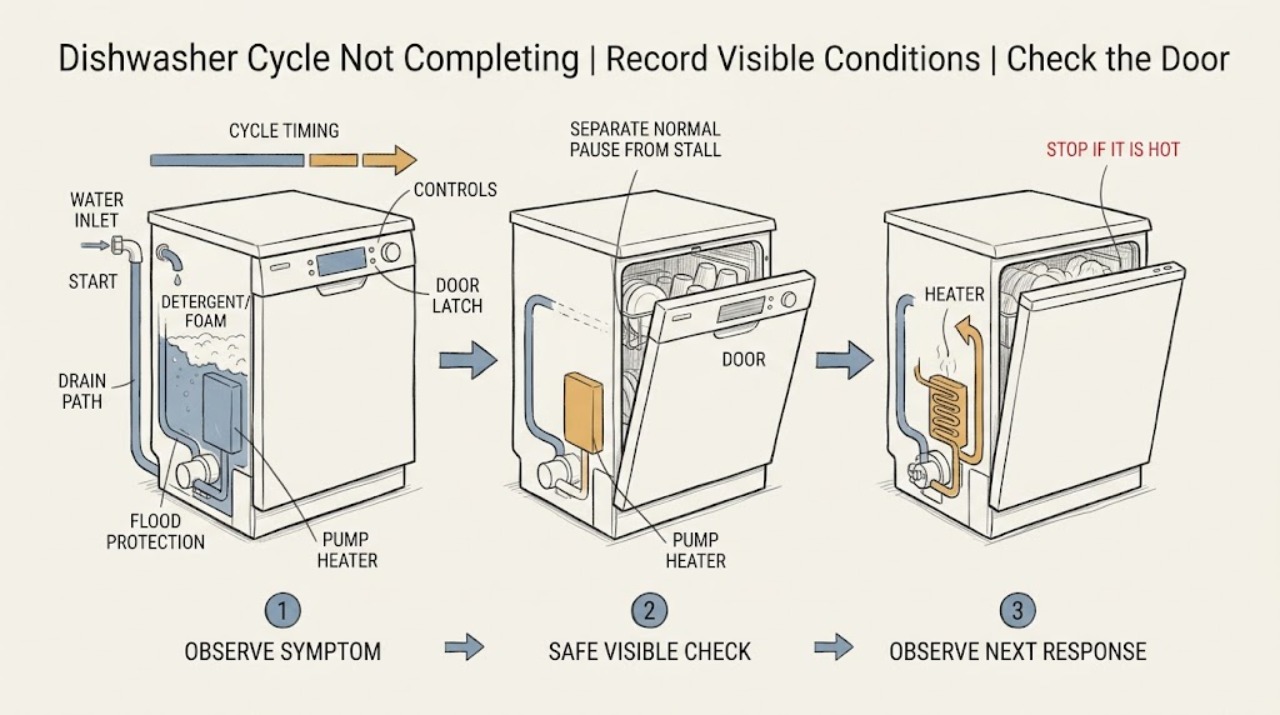
First record the exact Haier model, selected cycle and options, display or light pattern, remaining time, water level, and the point at which the program stopped. Do not treat every pause as a failure: Haier says some models pause about five minutes near the start to soak dishes, certain cycles pause 15–65 seconds during the main wash, and a cycle can take up to 120 minutes depending on the selected program. If the machine stops at the beginning, check that Delay Start is not selected, the door closes until it clicks, the dishwasher has safe household power, and the under-sink water valve is open with no visible inlet-hose kink. If it stops with foam or a flood-protection alert, stop using it and remove only visible spilled rinse aid or incorrect dish soap after power and water hazards are controlled; do not defeat the protection system. If water remains after washing, isolate power from a dry accessible position, let hot water cool, and inspect only the model-approved filter and visible drain path, plus an accessible drain hose, disposal, or air gap for blockage or a kink. A 999 display reset procedure is documented only for the Haier QDT125SSL, so do not apply that button sequence to another model. Repeated stopping, a leak, smoke, burning odor, a hot cord, a recurring error, or any need to open the base requires qualified service.
Before you begin
Safety first
- The user may perform dry, accessible, model-supported checks of loading, door closure, controls, household supply, visible inlet hose, removable filter, and accessible drain connections only as the exact manual permits. Qualified service must handle the base, pump, heater, valve, sensors, flood protection, control board, latch wiring, and live tests.
Work through in order
Diagnostic checks
Use only checks that match the exact appliance or system and its official guide.
-
Check 1
Without deliberately restarting the dishwasher, record the complete model number, selected cycle and options, displayed time, status lights or code, whether the tub contains water or foam, and the last stage you could identify: filling, washing, drying, or draining.
Expected result: The timer is still changing, the machine is in a documented pause or long cycle, the panel is dark, the door was opened, water or foam is present, or an exact alert/code is shown.
Next step: Use the matching branch below and keep the recorded display state for service. Stop immediately for smoke, arcing, burning odor, a hot or damaged cord, water near electrical parts, or a recurring breaker trip.
Stop if: Do not repeatedly cancel and restart the program or recreate a hazardous stop just to obtain a code.
Why this matters
Why: The observation separates a normal timing pause from a door/power problem, a fill or drain restriction, a detergent/flood event, and a model-specific error. The model number determines which Haier controls and code instructions apply.
-
Check 2
If the machine is quiet but still shows a cycle, compare the selected program with the exact Haier manual and watch for eventual timer or status change without opening the tub or interrupting power. Account for the documented soak pause, shorter wash pauses, and a total program time that can reach 120 minutes depending on cycle.
Expected result: The timer or status eventually advances and there is no error, leak, foam, unusual odor, or standing water; or the same display remains unchanged beyond the model's expected program behavior.
Next step: Allow a clearly progressing, hazard-free cycle to complete. If the cycle does not progress or repeatedly stops at the same phase, record the phase and move to the corresponding external check or service handoff.
Stop if: Do not open a hot tub, remove panels, or keep operating if a leak, smoke, burning smell, or electrical hazard appears.
Why this matters
Why: Eventual progress is consistent with a pause or long program. A frozen state with a repeatable stop is more consistent with a control, door, water, heating, drain, or protection fault, but timing alone cannot identify an internal part.
-
Check 3
If the cycle never starts, pauses after loading, or stops immediately after the door was opened, inspect only the visible door edge, racks, and dishes for an obstruction. Close the door until it clicks. From a dry accessible position, check that the dishwasher's switch, plug, GFCI, or breaker has normal power once, and use the model manual for Delay Start or control-lock cancellation.
Expected result: A rack or dish prevents closure, the door clicks and the program resumes, Delay Start or a lock is displayed, the panel is dark, or the cycle stops again despite a closed door and normal external power.
Next step: Remove only the visible loading obstruction and apply the exact model's documented control sequence. If the door will not latch, the panel stays dark, or a protective device trips again, leave the unit off and arrange appliance or electrical service.
Stop if: Do not force the door, defeat its interlock, open electrical compartments, change breaker size, or repeatedly reset a tripping device.
Why this matters
Why: Haier identifies an unlatched door, power interruption, or selected delay as causes of a dishwasher that appears not to start. A repeated stop with a clear door and supply makes a latch, control, or another internal fault more likely.
-
Check 4
If the dishwasher stops before washing or shows little or no water, verify from a dry accessible position that Delay Start is not active, the under-sink water valve is fully open, the household supply is available, and the visible inlet line is not kinked or obstructed. Do not remove the inlet valve or work on pressurized internal fittings.
Expected result: Delay Start is selected, the water valve is closed, the supply is off, the line is kinked or visibly obstructed, or all external conditions look normal but the dishwasher still does not fill.
Next step: Correct only an obvious delay, closed valve, or visible hose condition and follow the exact manual before one normal observation. If filling still fails or a leak appears, close the water valve when safe, leave the machine off, and arrange service.
Stop if: Do not bypass water protection, disconnect a pressurized line, or run a test with a leaking connection.
Why this matters
Why: The first patterns match Haier's documented user-level fill checks. Normal external supply with recurring no-fill behavior points toward the inlet valve, sensor, wiring, or control, which cannot be distinguished safely from this symptom.
-
Check 5
If the cycle stops with visible foam, an alert tone, flashing lights, or a flood-protection message, stop normal use and identify whether dish soap entered the tub or rinse aid spilled around the dispenser. Mop only visible spilled rinse aid with a cloth once the area is safe; do not remove or defeat a sensor, overflow pan, or base component.
Expected result: Foam is present after incorrect soap or a rinse-aid spill, the model displays an Active Flood Protect alert, water is visible under the unit, or there is no foam or water but the alert repeats.
Next step: Keep the dishwasher out of service until foam or water is safely controlled and the exact manual's owner steps are followed. If water is under the unit, the alert returns, or the source is not accessible, close the supply valve when safe and arrange qualified service.
Stop if: Do not run another cycle to test the alert, pour chemicals into the tub, remove the overflow pan, bypass the sensor, or open the base.
Why this matters
Why: Haier attributes excessive foam to dish soap or spilled rinse aid. On applicable models, Active Flood Protect can detect high tub level or water in the pan, cancel the cycle, and activate draining; even a small amount of water at the pan sensor can trigger an alert. A repeated alert without a visible cause needs service diagnosis.
-
Check 6
If the program stops while draining or leaves the tub full, switch it off, isolate power from a dry accessible position, and let hot water cool. Check only the removable filter and model-approved visible drain area, then inspect the accessible drain hose, sink air gap, or disposal connection for food debris or a kink. Refit any removable filter exactly as the manual directs.
Expected result: The filter or visible drain area is blocked, the hose is kinked, the sink/air-gap/disposal path is blocked, the path looks clear but water remains, or the water amount is only a small amount around the filter in a new installation.
Next step: Clear only an obvious external or model-permitted obstruction, refit the filter, and arrange service if the tub remains full or the stop returns. Do not infer a failed drain pump from standing water alone.
Stop if: Do not reach into a disposer or pump, use drain chemicals, remove the base, or perform a live drain test.
Why this matters
Why: Haier links a full tub with blockage at the disposal or sink air gap or a kinked drain hose. A small amount of water around the filter can be normal after a new dishwasher installation, but persistent standing water with a clear path makes an internal pump, hose, sensor, or control issue more likely.
-
Check 7
Read the exact code or alert and compare it with the complete Haier model manual. If, and only if, the model is QDT125SSL and the display shows 999, use Haier's documented reset of holding Cycle Select and Start for five seconds; do not use that sequence on another model. For any other recurring code or incomplete cycle after safe external checks, stop owner diagnosis.
Expected result: The code clears only on the documented QDT125SSL procedure, a different model shows an unverified code, the alert returns, or the cycle still stops after the door, timing, supply, foam, and visible drain checks are normal.
Next step: Record the model, code, phase, remaining time, water level, sounds, and visible findings and contact qualified Haier appliance service. Use qualified electrical service if the household circuit or protective device is the problem.
Stop if: Do not guess a code meaning, repeatedly reset the unit, open the cabinet, bypass safety controls, or replace an internal part based only on the symptom.
Why this matters
Why: The QDT125SSL 999 procedure is a model-specific control reset, not a general Haier dishwasher repair. A recurring or unverified code can involve the latch, inlet, pump, heater, sensor, flood protection, wiring, or control and requires model-specific diagnosis.
Use your observations
Decision map
Find the observation that best matches what you see, then follow the next safe action.
-
PATH 01Safety boundary
What you see
The timer or status eventually advances, the dishwasher is washing or drying, and there is no leak, standing water, foam, error, smoke, or burning odor.
Do this next
Compare the selected program with the exact model manual and allow one hazard-free cycle to finish. Escalate if the display freezes or the same phase repeatedly ends the cycle.
Why this path and its safety boundary
Why it matters: A normal soak pause, short main-wash pause, or long program is more likely than a failed component. Haier documents pauses on some models and up to 120 minutes depending on cycle.
Safety stop: Do not interrupt a hot or active cycle to make the timer move faster.
-
PATH 02Safety boundary
What you see
The panel is dark, the cycle stopped after the door was opened, the door does not click shut, or Delay Start/control lock is displayed, with no water or electrical hazard.
Do this next
Remove a visible rack or dish obstruction, close the door normally, and follow the exact model's controls. Check an accessible power device only once; use service if the panel stays dark or protection trips again.
Why this path and its safety boundary
Why it matters: Door closure, selected controls, or accessible power is more likely than a drain or heater fault. A repeat stop with a secure door and normal supply needs service.
Safety stop: Do not force or bypass the door interlock or repeatedly reset a breaker/GFCI.
-
PATH 03Safety boundary
What you see
The program stops before washing, no normal fill is heard, or the tub remains dry, and the visible door and power state are normal.
Do this next
Correct only an obvious external supply condition and use the exact model guidance. If no-fill recurs, close the water supply when safe and arrange service.
Why this path and its safety boundary
Why it matters: Delay Start, a closed water valve, household supply interruption, or a kinked/obstructed inlet line is more likely. If those are normal, an internal inlet valve, sensor, wiring, or control fault becomes more likely.
Safety stop: Do not disconnect pressurized tubing or open the inlet assembly.
-
PATH 04Safety boundary
What you see
The machine cancels with foam, an alert tone/flashing lights, a flood-protection message, or water under the unit.
Do this next
Stop using the dishwasher, control water from a safe accessible valve if needed, and arrange service when the alert returns, water is under the unit, or the source cannot be safely accessed.
Why this path and its safety boundary
Why it matters: Incorrect detergent or spilled rinse aid may explain foam; on applicable Haier models, a high-level or pan sensor can cancel the cycle and activate draining. Water under the unit or a returning alert is not a normal timing pause.
Safety stop: Do not run a confirming cycle, add chemicals, remove the pan, or bypass flood protection.
-
PATH 05Safety boundary
What you see
Water remains after the program, the machine stops during drain, an external drain connection is blocked/kinked, or the cycle repeatedly fails after door, supply, foam, and visible-path checks.
Do this next
Isolate power and cool the water before only the model-approved visible drain check. If the tub remains full, the code returns, or internal access is needed, leave the appliance off and contact qualified service with the model and recorded phase.
Why this path and its safety boundary
Why it matters: An external drain restriction is plausible when the disposal, air gap, hose, or permitted filter is visibly blocked. A clear path with recurring failure points toward an internal pump, hose, sensor, heater, control, or wiring fault; symptoms do not select a safe part.
Safety stop: Do not use drain cleaner, reach into the pump/disposer, open the base, live-test wiring, or keep restarting a leaking or electrically unsafe unit.
Helpful context
Understand the symptom
A pause is not always an incomplete cycle
Start by distinguishing a progressing program from a true stop. Haier describes a roughly five-minute soak pause near the beginning on some models and shorter 15–65 second pauses during parts of the main wash. It also says total wash-and-dry time can be as long as 120 minutes depending on the selected cycle. A timer that eventually changes, normal washing or drying sounds, and no error, leak, odor, or standing water are different from a cycle that repeatedly cancels at the same phase.
Use the stop phase to choose the next check
A program that never gets water points toward Delay Start, the door, the household supply, or the inlet path. A program that washes but ends with water points toward the drain connection or obstruction. Foam or an Active Flood Protect message is a separate water-level or detergent event, while a model-specific code must be interpreted only with that model's manual. The Haier support pages are mechanism guidance, not proof that every Haier dishwasher has the same display, sensor, filter layout, or controls.
Keep water and electrical work within the safe boundary
Do not reach into a moving spray arm or pump area, remove the base, bypass the door or flood protection, or perform live electrical tests. For a visible filter or drain-path check, turn the dishwasher off and isolate power from a dry accessible position, let hot water cool, and follow the exact model manual. If water is near a cord or outlet, the cord is hot or damaged, a breaker trips again, or there is smoke or a burning smell, leave the appliance off and arrange qualified service.
Safety boundary
Stop conditions
- Stop using the dishwasher immediately for smoke, visible arcing, burning odor, a hot or damaged cord, water near an outlet or cord, or repeated breaker/GFCI operation.
- If water is under the dishwasher or an Active Flood Protect alert returns, close the accessible water supply from a safe dry position and arrange qualified service; do not remove the overflow pan or defeat the sensor.
- Before a model-approved filter or visible drain check, isolate power from a dry accessible position and let hot water cool. Do not reach into a disposer or pump, use drain chemicals, or open the base.
- Use the exact Haier manual for controls, filters, displays, and error codes. Internal latch, inlet, pump, heater, sensor, flood-protection, wiring, and control work requires qualified service.
Only after diagnosis
Potential parts
- model-specific door latch or door-interlock assembly
Consider only when the exact model will not recognize a normally closed door after visible rack and dish obstructions are ruled out and service diagnosis confirms the latch or interlock.
Haier latch shapes, switches, connectors, and control logic vary by model; a cycle stopping alone does not establish fit or failure. - model-specific inlet valve or water-level sensor
Consider only when the water valve is open, the household supply and visible inlet line are normal, and a qualified technician confirms an internal fill or level-sensing fault.
Confirm the full model number and service diagnosis before selecting a valve, sensor, or connector; do not substitute a generic part. - model-specific drain pump, drain hose, or check-valve component
Consider only when the permitted filter, visible drain area, accessible hose, and sink/disposal connection are clear but a technician confirms an internal drain restriction or failed component.
Standing water can originate upstream or in the control sequence; pump, hose routing, and electrical specifications are model-dependent. - model-specific heater, sensor, flood sensor, or control board
Consider only after a recurring incomplete cycle or protection/error state is diagnosed by the exact model's service procedure as an internal heater, sensor, flood system, or control fault.
These are internal service parts. Do not choose one from cycle length, a single alert, or a 999 display on a non-QDT125SSL model.
When checks do not resolve it
Need a professional?
Arrange qualified Haier appliance service when the cycle repeatedly stops, a model-specific code or flood alert returns, no-fill continues with a normal supply, water remains with a clear permitted drain path, or any internal access is needed. Use qualified electrical service when the cord, outlet, household circuit, breaker, or GFCI is hot, damaged, dead, or trips again. Treat smoke, arcing, burning odor, and water near electrical parts as immediate stop-use conditions.
Safety scope: The user may perform dry, accessible, model-supported checks of loading, door closure, controls, household supply, visible inlet hose, removable filter, and accessible drain connections only as the exact manual permits. Qualified service must handle the base, pump, heater, valve, sensors, flood protection, control board, latch wiring, and live tests.
Common questions
FAQ
Can a Haier dishwasher pause and still be working?
Yes. Haier says some models pause about five minutes near the start to soak dishes, and certain cycles pause 15–65 seconds during the main wash. It also says a wash-and-dry program can take up to 120 minutes depending on cycle. If the timer never advances, an error appears, water remains, or the same stop repeats, treat it as a fault rather than a normal pause.
Why does my Haier dishwasher stop before it fills?
Check whether Delay Start is selected, then verify the under-sink water valve is open, the household supply is available, and the visible inlet line is not kinked or obstructed. Haier sends persistent no-fill behavior to service because an internal valve, sensor, wiring, or control problem cannot be identified from the external checks alone.
What should I do if the Haier dishwasher stops with water inside?
Turn the machine off, isolate power from a dry accessible position, and let hot water cool before checking only the model-approved filter and visible drain path. Haier specifically points to a blocked disposal or sink air gap and a kinked drain hose for a full tub. If those paths are clear but water remains, arrange service.
Can too much soap stop a Haier dishwasher cycle?
It can cause excessive foam. Haier says foam may result from dish soap entering the dishwasher or rinse aid spilling while the dispenser is filled, and recommends mopping up spilled rinse aid before use. Stop normal operation if foam is present; do not add chemicals or run repeated test cycles.
What does an Active Flood Protect alert mean on a Haier dishwasher?
On applicable Haier models, a water-level sensor or an overflow-pan sensor can trigger draining, cancel the cycle, and show a message with flashing LEDs and an alert tone. Water under the unit or a returning alert needs service. Do not remove the pan or bypass its sensor.
How do I reset a Haier dishwasher showing 999?
Haier documents a reset only for model QDT125SSL: hold Cycle Select and Start for five seconds until the code clears, then follow the model's normal controls. Do not use this button sequence on another Haier dishwasher; identify the exact model and use its manual instead.
Read the exact guide
Official sources
- Haier - Dishwasher Does Not StartHaier Appliances · Official Haier support guidance; exact controls and model behavior must be confirmed by the complete model number.
- Haier - Dishwasher Will Not DrainHaier Appliances · Official Haier support guidance; drain layout and installation connections vary by model and household.
- Haier Dishwasher - 999 Error Code Appears in DisplayHaier Appliances · Specific to the Haier QDT125SSL model identified by the support page; do not generalize the code or buttons to other Haier dishwashers.
- Haier Dishwashers - Active Flood ProtectHaier Appliances · Only Haier dishwasher models equipped with Active Flood Protect; do not assume the feature exists on every model.
- Haier - Dishwasher Not Filling With WaterHaier Appliances · Official Haier support guidance; supply connections and controls vary by model.
- Haier - Foam or Excessive Bubbles in DishwasherHaier Appliances · Official Haier dishwasher guidance; detergent and dispenser details should be confirmed with the exact model instructions.
- Haier - Dishwasher Running a Long TimeHaier Appliances · Official Haier support guidance; duration depends on the selected cycle and model.
Community feedback
Share a repair observation
Share a plain-text repair observation. Accepted observations are published automatically; this page may take a moment to update.