
On this page
Start here
Quick answer
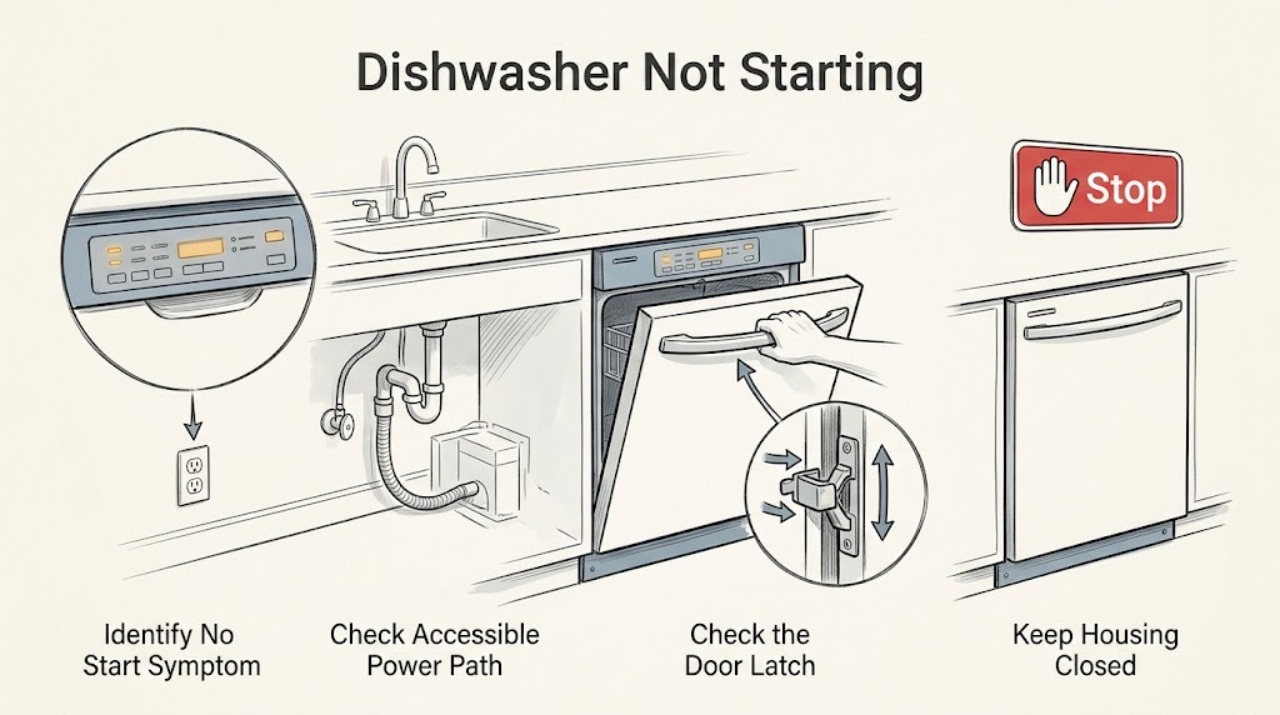
First identify whether the Haier dishwasher is completely dark, has a powered panel but will not start, starts and pauses, or starts without filling. Haier's official no-start guidance lists a door that is not fully latched, the main power switch being off, a tripped breaker, and a water supply that is off; some models also pause several minutes at the beginning of a cycle or briefly during washing. Check only the accessible power, control, door, and under-sink water conditions. Select a cycle and press Start exactly as the model manual shows, cancel any delay or control-lock state only if the manual documents it, and do not keep resetting a breaker. If the dishwasher leaks, smells electrically burned, sparks, trips repeatedly, or has water near electrical components, stop using it and isolate power only from a safe accessible point. Do not remove panels, bypass the door latch or flood protection, or perform live electrical tests.
Before you begin
Safety first
- The owner may observe the panel, close the door normally, rearrange an obstruction, check an accessible breaker and water shutoff, and follow an exact model's documented owner reset once when no hazard exists. Electrical connections, door-latch switches, inlet valves, pumps, flood protection, controls, and wiring require qualified service.
Work through in order
Diagnostic checks
Use only checks that match the exact appliance or system and its official guide.
-
Check 1
Record whether the control panel is completely dark, lights up but ignores buttons, accepts a cycle but does not begin, starts and pauses, or starts without filling. Look and listen from outside for leaking water, smoke, burning odor, sparks, a hot switch or cord, or water near electrical parts.
Expected result: The dishwasher is dark, the panel is responsive or unresponsive, the door clicks or does not click shut, it pauses, or a safety hazard is visible.
Next step: If a hazard is present, stop using the dishwasher and isolate power only from a safe accessible point; arrange qualified service. Otherwise keep the symptom description and continue with the matching external check.
Stop if: Do not touch wet electrical equipment, open the toe-kick or control panel, or run another cycle to reproduce a hazard.
Why this matters
Why: A dark panel points to a power path; a powered panel with no start points to door, control, lock, or cycle state; a start with no fill points to water supply or a later fault. Smoke, burning odor, sparking, repeated trips, or water at electrical parts is a stop-use condition.
-
Check 2
For a dark or suddenly stopped dishwasher, verify from a dry, safe position that the appliance is connected as the installation instructions require and that the household breaker or fuse has not operated. If the dishwasher is hardwired, do not remove covers; if the breaker trips again or will not reset, leave it off.
Expected result: The panel returns after a single safe breaker restoration, the breaker immediately trips again, the dishwasher remains dark, or the installation appears damaged or wet.
Next step: If power is absent or a protective device trips again, use qualified electrical service before reconnecting the dishwasher. If the panel returns and no hazard is present, continue with door and control checks rather than repeating power resets.
Stop if: Do not open the junction box, change a breaker rating, bypass grounding, use an extension cord, or perform a live voltage test.
Why this matters
Why: A supply interruption can explain a dark panel, but a repeat trip or damaged/wet installation shifts the problem to electrical diagnosis. Haier's model-specific electrical requirements and installation instructions control the circuit details.
-
Check 3
Use the exact model manual to select a cycle and press Start, then close the door firmly until the model's latch engagement is complete. Check that no dish, rack, or utensil prevents the door from closing and that a control-lock, delay-start, or other indicator is not active. Do not press the latch switch by hand.
Expected result: The cycle starts after the door is closed, the panel accepts buttons but a lock or delay is shown, the door will not latch, or the panel remains unresponsive.
Next step: Clear a documented lock or delay and retry once. If the door still cannot latch or the controls remain unresponsive, keep the dishwasher off and arrange service; do not bypass the latch to force a start.
Stop if: Do not defeat the door interlock, wedge the door closed, remove the inner door panel, or apply a generic button sequence.
Why this matters
Why: Haier identifies a door that is not properly latched and a dishwasher that is not turned on as no-start causes. A lock or delay is a control state; a door that will not latch or a panel that ignores commands may involve alignment, latch, control, or wiring diagnosis.
-
Check 4
If the door latches and a cycle was accepted, note the elapsed time and whether the dishwasher makes the expected fill, pump, or wash sounds without opening the door repeatedly. Compare the pause with the exact model documentation; Haier says some models pause near the start for soaking and may pause briefly during the main wash.
Expected result: The cycle resumes after the documented pause, the pause is much longer than documented with no fill or wash activity, or the unit stops with water remaining or an indicator.
Next step: Allow a documented pause to finish without repeatedly cancelling and restarting. For a prolonged stop, record the indicator and keep the door closed if safe; check the accessible water supply next, then arrange service if it does not proceed.
Stop if: Do not enter service mode, force the pump, or cycle power repeatedly to skip a programmed pause.
Why this matters
Why: A documented pause can be normal and is not proof that the dishwasher failed to start. A prolonged silent pause or water-state indicator suggests a supply, drain, door, control, or fault condition that needs the next model-specific branch.
-
Check 5
If the cycle is accepted but the dishwasher does not fill, visually check that the water-supply shutoff under the sink is open and that the accessible hose is not visibly kinked or leaking. Do not disconnect the hose or reach into the inlet assembly. If the dishwasher was recently installed, compare the installation status with the model instructions.
Expected result: The shutoff is closed, the hose is visibly kinked or leaking, the supply appears normal, or water enters but the cycle still stops.
Next step: Open only an accessible shutoff that was clearly closed, correct a visible hose bend without disconnecting it, and try the documented start once. For leaks, no fill with a normal supply, or a repeated stop, shut off the water supply if safely accessible and arrange service.
Stop if: Do not remove the inlet hose, bypass the float or leak protection, run with a leak, or test the inlet valve electrically.
Why this matters
Why: Haier lists the water supply being off as a no-start cause, and installation problems can prevent the unit from completing its initial fill. A normal visible supply with no fill shifts concern toward an inlet valve, float, control, door-latch signal, or wiring that requires service.
-
Check 6
Record the exact model and serial number, selected cycle, panel lights or code, door-latch behavior, breaker state, water-supply observation, elapsed pause, and whether any water entered or drained. Match the display only to the exact Haier manual or support page; do not use the QDT125SSL 999 reset unless that is the installed model.
Expected result: The model-specific code or documented owner step resolves the start, the code persists, the dishwasher remains dark/unresponsive, or it still will not fill or run after the applicable external checks.
Next step: Follow a documented model-specific owner reset once only when no safety hazard exists. Otherwise leave the dishwasher off, close its water supply for a leak or uncontrolled fill, and arrange qualified appliance service with the recorded information.
Stop if: Do not guess a code, replace a control or latch from a generic listing, open panels, or continue resetting a failed dishwasher.
Why this matters
Why: Haier's published 999 procedure is explicitly for QDT125SSL, while other models may use different controls and codes. Persistent failure after external checks requires diagnosis of inaccessible control, latch, inlet, drain, pump, or wiring components.
Use your observations
Decision map
Find the observation that best matches what you see, then follow the next safe action.
-
PATH 01Safety boundary
What you see
There is smoke, burning odor, sparking, water near electrical parts, a hot or damaged connection, or the breaker trips again.
Do this next
Stop using the dishwasher, isolate power only from a safe accessible point, close the water supply if a leak is present and safe to reach, and arrange qualified electrical/appliance service.
Why this path and its safety boundary
Why it matters: This is an electrical or water-safety stop-use condition, not a cycle-selection problem.
Safety stop: Do not reset repeatedly, touch wet equipment, remove covers, or run another cycle.
-
PATH 02Safety boundary
What you see
The dishwasher has no display or response, and the accessible supply, breaker, and model-required connection do not restore operation safely.
Do this next
Leave the circuit safe and arrange qualified electrical or appliance service; provide the model and whether the breaker remains stable.
Why this path and its safety boundary
Why it matters: A power supply, control, or wiring issue is more likely than a water or wash-cycle pause.
Safety stop: Do not open hardwired connections, change protection, or use a temporary power cord.
-
PATH 03Safety boundary
What you see
The panel lights, but Start is ignored, a delay/lock indicator is active, or the door does not latch completely.
Do this next
Clear only the documented lock or delay and close the door once. If the door will not latch or the panel still ignores commands, arrange service without bypassing the interlock.
Why this path and its safety boundary
Why it matters: The dishwasher has power but is being held by a documented control state or cannot verify the door closure; a latch/control fault remains possible.
Safety stop: Do not press the latch switch manually, wedge the door, or dismantle the control panel.
-
PATH 04Safety boundary
What you see
A cycle is accepted and the door latches, but the dishwasher pauses briefly near the start or during washing, or remains silent much longer than the model documentation describes.
Do this next
Allow the documented pause to finish. If the unit does not proceed, record the time and indicator, check the accessible water shutoff, and arrange service if the supply is normal.
Why this path and its safety boundary
Why it matters: Some Haier cycles pause normally; an excessive silent pause or no fill indicates a later water, control, latch, or fault branch.
Safety stop: Do not repeatedly cancel, restart, or enter diagnostic mode to force progress.
-
PATH 05Safety boundary
What you see
The cycle is accepted but no water enters, a visible supply problem or leak exists, a model-specific code remains, or a documented reset does not restore operation.
Do this next
Correct only an accessible closed shutoff or visible hose bend, stop for any leak, and arrange service for no fill, persistent code, or repeated failure.
Why this path and its safety boundary
Why it matters: The water supply or installation may be blocking the start; with a normal supply, an inlet, float, control, pump, or wiring issue needs qualified diagnosis. Codes cannot be generalized across Haier models.
Safety stop: Do not disconnect hoses, bypass flood protection, test valves live, or apply the QDT125SSL 999 sequence to another model.
Helpful context
Understand the symptom
“Not starting” can be a normal pause or a real failure
A blank panel and a selected cycle that pauses are different symptoms. Haier notes that some models pause for several minutes near the start to let dishes soak and may pause briefly during the main wash. Confirm that the unit has actually accepted the cycle, that the door is latched, and that the pause exceeds the behavior documented for the exact model before treating it as a no-start failure.
The door and water path are part of the start decision
A dishwasher may have lights but refuse to run if the door latch is not recognized. After a valid start, a closed water-supply valve or an installation problem can make the unit appear stuck at the beginning. These are external observations; the latch, inlet valve, control, and wiring should not be bypassed or tested live by the owner.
Use model identity before interpreting codes
Haier support publishes a 999 reset for the QDT125SSL and separate manuals and installation documents by model. A code, flashing panel, or control-lock symbol must be matched to the appliance's model number; if the document does not provide an owner step, record the display and arrange service.
Safety boundary
Stop conditions
- Stop using the dishwasher for smoke, burning odor, sparks, water near electrical parts, a hot or damaged connection, uncontrolled filling, or repeated breaker operation.
- Do not repeatedly reset the breaker, bypass the door latch, float, leak protection, or control lock, or use a temporary or ungrounded power connection.
- Do not open the toe-kick, junction box, control panel, pump, inlet assembly, or wiring for live tests; internal electrical and water-valve diagnosis belongs to qualified service.
- Do not use a generic reset or error-code sequence. Match every code and procedure to the exact Haier model and manual.
Only after diagnosis
Potential parts
- door latch or door-switch assembly
Consider only after the door closes normally but a qualified diagnosis finds that the model's latch or switch is not reporting a closed door.
Latch and switch assemblies vary by model. Never bypass the latch or order a part from the no-start symptom alone. - inlet valve, float/flood component, or control assembly
Consider only after the supply and installation are verified and qualified diagnosis identifies the model-specific component.
Water-entry, flood-protection, pump, and control parts are model-specific and may involve electrical or leak hazards; no owner live testing is appropriate.
When checks do not resolve it
Need a professional?
Use qualified electrical service for a dead circuit, repeated breaker operation, damaged or hot wiring, smoke, odor, or sparking. Use qualified appliance service when a Haier dishwasher will not latch, the controls remain unresponsive, a documented lock or model-specific code persists, the initial pause is excessive, the unit does not fill with the supply open, or an external check does not restore a cycle. Stop and arrange service immediately for a leak near electrical components or uncontrolled filling.
Safety scope: The owner may observe the panel, close the door normally, rearrange an obstruction, check an accessible breaker and water shutoff, and follow an exact model's documented owner reset once when no hazard exists. Electrical connections, door-latch switches, inlet valves, pumps, flood protection, controls, and wiring require qualified service.
Common questions
FAQ
Why does my Haier dishwasher have power but not start?
Check that the door latches, the cycle and Start command were accepted, and no documented lock or delay is active. Some Haier cycles pause normally, but a door that will not latch or a panel that ignores commands needs service rather than a bypass.
Why does my Haier dishwasher start and then pause?
Haier says some models pause for several minutes near the start to soak dishes and may pause briefly during the main wash. If the pause is much longer than the exact model documentation or there is no fill, record the indicator and check the accessible water supply before arranging service.
Can I use the Haier 999 reset on any dishwasher?
No. Haier publishes that reset specifically for the QDT125SSL. Use an error-code or reset procedure only when the exact model manual or Haier support page identifies your dishwasher.
Read the exact guide
Official sources
- Haier - Dishwasher Does Not StartHaier Appliances · Directly supports the broad Haier dishwasher no-start decision tree; exact controls and procedures remain model-specific.
- Haier Dishwasher - 999 Error Code Appears in DisplayHaier Appliances · Only for the QDT125SSL model named by Haier; it must not be generalized to other dishwashers.
- Owner's Manual & Installation InstructionsHaier Appliances · Supports retrieving the exact model documents before interpreting controls, locks, codes, wiring, or installation.
- Haier - Dishwasher Electrical Requirements and Breaker SizeHaier Appliances · Supports using the exact installation instructions and keeping electrical work out of owner troubleshooting; model-specific installation documents control.
- Delivery & Installation - Appliance Damaged, Not Working or Parts are Missing at DeliveryHaier Appliances · Supports the installation and initial fill/drain branch; it is not a repair procedure for every model.
- Support by Product LineHaier Appliances · Supports the model-specific approach and service escalation for Haier dishwashers.
Community feedback
Share a repair observation
Share a plain-text repair observation. Accepted observations are published automatically; this page may take a moment to update.