
On this page
Start here
Quick answer
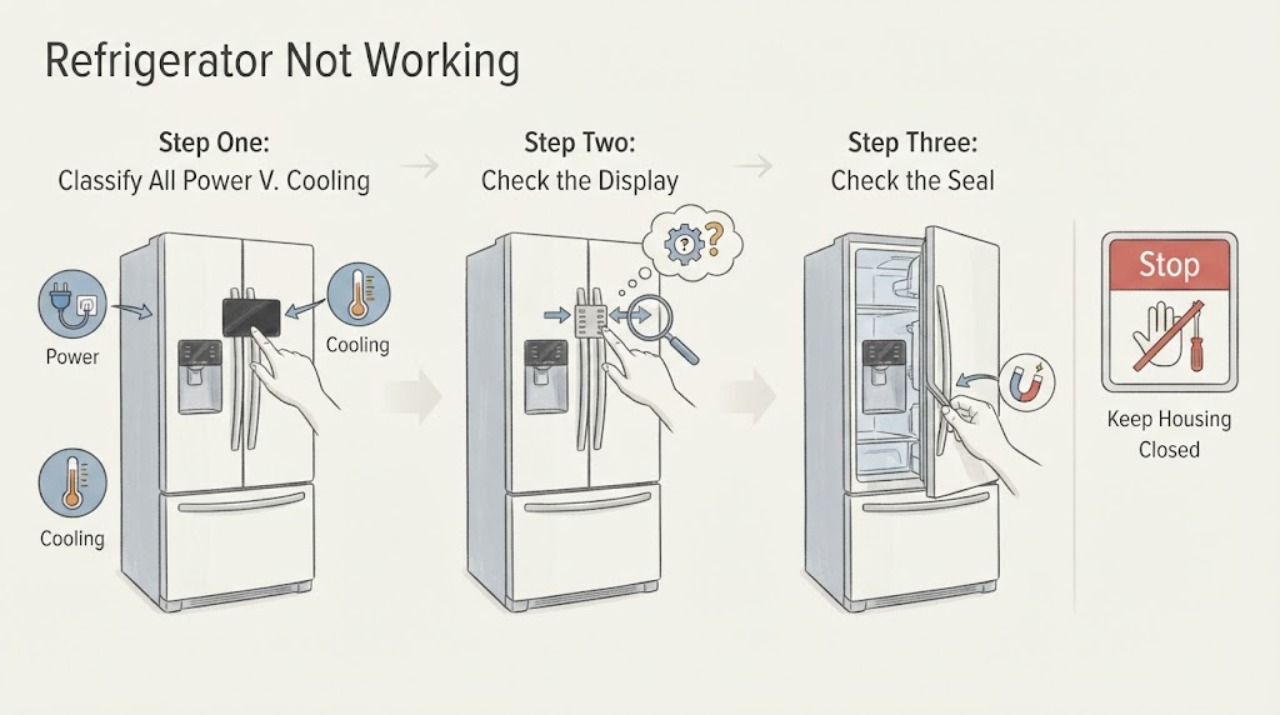
“Not working” can mean no power, no cooling, one compartment disabled, or a control that will not respond. Start by recording whether the interior light and display work, whether the compressor or fan runs, and whether one or both compartments are warm. With dry hands, check the accessible plug, wall outlet, switch, and breaker or fuse once; verify the refrigerator is turned on and the thermostat is not at OFF, Min, or 0. If the panel works, check the exact model for a locked panel, Holiday or other mode, a disabled fridge compartment, or a temperature setting that needs time to balance. Then check the door gasket, frequent openings, warm food load, and blocked air vents. A refrigerator that stays warm after these external checks, has a persistent control or sensor indication, repeatedly trips power, or has a compressor, fan, wiring, or sealed-system symptom needs qualified Haier service. This page covers the broader “not working” problem and should not be read as a model-specific diagnosis or as the same narrow symptom as “not turning on.”
Before you begin
Safety first
- The user may record the exact model and symptom pattern, use the documented controls, inspect visible door, gasket, load, and air vents, and check an accessible dry outlet, plug, switch, breaker, or fuse. Qualified personnel must handle hardwired supply, live testing, panels, sensors, fans, controls, compressor, defrost, wiring, refrigerant, and sealed-system work.
Work through in order
Diagnostic checks
Use only checks that match the exact appliance or system and its official guide.
-
Check 1
Note whether the interior light, display, alarms, and any fan or compressor sound are present, and whether the freezer, fridge, or both compartments are warm. With dry hands, inspect only the accessible plug, cord, wall switch, and outlet for visible damage, then check the correct breaker or fuse once.
Expected result: The light and display are dark; the outlet is dead; the breaker has tripped; the display works but both compartments are warm; or only one compartment is warm.
Next step: Restore an accessible supply only if the cord, plug, outlet, and breaker are cool and undamaged and the breaker resets normally. For a powered but warm unit, continue with controls and airflow; for a single warm compartment, continue with the compartment-specific branch.
Stop if: Stop immediately for smoke, sparks, burning odor, a hot or damaged cord, plug or outlet, exposed wiring, water near electrical parts, or a breaker that trips again.
Why this matters
Why: A dark appliance points first to household supply, plug, switch, fuse or breaker, or the refrigerator power path. A lit appliance with warm compartments shifts toward a setting, airflow, door, control, or cooling-system problem. One warm compartment is not the same fault as total refrigerator failure.
-
Check 2
Use the exact model's Owner's Manual to verify that the refrigerator is on, the thermostat or temperature setting is not OFF, Min, or 0, and the panel is unlocked. If the model has a separate fridge-compartment control or Holiday mode, check those indicators before changing a setting. Do not guess a reset sequence.
Expected result: The control is off or too warm, the panel is locked, the fridge compartment is disabled, Holiday mode is active, the display will not accept a documented setting, or all controls appear normal.
Next step: Correct only the model-documented mode, lock, or setting and allow the manual's temperature-balance period. If the panel remains abnormal or the compartment cannot be enabled, record the display and arrange service.
Stop if: Stop if the panel is hot, scorched, erratic, or requires cover removal, live testing, or bypassing a lock or safety function.
Why this matters
Why: A mode, lock, disabled compartment, or incorrect setting can mimic a mechanical failure. A normal control state with no response to a documented change makes the control, sensor, or refrigeration system more likely, but does not identify a part.
-
Check 3
Close each door normally and inspect the visible gasket contact around the frame. Remove packages that hold a door open, keep the door from sealing, or were recently added while warm. Do not force the door or remove the gasket.
Expected result: A door remains ajar, the gasket has a gap or visible damage, warm food was recently loaded, doors are opened frequently, or closure and gasket contact appear normal.
Next step: Reposition the load and clean only the accessible gasket using the model's care instructions, then keep the doors closed while cooling recovers. Escalate a damaged seal, door alignment problem, or no improvement after recovery.
Stop if: Stop for a damaged door, hinge, cabinet, gasket mount, sharp glass, or any need to remove hardware or panels.
Why this matters
Why: Haier identifies frequent openings, warm food, and a poor gasket seal as conditions that can leave food warm even when the refrigerator has power. A normal seal and ordinary load make these external causes less likely.
-
Check 4
Look through the doorway for food blocking the cold-air outlet or other visible air vents in the affected compartment. If the exact manual permits accessible cleaning, unplug first; do not reach into a fan, remove an air duct, or chip ice from a liner.
Expected result: The affected compartment's outlet is blocked, air movement is absent where the model normally provides it, heavy frost surrounds an outlet, or the visible air path is clear.
Next step: Move only the visible obstruction and allow the refrigerator to rebalance. If frost is thick, air remains absent, or one compartment stays warm after the exact model's recovery period, leave internal access to service.
Stop if: Stop for water near electrical parts, a damaged liner, a moving fan, sharp ice, or any need to remove panels or use tools inside the compartment.
Why this matters
Why: Haier directs owners to clear blocked air vents when only the fridge or freezer compartment is not cool. A clear path with no expected air movement or recurring heavy frost shifts concern toward a fan, defrost, sensor, control, or refrigeration fault.
-
Check 5
After the safe external corrections, record whether cooling returns in both compartments, only one compartment, or neither; whether the compressor or fan cycles; and whether frost, water, alarms, or unusual heat appear. Compare the result with the exact model manual and do not diagnose from a sound or temperature reading alone.
Expected result: Cooling recovers; one compartment remains warm; both remain warm; the compressor or fan never starts or repeatedly clicks; a fault indication remains; or electrical or heat symptoms occur.
Next step: Protect perishable food and arrange authorized Haier service for persistent symptoms. Provide the exact model, compartment pattern, temperature setting, display behavior, sounds, frost or water observations, power history, and the safe checks already performed.
Stop if: Stop immediately for smoke, burning odor, sparks, a hot cord or cabinet, water near electrical parts, gas odor, or repeated breaker trips.
Why this matters
Why: Recovery after a setting, door, load, or vent correction supports an external use or airflow cause. Persistent one-zone or whole-cabinet warmth, a failed fan or control indication, repeated clicking, or abnormal heat makes an internal control, fan, compressor, defrost, or sealed-system issue more likely.
Use your observations
Decision map
Find the observation that best matches what you see, then follow the next safe action.
-
PATH 01Safety boundary
What you see
The light and display are dark, or the accessible outlet has no power.
Do this next
Check the accessible supply once when dry and safe. If power is present but the refrigerator stays dark, or power trips again, leave it off and use qualified electrical or Haier service.
Why this path and its safety boundary
Why it matters: Household supply, plug, switch, fuse or breaker, or the refrigerator power path is more likely than a cooling-only fault.
Safety stop: Do not reset repeatedly or touch wiring; stop for heat, smoke, sparks, odor, water, or damaged power hardware.
-
PATH 02Safety boundary
What you see
The light or display works, but both compartments are warm after the refrigerator is on and the setting is cold enough.
Do this next
Check visible gasket, load, and vent conditions and allow the exact model's recovery time. If both compartments remain warm or the compressor never starts, arrange service.
Why this path and its safety boundary
Why it matters: Door sealing, warm loading, blocked airflow, control, fan, compressor, defrost, or refrigeration causes are more likely than a dead outlet.
Safety stop: Stop for abnormal heat, odor, smoke, sparks, water near electrical parts, or repeated power trips.
-
PATH 03Safety boundary
What you see
The freezer cools but the fridge does not, or only the fridge display area is absent while other control functions work.
Do this next
Use the exact model manual to enable the compartment and exit any documented mode, then clear visible vent obstructions and allow temperature balance. Escalate persistent one-zone warmth or a missing air path.
Why this path and its safety boundary
Why it matters: A separate compartment-off state, Holiday mode, blocked cold-air outlet, door/load condition, or compartment fan/control fault is more likely than total refrigerator power failure.
Safety stop: Do not remove an air duct, fan cover, sensor, or control panel or use a guessed button sequence.
-
PATH 04Safety boundary
What you see
The door has a gap or obstruction, the gasket does not seal, warm food was recently loaded, frequent openings occurred, or a visible air outlet is blocked.
Do this next
Correct only the visible load, gasket, and vent condition allowed by the manual, then reassess with the doors closed. Arrange service for a damaged gasket, persistent frost, or no recovery.
Why this path and its safety boundary
Why it matters: Warm-air entry or restricted circulation is more likely than an immediate compressor or sealed-system failure.
Safety stop: Do not force doors, remove gaskets, chip frost, or work around a damaged cabinet or wet electrical area.
-
PATH 05Safety boundary
What you see
Power and settings are normal, visible door and vent checks are normal, but one or both compartments remain warm; a control, sensor, or fault indication persists; the compressor or fan is silent or repeatedly clicking; or electrical warning signs occur.
Do this next
Disconnect power when safe, protect perishable food, and arrange qualified Haier service or an electrician for the supply. Supply the model and serial information, display code, compartment pattern, sounds, frost and water clues, and power history.
Why this path and its safety boundary
Why it matters: An internal control, sensor, fan, defrost, compressor, wiring, or sealed-system problem is possible and cannot be identified safely from the symptom alone.
Safety stop: Do not perform live measurements, remove panels, replace internal parts, handle refrigerant, or repeatedly reset a breaker.
Helpful context
Understand the symptom
Classify what “not working” means
A dark light and display indicate a supply or power-path problem. A lit cabinet that is warm is a cooling or settings problem. A working freezer with a warm fridge compartment is a compartment, mode, door, or airflow clue. Record the symptom before changing controls so a technician can distinguish the broad complaint from the narrower “not turning on” or “not starting” intent.
Use the exact model for modes and temperatures
Haier uses both dial and electronic controls. Some models have a separate fridge-compartment switch, Holiday mode, a control lock, or a reset procedure; other models do not. Use the model number to retrieve the Owner's Manual and do not copy a button sequence or temperature range from another refrigerator.
Cooling recovery takes more than one quick glance
Haier advises allowing time for warm food to reach temperature and notes that frequent door openings, poor gasket sealing, and blocked air vents can affect cooling. Compare both compartments after the setting and visible airflow checks, rather than declaring the compressor failed from one warm shelf or a single quiet period.
Internal diagnosis is a service boundary
The user-level checks end at accessible power, documented controls, visible gasket and loading conditions, and visible air vents. Do not remove covers, touch a fan or compressor, perform live electrical measurements, or open the refrigeration circuit. Haier reserves repair of electrically powered products for qualified personnel.
Safety boundary
Stop conditions
- Stop immediately for smoke, burning odor, sparks, scorching, a hot or damaged cord, plug or receptacle, exposed wiring, water near electrical parts, gas odor, abnormal heat, or repeated breaker trips.
- Check an accessible plug, outlet, switch, breaker, or fuse only when dry and safe, and do not repeatedly reset a tripping circuit.
- Do not remove covers, interior panels, fans, sensors, control boards, compressor parts, or wiring; do not perform live measurements or sealed-system work.
- Do not chip, drill, scrape, or heat ice, probe a suspected drain or liner, or force a door, gasket, or control lock.
- If the exact model's external checks and documented settings do not restore normal cooling, leave the refrigerator off as appropriate and arrange qualified service while protecting perishable food.
Only after diagnosis
Potential parts
- model-matched door gasket or door-closure hardware
Consider only after visible inspection confirms a torn gasket, persistent perimeter gap, or closure problem that remains after load repositioning.
Confirm the complete Haier model and door design; do not infer fit from cabinet dimensions or a similar-looking gasket. - model-matched temperature, compartment, or door sensor
Consider only after the exact manual or qualified diagnosis identifies a persistent sensor, compartment, or control indication; warm food alone does not prove a sensor failure.
Sensor location, connector, and fit vary by Haier model; use the rating-plate model and authorized fit information. - model-matched fan, control, compressor, defrost, or sealed-system component
These parts are relevant only after qualified diagnosis of persistent no-cooling, one-zone cooling loss, fan or compressor symptoms, defrost problems, or control faults following the safe external checks.
Do not select an internal part from a broad “not working” symptom or generic listing; model-specific access, ratings, and sealed-system requirements must be confirmed by qualified service.
When checks do not resolve it
Need a professional?
Arrange qualified Haier refrigerator service when it remains dead after one safe accessible power check, stays warm after correct model settings and the documented recovery period, has one compartment that remains warm after mode, door, load, and vent checks, shows a persistent control or sensor indication, or has compressor, fan, defrost, wiring, or sealed-system symptoms. Use a qualified electrician for a defective or hardwired household supply. Stop immediately for smoke, burning odor, sparks, scorching, a hot or damaged cord or receptacle, water near electrical parts, gas odor, abnormal heat, or repeated breaker trips. Give the technician the exact model and serial information, light and display behavior, temperature setting, mode or code, compartment pattern, power history, door and gasket condition, vent and frost observations, sounds, and the safe checks already performed.
Safety scope: The user may record the exact model and symptom pattern, use the documented controls, inspect visible door, gasket, load, and air vents, and check an accessible dry outlet, plug, switch, breaker, or fuse. Qualified personnel must handle hardwired supply, live testing, panels, sensors, fans, controls, compressor, defrost, wiring, refrigerant, and sealed-system work.
Common questions
FAQ
What should I check first when my Haier refrigerator is not working at all?
Check whether the interior light and display work, then inspect the accessible plug and outlet and check the breaker or fuse once when dry and safe. Verify that the refrigerator is on and the thermostat is not at OFF, Min, or 0. A refrigerator that stays dead with power present needs qualified service.
Why does my Haier refrigerator have power but stay warm?
Check the exact temperature setting or mode, door and gasket sealing, warm loading, frequent openings, and blocked air vents. If both compartments remain warm after the model's recovery period, or the compressor or fan never starts, arrange service.
Why is only the fridge compartment of my Haier refrigerator not working?
Some Haier models can switch the fridge compartment off or use Holiday mode. Confirm the exact model's controls first, then clear visible air-outlet obstructions and allow temperature balance. Persistent one-zone cooling loss needs service.
Why will my Haier refrigerator temperature control not change?
An electronic panel may be locked, or the model may use a different temperature-setting sequence. Use the exact Owner's Manual to unlock or reset it; if an unlocked panel still will not accept a setting, Haier directs the issue to service.
When is a Haier refrigerator that is not working unsafe to keep running?
Stop and disconnect power when safe for smoke, sparks, burning odor, a hot or damaged cord, water near electrical parts, abnormal heat, gas odor, or repeated breaker trips. Do not remove panels or keep operating through a suspected fan, compressor, wiring, or sealed-system fault.
Read the exact guide
Official sources
- Fridge compartment does not work.Haier India · Applies to the Haier refrigerator models and control families described on this page; use only conditionally because model operations differ.
- Haier - Service Manual RequestsHaier Appliances · Applies to Haier electrical products, including refrigerators; exact service procedures remain model-specific.
- Owner's Manual & Installation InstructionsHaier Appliances · Use after identifying the exact refrigerator model; it does not establish a universal control sequence.
- Cannot set temperatureHaier Saudi Arabia · Applies to the display and non-display refrigerator control types described on this page; exact unlock and reset behavior varies by model.
- Haier - Refrigerator Running but Not CoolingHaier Appliances · Applies to Haier refrigerators covered by the support article; temperature ranges and airflow layouts vary by model.
- Haier - Refrigerator Not Coming On / Not RunningHaier Appliances · Applies to Haier refrigerators in the support article; controls and thermostat behavior vary by exact model.
- Freezer does not operate or Power-On Light is not onHaier Philippines · Applies to the freezer symptom page and is used conditionally for comparable Haier refrigeration power checks; exact product controls vary.
Community feedback
Share a repair observation
Share a plain-text repair observation. Accepted observations are published automatically; this page may take a moment to update.