
On this page
Start here
Quick answer
A Haier washer-dryer door can remain locked normally while the drum is rolling, the water level or temperature is too high, or a drying cycle is still cooling. Press Pause or cancel the program using the exact model instructions, then wait until the lock indicator clears; do not pull the handle. If water remains, use only the model-approved drain or spin function before switching the appliance off. Haier's combo support also recommends disconnecting power for one minute and trying again, but says a door that remains locked requires service. Stop immediately for a hot door, leaking water, smoke, damaged latch, or any need to reach inside the lock, and arrange qualified Haier appliance service.
Before you begin
Safety first
- This article covers control-state observation, waiting for safe stop and cool-down, ordinary external closure checks, the exact manual's accessible drain procedure, and one model-appropriate power check. Do not force or bypass the lock, enter standing water, remove panels, or improvise internal access.
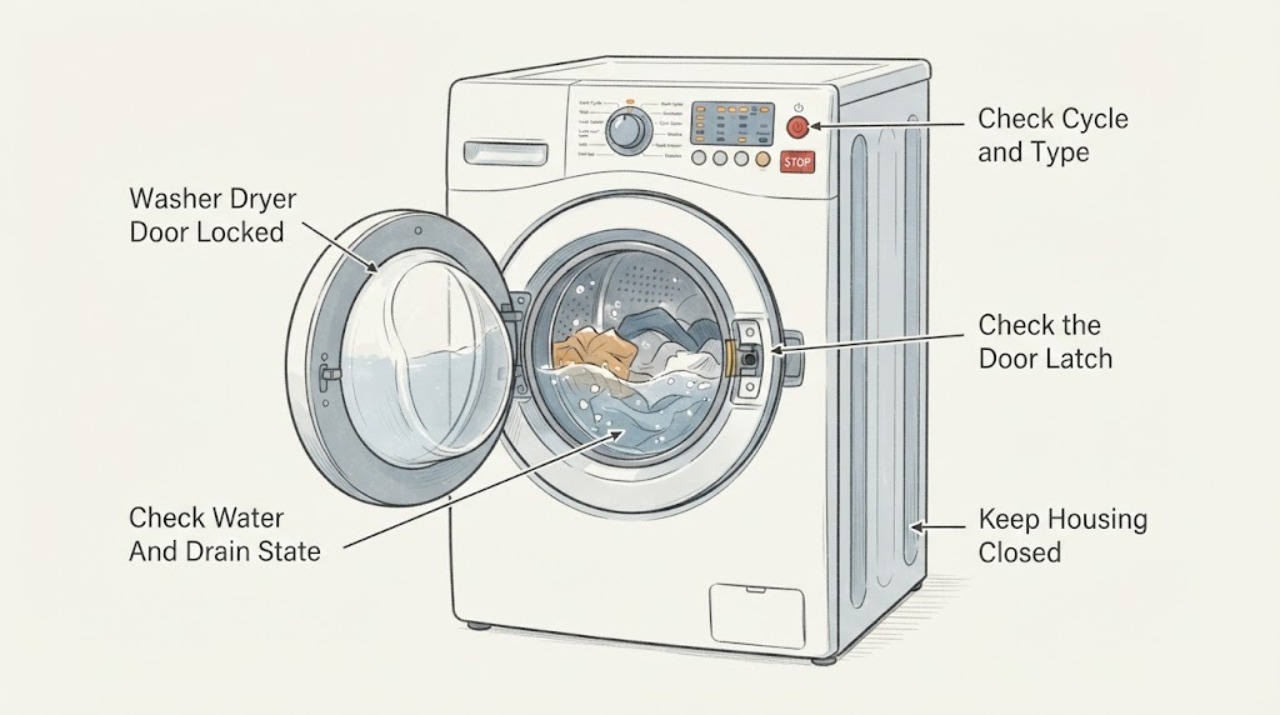
Work through in order
Diagnostic checks
Use only checks that match the exact appliance or system and its official guide.
-
Check 1
Read the display and lock indicator from outside the Haier washer-dryer and note whether the appliance is washing, spinning, drying, cooling, paused, delayed, or showing an error; do not pull the handle or insert anything around the door.
Expected result: The drum is still rolling, the cycle is washing or spinning, drying or cooldown is active, a delay is selected, the lock indicator is lit, or the appliance shows a door, water-level, drain, or other error.
Next step: Use Pause or cancel only as described in the exact Haier manual, then wait for the drum to stop and the lock indicator to clear before testing the handle gently.
Stop if: Do not force the door, open it while the drum is rolling, or continue if the glass or door is hot, the appliance is leaking, or smoke or a burning odor is present.
Why this matters
Why: Haier says the lock can remain active while the drum is moving, the water level or temperature is high, during spinning, or during drying until the interior cools. A lock indicator during one of these states may be normal; a persistent lock after the cycle and safe cool-down are complete needs the next checks.
-
Check 2
From outside the closed appliance, check whether water is visible through the door or whether the display reports a drain or water-level condition; do not open the door into standing water or disconnect hoses while the unit is energized.
Expected result: No water is visible and no drain message appears; water remains in the drum; the pump runs but water does not leave; or a drain or pump-filter error is shown.
Next step: Follow the exact Haier owner's manual for an accessible pump-filter or drain check, or use its approved spin or drain function only when the water is safe and the controls permit it; arrange service if draining fails or access requires disassembly.
Stop if: Do not force the door, handle hot or contaminated water, loosen a hose into an uncontrolled spill, or open the cabinet to reach the pump or lock.
Why this matters
Why: A residual water level can keep the safety lock active. Haier's combo error guidance associates drain faults with a pump-filter restriction or a kinked or incorrectly placed drain hose, but the exact access and emptying method vary by model.
-
Check 3
After the drum is stopped and the door area is cool, inspect the visible gasket, latch opening, and door edge for a plainly accessible garment, debris, misalignment, or damage; close the door normally without slamming or applying force.
Expected result: The door closes and the lock indicator engages normally; a visible item prevents closure; the latch or gasket is damaged; or the door appears aligned but the lock does not engage or release.
Next step: Remove only a loose, plainly accessible item without tools and retry the documented close-and-pause sequence once; request service if the latch, gasket, door, or lock remains abnormal.
Stop if: Do not pry the gasket, reach through the lock opening, use a tool to release the latch, tape or hold a safety switch, or run the machine with a damaged door or seal.
Why this matters
Why: A visible obstruction or damaged gasket can keep the latch from reaching its normal position, while a door that closes but will not lock or unlock can involve the interlock, sensor, wiring, water-level state, or control. Appearance alone cannot identify the failed part.
-
Check 4
If the drum is stopped, the door is not hot, no water hazard is present, and the power connection can be isolated safely, follow Haier's combo guidance to disconnect power for one minute, restore power, and try the door once without forcing it.
Expected result: The door unlocks after power is restored; the lock remains active; the lock clears only briefly and returns; or the control shows a recurring error.
Next step: If the door opens normally, remove the laundry and use the exact manual to identify why the cycle stopped; if it remains locked or relocks, leave the appliance out of service and arrange qualified Haier repair.
Stop if: Do not repeat resets continuously, unplug by pulling a damaged cord, restore power near a leak, or use a manual release that is not explicitly provided for the exact model.
Why this matters
Why: Haier identifies a one-minute power disconnect as a limited check for a locked washer-dryer combo. A successful release does not prove the underlying latch, sensor, water-level, or control condition is resolved; a persistent or recurring lock requires service.
-
Check 5
Find the exact Haier model and serial information from the rating label or manual, and record the cycle, lock indicator, error text, water or heat state, power-reset result, and any visible latch or gasket issue for service.
Expected result: The model manual gives a safe, matching procedure that resolves the lock; the lock returns after the cycle; the error identifies a door, drain, water-level, or control condition; or the exact procedure remains uncertain.
Next step: Keep the washer-dryer out of service and arrange qualified Haier appliance service, providing the model identity and the complete observation record.
Stop if: Do not remove panels, defeat the lock, reach inside the door mechanism, or replace a lock or pump without model-specific diagnosis and safe isolation.
Why this matters
Why: Haier support and manuals are model-specific. A door that remains locked after the documented pause, drain, cool-down, and limited power check cannot be safely diagnosed by pulling the door or guessing at a lock, pump, sensor, or control replacement.
Use your observations
Decision map
Find the observation that best matches what you see, then follow the next safe action.
-
PATH 01Safety boundary
What you see
The drum is still rolling, the appliance is spinning, the water or temperature is high, or drying or cooldown is active and the lock indicator is present.
Do this next
Pause or cancel using the exact manual and wait for the drum to stop, water to drain if applicable, and the lock indicator to clear.
Why this path and its safety boundary
Why it matters: The door lock may be operating normally to prevent access to a moving drum, hot water, or hot laundry.
Safety stop: Do not pull the door, interrupt the lock mechanically, or open it while hot water or moving laundry is present.
-
PATH 02Safety boundary
What you see
Water remains in the drum or a drain or pump-filter condition is displayed.
Do this next
Use the model-approved spin or drain and accessible pump-filter procedure, then power off only as the manual permits; request service if draining fails.
Why this path and its safety boundary
Why it matters: The appliance may retain the lock until the water level is safe; the drain path may also be preventing normal program completion.
Safety stop: Do not open into standing water, handle hot or contaminated water, or disassemble the pump or drain path.
-
PATH 03Safety boundary
What you see
A loose garment or debris is plainly visible at the gasket or latch area and the door does not close normally.
Do this next
Remove only the accessible item without tools, close the door normally, and retry the documented sequence once; arrange service if closure or locking remains abnormal.
Why this path and its safety boundary
Why it matters: The obstruction may be preventing the lock from reaching its normal position, but damage to the gasket, door, or latch still needs checking.
Safety stop: Do not pry, cut, pull hidden fabric, or operate with a damaged seal or latch.
-
PATH 04Safety boundary
What you see
The drum is stopped, the door is cool and safe, no water hazard is present, and the door unlocks after Haier's one-minute power disconnect.
Do this next
Record the cycle and display state, use the exact manual to identify the interruption, and monitor one normal cycle; arrange service if the lock returns.
Why this path and its safety boundary
Why it matters: The lock state cleared, but the original cycle interruption or control, sensor, drain, or latch issue may still recur.
Safety stop: Do not keep cycling power to mask a recurring lock or restart near a leak or damaged cord.
-
PATH 05Safety boundary
What you see
The door remains locked after the documented pause, safe drain or cool-down, and one model-appropriate power check.
Do this next
Leave the appliance out of service and arrange qualified Haier appliance repair with the model, display, cycle, and water or temperature observations.
Why this path and its safety boundary
Why it matters: Haier identifies a washer-dryer combo door that remains locked after its power check as requiring service; the failure may involve the latch, lock signal, water-level state, drain, or control.
Safety stop: Do not force the handle, use an improvised release, remove panels, or order a lock or pump by symptom alone.
-
PATH 06Safety boundary
What you see
The door or glass is dangerously hot, water is leaking near electrical parts, smoke or a burning odor is present, the latch is broken, or the cord or outlet is damaged.
Do this next
Stop the appliance, keep people away, isolate power only through a safe accessible control if appropriate, and arrange urgent qualified service; seek emergency help for an active fire or immediate electrical danger.
Why this path and its safety boundary
Why it matters: This is beyond ordinary door-release troubleshooting and may involve burn, electrical, water, or mechanical risk.
Safety stop: Do not touch hot glass or damaged wiring, open the locked door, move a leaking appliance, or restart it to test the lock.
Helpful context
Understand the symptom
A locked door is often a safety state, not a broken handle
Haier describes the door lock as a safety function. During washing or spinning, the drum can still be moving or the water level or temperature can be too high for the door to open. During drying, heat inside the drum can also keep the lock active until the appliance cools. The correct first response is to stop or pause the program through the controls and wait for the model's lock indicator or door state to clear, not to pull the door.
Water remaining in the drum changes the next step
A door may stay locked when the appliance detects residual water. Haier's combination washer-dryer error guidance links a drain condition with the pump-filter and drain hose, while its door-opening guidance says to use the spin or drain function when water is present. Use only the exact manual's accessible procedure and keep the door closed if water is hot, contaminated, or at an unknown level.
Power reset is limited and model-dependent
For its washer-dryer combo door-locked symptom, Haier says to disconnect power for one minute, restore power, and try again; if the door still will not unlock, service is required. This does not authorize prying the latch, reaching through a gap, removing a panel, or repeating resets indefinitely. Record the model, cycle, display message, water level, and temperature state for the technician.
Safety boundary
Stop conditions
- Do not pull, pry, tape, hold, or otherwise bypass the Haier door lock or latch.
- Do not open the door while the drum is rolling, the water level is high, the water is hot, or the drying compartment has not cooled.
- Do not enter standing or contaminated water, disconnect internal hoses, remove panels, or use an improvised manual release.
- Stop for smoke, burning odor, damaged wiring or cord, a hot or cracked door, leaks near electrical parts, or a broken latch.
- Stop and arrange qualified service when the door remains locked after the exact model's documented pause, drain, cool-down, and limited power check.
Only after diagnosis
Potential parts
- Haier-compatible door lock or interlock assembly
Consider this category only if qualified diagnosis confirms that the exact model's door lock or interlock is failing after safe closure, drain, and control checks.
Confirm the exact Haier model, lock design, wiring connector, gasket alignment, and manufacturer fit information; never bypass the interlock. - Haier-compatible door latch or gasket
Consider this category only if inspection or service confirms physical latch or gasket damage, misalignment, or a seal condition that prevents safe locking.
Confirm the exact model and seal position with qualified service; do not pry, cut, or operate with a damaged gasket. - Haier-compatible drain pump or filter component
Consider this category only when the model-approved filter and hose checks are complete and diagnosis confirms a drain component fault rather than a temporary restriction.
Confirm the exact model, pump design, hose connections, water-isolation procedure, and safe installation method with a qualified technician.
When checks do not resolve it
Need a professional?
Arrange qualified Haier appliance service when the door remains locked after the drum stops, the water is safely drained, the appliance cools, and one model-appropriate power check is complete; when a door, latch, gasket, drain, water-level, or control error returns; or when opening the lock would require a panel, tool, improvised release, or internal electrical work. Seek urgent service for a hot or damaged door, smoke, burning odor, electrical damage, or a leak near electrical parts.
Safety scope: This article covers control-state observation, waiting for safe stop and cool-down, ordinary external closure checks, the exact manual's accessible drain procedure, and one model-appropriate power check. Do not force or bypass the lock, enter standing water, remove panels, or improvise internal access.
Common questions
FAQ
Why is my Haier washer-dryer door locked?
The lock may be normal while the drum is moving, water remains, the water or drum temperature is high, or drying cooldown is active. Pause or cancel with the exact manual, wait for the lock indicator to clear, and never force the handle.
How do I unlock a Haier washer-dryer door with water inside?
Do not open the door into standing water. Use only the exact model's approved spin or drain function and accessible pump-filter procedure when the water is safe to handle. If it will not drain or the procedure requires disassembly, stop and arrange service.
Can I reset a locked Haier washer-dryer?
For a Haier washer-dryer combo door that will not open, Haier says to disconnect power for one minute, restore it, and try again. This is a limited check, not permission to repeat resets or bypass the lock. If the door remains locked, service is required.
What if the Haier lock clears but comes back?
A temporary release does not prove the cause is fixed. Record the cycle, lock indicator, water or heat state, display message, and any drain or closure result, then use the exact manual to identify the interruption. Arrange service if the lock returns.
Should I use a manual release or replace the door lock?
Do not use an improvised manual release or replace a lock from the symptom alone. A persistent lock can involve the latch, gasket, drain, water-level sensing, temperature state, wiring, or control. A qualified technician should diagnose the exact Haier model and confirm a compatible repair.
Read the exact guide
Official sources
- Haier - Washer/Dryer Combo Door LockedHaier Appliances · Directly applies to Haier washer-dryer combo doors that remain locked and will not open.
- Owner's Manual & Installation Instructions | Haier AppliancesHaier Appliances · Use to locate the exact manual for the installed Haier washer-dryer before attempting a model-specific door or drain procedure.
- Haier Combination Washer/Dryer - Error CodesHaier Appliances · Applies to Haier combination washer-dryer models covered by this support article; exact model documentation controls the final procedure.
- Special function-door Lock-Haier IndiaHaier India · Use as Haier's model-specific safety explanation; the installed washer-dryer's exact manual controls the applicable controls and timing.
- Haier combo W/D won't closeReddit · A user-reported Haier combo door and latch case used only as an anecdotal caution about visible closure damage and uncertain part diagnosis.
- Support by Product Line | Haier AppliancesHaier Appliances · Use to identify the washer-dryer combo product line and find model-specific manuals or service support.
- The door can not be opened.-Haier PhilippinesHaier Philippines · Use as a Haier regional troubleshooting reference for a locked door; the exact model manual controls the final sequence.
- Door Lock-Haier MalaysiaHaier Malaysia · Use as a general Haier safety reference; exact model controls and regional instructions take precedence.
- Washer-dryerHaier Australia · Applies to the identified Haier washer-dryer manual model family; use the exact installed model manual for a different appliance.
Community feedback
Share a repair observation
Share a plain-text repair observation. Accepted observations are published automatically; this page may take a moment to update.