
On this page
Start here
Quick answer
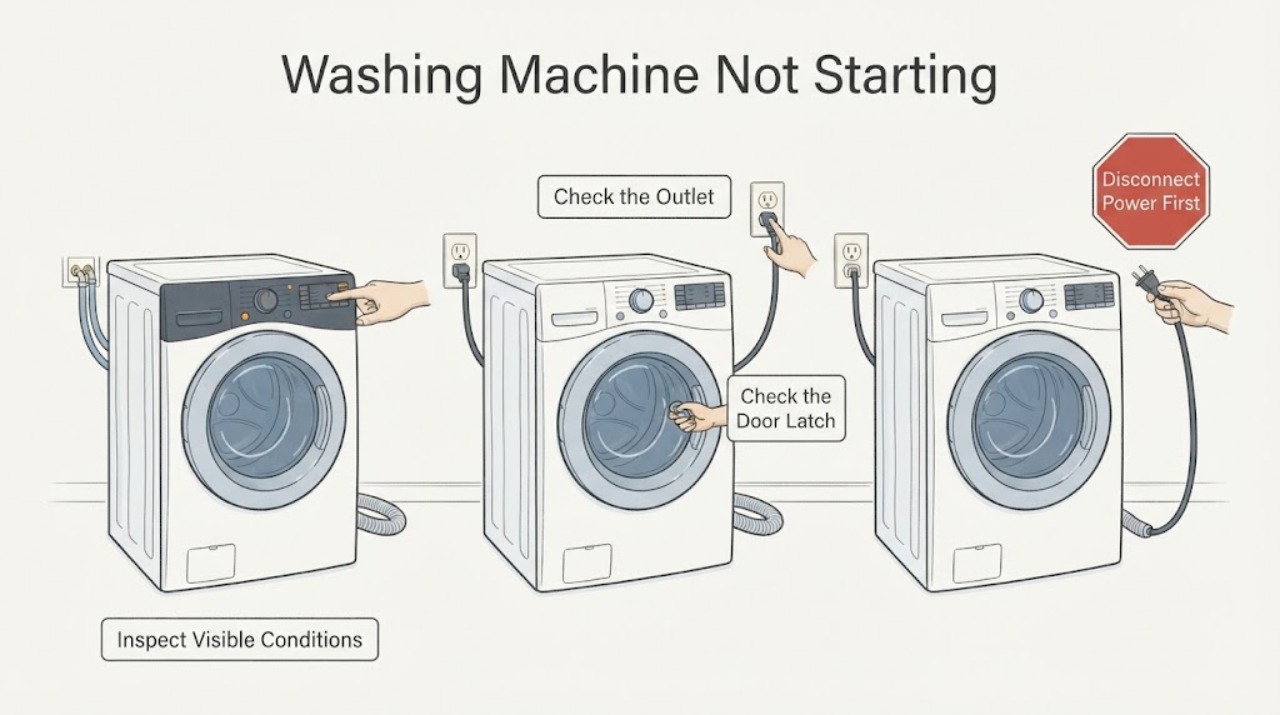
If a Haier washing machine will not start, first check for water near electrical parts, then confirm the plug, outlet, power button, and any breaker or GFCI are safe and working. Close the door or lid until its lock indicator responds, and check that Child Lock, Delay, Soak, or another non-wash programme is not holding the cycle. Confirm the water tap is open and that a residual-water or drain condition is not blocking the start. Do not bypass the door or lid lock, probe live wiring, or repeatedly reset a tripping circuit. Stop for active leakage, wet electrical parts, burning odor, smoke, sparks, abnormal heat, or a damaged cord; request qualified service if safe external checks do not restore operation.
Work through in order
Diagnostic checks
Use only checks that match the exact appliance or system and its official guide.
-
Check 1
Check the immediate safety state before pressing Start: look for active water, a wet or damaged cord or outlet, burning odor, smoke, sparks, abnormal heat, violent movement, or a breaker or GFCI that has tripped.
Expected result: A dry, stable machine with no visible damage can proceed to external checks. Active leakage, wet electrical parts, scorching, odor, smoke, sparks, heat, or a repeated trip is an unsafe fault.
Next step: Stop using the washer and isolate power or water only from a dry, safe position. Do not touch wet parts or reset a tripping circuit repeatedly; request qualified appliance, electrical, or plumbing service.
Why this matters
Why: The stop boundary comes before diagnosing a lock or control. A dark panel does not make wet or energized parts safe to touch.
-
Check 2
Determine whether the washer has power: check the plug and outlet from a dry position, verify the panel or indicator response, and press the power control exactly as the model manual describes.
Expected result: No indicator or response points to an outlet, supply, plug, or appliance power issue. A lit panel means the machine has at least some power and shifts the check toward lock, water, programme, delay, or control behavior.
Next step: Use a safe known-working outlet only when the cord and outlet are intact and the model installation permits it. If the outlet is dead or the washer stays dark, stop and arrange electrical or appliance service.
Why this matters
Why: Haier distinguishes a power failure or loose plug from forgetting to switch on, and notes that touch-control models may require a deliberate power-button action.
-
Check 3
Close the door or lid firmly without forcing it, remove an accessible obstruction from the seal or latch area, and check whether the lock indicator or start-ready state changes.
Expected result: A start response after the door or lid is closed points to closure or interlock status. A door or lid that will not align, a lock indicator that never responds, or a damaged seal or latch points to a lock or mechanical fault.
Next step: Keep the door or lid closed and use the exact model manual for the lock indication. Request service if it repeatedly fails to lock; do not defeat the interlock or open panels.
Why this matters
Why: Haier states that a front-load programme will not begin with an open door and that applicable top-load models stop when the lid is not closed. The lock must not be bypassed.
-
Check 4
Read the panel for Child Lock, Delay, Soak, Rinse Hold, Fold Prevention, a non-wash programme, or an error code before changing settings.
Expected result: A lock icon can make buttons ineffective; a delay or soak state can intentionally wait; a single-dehydration or other programme may not start a normal wash; a code can identify a water, drain, lid, sensor, or communication condition.
Next step: Use the model manual to cancel or exit the setting and select a valid programme. Do not guess a code meaning or repeatedly press controls when a fault code returns; arrange service for persistent codes.
Why this matters
Why: Haier's troubleshooting pages describe child lock, delayed startup, soak or rinse-hold behavior, and model-specific error indications as separate from a dead machine.
-
Check 5
Confirm the water supply and drain conditions from outside: check that the tap is open, inlet hose is not kinked, drain hose is not visibly blocked, and the washer is not retaining water from a prior cycle.
Expected result: No water supply, a kinked inlet, or residual water and a restricted drain can prevent a programme from starting. A normal supply with an empty tub shifts suspicion toward the programme, lock, control, or internal fault.
Next step: Correct only an obvious external hose position or supply shutoff issue according to the model manual. Do not dismantle hoses or run a new cycle into an overflowing drain; request service if water remains or leakage is present.
Why this matters
Why: Haier says its control may refuse to start when it detects residual water, and identifies water-supply and drainage conditions as start and operation checks.
-
Check 6
Check the selected programme and load preparation: confirm the intended wash programme, remove an obvious overload, and use the detergent amount and cycle options specified by the model.
Expected result: An unintended delay, soak, dehydration-only, or non-wash setting can look like no start. An overloaded or badly arranged load may let the panel start but stop before normal action; thick foam can also disrupt a cycle.
Next step: Select a valid model-supported programme and press Start or Start/Pause once. If the machine remains inactive with correct settings, stop repeating attempts and request service.
Why this matters
Why: Haier separates programme selection and delayed start from power faults and links load, detergent, and foam conditions with washer operation.
-
Check 7
After the safe checks, run one short model-supported start or rinse test while watching the door or lid, inlet, drain, floor, and panel; stop immediately if water or electrical symptoms appear.
Expected result: A normal fill and controlled start supports a corrected power, lock, setting, water, or drain condition. No response, a returning error, failed lock, no water entry, retained water, or a new leak indicates an unresolved fault.
Next step: Keep the washer off and request qualified service for persistent no-start, code, lock, water, drain, or control symptoms. Record the exact model, code, cycle, and first abnormal behavior.
Why this matters
Why: A single controlled test can confirm a visible correction, but it cannot prove that an internal board, motor, sensor, valve, lock, or wiring is healthy.
Use your observations
Decision map
Find the observation that best matches what you see, then follow the next safe action.
-
PATH 01Next step
What you see
The panel and indicators are completely dark, the outlet is dead, or the breaker will not stay on.
Do this next
Leave the washer disconnected and arrange electrical service for the circuit or outlet. Request appliance service if the supply is sound but the washer remains dark.
-
PATH 02Next step
What you see
The panel is lit but Start does nothing and the door or lid lock indicator does not respond.
Do this next
Close the door or lid without forcing it and follow the model manual. Do not bypass the interlock; request service for a recurring latch, lock, seal, or control fault.
-
PATH 03Next step
What you see
A Child Lock, Delay, Soak, Rinse Hold, Fold Prevention, or non-wash programme is active.
Do this next
Cancel or exit the setting using the exact model instructions, select the intended programme, and press Start once. Request service if the setting cannot be changed or returns unexpectedly.
-
PATH 04Next step
What you see
The washer has residual water, a water-supply issue, or a drain-hose or household-drain restriction.
Do this next
Keep the machine off, correct only visible external conditions according to the manual, and do not start another cycle into an overflowing drain. Request appliance or plumbing service if water remains.
-
PATH 05Next step
What you see
The washer starts only after a valid programme, correct load, and safe Start/Pause action, but stops again or shows a code.
Do this next
Record the code and cycle stage and request qualified Haier service. Do not guess at internal sensor, motor, board, or wiring repair.
-
PATH 06Next step
What you see
Water reaches electrical parts, leakage is active, or there is burning odor, smoke, sparks, abnormal heat, or repeated power trips.
Do this next
Stop immediately and isolate power or water only from a dry safe position. Do not restart or open the cabinet; obtain qualified appliance, electrical, or plumbing service.
Helpful context
Understand the symptom
Not starting can mean no lights at all, a lit panel that ignores Start, a door or lid that never locks, or a cycle that is intentionally waiting. Haier's model families use different controls and messages, so identify what the panel and machine are doing before trying a reset.
Keep the washer door or lid closed while investigating and do not reach into a moving drum. A safe external check can distinguish a power or setting problem from a water, lock, drain, or internal control fault without opening the cabinet.
Protect the floor and electrical area first
If water is on the floor or near the plug, cord, outlet, or controls, do not touch the wet area. Stop for burning odor, smoke, sparks, abnormal heat, or a breaker that trips again; isolate power only from a dry safe position.
Safety boundary
Stop conditions
- Stop immediately if water reaches the plug, cord, outlet, controls, wiring, or another electrical part, or if leakage is active or uncontrolled.
- Stop for burning odor, smoke, sparks, abnormal heat, a damaged cord or outlet, or a breaker or GFCI that trips again.
- Do not bypass a door or lid lock, probe live wiring, remove sealed covers, or force a latch, hose, or filter.
- Do not keep restarting a washer with standing water, an overflowing household drain, a recurring error, or an unexplained control failure.
- Request qualified service when safe power, door, setting, water, and drain checks do not restore a start, or when an internal lock, valve, sensor, motor, board, or wiring diagnosis is required.
When checks do not resolve it
Need a professional?
Call qualified Haier appliance service when the washer remains inactive on a sound power supply, the door or lid will not lock, a code returns, water or drainage prevents the programme from starting, or an internal control, lock, valve, sensor, motor, or wiring fault is suspected. Call an electrician for a dead outlet or recurring circuit trip and a plumber for a blocked household drain. Stop immediately for water near electricity, active leakage, burning odor, smoke, sparks, abnormal heat, or a damaged cord.
Common questions
FAQ
Why will my Haier washing machine not start?
Check power and the power control, close the door or lid until it locks, and check Child Lock, Delay, Soak, or programme selection. Confirm the water supply and that residual water is not blocking the start. Persistent no-start or codes need service.
Can a Haier washer appear inactive during a normal cycle?
Yes. Haier notes that a heating or soak state can pause visible drum action, and a delay or hold setting can intentionally wait. Check the selected programme and display before assuming power has failed.
Why does the Haier door or lid need to be closed before starting?
The interlock prevents the wash programme from beginning when the door or lid is not closed. Close it without forcing it and follow the model manual; do not bypass a lock that repeatedly fails.
When should I stop troubleshooting a Haier washer that will not start?
Stop for water near electricity, active leakage, burning odor, smoke, sparks, abnormal heat, a damaged cord, or repeated breaker trips. Keep the machine off and obtain qualified appliance, electrical, or plumbing service.
Read the exact guide
Official sources
- washing machine stopping working before wash cycleHaier India · Haier washer water or electricity interruption, soak cycle, and Start/Pause behavior
- Does not work (No work/ Not Operate /Does not start / Does not function)Haier India · Haier washer no-start power, door, programme, heating or soak behavior, and service escalation
- Stops during drain cycleHaier Pakistan · Haier washer drain hose, power, error-code, and service checks
- Not wash of front load washing machineHaier India · Haier front-load washer power, door lock, water, drain, programme, delay, and child-lock checks
- The washing Machine is no powerHaier India · Haier washer no-power indicator, plug, power failure, and model-specific power-button behavior
- The washing machine dose not workHaier India · Haier washer power supply, power-button state, electrical fault, and service escalation
- Much foam during the spin cycle of washing machineHaier India · Haier washer detergent, excess foam, drainage, and cycle-interruption checks
- Common problem trouble shooting for top load washing machineHaier India · Haier top-load washer lid, water, drain, load, sensor, communication, and safe-check instructions
Community feedback
Share a repair observation
Share a plain-text repair observation. Accepted observations are published automatically; this page may take a moment to update.