
On this page
Start here
Quick answer
If a Haier washing machine will not turn on, first separate a completely blank panel from a machine that powers on but will not start. From a dry, safe position, check for a home power outage, a tripped outlet breaker, a loose plug, and a damaged cord; then confirm the power control is pressed as the model requires. If the panel lights but the cycle does not begin, check that the door or lid is fully closed, the program and Start/Pause control are selected, Delay or Child Lock is not holding the machine, and the water tap is open when the model requires water before start. Do not operate the washer with water around the outlet, a leak, a hot or damaged cord, smoke, burning odor, sparks, overheating, or a repeated breaker trip. If the safe checks do not restore power or the panel remains dead, leave the washer off and arrange Haier or qualified appliance service rather than opening the cabinet.
Before you begin
Safety first
- This article supports dry, ordinary-access checks of power status, controls, door or lid closure, program, water tap, and visible hose condition only. Do not open panels, access live wiring, bypass interlocks, or disconnect plumbing to diagnose the no-start condition.
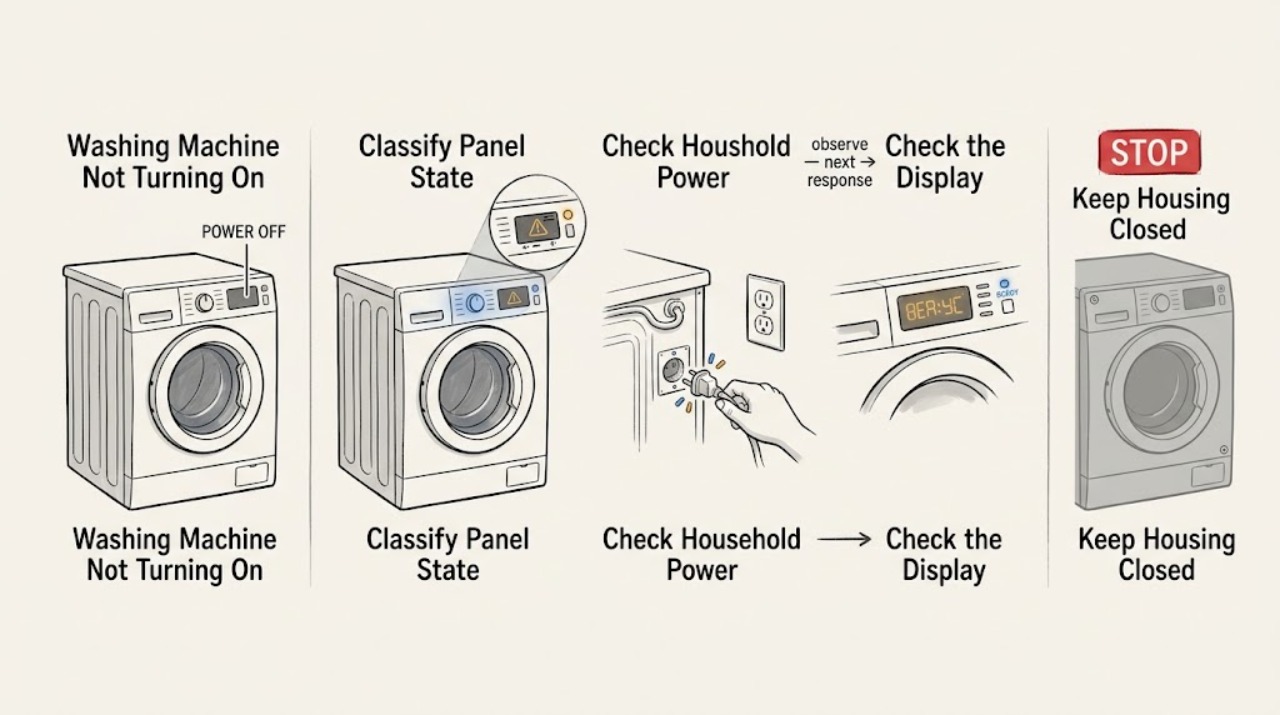
Work through in order
Diagnostic checks
Use only checks that match the exact appliance or system and its official guide.
-
Check 1
With the washer stopped and the area dry, press the Power control once as the owner's manual shows and observe the panel without opening the cabinet; note whether the display and indicators stay completely blank or come on.
Expected result: Record a blank panel, intermittent lights, a normal panel with no cycle start, a lock icon, an error message, a water or delay message, or any smoke, burning odor, spark, heat, leak, or repeated breaker trip.
Next step: Follow the immediate stop branch for a safety symptom. Otherwise continue to the external power check for a blank panel or the control and closure check for a lit panel.
Stop if: Stop immediately for water near electricity, a hot or damaged cord, smoke, burning odor, sparks, overheating, visible damage, or a breaker that trips again.
Why this matters
Why: A blank panel sends the check toward household power, plug, cord, or an internal power path. A lit panel means the machine has some power and the next checks are control, door or lid, program, delay, lock, water, or start conditions. A safety symptom overrides every routine check.
-
Check 2
For a blank panel only, check the room lights or another appliance from a dry position, inspect whether the washer plug is fully seated, and look at the clearly labeled outlet breaker or air switch without removing any cover.
Expected result: Record a wider power outage, a tripped breaker, an outlet that does not power another safe appliance, a loose plug, a damaged cord, or normal household power with the washer still blank.
Next step: Restore a clearly tripped breaker only once if there is no odor, water, damage, or repeat trip; do not use an extension lead. If the outlet or cord is damaged, or the washer stays blank, leave it off and arrange qualified electrical or appliance service.
Stop if: Do not reset a breaker that trips again, touch wet parts, test exposed conductors, open the receptacle, remove the washer cover, or keep using a hot, loose, scorched, or damaged plug or cord.
Why this matters
Why: A wider outage or tripped protective device is an upstream supply condition. A loose or damaged plug or cord can prevent power and creates a safety boundary. Normal household power with a blank washer panel points toward the washer's cord connection, power entry, or control system and needs service.
-
Check 3
With the panel lit, use the exact Power and Start/Pause controls shown in the manual; check for a Child Lock or control-lock icon and confirm that a Delay or appointment-start setting is not active.
Expected result: Record a responsive panel, an unchanged lock icon, a delay countdown, a selected but unstarted program, a Start/Pause response, or a panel that freezes or goes blank when a control is pressed.
Next step: Cancel Delay or release Child Lock only with the model's documented control sequence, then select a normal program and press Start/Pause once. If the control remains unresponsive or the panel drops out, leave the washer off and request service.
Stop if: Do not pry the control panel, bridge a lock, repeatedly press controls, or access internal wiring to test a no-start condition.
Why this matters
Why: A lock or delay can intentionally prevent a cycle from starting. A control that does not respond, a display that resets, or a panel that goes blank under normal input points toward a control or power fault rather than a forgotten setting.
-
Check 4
Inspect the door or lid from ordinary access for clothing, a drawer, detergent residue, or another obstruction; close it firmly without slamming and observe whether the lock indicator or normal start response appears.
Expected result: Record a clean closure and start, an obstruction, a door or lid that springs open, a missing lock indication, a gap or misalignment, or a lock message that returns.
Next step: Remove only a loose obstruction and retry the documented start sequence once. If the lock will not engage, the seal or latch is damaged, or the machine has water inside that prevents safe opening, leave it off and arrange service.
Stop if: Do not force the door or lid, bypass the lock, reach into a moving drum, or dismantle the latch or hinge.
Why this matters
Why: Haier lists an improperly closed door as a cause of a washer that fails to operate. An obstruction can be corrected externally; a misaligned door, damaged latch, or lock indication that never appears may require a service inspection.
-
Check 5
Confirm that a normal wash program is selected, Start/Pause has been pressed as directed, the water tap is open, and the inlet hose is not visibly kinked; do not disconnect a hose or reach behind a wet machine.
Expected result: Record a valid program and start response, a non-wash or paused program, a closed tap, a kinked visible hose, a water message, or a washer that still does not respond after the controls and water supply appear normal.
Next step: Correct only an obvious program, Start/Pause, tap, or visible hose condition allowed by the manual, then observe one start attempt. If the washer remains inactive, preserve the display and model details for service.
Stop if: Stop for a leak, standing water near electrical parts, a burst or damaged hose, water entering unexpectedly, or any need to move the washer or access internal plumbing.
Why this matters
Why: Haier's no-start guidance includes program selection, Start/Pause, and water supply. A correct selection with no response shifts the likely cause toward the door lock, control, power path, or another model-specific fault rather than the tap alone.
-
Check 6
If the washer remains off or will not start after the safe checks, record the exact model, panel state, display code or icon, breaker behavior, door or lid result, program, Delay or Child Lock state, water condition, and any leak or odor.
Expected result: Record a repeatable code or lock indication, a completely dead panel with a powered outlet, a panel that resets, or a panel that works but never starts a cycle.
Next step: Leave the washer off and arrange Haier or qualified appliance service. Provide the model and all observations rather than ordering a part from a generic symptom description.
Stop if: Do not open the cabinet, probe energized wiring, bypass the door or lid lock, run repeated start attempts, or use the machine after an electrical or water-safety event.
Why this matters
Why: A repeatable display condition gives the technician a model-specific path. A dead panel with normal outlet power, a resetting panel, or a working panel that never starts can involve an internal power, lock, control, or safety circuit that should not be bypassed.
Use your observations
Decision map
Find the observation that best matches what you see, then follow the next safe action.
-
PATH 01Safety boundary
What you see
There is water near the outlet or controls, a leak reaches the floor, a hot or damaged cord, smoke, burning odor, sparks, overheating, visible damage, or a repeated breaker trip.
Do this next
Stop the washer. From a dry, safe position, isolate power only if doing so does not require touching wet or damaged parts; leave the area for smoke or fire and request emergency help from a safe location. Arrange qualified service before any restart.
Why this path and its safety boundary
Why it matters: The no-start symptom is secondary to shock, fire, flood, or equipment-damage risk.
Safety stop: Do not touch wet electrical parts, operate a switch in smoke, spray water, restart the washer, open panels, or bypass a safety device.
-
PATH 02Safety boundary
What you see
Room power is out, the outlet breaker is tripped, the outlet is dead, or the plug is loose while the washer panel is blank.
Do this next
Restore a clearly tripped protective device once only when the area is dry and there is no damage or odor; have a qualified electrician inspect a dead outlet, and have the washer serviced for a damaged cord or continued blank panel.
Why this path and its safety boundary
Why it matters: Power is not reaching the washer through the expected household path.
Safety stop: Do not keep resetting a breaker, use an extension lead, open the outlet, or use a loose, hot, scorched, or damaged cord.
-
PATH 03Safety boundary
What you see
The panel lights, but a Child Lock, Delay, paused program, unselected program, or unresponsive Start/Pause prevents the cycle from beginning.
Do this next
Use only the model manual's sequence to clear Delay or Child Lock, select a valid program, and press Start/Pause once. Request service if the panel freezes, resets, or remains unresponsive.
Why this path and its safety boundary
Why it matters: The washer has power, but a control state is intentionally or accidentally holding the start sequence, or the panel may have a control fault.
Safety stop: Do not bridge a lock, pry controls, repeatedly cycle the power, or access internal wiring.
-
PATH 04Safety boundary
What you see
The door or lid will not close, the lock indicator does not appear, clothing or a drawer blocks closure, or a door or lid code returns.
Do this next
Remove only a loose obstruction and close the door or lid as directed. Request service for a damaged seal, latch, hinge, alignment, lock, or persistent code.
Why this path and its safety boundary
Why it matters: The washer may be preventing operation because its closure safety condition is not confirmed.
Safety stop: Do not force or bypass the lock, dismantle the latch, or reach into a drum that could move.
-
PATH 05Safety boundary
What you see
The program is wrong or paused, the tap is closed, the visible inlet hose is kinked, or the washer displays a water-related start condition.
Do this next
Select a normal program, confirm Start/Pause, open the tap, and correct only a visible hose kink allowed by the manual. Request service if it still does not start or a leak appears.
Why this path and its safety boundary
Why it matters: The washer may be waiting for a valid program or water supply before it starts.
Safety stop: Stop for a leak, standing water, a damaged hose, water near electrical parts, or any need to move the washer or disconnect plumbing.
-
PATH 06Safety boundary
What you see
The outlet has safe power, the panel remains blank or resets, or all documented controls and closure checks pass but the washer will not start.
Do this next
Leave the washer off and arrange Haier or qualified appliance service with the model, exact display state, and safe checks already performed.
Why this path and its safety boundary
Why it matters: An internal power entry, control, interlock, wiring, or safety circuit fault remains possible and cannot be identified safely from external checks.
Safety stop: Do not open the cabinet, test live circuits, bypass a lock, replace a control without diagnosis, or keep retrying the cycle.
Helpful context
Understand the symptom
First identify whether the panel is dead
A blank display and no indicator light point toward household power, the receptacle, the plug, the cord, or an internal power path. If lights or the display work but the washer does not begin, the problem has moved to door or lid closure, program selection, Start/Pause, Delay, Child Lock, water supply, or a model-specific interlock. Record the exact model and any display message before changing settings.
Haier control behavior varies by model
Haier's official regional guidance includes models that need the Power control held for several seconds, while other models use a normal Power and Start/Pause sequence. Use the owner's manual for the exact panel rather than holding every key or forcing a control. A working display with no cycle start is not proof that the washer has lost all power.
Door, water, and delay settings can prevent a start
A closed door or lid is a safety condition on many washers. Haier also lists an unopened water tap, a Delay setting, an incorrect program, or Child Lock as causes of a washer that does not start. These are low-risk observations when the area is dry and the machine is not leaking; an internal lock, wiring, or control repair needs service.
Know when to stop checking
Do not turn a no-start complaint into an electrical or flood risk. Stop when there is water at the receptacle, a leak that reaches the floor or controls, a hot or damaged cord, smoke, a burning odor, sparks, overheating, or a breaker that trips again. Keep the washer off and request qualified service after the safe external checks are exhausted.
Safety boundary
Stop conditions
- Stop immediately for water near electricity, a leak reaching the floor or controls, a hot or damaged cord, smoke, burning odor, sparks, overheating, visible damage, or a repeated breaker trip.
- Do not touch wet electrical parts, operate switches in smoke, spray water, restart after an electrical or water-safety event, or bypass a door, lid, or control lock.
- Do not open the washer cabinet, probe energized wiring, dismantle the latch or hinge, or disconnect plumbing to investigate a no-start symptom.
- Keep the washer off when the panel remains blank with a powered outlet, resets during normal input, or displays a persistent code after the documented external checks.
- Request qualified service when safe power, control, closure, program, and water checks do not restore a start.
Only after diagnosis
Potential parts
- door or lid lock assembly
Consider this category only when safe inspection shows correct closure but model-specific diagnosis confirms that the lock is not reporting closure.
Confirm the exact Haier model and technician diagnosis before ordering; do not bypass or replace the interlock by guesswork. - power cord
Consider this category only when the cord is visibly damaged and a qualified technician confirms the model-approved replacement path.
Confirm the exact model, electrical rating, grounding method, and installation instructions; do not use a loose or damaged cord. - control board
Consider this category only after safe household power and closure checks pass and model-specific diagnosis identifies a control fault.
Confirm the exact model and service diagnosis before ordering; the control area may contain hazardous wiring even when the panel is blank.
When checks do not resolve it
Need a professional?
Arrange Haier or qualified appliance service when the washer remains blank with a powered outlet, the panel resets or will not respond, the door or lid lock will not engage, a code returns, the cord or outlet is damaged, a leak or water-safety event occurred, a breaker trips again, or the washer still will not start after the documented external checks.
Safety scope: This article supports dry, ordinary-access checks of power status, controls, door or lid closure, program, water tap, and visible hose condition only. Do not open panels, access live wiring, bypass interlocks, or disconnect plumbing to diagnose the no-start condition.
Common questions
FAQ
Why is my Haier washing machine completely blank?
Check for a wider power outage, a tripped outlet breaker, a loose plug, and a damaged cord from a dry, safe position. Confirm the model's Power control behavior. If the outlet has power but the panel stays blank, leave the washer off and arrange qualified service.
Why does my Haier washer have lights but not start?
Check that the door or lid closes, a valid program is selected, Start/Pause is pressed, Child Lock and Delay are not active, and the water tap is open when required by the model. If the controls respond but the cycle never begins, request service rather than bypassing a lock.
Does a Haier washing machine need the Power button held down?
It depends on the model. Haier's support library documents a related model that uses a longer Power-button press, while other models use the normal Power and Start/Pause sequence. Follow the owner's manual for the exact model instead of forcing controls.
Can Child Lock or Delay stop a Haier washer from starting?
Yes. Haier lists Child Lock and, in its no-start checks, Delay as conditions that can prevent a cycle from beginning. Use only the exact model's documented release or cancel sequence; a frozen or unresponsive panel needs service.
What should I do if my Haier washer will not start after checking power?
Confirm the door or lid, program, Start/Pause, water tap, Delay, and Child Lock from safe external access. If the panel is still blank, resets, shows a persistent code, or the lock will not engage, leave the washer off and arrange Haier or qualified appliance service.
When should I stop using a Haier washing machine that will not turn on?
Stop for water near electricity, a leak reaching the floor or controls, a hot or damaged cord, smoke, burning odor, sparks, overheating, visible damage, or a repeated breaker trip. Do not restart or bypass a door or lid lock after such an event; request qualified service.
Read the exact guide
Official sources
- The washing Machine is no powerHaier India · Haier India support guidance for related model HWM200-678NZP; control behavior varies by model.
- Does not startHaier Philippines · Haier Philippines support guidance; the listed checks and controls vary by model.
- Washing machine fails to operateHaier Malaysia · Haier Malaysia troubleshooting guidance; exact controls and lock behavior vary by model.
- No power / Power failure of washing machineHaier Philippines · Haier Philippines support guidance; outlet and control design varies by model and region.
- Disposal after washingHaier · Haier washing machine manual for a regional model family; exact warnings and installation requirements vary by model.
Community feedback
Share a repair observation
Share a plain-text repair observation. Accepted observations are published automatically; this page may take a moment to update.