
On this page
Start here
Quick answer
Start with the safe external states, not an internal part. Turn the machine on, confirm the plug and household power are sound, select a real wash program, close the door or lid fully, release any child lock, make sure the water tap is open, and cancel any delay setting. Haier's own troubleshooting guidance treats those as common reasons a washer fails to start. If the washer has standing water, a leak, a critical water-level indication, a burning or electrical smell, sparks, overheating, exposed wiring, or a breaker that trips again, stop using it, isolate water or power only when safe, and arrange qualified service. A persistent fault after one model-appropriate reset needs model-specific diagnosis.
Before you begin
Safety first
- Do not bypass a door or lid lock, reach into moving parts, open panels, test live wiring, dismantle a pump or valve, repeatedly reset a tripping circuit, or continue operating with leaks, smoke, sparks, overheating, burning smell, or critical water.
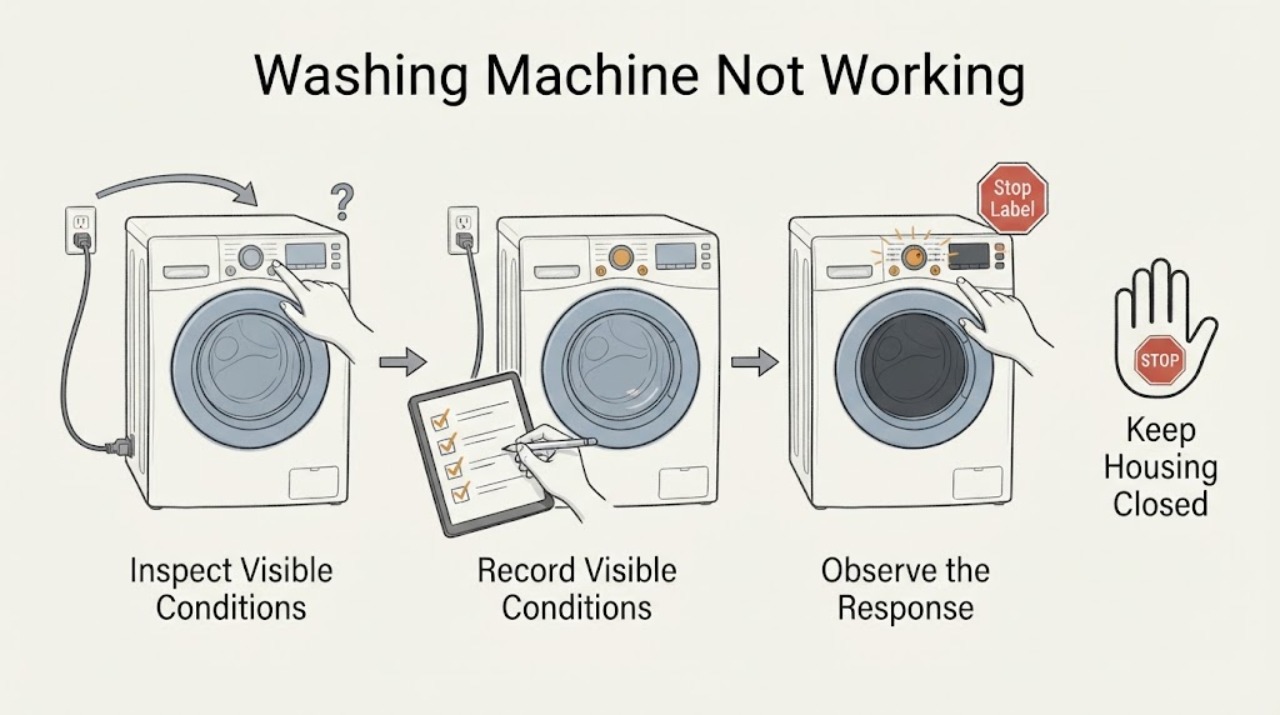
Work through in order
Diagnostic checks
Use only checks that match the exact appliance or system and its official guide.
-
Check 1
Before pressing Start again, look for a leak, standing water near electrical parts, burning or electrical smell, smoke, sparks, overheating, a damaged cord or plug, exposed wiring, or a breaker that has tripped more than once.
Expected result: One of those hazards is present, or the washer has no visible hazard and the issue is limited to not starting or stopping.
Next step: For a hazard, stop the cycle and isolate water or power only if it is safe to do so; keep clear and arrange qualified appliance or electrical service. If no hazard is present, keep the controls off while checking the start state.
Stop if: Stop immediately for renewed leak, burning smell, sparks, smoke, overheating, exposed wiring, or a repeated breaker trip.
Why this matters
Why: A safety hazard takes priority over ordinary cycle checks. A washer that simply fails to start can be checked externally, but a water or electrical hazard can worsen if the machine is energized or restarted.
-
Check 2
Record whether the Haier washer is front-load or top-load, whether the display or indicator lights turn on, and the exact model if the label is safely accessible. With the machine off, confirm the plug is fully seated and the household outlet or breaker has power; do not remove covers or probe wiring.
Expected result: The display is dark, power is absent, the plug is loose, a breaker or fuse is open, or the display is lit and accessible power appears normal.
Next step: Restore only an obvious safe connection or household supply condition. If the breaker opens again, the outlet is hot or damaged, or power remains uncertain, stop and arrange qualified electrical or appliance service.
Stop if: Do not repeatedly reset a breaker, use an extension workaround, open the console, or continue with scorching, a damaged cord, moisture, or exposed conductors.
Why this matters
Why: A power outage, loose connection, or switched-off machine can look like a total failure. A lit display with normal accessible power shifts attention to the control, lock, water, or program state rather than proving an internal board fault.
-
Check 3
Choose a normal wash program appropriate for the exact Haier model, confirm the machine is switched on, close the front door or top lid fully, and check for a lock or child-lock icon. Use only the model manual's control-lock release; do not force the door or lid.
Expected result: The machine accepts Start after the program and closure are corrected, the lock icon or child lock remains active, or the controls still ignore Start despite a closed door or lid.
Next step: Cancel delay or child lock using the exact manual and make one controlled Start/Pause attempt. If the latch will not confirm closed, the lid/door is damaged, or controls remain unresponsive, stop and arrange service.
Stop if: Stop for a damaged latch, forced door or lid, water behind a locked door, or any need to bypass or dismantle the interlock.
Why this matters
Why: Haier identifies an unstarted program, an improperly closed door, and active child lock as causes of a washer that does not operate. A persistent lock or unresponsive control may indicate an interlock or control fault, not user error.
-
Check 4
With no leak or electrical hazard present, check that the household water tap is open and the accessible inlet hose is not obviously kinked. Confirm the selected program is not Delay Start, a non-wash program, or a model-specific hold or child-lock state.
Expected result: The tap is closed, the inlet hose is kinked or obstructed, a delay or non-wash program is selected, or the supply and program appear correct.
Next step: Correct only the obvious external tap, hose, or program state described by the model manual, then make one Start/Pause attempt. If the washer still does not fill or the inlet connection leaks, stop and request service.
Stop if: Stop for a leaking or swollen hose, a loose connection that cannot be safely corrected, water near electrical parts, or an unexplained water-level warning.
Why this matters
Why: Haier's guidance identifies water supply, delayed start, and program selection as reasons a washer may not enter or appear not to perform a wash. These checks do not establish an inlet-valve, sensor, or control-board failure.
-
Check 5
If the drum or tub contains water or the washer stopped before washing, read the exact display message and inspect only the visible drain hose for a kink, blockage, or unsafe placement. Do not reach into a moving tub or remove a pump cover unless the exact manual explicitly provides a safe user procedure and the machine is disconnected and drained safely.
Expected result: Water remains, the drain hose is visibly kinked or blocked, the display reports a water-level or drain condition, or there is no water and no relevant message.
Next step: Follow one model-specific drain instruction only when safe. For critical water, a persistent no-drain, leak, or sensor/communication message, keep the washer off and arrange qualified service.
Stop if: Do not touch moving parts, siphon unknown water into electrical areas, open panels, or continue if the hose, pump area, or tub leaks.
Why this matters
Why: Haier notes that residual water can prevent a front-load washer from starting and that top-load messages can indicate drain, water-level, or critical-water conditions. A critical-water, sensor, or communication indication is a service boundary.
-
Check 6
After the drum or tub is stopped, the water situation is safe, and no hazard is present, perform at most one reset or power-cycle exactly as the Haier model manual allows. Record whether the same symptom or message returns.
Expected result: The washer resumes a normal program once, or it remains unresponsive, stops again, returns a code, leaks, overheats, sparks, smells abnormal, or trips power.
Next step: If the fault recurs, keep the washer out of service and arrange qualified Haier appliance service. Provide the exact model, front/top-load design, message, water state, program, and all safe checks performed.
Stop if: Stop for any leak, standing water, smoke, burning smell, sparks, overheating, repeated trip, or critical-water indication, regardless of reset result.
Why this matters
Why: A one-time reset can clear a temporary control state, but recurrence indicates an unresolved door, water, drain, sensor, control, motor, or electrical problem. A reset cannot make a hazardous condition safe.
Use your observations
Decision map
Find the observation that best matches what you see, then follow the next safe action.
-
PATH 01Next step
What you see
There is a leak, water near electrical parts, burning or electrical odor, smoke, sparks, overheating, exposed wiring, a damaged cord, or a repeated breaker trip.
Do this next
Stop the cycle, isolate water or power only if safe, keep clear, and obtain qualified appliance/electrical or emergency help as appropriate.
Why this path and its safety boundary
Why it matters: This is an immediate water, fire, or electrical safety stop, not an ordinary no-start problem.
-
PATH 02Next step
What you see
The display and indicators are dark, and the plug and household supply cannot be confirmed as powered.
Do this next
Check only the accessible plug and household supply. Do not repeatedly reset a trip or open the washer; arrange qualified service if power remains absent or trips again.
Why this path and its safety boundary
Why it matters: A supply, plug, fuse, breaker, or internal power issue is possible.
-
PATH 03Next step
What you see
The display is lit, but Start is ignored or the program does not begin.
Do this next
Confirm the program, close the door/lid, release the model-specific lock, and make one Start/Pause attempt. Persistent no-start needs service.
Why this path and its safety boundary
Why it matters: A door or lid lock, child lock, delay, wrong program, or control fault is more relevant than a total power failure.
-
PATH 04Next step
What you see
The washer is powered and accepts a program, but the tap is closed, the inlet hose is kinked, or the machine never fills.
Do this next
Correct only the accessible tap or hose condition described in the manual and try once. A leak, low or uncertain supply, or persistent no-fill requires qualified service.
Why this path and its safety boundary
Why it matters: An external water-supply condition may be preventing the cycle from proceeding.
-
PATH 05Next step
What you see
Water remains in the drum/tub, the washer stopped before washing, or a drain/water-level message appears.
Do this next
Use one model-specific safe drain path only when the area is safe. For critical-water, sensor, communication, leak, or persistent no-drain conditions, keep the washer off and call service.
Why this path and its safety boundary
Why it matters: The controller may be preventing operation because water has not safely drained or a level sensor condition is present.
-
PATH 06Next step
What you see
Delay Start, child lock, fold-prevention/hold state, or another non-wash program is active.
Do this next
Use the exact model manual to cancel the state once, select the intended program, and monitor one start. Do not use random button combinations repeatedly.
Why this path and its safety boundary
Why it matters: The machine may be waiting by design or ignoring controls until the state is cleared.
-
PATH 07Next step
What you see
Power, program, door/lid, lock, water, drain, and one allowed reset are correct, but the washer still does not work or the symptom returns.
Do this next
Keep the washer out of service and arrange qualified Haier appliance inspection with the exact model, messages, symptom sequence, and safe checks performed.
Why this path and its safety boundary
Why it matters: An internal interlock, sensor, pump, motor, control, wiring, or supply fault is possible and cannot be identified safely from the symptom alone.
Helpful context
Understand the symptom
First identify what not working means
A dark display, a lit display that ignores Start, a cycle that stops after filling, and a washer that leaves water behind are different symptoms. Haier models also differ between front-load and top-load designs, so record the model, whether the door or lid locks, any displayed message, and whether water is inside before choosing a branch. Do not open panels to find a switch or test a component.
Use one controlled start attempt
After the safety screen is clear, correct only an obvious external state: a loose plug, an unselected program, an incompletely closed door or lid, an active delay, a child lock, or a closed water tap. Start the selected program once and observe the result. Repeated breaker resets, rapid button cycling, or repeated starts can conceal a water or electrical fault and do not replace service diagnosis.
Treat water and electrical warnings as stop signals
Water near electrical parts, a visible leak, a critical water-level message, burning or electrical odor, sparks, overheating, a damaged cord, or repeated breaker trips is not a normal no-start branch. Keep people away, stop the cycle, and use qualified help. Haier's published troubleshooting tables reserve sensor, communication, and critical-water faults for service rather than a user component repair.
Safety boundary
Stop conditions
- Water is leaking, standing near electrical parts, entering an unsafe area, or a critical water-level indication is displayed.
- There is smoke, fire, burning or electrical odor, sparks, overheating, a damaged cord, exposed wiring, or a breaker trips again.
- The door or lid is locked with water present, the latch is damaged, or opening it would require force or bypassing a safety interlock.
- A sensor, communication, critical-water, or recurring fault message remains after the model-specific safe instruction.
- Diagnosis would require opening panels, reaching moving parts, testing live circuits, dismantling a pump or valve, or repeatedly resetting the machine.
When checks do not resolve it
Need a professional?
Request immediate emergency help for smoke, fire, severe overheating, or active electrical danger; keep away from the appliance., Arrange qualified appliance or electrical service for a dark display with confirmed power, repeated breaker trips, sparks, burning smell, damaged wiring, or a damaged cord., Arrange qualified Haier appliance service for a persistent no-start, failed door/lid lock, no-fill, no-drain, critical-water, sensor, communication, or recurring error condition., Provide the exact model, front-load or top-load design, displayed code, water state, selected program, door/lid behavior, and the one-time reset result.
Safety scope: Do not bypass a door or lid lock, reach into moving parts, open panels, test live wiring, dismantle a pump or valve, repeatedly reset a tripping circuit, or continue operating with leaks, smoke, sparks, overheating, burning smell, or critical water.
Common questions
FAQ
Why is my Haier washing machine not working even though the display is on?
A lit display does not prove that a wash program can start. Check the selected program, door or lid closure, child lock, delay setting, water tap, and any water remaining, then make one controlled Start/Pause attempt. Persistent failure needs service.
What should I check if my Haier washer has no power?
With the washer off, check the accessible plug and household supply. Do not repeatedly reset a breaker or open the washer. A dark display with confirmed power, a hot or damaged connection, or another trip requires qualified electrical or appliance help.
Can a closed door or child lock stop a Haier washer from starting?
Yes. Haier lists proper door closure and child-lock status among no-start checks. Close the door or lid without force and use the exact model manual to release the lock; never bypass a door or lid interlock.
Why does my Haier washer stop before the wash cycle?
Check for a closed tap or inlet restriction, a delayed or non-wash program, a door/lid lock state, or water remaining from an incomplete drain. A leak, critical-water indication, sensor message, or persistent no-drain condition is a service boundary.
Should I keep resetting my Haier washer until it starts?
No. After the drum or tub is stopped and the water situation is safe, use at most one model-specific reset. If the fault returns, or a breaker trips, water leaks, the machine overheats, sparks, or smells abnormal, keep it off and request qualified service.
What does a critical water-level or sensor message mean on a Haier washer?
The exact code varies by model, but Haier's troubleshooting guidance treats critical water-level, water-level sensor, and communication indications as service cases. Do not open the washer or continue running it; note the exact code and arrange qualified inspection.
When should I stop using a Haier washing machine immediately?
Stop for a leak, water near electrical parts, smoke, sparks, burning or electrical smell, overheating, exposed wiring, a damaged cord, or a breaker that trips again. Isolate water or power only if safe and obtain qualified or emergency help as appropriate.
Read the exact guide
Official sources
- Not wash of front load washing machineHaier India · Official Haier regional support page for front-load machines; it supports power, door lock, water, drainage, program/delay, child-lock, and service branches but does not replace the exact model manual.
- Washing machine fails to operateHaier Malaysia · Official Haier regional support page; it reinforces program, door, power, and child-lock checks but regional controls and model instructions can differ.
- Does not startHaier Philippines · Official Haier regional support page; it supports common external checks for power, door, program, Start/Pause, water tap, and delay function, while exact model behavior remains manual-specific.
- Common problem trouble shooting for top load washing machineHaier India · Official Haier regional support page for top-load machines; it supports unplug-before-checking, drain, lid, water supply, sensor, communication, leak, and critical-water service boundaries; exact model codes may differ.
Community feedback
Share a repair observation
Share a plain-text repair observation. Accepted observations are published automatically; this page may take a moment to update.