
On this page
Start here
Quick answer
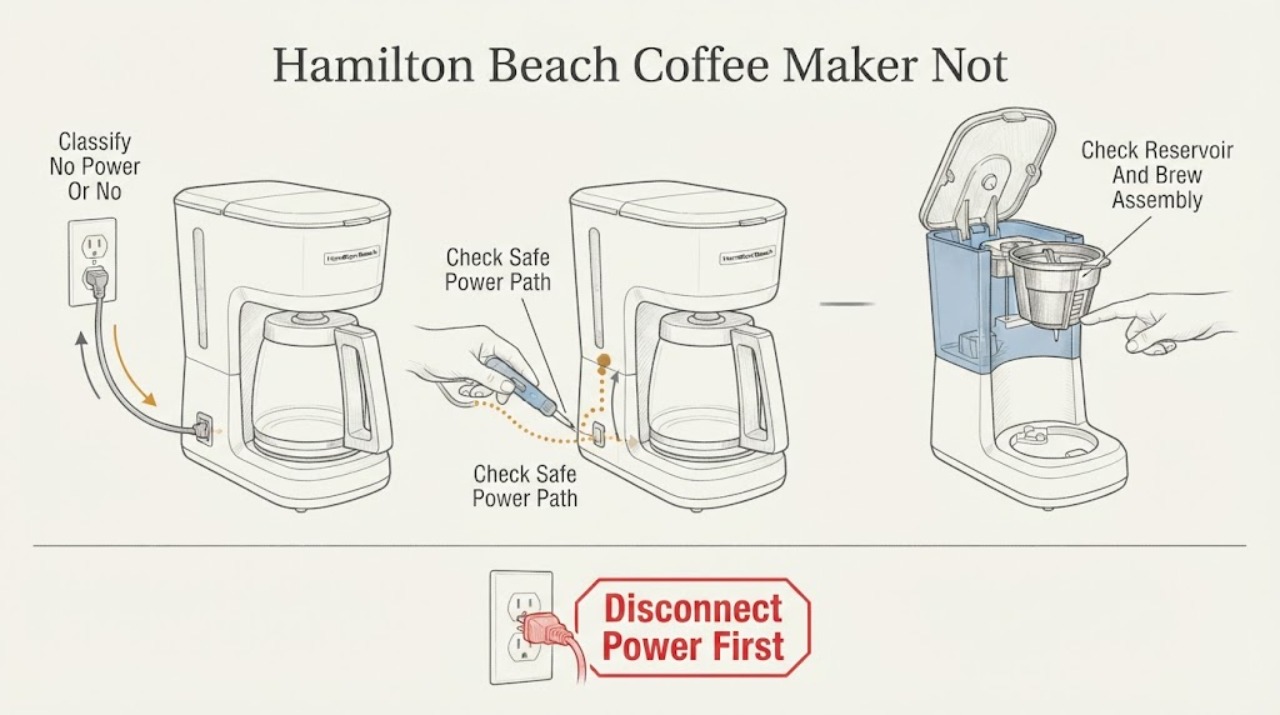
First say what 'not working' means: a completely dark machine needs a power-path check, while a lit machine that will not brew needs the model's water, lid, basket, pod/needle, and cleaning checks. Hamilton Beach's official guidance lists a secure plug, ON power switch, outlet fuse/breaker, water in the reservoir, correct reservoir placement, and a closed/latching lid among model-specific checks. A FlexBrew machine can be in preheating, need descaling, have a clogged piercing needle, or refuse to brew when the lid is not locked; some models document a short cool-down between brews or after an overheat indication. Unplug before cleaning or handling a needle, hot water, basket, or carafe. Stop for a damaged cord or plug, water in the electrical base, steam or burning odor, overflow, repeated breaker trip, or a machine that remains dead after safe checks; do not open the base or test the heater live.
Before you begin
Safety first
- The owner may perform dry external outlet checks and the exact guide's accessible reservoir, basket, lid, needle, and cleaning checks after unplugging and cooling. Qualified personnel must access the heater, pump, valve, controls, wiring, base, or any wet electrical area.
Work through in order
Diagnostic checks
Use only checks that match the exact appliance or system and its official guide.
-
Check 1
Record the complete Hamilton Beach model/type/series and photograph the controls before changing anything. Note whether the machine is completely dark, lights up but will not brew, starts and stops, dispenses slowly or not at all, or leaks/overflows. Record the selected side or mode on FlexBrew or multi-function models.
Expected result: There are no lights; lights are fading or flashing; a code appears; the machine heats but no water moves; only one brew side fails; or the machine has no response at all.
Next step: Use the matching branch and exact manual. Do not assume that a FlexBrew code, brew time, reservoir quantity, or button behavior applies to a drip or BrewStation model.
Stop if: Stop for a damaged cord or plug, water at the electrical base, smoke, burning odor, sparks, abnormal heat, or a repeated breaker trip.
Why this matters
Why: A dark unit needs power checks. Fading lights can be normal preheating on some FlexBrew models, while flashing can indicate water, lid, needle, or cleaning conditions. A single-side failure makes a mode-specific path more likely than a household outlet failure.
-
Check 2
With the coffee maker's controls OFF, verify from a dry position that the plug is fully inserted and the model's power switch is ON if it has one. Check whether the outlet works with another safe appliance and whether a fuse has blown or breaker has tripped; do not repeatedly reset a breaker or open the coffee maker.
Expected result: The plug is loose; the power switch is OFF; the outlet is dead; a breaker/fuse has operated; or the outlet and switch appear normal but the machine remains dark.
Next step: Correct only a safe plug or switch position, or have an electrician address a household outlet problem. If the outlet is normal and the coffee maker remains dark, unplug it and arrange service.
Stop if: Do not use a damaged cord/plug, wet outlet, adapter that defeats plug safety, or a circuit that trips again; do not make live electrical tests.
Why this matters
Why: Hamilton Beach identifies the plug, ON switch, outlet, fuse, and breaker as no-power checks. A normal supply with a dark coffee maker points to an internal cord, switch, control, or heater fault that cannot be safely distinguished externally.
-
Check 3
With power disconnected and hot parts cooled, inspect the reservoir level and seating, removable brew basket or pod holder, carafe/cup position, and any visible lid latch. Use only the exact model's MIN/MAX marks and assembly instructions; do not overfill or brew with a required basket, needle holder, lid, or carafe missing.
Expected result: The reservoir is empty, below MIN, over MAX, or not seated; the brew basket/pod holder is missing or displaced; the carafe/cup is not positioned; or all required parts appear correctly installed.
Next step: Fill and reseat only according to the exact guide, then make one normal brew attempt. If a part will not latch or seat because it is damaged, stop and arrange a model-specific parts/service assessment.
Stop if: Do not handle hot water, run without required basket/holder/lid, bypass a lid latch, or dismantle a wet reservoir connection.
Why this matters
Why: Hamilton Beach guides link no-brew and counter water to inadequate/overfilled water or incorrectly placed reservoirs, and link FlexBrew no-brew to a lid that is not closed or a missing/incorrect holder. Correct seating can restore operation without proving an internal fault.
-
Check 4
For a model with a preheat indicator, wait for the exact ready state shown in its manual before pressing a brew button. Record whether lights are slowly fading, rapidly flashing, steady, or showing a clean/close-lid/low-water/overheat message. Do not press every button or switch modes repeatedly while the unit is heating.
Expected result: Lights are slowly fading; all lights flash; a lid/water/needle/clean/overheat message appears; the ready state never arrives; or the controls are steady but no water dispenses.
Next step: Follow the exact message procedure once. If the state remains or the machine is hot, leaking, or electrically abnormal, stop and arrange service rather than resetting blindly.
Stop if: Do not open a hot lid, handle a needle under pressure, continue after abnormal steam/odor, or bypass a control message or safety latch.
Why this matters
Why: Hamilton Beach documents slow fading as preheating on FlexBrew and uses other patterns/messages for water level, lid closure, needle blockage, cleaning, or overheat on applicable models. A ready state that never arrives or a persistent code is not a user-level proof of a failed heater.
-
Check 5
Only for a model whose Use & Care guide documents it, unplug and let the coffee maker cool, remove the specified removable needle holder or brew components, and clean the accessible piercing needle or descale the water path exactly as directed. Rinse and dry removable parts; never push a sharp object into an unknown opening or immerse the base.
Expected result: The exact guide reports a clogged needle or mineral deposits; a removable needle holder is not aligned/locked; the machine has a clean prompt; or the documented path is clear.
Next step: Complete only the model's cleaning/descaling cycle, then make one normal brew attempt. If the fault remains, keep the machine unplugged and arrange service; do not substitute a generic cleaner sequence.
Stop if: Do not clean while powered or hot, use a sharp improvised tool, immerse the coffee maker, mix cleaners, or open the heater/pump path.
Why this matters
Why: Hamilton Beach identifies a clogged piercing needle and mineral deposits as FlexBrew no-brew causes, and documents routine cleaning intervals. A clear accessible needle does not rule out a pump, valve, heater, or control fault.
-
Check 6
If the exact guide identifies a normal between-brew delay or an overheat condition, let the unplugged coffee maker cool for the documented period before one restart attempt. Record whether the machine then brews, remains dark, stops again, leaks, or shows the same code. Do not repeatedly cycle a failed unit.
Expected result: The unit was used immediately before failure; the model documents approximately two minutes between brews or a 15-minute overheat recovery; it recovers; or it remains inoperative after cooling.
Next step: If one documented cooldown does not restore operation, unplug and arrange qualified service with the model, lights/code, water level, mode, and test timing. Do not replace a heater or pump based only on no-brew behavior.
Stop if: Stop for abnormal steam, burning odor, smoke, sparks, a hot/damaged cord or outlet, overflow, liquid in the base, or a repeated breaker trip.
Why this matters
Why: Hamilton Beach documents short between-brew cooling on some single-serve models and a 15-minute recovery for an applicable FlexBrew overheat indication. A recovery supports temporary thermal protection; a repeat failure points to a service condition, not a confirmed replaceable part.
Use your observations
Decision map
Find the observation that best matches what you see, then follow the next safe action.
-
PATH 01Next step
What you see
The coffee maker is completely dark and does not respond to its controls.
Do this next
Check the safe external supply path once. If the outlet is good and the coffee maker remains dark, unplug it and arrange service; do not open the base.
Why this path and its safety boundary
Why it matters: A power switch, plug, outlet, fuse, or breaker issue is the first documented branch. If those are normal, an internal cord, switch, control, or heater fault is possible.
-
PATH 02Next step
What you see
The controls light, but the machine is slowly fading its lights or otherwise indicates preheating rather than ready-to-brew.
Do this next
Wait for the exact ready state shown by the model guide. If it never arrives or the unit becomes abnormally hot, stop and arrange service.
Why this path and its safety boundary
Why it matters: Hamilton Beach documents slow-fading cup lights as preheating on applicable FlexBrew models. Pressing brew before the documented ready state can make the user-facing symptom look like a no-start.
-
PATH 03Next step
What you see
The machine is powered but will not dispense, and the reservoir is empty/not seated, the lid is not latched, the needle/holder is flagged, or the selected cup light flashes.
Do this next
Refill and seat the reservoir, latch the lid, or clean the accessible needle only as the exact guide directs; then test once. Escalate if the message or no-brew symptom persists.
Why this path and its safety boundary
Why it matters: Hamilton Beach links these patterns to too little water, an unlatched lid, a clogged piercing needle, or a mis-seated holder on applicable FlexBrew families. They are not evidence of a failed heater until the documented external path is clear.
-
PATH 04Next step
What you see
The model reports mineral deposits or cleaning, or the failure follows a recent brew and its guide documents a between-brew or overheat cooldown.
Do this next
Follow only the model's cleaning/descaling and cooldown instructions once. If it still will not brew, unplug and arrange service.
Why this path and its safety boundary
Why it matters: Mineral scale can restrict the documented brew path, while a recently used machine may be in a model-specific cooldown. These conditions do not authorize an improvised descaling recipe or repeated power cycling.
-
PATH 05Next step
What you see
Water or coffee is entering the electrical base, the machine overflows, the cord/outlet is wet or damaged, or smoke, burning odor, sparks, abnormal heat, or a repeat breaker trip occurs.
Do this next
Stop the brew, keep hands away from hot or wet parts, unplug only if the connection is dry and safe to reach, and obtain qualified appliance/electrical assistance.
Why this path and its safety boundary
Why it matters: The immediate issue is a burn, liquid, or electrical hazard, not choosing a basket, needle, pump, or heater part. Continued brewing or a live test can increase risk.
-
PATH 06Next step
What you see
The outlet, reservoir, required basket/lid, applicable needle/scale check, and model-documented cooldown are clear, but the coffee maker remains dark, heats without moving water, or stops repeatedly.
Do this next
Keep the coffee maker unplugged and arrange qualified Hamilton Beach service with the model and complete symptom record. Do not open the base or order an internal heater solely from this branch.
Why this path and its safety boundary
Why it matters: An internal heater, pump, valve, sensor, control, or wiring problem is possible, but the symptom cannot identify a safe part or user repair.
Helpful context
Understand the symptom
'Not working' can mean no power or no brew
A dark Hamilton Beach coffee maker is a supply or power-control branch. A lit machine that will not dispense is a different branch involving water level, preheating, a lid or basket interlock, a pod needle, mineral scale, or a selected mode. FlexBrew, single-serve, carafe, BrewStation, and other families are not interchangeable; record the model and use its guide before applying a capacity, code, or button sequence.
Read the lights before changing parts
Some Hamilton Beach models fade their lights during preheating and become ready only when the lights stay on. Other models flash for an empty reservoir, an unlatched lid, a clogged needle, a clean prompt, or an overheat condition. Record the exact light pattern or display message; do not borrow a code meaning from another Hamilton Beach family.
Water and brew-path checks are model-specific
A reservoir that is empty, overfilled, or not seated can prevent brewing or put water on the counter. A FlexBrew single-serve side may additionally need a locked lid, aligned removable needle holder, a clear piercing needle, and descaling. A carafe side has its own basket and carafe seating. Follow only the exact manual's accessible checks and do not pour cleaner into an unknown path.
Hot water and the electrical base need a hard boundary
Unplug before cleaning, handling a piercing needle, removing a basket, or investigating a spill. Hamilton Beach warns not to immerse the cord, plug, or coffee maker in liquid. Do not touch hot coffee or water, reach under a wet machine, open the base, measure a heater live, or restore power to reproduce an electrical fault. Stop for steam escaping abnormally, burning odor, smoke, sparks, a hot/damaged cord or outlet, or a repeated breaker trip.
Safety boundary
Stop conditions
- Stop immediately for smoke, sparks, persistent burning odor, abnormal heat, overflow onto the base, a damaged cord or plug, a wet outlet, or a repeated breaker trip.
- Unplug before cleaning, descaling, handling a piercing needle, removing a brew basket/pod holder, or investigating a spill; allow hot water and coffee to cool.
- Do not immerse the cord, plug, or coffee maker; do not open the base, test the heater or pump live, or reach under a wet machine.
- Do not bypass a lid or holder latch, brew without required components, mix cleaning chemicals, or use an improvised sharp tool in the water/needle path.
- Arrange qualified service for persistent no-power/no-brew after model-specific checks, internal heater/pump/control faults, or any liquid-related electrical symptom.
Only after diagnosis
Potential parts
- brew basket, pod holder, piercing needle holder, reservoir, or carafe
Consider only when the complete model confirms a cracked, missing, warped, or non-latching removable component after qualified or manual-based diagnosis.
Component shape, latch/needle geometry, reservoir fit, and carafe interface vary by Hamilton Beach model; confirm the complete model before ordering.
When checks do not resolve it
Need a professional?
Arrange qualified Hamilton Beach coffee-maker service when the machine remains dark after a safe outlet check, will not brew after the exact model's reservoir/lid/basket/needle and cleaning checks, repeatedly stops after cooldown, heats without moving water, leaks into the base, or shows smoke, burning odor, abnormal heat, damaged electrical parts, or repeat breaker trips.
Safety scope: The owner may perform dry external outlet checks and the exact guide's accessible reservoir, basket, lid, needle, and cleaning checks after unplugging and cooling. Qualified personnel must access the heater, pump, valve, controls, wiring, base, or any wet electrical area.
Common questions
FAQ
Why is my Hamilton Beach coffee maker completely dark?
Check the plug, the model's ON switch, the outlet, and a tripped breaker or fuse from a dry, safe position. Hamilton Beach lists these as no-power checks; if the supply is normal and the machine stays dark, unplug it and arrange service.
Why is my Hamilton Beach coffee maker lit but not brewing?
First distinguish preheating from a fault: some FlexBrew lights slowly fade until the machine is ready. Then check model-specific water level, reservoir seating, lid/needle-holder latch, piercing needle, mineral cleaning, and selected mode. Persistent no-brew after those checks needs service.
Can an empty reservoir keep a Hamilton Beach coffee maker from working?
Yes. Hamilton Beach guides say applicable single-serve and FlexBrew models will not brew with no or too little water, and some require the reservoir to be seated correctly. Use the exact model's MIN/MAX marks and do not overfill.
Why does my Hamilton Beach FlexBrew flash or say to close the lid?
On applicable FlexBrew models, a selected cup light flashing three times means the lid is not closed or latched; other messages can indicate low water, a clogged needle, cleaning, or overheat. Close or clean only as the exact guide shows, and do not bypass the latch.
How long should I wait before trying a Hamilton Beach coffee maker again?
The interval is model-specific. One Hamilton Beach single-serve guide documents about two minutes between brews, while the FlexBrew TRIO guide documents 15 minutes for its OVEr overheat indication. Use only the exact guide's interval; repeated failures need service.
When should I stop troubleshooting my Hamilton Beach coffee maker?
Stop for water in the electrical base, smoke, burning odor, abnormal steam or heat, a damaged cord or plug, overflow, sparks, or a repeated breaker trip. Also stop when the machine remains dark or will not brew after the exact model's safe power, reservoir, lid/basket, needle, cleaning, and cooldown checks.
Read the exact guide
Official sources
- Hamilton Beach FAQsHamilton Beach · Brand FAQ covering multiple Hamilton Beach coffee-maker families; exact model Use & Care guide controls the applicable procedure and quantities.
- Hamilton Beach FlexBrew Universal Coffee Maker (49930) - Use & CareHamilton Beach · Specific 49930 FlexBrew model; do not transfer its button patterns, reservoir quantity, or lid/needle layout to another model.
- Hamilton Beach FlexBrew TRIO Coffee Maker (49904) - Use & CareHamilton Beach · Specific 49904 FlexBrew TRIO family; its dual brew-path controls and messages are not universal to all Hamilton Beach coffee makers.
- Hamilton Beach Single-Serve Coffee Maker - Use & Care Guide 840267400Hamilton Beach · Specific Hamilton Beach single-serve guide family; use the exact model for reservoir capacity, brew light behavior, and cleaning steps.
- Hamilton Beach FlexBrew Single Serve Premium Coffee Maker (49901, 49921) - Use & CareHamilton Beach · Specific 49901/49921 FlexBrew family; exact model determines reservoir limits, light messages, and removable-part access.
- Hamilton Beach Single-Serve Coffee Maker - Use & Care Guide 840251801Hamilton Beach · Specific single-serve guide family; its two-minute cooldown and reservoir behavior must not be assumed for another model.
Community feedback
Share a repair observation
Share a plain-text repair observation. Accepted observations are published automatically; this page may take a moment to update.