
On this page
Start here
Quick answer
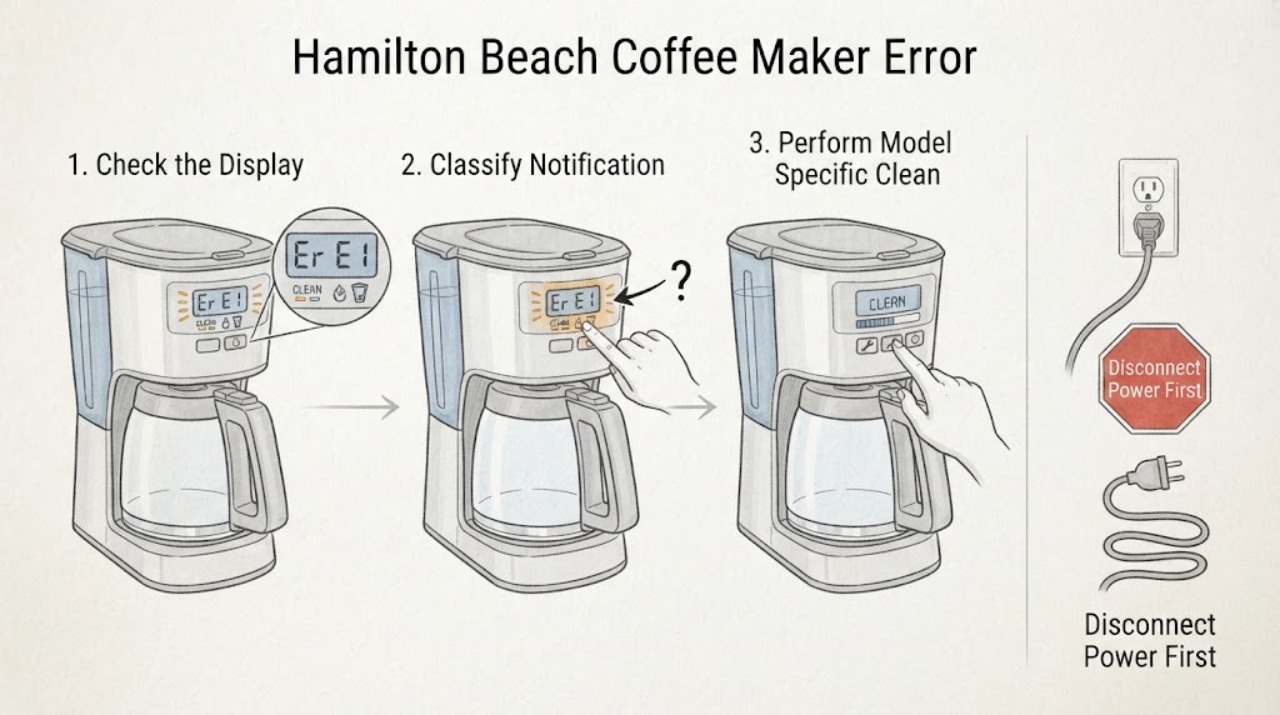
Do not assign a meaning to an alphanumeric code until you record the complete Hamilton Beach model, type, and series information and match the exact Use & Care guide. Hamilton Beach sells multiple coffee-maker designs, and the same-looking display symptom is not proof of the same fault. The official FAQ describes CLEAN as a cleaning reminder and a water-drop symbol as a water-filter notification, but those are notifications rather than a universal cross-model error-code chart; the exact model guide controls. If the display says CLEAN and the guide confirms it, follow that guide's unplug, cool-down, cleaning, and rinse procedure. If the display names a lid, water, needle, filter, or brew condition, correct only the accessible condition described for that model. Stop for smoke, sparks, burning odor, a damaged cord, water entering the electrical area, a hot base, or a display that returns after the model-specific external procedure. Do not open the housing, immerse the cord or appliance, probe a live heater, or borrow codes from another Hamilton Beach coffee maker; persistent or unexplained codes need the manufacturer or qualified service path.
Before you begin
Safety first
- The user may identify the model, record the display, verify an ordinary outlet, follow a model-confirmed cleaning or filter reminder, reseat accessible parts after unplugging and cooling, and keep the appliance dry. Qualified personnel must handle cabinet disassembly, live electrical testing, heater or control wiring, internal pump or sensor work, and any repair after liquid intrusion or overheating.
Work through in order
Diagnostic checks
Use only checks that match the exact appliance or system and its official guide.
-
Check 1
Before clearing anything, photograph or write down the complete Hamilton Beach model, type, series, and wattage information from the rating label, then transcribe the display exactly. Note whether the message is CLEAN, a water-drop or filter symbol, Lid, Add Water, Needle, an alphanumeric code, a blank display, or flashing lights, and whether brewing is blocked.
Expected result: The model and display are known; only a general notification is visible; an alphanumeric code is present; or the model cannot be identified.
Next step: Retrieve the matching Use & Care guide and follow only its display section. If the model remains unknown, limit the diagnosis to safe identification and service handoff rather than interpreting the code.
Stop if: Stop for smoke, sparks, burning odor, a hot or damaged cord or plug, water near electrical parts, or a display accompanied by abnormal heat or leaking.
Why this matters
Why: Hamilton Beach coffee makers use different controls and notifications. Without the model, a code meaning and reset can be wrong, and a blank display must be separated from a brew or reminder condition.
-
Check 2
Compare the recorded message only with the exact model guide. If it says CLEAN or shows a water-filter symbol, check whether the guide describes a maintenance reminder. If it says Lid, Add Water, Needle, or another control message, inspect only the matching accessible lid, reservoir, brew basket, or needle area after unplugging and cooling as directed.
Expected result: The guide identifies a maintenance reminder or an accessible seating or supply condition; it identifies a model-specific error; or the displayed message is not in the guide.
Next step: Use the model guide's safe procedure for a documented reminder or accessible condition. For an unlisted code, preserve the display record and arrange manufacturer or qualified service.
Stop if: Stop if the guide calls for internal testing, if liquid reaches the controls, or if the message is accompanied by smoke, odor, sparking, or abnormal heat.
Why this matters
Why: A documented reminder may clear after maintenance, while an unknown or model-specific code cannot safely be translated into a universal component failure. A message absent from the guide is evidence to stop guessing, not to try another model's procedure.
-
Check 3
For a model-confirmed CLEAN notification, unplug and cool the coffee maker, remove any water filter only if the guide says to, and perform the documented cleaning and rinse sequence. For a model-confirmed Lid, Add Water, Needle, or reservoir message, correct only the visible condition described by that guide; keep hands away from hot water and the heating path.
Expected result: The message clears and the machine completes a normal, dry, supervised brew; the message clears but brewing still fails; or the message remains or returns immediately.
Next step: If the guide's procedure succeeds, return the machine to ordinary use only after it is dry and fully reassembled. If the message persists or brewing remains abnormal, stop and provide the model and result to service.
Stop if: Stop if cleaning would require opening the housing, immersing the appliance, working near live parts, or handling a hot or pressurized component.
Why this matters
Why: A cleared reminder supports a maintenance condition. A persistent message or a normal-looking display with no brew indicates that the notification was not the whole problem, and the exact model's water path, heater, control, or interlock may need service.
-
Check 4
After any documented external procedure and with the unit cool, note whether the display is powered, whether a brew button or indicator responds, whether water moves, and whether the heater or warming plate behaves normally. Check only the ordinary outlet and plug condition; do not remove panels or perform a live voltage or continuity test.
Expected result: The display is blank with a working outlet; the display works but no brew starts; water moves but the heater does not behave normally; or the machine operates normally after the notification clears.
Next step: Keep the unit unplugged if the abnormal result persists and use the exact manual and qualified service route. Do not replace a heater, sensor, board, or pump based only on the displayed text.
Stop if: Stop for a hot plug, damaged cord, smoke, sparks, burning odor, water in the base or controls, or repeated breaker operation.
Why this matters
Why: A blank display with a working outlet points away from a simple reminder. A responsive display with no brew, no heat, or a recurring code can involve a model-specific interlock, pump, heater, sensor, or control, none of which can be selected from the display alone.
-
Check 5
Prepare the service handoff with the exact model, type, series, display text and timing, the matching guide's interpretation if any, outlet result, water and brew state, cleaning or seating steps attempted, and any heat, odor, leak, or trip. Do not open the housing or use another Hamilton Beach model's error table.
Expected result: The display is unlisted, returns after the exact procedure, prevents brewing, or is accompanied by a safety symptom; or the message clears and the coffee maker works normally.
Next step: Use the manufacturer support or qualified appliance service path for the unresolved condition. If normal operation is restored, monitor for recurrence and retain the model-specific guide.
Stop if: Stop immediately for smoke, sparks, burning odor, a hot or damaged cord or plug, water near electrical parts, or any need to open the housing.
Why this matters
Why: A recurring or unlisted display needs model-specific diagnosis. Normal operation after a documented maintenance procedure supports a reminder rather than a confirmed electronic failure, but the guide still governs future recurrence.
Use your observations
Decision map
Find the observation that best matches what you see, then follow the next safe action.
-
PATH 01Next step
What you see
The exact model guide identifies CLEAN or a water-filter symbol as a maintenance notification, and there is no electrical or burn hazard.
Do this next
Follow that model's unplug, cool-down, cleaning, filter, and rinse instructions. If the notification clears and a normal brew completes, the reminder was likely the immediate cause; if it returns or brewing still fails, preserve the display and use service.
-
PATH 02Next step
What you see
The exact guide identifies a Lid, Add Water, Needle, reservoir, or brew-basket condition and the relevant part is accessible without opening the housing.
Do this next
Unplug and cool the appliance, correct only the documented seating, water, or accessible blockage condition, and retry once as directed. A message that persists after the condition is correct needs model-specific service rather than a guessed sensor or board.
-
PATH 03Next step
What you see
An alphanumeric code is shown but the model is unknown, or the code is absent from the matching Hamilton Beach guide.
Do this next
Do not borrow a code definition from another coffee maker. Keep the unit unplugged if brewing is blocked or the display returns, and hand the exact model, code, timing, and accompanying symptoms to manufacturer or qualified service.
-
PATH 04Next step
What you see
The notification clears after a documented procedure, but the coffee maker remains blank, will not brew, does not heat, or immediately displays another message.
Do this next
The maintenance reminder was not the complete fault. Stop using the unit and arrange model-specific diagnosis; the display symptom does not identify a heater, pump, interlock, sensor, or control replacement.
-
PATH 05Next step
What you see
The code or notification is accompanied by smoke, sparks, burning odor, a hot or damaged cord or plug, liquid in the base, or repeated breaker operation.
Do this next
Treat the condition as a safety stop, not a display-reset problem. Disconnect power only from a dry, safe position, keep the coffee maker out of use, and obtain qualified electrical or appliance service.
Helpful context
Understand the symptom
An error display is not a universal Hamilton Beach code
Hamilton Beach's coffee-maker range includes drip, single-serve, FlexBrew, and other designs. A model number, type, and series number from the rating label are therefore part of the diagnosis. Record the display exactly, including capitalization, punctuation, flashing versus steady behavior, and any accompanying beeps or lights. Do not copy E-codes or fixes from a different machine.
Separate reminders from fault indications
The Hamilton Beach FAQ says CLEAN scrolls across the display when cleaning is required and that a water-drop symbol means the water filter needs replacement. A 46390 guide documents its own CLEAN and water-filter notifications, while other models may show different labels such as Lid, Add Water, Needle, or Clean. Treat these as model-specific notifications and follow the exact guide rather than calling every message an electronic failure.
Use only accessible, cool, dry checks
If the matching guide identifies a reminder or an accessible lid, water, needle, filter, or brew condition, unplug before cleaning or removing a part, let hot components cool, and keep the cord and plug dry. A lid or reservoir that is not seated can be a user-level condition on some models; a control-board, heater, sensor, or wiring fault is not. Never immerse the coffee maker, cord, or plug.
A code that persists changes the decision
After the exact model procedure, note whether the display clears, whether the machine starts a normal brew cycle, and whether the same message returns. A cleared CLEAN reminder after the documented cleaning is different from a recurring alphanumeric code, a blank display, a heater that never warms, or a message accompanied by a trip, odor, leak, or abnormal heat. Those results need the model guide and service assessment, not a guessed part.
When checks do not resolve it
Need a professional?
Safety scope: The user may identify the model, record the display, verify an ordinary outlet, follow a model-confirmed cleaning or filter reminder, reseat accessible parts after unplugging and cooling, and keep the appliance dry. Qualified personnel must handle cabinet disassembly, live electrical testing, heater or control wiring, internal pump or sensor work, and any repair after liquid intrusion or overheating.
Common questions
FAQ
What does CLEAN mean on a Hamilton Beach coffee maker?
Hamilton Beach's FAQ describes CLEAN as a cleaning reminder, and the 46390 Use & Care guide documents a model-specific CLEAN notification and cleaning cycle. Confirm the model first and follow its unplug, cool-down, cleaning, and rinse instructions. CLEAN is not evidence that every Hamilton Beach coffee maker uses the same code or procedure.
What should I do when my Hamilton Beach coffee maker shows an alphanumeric error code?
Record the complete model, type, and series information and the exact code, then consult that model's Use & Care guide. If the code is not listed, do not use another model's error table or open the housing. Keep the unit unplugged if brewing is blocked or a hazard is present and arrange model-specific service.
Is it safe to keep using a Hamilton Beach coffee maker with an error display?
Only when the exact guide identifies a routine notification and the appliance is dry, cool, and otherwise normal. Stop for smoke, sparks, burning odor, a hot or damaged plug or cord, liquid in the base, repeated breaker operation, or a code that returns after the documented external step. Never immerse the coffee maker, cord, or plug.
Read the exact guide
Official sources
- Coffee Makers | HamiltonBeach.comHamilton Beach · Official Hamilton Beach product-family page showing multiple coffee-maker formats and model-specific product support.
- Hamilton Beach FAQsHamilton Beach · Official Hamilton Beach FAQ with coffee-maker entries including CLEAN, water-filter symbol, model/type/series location, and selected control notifications.
- Hamilton Beach Coffee Maker (46390) - Use & CareHamilton Beach · Official Use & Care guide for the 46390 model family; its CLEAN and water-filter behavior is an example of model-specific documentation, not a universal Hamilton Beach code chart.
Community feedback
Share a repair observation
Share a plain-text repair observation. Accepted observations are published automatically; this page may take a moment to update.