
On this page
Start here
Quick answer
First identify which cleaning problem you have: a CLEAN message or icon that has not cleared, a clean cycle that appears inactive during its documented soak, or slow or incomplete flow caused by mineral buildup. Find the complete model number on the rating label and use that model's Use & Care guide; do not copy another Hamilton Beach model's button sequence. Hamilton Beach's official FAQ gives a general automatic-drip procedure using an empty carafe and basket, one pint of plain white vinegar or a coffee-maker cleaner/descaler, a brief start, a 30-minute cleaning wait, and two clean-water cycles. The opened Smart Connected 49700 guide documents the same style of procedure and says the CLEAN display clears after cleaning. The opened One Press guide instead requires its specified two-button hold and says the machine can appear inactive for 30 minutes while vinegar descales the system. If the clean reminder remains after the exact cycle and flushing, flow never resumes, or the appliance has smoke, a damaged cord, leaking liquid near the base, or abnormal heat, stop using it and arrange qualified service. Unplug and let the machine cool before cleaning, never immerse the cord, plug, or coffee maker, and do not open the housing.
Before you begin
Safety first
- The user may identify the model, unplug and cool the appliance, clean model-permitted removable parts, and run the exact documented solution and fresh-water cycle. Qualified service must handle the housing, internal pump, heater, valve, sensor, control, seals, wiring, blockages requiring tools, and live tests.
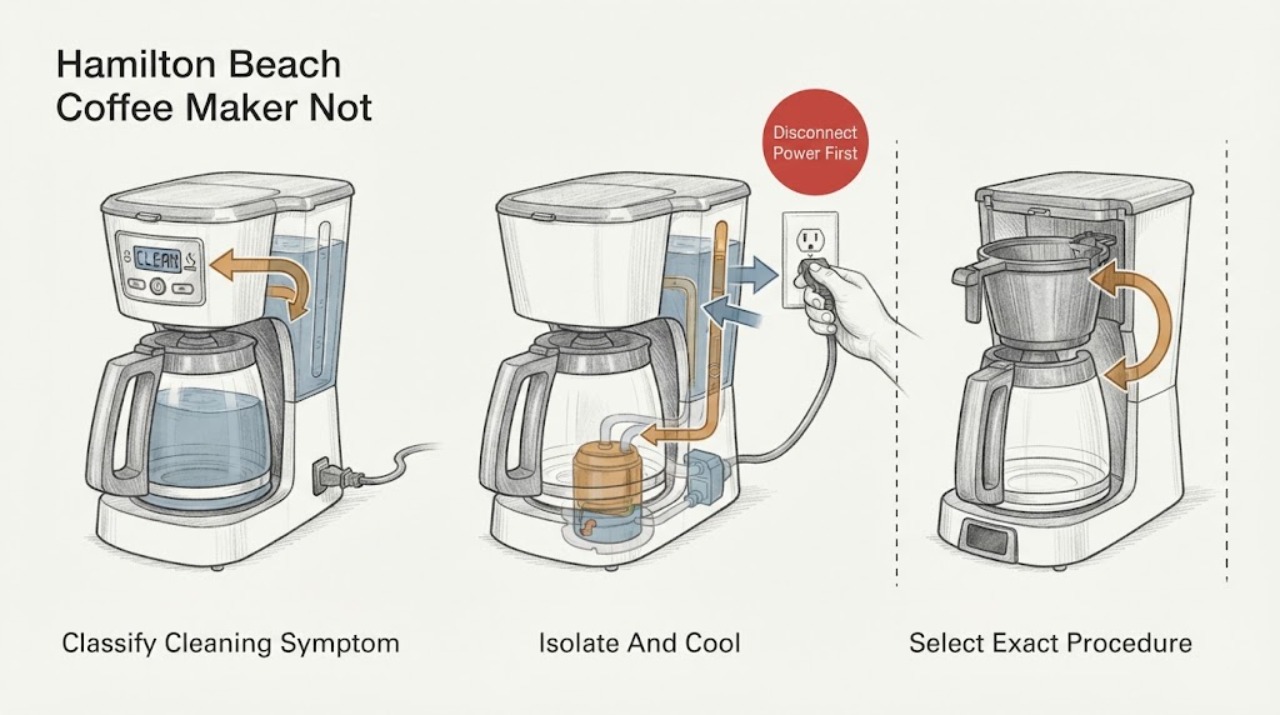
Work through in order
Diagnostic checks
Use only checks that match the exact appliance or system and its official guide.
-
Check 1
Stop the current cycle and record whether the symptom is a CLEAN message or icon, a cycle that appears paused, slow or incomplete water flow, or only dirty removable parts. Photograph or write down the display and find the complete model, type, and series information from the rating label.
Expected result: The reminder is present, the machine is in a documented-looking soak, water flow is restricted, or there is no cleaning notification and only a carafe, basket, or exterior needs washing.
Next step: Follow the matching branch below and open the exact model's Use & Care guide before pressing a clean control or adding solution.
Stop if: Do not continue a cycle that produces smoke, a burning smell, abnormal heat, leakage at the base, or a damaged cord or plug.
Why this matters
Why: These are different user decisions. A reminder or slow flow points to the model's descaling procedure; a quiet soak may be a planned stage; removable-part soil is not proof of an internal cleaning failure.
-
Check 2
Unplug the coffee maker and let the carafe, warming surface, water path, and any solution cool. Empty the coffee and grounds, remove a water filter or filter base only if the model guide calls for it, and place the appliance on a dry, stable surface.
Expected result: The appliance is cool and dry with an intact cord, or liquid is near the base, the cord or plug is damaged, or the appliance is still hot.
Next step: Proceed only when the low-risk conditions are met. For liquid at the base, damage, smoke, or unusual heat, keep it unplugged and arrange qualified service.
Stop if: Never submerge or rinse the powered base, pour liquid over controls, or open the housing to reach an internal path.
Why this matters
Why: Cleaning involves hot liquid and electrical parts. Hamilton Beach's guides require cooling before cleaning and warn not to immerse the cord, plug, or coffee maker; a wet or damaged appliance is not a routine descaling task.
-
Check 3
Read the cleaning section for the exact model and verify the required solution, minimum or maximum fill, filter removal, empty carafe or basket position, and button sequence. Use only plain white vinegar or a coffee-maker cleaner/descaler named or permitted by that guide.
Expected result: The guide describes a clean or descale program, gives a manual-only vinegar or cleaner procedure, or cannot be found for the exact model.
Next step: Use the exact documented procedure. If the model guide is unavailable or the controls do not match, stop at identification and obtain model-specific support instead of guessing.
Stop if: Do not combine quantities or button sequences from different Hamilton Beach models and do not use an unapproved chemical mixture.
Why this matters
Why: Hamilton Beach does not use one universal control sequence. For example, the 49700 guide starts and stops with ON/OFF, while the One Press guide starts by holding two specified controls for five seconds.
-
Check 4
With the empty carafe or model-required container in place, run the exact clean cycle. As documented examples only: the 49700 guide uses at least 1 pint (2 cups / 473 ml) of white vinegar, starts for 30 seconds, waits 30 minutes, then finishes; the One Press guide uses 1 pint and its specified two-button hold. Do not use either sequence unless it matches your model guide.
Expected result: The clean indicator flashes or clears as documented, the solution moves through the path, the machine pauses for a documented soak, or the cycle stops with no movement or an error.
Next step: Allow a documented soak to finish, then follow the guide's completion and flushing steps. If the cycle stops abnormally, unplug and use the service branch.
Stop if: Do not restart repeatedly, bypass an interlock, run with the housing removed, or touch hot liquid while investigating a stalled cycle.
Why this matters
Why: Indicator behavior and a planned pause show progress only when they match the exact manual. No movement, a repeated stop, leaking, or an unrecognized error can indicate a restriction or internal pump, heater, sensor, or control problem rather than a need for more solution.
-
Check 5
Compare the apparent pause and the amount of solution moved with the exact guide's timing. Do not interrupt a model-documented soak merely because the display or pump is quiet; do not assume a pause is normal when the guide does not document one.
Expected result: The machine resumes after the documented wait, remains inactive beyond the guide's stage, has no flow at all, or shows a new fault or leak.
Next step: Let the documented program complete once. If it does not resume or flow remains absent, stop using the appliance and arrange qualified diagnosis rather than forcing solution through it.
Stop if: Do not pour extra liquid into a blocked reservoir, use compressed air, insert tools into the heater or pump path, or perform live electrical tests.
Why this matters
Why: The One Press guide states that a 30-minute inactive-looking period is part of descaling. A longer or undocumented stop, no flow, or a fault after the correct setup makes mineral obstruction or an internal component issue more likely.
-
Check 6
After the solution stage completes, empty and rinse the carafe or reservoir, then run the exact number of clean-water cycles in the model guide. The 49700 and One Press guides each call for two or three clean-water cycles; allow the model's cooling interval and do not brew a beverage until cleaner odor is gone.
Expected result: Water flows through normally and the reminder clears, flow is still slow or incomplete, the reminder returns immediately, or vinegar or cleaner odor remains.
Next step: Repeat only the model guide's clean-water flush if it allows it. For persistent slow flow or a reminder that remains, leave the coffee maker unplugged and arrange qualified service.
Stop if: Do not operate for drinking use while cleaner remains, and do not keep repeating descaler cycles when the machine cannot move liquid normally.
Why this matters
Why: Normal flow with a cleared reminder supports a completed cleaning cycle. Persistent restriction or a reminder that does not clear after the correct cycle is not fixed by ordinary carafe washing; remaining odor means the system needs more model-permitted flushing before beverage use.
-
Check 7
Stop owner troubleshooting when the exact cleaning cycle and water flush are complete but the reminder remains, the pump or heater will not move solution, the fault recurs, or inspection would require opening the base or control housing.
Expected result: The problem resolves after the documented cycle, or it persists with abnormal sound, no flow, an error, leakage, smoke, odor, heat, or a damaged cord or plug.
Next step: Keep the appliance unplugged and arrange qualified Hamilton Beach service or replacement guidance, providing the exact model, display, solution used, timing, and whether any liquid moved. Use qualified electrical help for supply or cord damage.
Stop if: No housing disassembly, live testing, bypassing of controls, or attempts to scrape or drill an internal water path.
Why this matters
Why: A persistent result can involve an internal pump, heater, valve, sensor, control, seal, or mineral blockage that cannot be identified safely from the reminder alone. Hamilton Beach says coffee makers are not intended for consumer repair and internal parts are not sold to consumers.
Use your observations
Decision map
Find the observation that best matches what you see, then follow the next safe action.
-
PATH 01Safety boundary
What you see
A CLEAN message or clean icon remains, but the exact model's clean cycle has not yet been run or the model identity is unknown.
Do this next
Identify the complete model and run only its documented vinegar or approved cleaner/descaler cycle, then complete the clean-water flush. If the reminder remains afterward, stop and arrange service.
Why this path and its safety boundary
Why it matters: The reminder is a maintenance prompt, not proof that a particular internal part has failed. The model guide controls the quantity, filter handling, and controls.
Safety stop: Do not clear or reset the reminder without completing the model's cleaning procedure.
-
PATH 02Safety boundary
What you see
The machine becomes quiet or appears inactive during a clean cycle, and the exact guide documents a timed descaling wait.
Do this next
Wait through the documented stage once, then let the cycle finish and flush with fresh water. If it does not resume at the documented point, unplug and use the service path.
Why this path and its safety boundary
Why it matters: A quiet interval can be normal. The One Press manual specifically documents a 30-minute inactive-looking stage before the heater and pump resume.
Safety stop: Do not repeatedly power-cycle during the documented soak or open the base to check the pump.
-
PATH 03Safety boundary
What you see
The clean cycle moves little or no solution, the cycle stops early, or slow flow returns after flushing.
Do this next
Confirm the reservoir, carafe, removable basket, and filter setup exactly as the model guide specifies. If those are correct and flow remains absent or restricted, stop using the machine and arrange qualified service.
Why this path and its safety boundary
Why it matters: Mineral buildup or a blocked water path is plausible, but no-flow after the correct model procedure can also indicate an internal pump, heater, valve, sensor, or control fault.
Safety stop: Do not force solution, insert tools, use compressed air, or run with panels removed.
-
PATH 04Safety boundary
What you see
The vinegar or cleaner stage finished, but cleaner odor remains or the prescribed clean-water cycles were not completed.
Do this next
Complete only the model-specified fresh-water cycles, observing its cooling interval. Do not add grounds or drink from the machine until the cleaner odor is gone.
Why this path and its safety boundary
Why it matters: The water path has not yet been verified ready for a beverage. The official FAQ and cited manuals require fresh-water flushing after the solution stage.
Safety stop: If clean water cannot flow normally, stop rather than repeatedly adding cleaner.
-
PATH 05Safety boundary
What you see
There is smoke, burning odor, abnormal heat, leakage near the base, cord or plug damage, a recurring fault, or a reminder that persists after the exact cleaning and flush.
Do this next
Leave the coffee maker unplugged and arrange qualified appliance or electrical service. Provide the model and the sequence of observations without recreating the fault.
Why this path and its safety boundary
Why it matters: This is no longer a routine cleaning decision. Electrical, thermal, liquid, or internal water-path work can create shock, burn, or further damage risk.
Safety stop: Do not open the housing, bypass controls, or repeatedly reset and run the machine.
Helpful context
Understand the symptom
Define what “not cleaning” means
This page covers a clean reminder that will not clear, a documented clean or descale cycle that seems to pause, and mineral buildup that leaves flow slow or incomplete. Washing the carafe or brew basket, correcting bad-tasting coffee, and a coffee maker that will not power on are separate paths. Record the complete model, the exact display or icon, whether vinegar or cleaner entered the water path, and where the cycle stopped before choosing a procedure.
A quiet soak can be normal
Some Hamilton Beach cleaning programs deliberately pause while the solution works. The One Press manual specifically says the coffee maker may appear inactive for 30 minutes, then restart the heater and pump the remaining vinegar. That observation is normal only for a model whose own guide documents it; a different button sequence, time, reservoir, or display behavior requires that model's instructions rather than a guess.
Flush before judging the result
A vinegar or approved descaler cycle is not complete when the solution stops moving. Empty and rinse the carafe or reservoir as the guide directs, then run the specified clean-water cycles and let hot parts cool. If the reminder clears and water flows normally without cleaner odor, the cleaning intent is resolved. If the reminder or slow flow returns, do not keep repeating an incompatible sequence; treat it as a model-specific service diagnosis.
Safety boundary
Stop conditions
- Unplug and let the coffee maker cool before cleaning or removing parts. Keep hands, the counter, and the plug area dry.
- Never immerse the cord, plug, or coffee maker in liquid, and do not operate it with a damaged cord or plug, smoke, burning odor, abnormal heat, or liquid near the base.
- Use the complete model, type, and series information and its own Use & Care guide. Do not mix a different model's solution quantity, button sequence, timing, or display interpretation.
- Do not open the housing, bypass controls, force solution through a blocked path, scrape internal passages, or perform live electrical tests. Persistent no-flow, recurring reminders, and internal faults require qualified service.
Only after diagnosis
Potential parts
- water filter or water-filter base
Consider this category only when the exact model uses a removable water filter and the model guide or filter instructions call for replacement; a filter reminder is not the same as a clean-cycle failure.
Confirm the complete model, type, and series information and the manufacturer's fit information before ordering. Some models do not use this accessory. - approved coffee-maker cleaner or descaler
Consider this consumable only when the exact model guide permits a coffee-maker cleaner or descaler, or when it documents vinegar cleaning for the observed mineral-buildup symptom.
Use the exact guide's solution and quantity; never infer a chemical mixture or quantity from another model. - removable brew basket, carafe, lid, or seal
Consider a removable part only when it is visibly cracked, warped, leaking, or missing after the cleaning symptom has been separated from an internal no-flow fault.
Verify the complete model before ordering. A removable-part replacement cannot correct an internal pump, heater, control, or blocked water path without model-specific diagnosis. - internal pump, heater, valve, sensor, or control
Consider this only as a qualified-service diagnosis after the exact clean cycle and water flush fail or the appliance shows no flow, recurring faults, or abnormal heat.
Hamilton Beach says internal coffee-maker parts are not sold to consumers. Do not open the housing or perform live tests; qualified service must determine whether repair or replacement is appropriate.
When checks do not resolve it
Need a professional?
Arrange qualified appliance service when the exact Hamilton Beach clean cycle and required fresh-water flush do not clear the reminder, flow remains absent or restricted, a fault recurs, or diagnosis would require access to a pump, heater, valve, sensor, control, seal, or internal water path. Stop immediately for smoke, burning odor, abnormal heat, leakage near the base, or a damaged cord or plug, and use qualified electrical help for an electrical-supply hazard.
Safety scope: The user may identify the model, unplug and cool the appliance, clean model-permitted removable parts, and run the exact documented solution and fresh-water cycle. Qualified service must handle the housing, internal pump, heater, valve, sensor, control, seals, wiring, blockages requiring tools, and live tests.
Common questions
FAQ
Why does my Hamilton Beach coffee maker still show CLEAN after I cleaned it?
Confirm the complete model and repeat only its documented clean cycle, including the required solution setup and fresh-water flush. On the Smart Connected 49700 guide, the CLEAN display clears after the cleaning procedure; another model may use a different control sequence. If the reminder remains after the exact cycle, leave the machine unplugged and arrange service.
Is it normal for a Hamilton Beach coffee maker to stop during cleaning?
It can be normal on a model that documents a timed descaling soak. The One Press guide says the machine may appear inactive for 30 minutes and then resume. Do not apply that timing to an unidentified model; if the machine does not resume at the time stated in its own guide, unplug it and arrange service.
How do I descale a Hamilton Beach coffee maker?
Use the exact model's Use & Care guide. Hamilton Beach's general automatic-drip FAQ describes one pint of plain white vinegar or coffee-maker cleaner/descaler, a brief start, a 30-minute wait, completion of the brew, and two clean-water cycles, but model-specific quantities and buttons can differ. Do not mix instructions from another model.
What if my Hamilton Beach coffee maker has no flow during the clean cycle?
Check the model-required reservoir, carafe, basket, and water-filter setup with the machine unplugged and cool, then use the guide's exact procedure once. If solution still does not move, the cycle stops, or slow flow returns after flushing, do not force liquid or open the housing; an internal water-path or component diagnosis requires qualified service.
Can I repair the inside of a Hamilton Beach coffee maker myself?
Hamilton Beach's FAQ says its coffee makers are not intended to be repaired by consumers and that internal parts are not sold to consumers. Keep the appliance unplugged and use qualified service for an internal pump, heater, control, wiring, seal, or persistent cleaning fault.
Read the exact guide
Official sources
- Hamilton Beach One Press Dispensing Coffee Maker - Use & CareHamilton Beach · Specific Hamilton Beach One Press manual. It documents a 30-cycle reminder, a two-button five-second start, a 30-minute inactive-looking descale stage, and 2–3 fresh-water cycles; those details are not universal.
- Hamilton Beach Smart Connected Coffee Maker (49700) - Use & CareHamilton Beach · Specific Hamilton Beach 49700 manual. Its CLEAN behavior, quantities, controls, and timing are model-specific examples and must not be generalized to unidentified coffee makers.
- Hamilton Beach FAQsHamilton Beach · Official Hamilton Beach FAQ with general automatic-drip cleaning guidance and product-family caveats; use the exact model guide for controls and quantities.
Community feedback
Share a repair observation
Share a plain-text repair observation. Accepted observations are published automatically; this page may take a moment to update.