
On this page
Start here
Quick answer
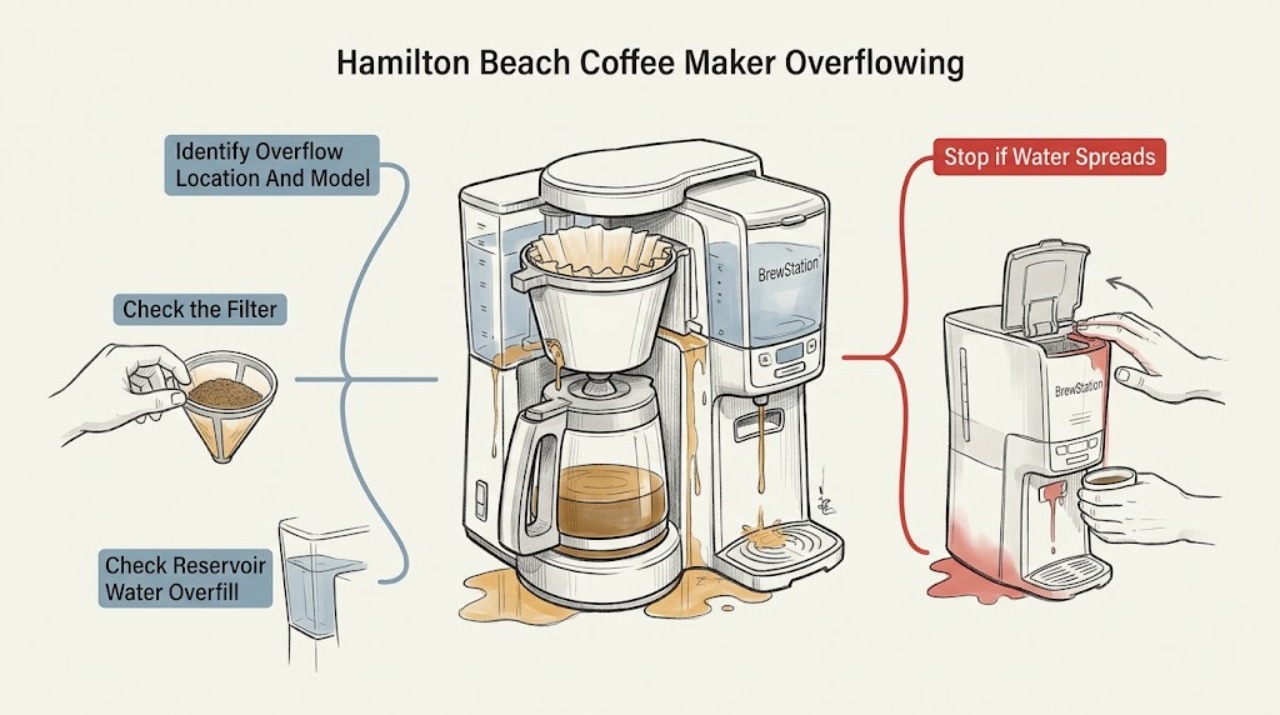
First unplug the coffee maker and let hot water or coffee cool before lifting a filter basket, holder, reservoir, or tank. Identify where the liquid escaped: water from the reservoir, coffee from a basket, coffee from the carafe or cup, or a leak from a BrewStation/One Press tank. On a standard drip model, Hamilton Beach says water overflow points to an overfilled reservoir, while coffee overflow is more often tied to too many grounds, a fine or decaffeinated grind, a collapsed or poor paper filter, or a brew basket or carafe that is not fully seated. For the 12 Cup Programmable Hot & Iced 49620, the carafe must be returned within 20 seconds during Auto Pause & Pour; the exact model's fill and coffee limits control. On an applicable One Press model, do not try to dispense coffee while it is brewing: Hamilton Beach says that can overflow the counter, and its coffee reservoir lid, seals, and dispensing straw must be seated and clear. A BrewStation has no glass carafe; a slow or start-and-stop pump can be a clogged path, while a leaking tank can involve buildup at the tank seal. Clean and descale only as the exact Use & Care guide allows, and never open the heater or base. If overflow continues with correct fill, basket/filter, carafe or cup placement, and a clean model-supported path—or if the cord/base gets wet, there is smoke, a burning smell, or a persistent tank or reservoir leak—keep the unit unplugged and arrange Hamilton Beach service.
Before you begin
Safety first
- The user may unplug and cool the unit, identify the model, adjust a documented fill or grounds level, seat the carafe/cup/basket, and clean removable parts only as the exact manual permits. Qualified service must handle the base, heater, pump, valve, control, internal seals, and live tests.
Work through in order
Diagnostic checks
Use only checks that match the exact appliance or system and its official guide.
-
Check 1
Unplug the coffee maker and allow hot liquid to cool. Record the complete model, type, and series from the rating label on the bottom or rear. Identify the highest wet point: water reservoir, standard brew basket, carafe, cup/travel mug, One Press coffee reservoir, or BrewStation tank/dispensing area.
Expected result: The spill is water only, coffee above the grounds basket, coffee at the carafe or cup, liquid under a BrewStation tank, liquid around a One Press lid/straw, or the source cannot be seen safely.
Next step: Use the matching standard-drip, single-serve, One Press, or BrewStation branch below and keep the model manual available. Do not move a wet appliance or open its base.
Stop if: Stop immediately for water near the cord or outlet, smoke, a burning smell, a hot/damaged cord, or a leak from an inaccessible housing.
Why this matters
Why: The liquid and location select different mechanisms. Water-reservoir overfill, basket flow restriction, cup/carafe placement, and internal-tank seal or dispensing problems should not be treated as one diagnosis.
-
Check 2
For a conventional drip model, with power disconnected and coffee cool, remove the basket only by its normal handle. Check that the paper filter is open and supported, grounds are below the model's limit, the basket holder is fully seated, and the carafe with its lid is aligned under the basket. If Auto Pause & Pour is present, return the carafe within the model's documented time.
Expected result: The filter collapsed, grounds exceed the model limit, the coffee is decaf/flavored or very fine, the basket or carafe is misaligned, the carafe was away too long, or all seating and proportions are normal.
Next step: Discard the cooled grounds, clean and dry the removable basket and holder, use the exact manual's filter and coffee amount, seat the carafe, and observe one normal brew only if the appliance is dry and undamaged. Escalate if overflow returns.
Stop if: Do not lift a hot basket, force the carafe, use a damaged filter holder, or continue brewing into an absent or undersized vessel.
Why this matters
Why: Hamilton Beach identifies each of these as a standard drip overflow pattern. A normal filter, dose, basket, and carafe with recurring overflow makes a flow restriction, valve, heater, or internal fault more likely, but does not identify a part.
-
Check 3
If the liquid was clear water rather than brewed coffee, inspect the accessible water reservoir and window after cooling. Compare the fill level with the exact model's MAX line and verify the reservoir is seated correctly. Do not pour water into the base or remove internal tubing.
Expected result: The reservoir is above MAX, the model has a removable tank that is not fully seated, water appears only at a reservoir seam, or the reservoir level and seating are normal but water still escapes.
Next step: Empty to the model's MAX line and refit only the removable reservoir as directed. If water returns at a seam or from inside the base, keep the unit unplugged and arrange service.
Stop if: Do not exceed the MAX line, add hot water unless the manual permits it, seal a crack with an improvised material, or operate with water in the base.
Why this matters
Why: Hamilton Beach says an overfilled reservoir can cause water overflow; on a removable-reservoir design, incomplete seating or a damaged seal can also leak. A normal level with recurring water escape points toward a reservoir, seal, valve, or internal flow fault.
-
Check 4
For a One Press or other single-serve model, confirm the cup or travel mug is fully on the cup rest and is appropriate for the selected brew size. With power off and the machine cool, check only the removable basket/pod holder, lid, needle holder, reservoir lid, or dispensing straw that the exact manual identifies. On The Scoop, keep grounds below its MAX line; do not lift the lid during brewing on models whose manual forbids it.
Expected result: The cup is too small or mispositioned, grounds exceed MAX, a lid or basket is not seated, the One Press straw or seal has visible residue, or overflow occurs despite correct removable-part placement.
Next step: Use the correct cup and model-specific fill line, clean and dry removable parts, and refit them as directed. If the overflow repeats without an external cause, leave the machine unplugged and arrange service.
Stop if: Do not insert fingers or metal into a piercing needle, force a lid, lift a hot lid, or run a brew cycle with a missing holder or seal.
Why this matters
Why: Single-serve and One Press machines can overflow at the cup, basket, reservoir lid, or dispensing path rather than at a conventional carafe. Hamilton Beach warns that One Press dispensing during brewing can overflow the counter and that The Scoop's overfilled or very fine grounds can overflow its filter.
-
Check 5
Only for a BrewStation-style model, check the removable brew tank, tank lid, and accessible dispensing area after unplugging and cooling. Look for visible coffee residue at the tank seal or a removable screen, and note whether the symptom is a tank leak, slow dispensing, or a pump that starts and stops. Do not open the pump or base.
Expected result: The tank seal area has buildup, dispensing is slow, pumping starts and stops, the removable screen is visibly dirty where the manual permits cleaning, or liquid comes from the base or an inaccessible joint.
Next step: Clean the removable screen or tank/valve only by the exact model's instructions; use the model's decalcification procedure for a suspected internal clog. If the tank still leaks or pumping remains abnormal, arrange service.
Stop if: Do not press a tank valve while the machine is hot, remove the pump, use a sharp tool in the screen, or run the BrewStation with a leaking tank.
Why this matters
Why: Hamilton Beach associates BrewStation slow/intermittent pumping with a clogged path or screen and tank leakage with seal buildup. Liquid from the base or an inaccessible joint is not a user-level screen or seal confirmation.
-
Check 6
After correcting only the applicable external fill, filter, basket, vessel, tank, or removable-path condition, inspect for mineral or coffee buildup and follow the exact Use & Care cleaning/descaling procedure. Do not substitute a generic chemical, pour liquid into the base, or repeat a full brew if the first safe correction still overflows.
Expected result: A model-supported cleaning restores normal flow, overflow returns immediately, coffee is slow despite a clear basket, water leaks from a seal or base, or the cord/base became wet.
Next step: Keep the coffee maker unplugged and contact Hamilton Beach or qualified appliance service with the model, overflow location, liquid type, dose/water level, and cleaning performed. Use qualified electrical service if an outlet or cord was affected.
Stop if: No housing disassembly, live test, heater or pump access, improvised seal repair, or operation after water enters the base.
Why this matters
Why: A successful cleaning supports a removable-path restriction. Recurrence with normal external conditions makes a valve, heater, pump, seal, sensor, or control issue more likely; the symptom does not select a replacement part.
Use your observations
Decision map
Find the observation that best matches what you see, then follow the next safe action.
-
PATH 01Safety boundary
What you see
Coffee rises above a conventional filter basket during brewing, especially with a fine, decaffeinated, flavored, or excessive coffee dose, a collapsed paper filter, an unseated basket, or a carafe removed too long.
Do this next
Unplug and cool, then use the exact model's filter and grounds limit, seat the basket and carafe, and honor its pause-and-pour time. Arrange service if a clean, correctly assembled path still overflows.
Why this path and its safety boundary
Why it matters: The brew rate has exceeded the basket's drainage capacity. Hamilton Beach identifies grounds, grind, paper-filter, basket, and carafe conditions before an internal fault.
Safety stop: Do not lift a hot basket, brew without a carafe or approved vessel, or continue a spill into the base.
-
PATH 02Safety boundary
What you see
Clear water, rather than brewed coffee, escapes around or beneath the reservoir before or during brewing.
Do this next
Cool and unplug, reduce the level to the exact MAX line, refit the removable reservoir, and stop use if the seam or base still leaks.
Why this path and its safety boundary
Why it matters: An overfilled or incompletely seated reservoir is more likely than a coffee-filter problem. A normal fill level with leakage suggests a seal, tank, valve, or internal path issue.
Safety stop: Do not operate with water in the base or attempt to patch a cracked tank while powered.
-
PATH 03Safety boundary
What you see
The overflow is at a cup/travel mug, single-serve holder, or One Press coffee reservoir/dispensing area rather than a standard carafe.
Do this next
Use the exact cup and fill line, refit and clean only removable parts, and never dispense One Press coffee while its manual says brewing is active. Escalate if the external path is correct but overflow recurs.
Why this path and its safety boundary
Why it matters: Cup size and placement, MAX grounds, a lid/holder/needle seal, or dispensing while brewing are more likely. These models do not share a conventional carafe path.
Safety stop: Do not lift a hot lid, insert tools into a needle, or brew without the model's holder, lid, or seal.
-
PATH 04Safety boundary
What you see
A BrewStation has no glass carafe and the tank leaks, dispenses slowly, or starts and stops while pumping.
Do this next
Clean the removable screen, tank, and dispensing valve only as the exact manual permits and use its descaling procedure. Keep the unit off and arrange service for a persistent leak or pump fault.
Why this path and its safety boundary
Why it matters: A clogged screen/path or buildup at the tank seal is more plausible than a conventional basket overflow. Liquid from the base or an inaccessible joint is an internal service condition.
Safety stop: Do not operate with a leaking tank, remove the pump, or access the base while energized.
-
PATH 05Safety boundary
What you see
Overflow returns after correct model-specific fill, grounds, filter, vessel, tank, and removable-path checks, or liquid reaches the cord, outlet, base, or an inaccessible internal joint.
Do this next
Leave the coffee maker unplugged, dry the surrounding area without moving a wet appliance, and contact Hamilton Beach or qualified appliance service with the model and recorded overflow pattern.
Why this path and its safety boundary
Why it matters: A seal, valve, heater, pump, control, or other internal fault is possible, and the liquid location creates burn or electrical risk. The symptom does not identify a safe replacement part.
Safety stop: Do not restore power, repeat a brew to reproduce the leak, open the base, or use an improvised repair.
Helpful context
Understand the symptom
Locate the actual overflow point first
A puddle under a Hamilton Beach coffee maker does not identify one failed part. Water-only overflow points toward the reservoir or a water path; coffee above the basket points toward grounds, filter, flow rate, or basket seating; coffee at a cup or travel mug points toward the container and brew size; a BrewStation or One Press tank has a different internal dispensing path. Record the complete model number from the rating label and use its manual before applying a limit or cleaning step.
Standard drip overflow is usually a flow-capacity mismatch
Hamilton Beach's standard drip guidance separates an overfilled water reservoir from coffee overflowing the brew basket. Excess grounds, very fine or decaffeinated coffee, a collapsed paper filter, a basket or carafe that is not seated, or removing the carafe too long can make the incoming brew exceed the basket's drainage capacity. The exact model's grounds, water, carafe, and pause-and-pour instructions override generic amounts.
BrewStation and One Press are not carafe machines
BrewStation models hold brewed coffee in an internal tank and dispense it through a valve rather than a conventional glass carafe. Hamilton Beach associates slow or intermittent BrewStation pumping with a clogged path and tank leakage with seal buildup. The One Press manual instead describes a coffee reservoir lid, seals, and stainless dispensing straw and warns that dispensing while brewing can overflow the counter. Do not transplant standard carafe checks onto either architecture.
Protect against burns and electrical damage
Unplug and let the machine cool before removing a basket, tank, reservoir, or needle-related removable part. Keep water away from the cord, plug, base, and control area. Do not open the housing, heater, pump, or internal valve, and do not continue a brew cycle to see whether a leak gets worse. Smoke, persistent burning odor, a wet electrical area, a damaged cord, or a leak that returns after safe external cleaning is a service boundary.
Safety boundary
Stop conditions
- Unplug and allow hot coffee or water to cool before removing a basket, holder, carafe, tank, reservoir, or removable flow component.
- Stop using the coffee maker for smoke, persistent burning odor, a hot or damaged cord, water near an outlet or base, or a leak from an inaccessible joint.
- Do not brew without the correct basket, filter, carafe/cup, lid, seal, or tank; do not lift a hot basket or lid, reach into a sharp needle, or repeat a brew to reproduce overflow.
- Do not open the heater, pump, valve, control, or base, immerse the cord/plug/appliance, or choose internal parts from a puddle location. Persistent overflow requires qualified service.
Only after diagnosis
Potential parts
- model-specific brew basket, filter holder, paper-filter support, or carafe
Consider only when the exact model has a cracked, warped, missing, or persistently mis-seating removable basket, holder, paper-filter support, or carafe after correct cleaning and assembly.
Basket geometry, filter size, carafe lid, and pause-and-pour valve vary by model; overflow alone does not prove a part is damaged. - model-specific reservoir, tank seal, lid seal, or dispensing straw
Consider only when the exact One Press or BrewStation model has a confirmed damaged reservoir/tank seal, lid seal, or dispensing straw after the removable path is cleaned and correctly seated.
BrewStation and One Press architectures differ from standard drip machines; verify model, seal location, and service diagnosis before selecting a part. - model-specific water valve, pump, heater, or internal flow component
Consider only after qualified service confirms an internal flow, pump, valve, heater, or control fault when external fill, basket, vessel, tank, and cleaning checks are normal.
Hamilton Beach says internal coffee-maker parts are not sold to consumers; do not open the base or select an internal part from overflow symptoms alone.
When checks do not resolve it
Need a professional?
Arrange Hamilton Beach or qualified appliance service when overflow returns after the exact model's fill, grounds, filter, vessel, tank, and removable-path checks; when a BrewStation or One Press tank leaks; when water comes from the base or an inaccessible joint; or when an internal valve, pump, heater, seal, or control needs inspection. Use qualified electrical service if liquid reaches the cord, outlet, or circuit. Treat smoke, persistent burning odor, hot/damaged wiring, and electrical contact with water as immediate stop-use conditions.
Safety scope: The user may unplug and cool the unit, identify the model, adjust a documented fill or grounds level, seat the carafe/cup/basket, and clean removable parts only as the exact manual permits. Qualified service must handle the base, heater, pump, valve, control, internal seals, and live tests.
Common questions
FAQ
Why is my Hamilton Beach coffee maker overflowing with water?
Hamilton Beach says water overflow can result from an overfilled water reservoir. Unplug and cool the machine, then compare the level with the exact model's MAX line and refit a removable reservoir if applicable. If water still leaks at a seam, from the base, or around internal tubing, stop using it and arrange service.
Why does coffee overflow the Hamilton Beach brew basket?
Common documented causes include too many grounds, very fine or decaffeinated coffee, a collapsed or poor paper filter, and a basket or carafe that is not seated. On the 49620, return the carafe within 20 seconds during Auto Pause & Pour. Unplug and cool before removing a hot basket.
Can removing the carafe make a Hamilton Beach coffee maker overflow?
Yes, on models with a pause-and-pour feature. The 49620 manual says the carafe must be returned within 20 seconds or the brew basket holder may overflow. Follow your exact model's time and placement instructions, and never remove a hot basket to inspect it.
Why is my Hamilton Beach One Press coffee maker overflowing?
The One Press manual says coffee can overflow onto the counter if you try to dispense while brewing. It also directs checks of the coffee reservoir lid, seals, and stainless dispensing straw for correct seating or obstruction. Unplug and cool before cleaning removable parts; a returning leak needs service.
Why is my Hamilton Beach BrewStation leaking or dispensing slowly?
Hamilton Beach says a BrewStation's slow or start-and-stop pumping can result from a clogged path or screen, while a leaking tank can involve buildup at the tank seal and dispensing valve. Clean only the removable path as the exact manual permits; a leak from the base or a persistent tank leak requires service.
How much coffee can I put in a Hamilton Beach The Scoop filter?
Keep the grounds below the MAX line for the exact Scoop model. Hamilton Beach says overfilling and very fine coffee can overflow the scoop filter; its product guidance also says not to exceed 14 ounces of water. Do not carry these limits over to another Hamilton Beach coffee maker.
Should I keep running the coffee maker after it overflows?
No. Unplug it and let the hot liquid cool before removing a basket or other removable part. Correct only the model-documented external cause; stop permanently for a recurring overflow, a wet base or cord, smoke, burning odor, or an inaccessible leak and arrange service.
Read the exact guide
Official sources
- Hamilton Beach FAQsHamilton Beach · Hamilton Beach brand FAQ; exact model Use & Care instructions control when they differ.
- Hamilton Beach Coffee Maker (46390) - Use & CareHamilton Beach · Specific to model 46390; standard-drip mechanism example, not a universal Hamilton Beach limit.
- The Scoop® Single-Serve Coffee Maker Stainless (47550)Hamilton Beach · Specific to The Scoop 47550 product page; use the exact model guide for other Scoop variants.
- Hamilton Beach 12 Cup Programmable Hot & Iced Coffee Maker (49620) - Use & CareHamilton Beach · Specific to model 49620; use its limits and timing only for that model family.
- 5 Reasons Why You Need a BrewStation® Coffee MakerHamilton Beach · Hamilton Beach BrewStation product-family page; individual tank, basket, and cleaning arrangements vary by model.
- Hamilton Beach One Press Dispensing Coffee Maker - Use & CareHamilton Beach · One Press model family represented by the cited manual; reservoir and controls vary across models.
Community feedback
Share a repair observation
Share a plain-text repair observation. Accepted observations are published automatically; this page may take a moment to update.