
On this page
Start here
Quick answer
First classify the symptom from a dry, safe position: a completely dark panel suggests the supply, fuse/breaker, plug or internal power path, while a lit panel that does nothing points more toward the exact start sequence, door lock, delay/child-lock setting, or a model-specific fault. Check the complete model number from the dishwasher door and use its Hisense manual; the model determines whether you hold a program button or press Start/Pause/Stop and how quickly the door must close. If safe and accessible, confirm the dishwasher's supply is on, the plug is seated or the dedicated breaker is on, the water tap is open, and the door closes and latches without obstruction. Cancel an unwanted Delay option or child lock only with the documented control sequence. If the unit is overflowing, leaking, a drain pump keeps whirring after power-off, the outlet/cord is wet or damaged, a breaker trips again, or there is burning odor, smoke, or sparking, turn off the water supply when appropriate, disconnect power only from a dry safe location, and arrange qualified appliance or electrical service. Do not remove panels, bypass the door lock, probe live wiring, or keep resetting a protective device.
Before you begin
Safety first
- Keep the dishwasher off when water or electrical damage is present. Disconnect power only from a dry, safe, accessible point and turn off the water tap for an active leak or overflow when safely reachable. Do not remove panels, perform live electrical tests, bypass the door lock or control lock, or restore power merely to reproduce a fault.
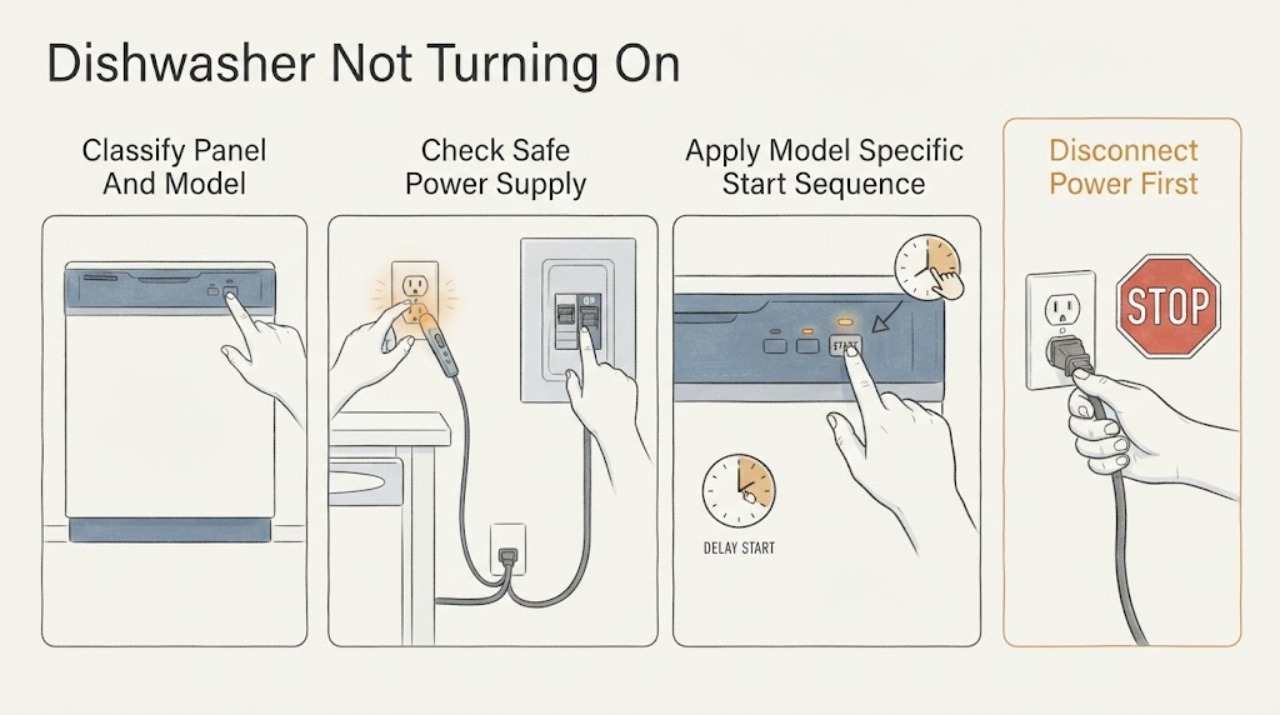
Work through in order
Diagnostic checks
Use only checks that match the exact appliance or system and its official guide.
-
Check 1
From a dry position, look at the controls without opening the cabinet. Record whether the display and indicator lights are completely blank, whether a code or lock symbol appears, whether a countdown is visible, and whether the dishwasher makes any sound. Record the full model from the right inner cabinet of the door; do not use a number beginning with WQP as the model number on the Hisense Canada identification guidance.
Expected result: The panel is dark; the panel is lit with a lock, delay, or code; a program countdown is present but washing does not begin; or a pump/other sound continues.
Next step: Use the matching branch below and the exact model manual. Keep the dishwasher off if water or an electrical hazard is present.
Stop if: Do not pull out a built-in dishwasher, remove panels, or touch wet controls, cords, outlets, or wiring.
Why this matters
Why: A blank panel sends the diagnosis toward supply or internal power. A lit panel shifts it toward the model-specific start command, door latch, delay/lock, water supply, or fault state. A persistent pump sound or leak is a water-safety path, not simply a failed Start button.
-
Check 2
If the panel is blank, check the household dishwasher breaker or fuse and the accessible plug/socket only from a dry, safe position. Confirm the plug is seated if it is designed to be accessible; do not pull a built-in appliance forward or remove an electrical cover. Do not repeatedly reset a breaker that trips.
Expected result: The breaker/fuse is open, the accessible outlet is dead, the plug is loose or damaged, the breaker trips again, or the supply appears normal but the panel stays blank.
Next step: For a dead circuit, damaged outlet/plug, or recurring trip, leave the dishwasher off and use a qualified electrician. If the safe supply is present but the panel remains blank, arrange qualified Hisense appliance service.
Stop if: Do not bypass a fuse, fit a larger breaker, use a damaged cord, touch wet electrical equipment, or perform live-voltage measurements.
Why this matters
Why: Hisense lists a tripped fuse/circuit breaker and an unplugged outlet among no-start causes. A recurring trip, damaged connection, or good supply with no display makes an electrical installation or internal appliance fault more likely than a door setting.
-
Check 3
With the panel powered and the tub safe, follow the exact model manual once. For a HUI6220XCUS-style interface, select a program and hold the desired program until its symbol flashes, then close the door within four seconds. For an HSAA16FS-style interface, turn the unit on, select the program/options, press Start/Pause/Stop, and close the door as directed. Do not assume that another Hisense model has either sequence.
Expected result: The display begins a countdown, the program symbol flashes but the cycle does not begin, pressing the supposed Start control has no response, or the model's manual uses different controls.
Next step: Continue to the door and setting checks if the panel responds. If the exact sequence produces no response, stop repeating commands and arrange service after recording the display behavior.
Stop if: Do not force a touch panel, bridge a start circuit, or open the control console.
Why this matters
Why: A response after the correct model-specific sequence points away from a dead power path. No response with a known-good panel suggests door-lock, control-lock, button, or internal control trouble; a different panel requires its own manual rather than trial-and-error button presses.
-
Check 4
Open the door normally and inspect only for an obvious dish, rack, or utensil preventing closure. Close the door without slamming and note whether the latch clicks or the model indicates a closed-door state. If the model uses a four-second start window, close it within that window; do not hold or bypass the latch.
Expected result: The door cannot close flush, a rack or dish obstructs it, the latch does not click, the cycle cancels after the door was opened, or the door closes and latches normally.
Next step: Remove only the obvious loading obstruction and try the documented start sequence once. If the latch does not engage, the door is misaligned, or the cycle will not resume after a correct closure, keep the unit off and arrange service.
Stop if: Do not defeat the door switch, insert tools into the latch, adjust hinges, or continue if water or sharp damaged metal is present.
Why this matters
Why: Hisense manuals identify improper closure and a door lock that has not clicked into place as no-start conditions. An obstruction or failed latch changes the path from power/start settings to door alignment or latch service.
-
Check 5
Read the display for Delay, a child-lock indication, an interrupted-cycle message, or a water/overflow warning. Use only the exact model's documented cancellation or unlock sequence; confirm the water supply tap is open if the manual requires it. Do not start a new cycle if the tub is overflowing, leaking, or the drain pump runs continuously.
Expected result: Delay or child lock is shown, the door was opened during a previous cycle, the water tap is off, the tub has standing water/overflow, or no setting/water warning appears.
Next step: Cancel the documented delay/lock or resume the interrupted cycle once, then stop if it does not start. For an overflow/leak or continuous pump sound, turn off the water tap and disconnect power as safely as possible, then arrange service.
Stop if: Do not bypass a child lock, repeatedly restart a leaking machine, or reach into a tub with an active electrical or water hazard.
Why this matters
Why: A delay or lock can intentionally prevent an immediate start. An opened door may require Start again. Hisense also lists a closed water valve and overflow/leaks in the no-start troubleshooting table; a persistent pump sound can signal a water fault requiring isolation.
-
Check 6
After one safe, model-correct attempt, record whether the dishwasher starts, remains silent with a lit panel, returns to a lock/delay state, goes blank, trips protection, or shows a persistent code. Do not repeat cycling to make the symptom occur.
Expected result: The cycle starts normally; it remains unresponsive despite power, settings, and latch checks; a code returns; the breaker trips; or water, odor, heat, smoke, or sparking is present.
Next step: Stop use and arrange qualified appliance service for a persistent no-start or code. Use an electrician for the supply/circuit, and provide the model, panel state, exact sequence used, latch result, delay/lock status, water state, and any protective-trip history.
Stop if: Do not open panels, live-test, bypass safety interlocks, repeatedly reset breakers, or restore power to wet or damaged equipment.
Why this matters
Why: A normal start supports a control, door-timing, delay, or supply-state explanation but does not prove an intermittent fault is repaired. Persistent no-start or a returning hazard can involve the latch, control, inlet/drain system, wiring, or another internal component.
Use your observations
Decision map
Find the observation that best matches what you see, then follow the next safe action.
-
PATH 01Safety boundary
What you see
The panel is blank, the accessible supply or breaker appears normal, and there is no water, heat, odor, or visible cord/outlet damage.
Do this next
Leave the dishwasher off and arrange qualified appliance service; use an electrician if the supply result is uncertain. Do not remove the console or perform live tests.
Why this path and its safety boundary
Why it matters: An internal power path, control, or installation issue is more likely than a delayed start or door command.
Safety stop: Stop immediately for a recurring trip, damaged cord, wet outlet, smoke, burning odor, or heat.
-
PATH 02Safety boundary
What you see
The display or indicators are lit, but the cycle does not begin after the exact model's documented program/start sequence.
Do this next
Verify the model and use its manual once, then inspect only obvious door/rack obstruction. Escalate a nonresponsive panel or latch that will not click.
Why this path and its safety boundary
Why it matters: A missed or model-inappropriate start command, control lock/delay, door latch, or internal control issue is more likely than a total power loss.
Safety stop: Do not force buttons, bypass the lock, or open the control panel.
-
PATH 03Safety boundary
What you see
The program indicator responds but the door does not close flush/click, or the door was not closed within the model's required start window.
Do this next
Remove only an obvious rack/dish obstruction and retry the documented start sequence once. If the latch still does not engage, arrange service.
Why this path and its safety boundary
Why it matters: A loading obstruction, door alignment, latch, or door-timing condition is more likely than a failed motor.
Safety stop: Do not insert tools, defeat the door switch, or adjust the latch/hinges yourself.
-
PATH 04Safety boundary
What you see
The display shows Delay/lock or an interrupted-cycle state, or the water tap is off without an active electrical or leak hazard.
Do this next
Cancel Delay or unlock only with the exact model sequence, open the water tap if required, and make one start attempt. Stop for overflow, leaks, or a pump that will not stop.
Why this path and its safety boundary
Why it matters: A deliberate setting or prerequisite may be holding the start, although a water warning can indicate a separate supply/overflow path.
Safety stop: Do not repeatedly cycle a machine with water on the floor or bypass a lock.
-
PATH 05Safety boundary
What you see
The dishwasher is leaking/overflowing, the drain pump continues after the main switch is off, a code returns, the breaker trips again, or smoke, burning odor, sparks, or wet electrical equipment is present.
Do this next
Turn off the water tap if it is safely reachable, disconnect power only from a dry safe location, keep clear, and arrange qualified appliance or electrical service. Give the technician the exact model and symptom timing.
Why this path and its safety boundary
Why it matters: This is a water-safety, electrical, or internal fault state rather than a safe start-setting problem.
Safety stop: Do not restore power to reproduce the symptom, reach behind the unit, open panels, bypass protection, or handle wet wiring.
Helpful context
Understand the symptom
“Not turning on” has two different starting points
Record whether the panel is completely dark, lights up but will not accept a start command, starts a countdown but never runs, or stops after the door was opened. Then record the model from the right inner cabinet of the door. Hisense publishes different panel layouts and start sequences, so a button sequence from another model can mislead the diagnosis.
The door is part of the start command
On the HUI6220XCUS instructions, the selected program must be held until its symbol flashes and the door must close within four seconds. The HSAA16FS instructions instead show a Start/Pause/Stop sequence and also require the door to close properly. A door that is not fully latched, a basket or dish obstructing closure, or a delayed start can look like a dead machine even when the control panel has power.
Do not confuse a start fault with a protection response
Hisense troubleshooting material links no-start symptoms with supply, door-lock, water-supply, overflow/leak, and delay conditions. A continuously whirring drain pump, an overflow, or a leak changes the job from button troubleshooting to isolation and service. Do not keep attempting cycles to reproduce a water or electrical symptom.
Stop before opening the machine
If water is on the floor or near the outlet, keep clear and disconnect power only from a dry, safe, accessible point. If an active leak or overflow is present and the water tap can be reached safely, turn it off before unplugging as the model manual directs. Smoke, burning odor, sparks, a hot or damaged cord, repeated breaker trips, or a drain pump that continues after the main switch is off require qualified help. Do not remove the inner door or toe-kick panels, bypass the latch, or perform live electrical tests.
Only after diagnosis
Potential parts
Only after the exact model and a technician confirm that the door cannot latch or the lock does not register closed.
Only after a qualified technician confirms safe supply and an internal no-display or no-response fault.
When checks do not resolve it
Need a professional?
Call qualified appliance service for a persistent no-start after the model, supply, start-command, door, and setting checks; a door lock that will not click; a returning code; or any leak, overflow, or continuous drain-pump condition. Call an electrician for a dead, wet, damaged, hot, or repeatedly tripping outlet, plug, breaker, or circuit. Stop immediately for smoke, burning odor, sparks, or water near energized parts.
Safety scope: Keep the dishwasher off when water or electrical damage is present. Disconnect power only from a dry, safe, accessible point and turn off the water tap for an active leak or overflow when safely reachable. Do not remove panels, perform live electrical tests, bypass the door lock or control lock, or restore power merely to reproduce a fault.
Have this ready
- Provide the exact model and serial information, panel/display state, breaker/outlet result, model-specific sequence attempted, door/latch result, delay or child-lock indication, water-tap state, whether the tub is leaking or full, any pump sound, displayed code, and any odor, heat, smoke, spark, or repeat-trip history.
Common questions
FAQ
Why is my Hisense dishwasher completely blank?
From a dry, safe position, check the accessible breaker/fuse and plug or outlet without pulling out a built-in unit or opening a panel. Hisense lists a tripped breaker/fuse and an unplugged outlet as no-start causes. If safe supply is present but the display stays blank, leave the dishwasher off and arrange qualified appliance service.
How do I start a Hisense dishwasher after selecting a cycle?
Use the exact manual for the model. HUI6220XCUS instructions select a program, hold that program until its symbol flashes, and close the door within four seconds. HSAA16FS instructions use a Start/Pause/Stop control and a displayed countdown. Hisense model panels differ, so do not assume one sequence applies to every dishwasher.
Can a Hisense dishwasher refuse to start because the door is closed?
Yes, if it is not fully latched or was not closed within the model's required start window. Check only for an obvious rack or dish obstruction and listen for the latch to engage. Do not bypass or dismantle the door lock; a latch that will not click needs service.
Could Delay or Child Lock make a Hisense dishwasher look dead?
Yes. The official manuals describe Delay start and child-lock behavior that can prevent an immediate response or start. Read the exact display and use that model's documented cancellation or unlock sequence once. If a lock/delay indication returns or the controls remain unresponsive, arrange service rather than trying random button combinations.
What if the dishwasher hums or the drain pump keeps running but the cycle will not start?
Treat a continuous pump sound, leak, or overflow as a water fault, not a normal start delay. Hisense's HUI6220XCUS troubleshooting guidance says to turn off the water supply, unplug the machine, and call for help when a drain-pump whir continues after the main switch is turned off. Do not restore power to reproduce it.
Read the exact guide
Official sources
- 24” Top Control Dishwasher with Metal Handle (HDW63314SS)Hisense Canada · Applies specifically to model HDW63314SS and is used to demonstrate model variation, not to assign its controls to another Hisense dishwasher.
- Find My Model NumberHisense Canada · Hisense Canada model-identification guidance; regional label placement may vary, so confirm against the appliance and local manual.
- HUI6220XCUS-owners-update-version-v2.PDFHisense USA · Official Hisense USA manual for HUI6220XCUS; start controls, timing, and troubleshooting labels must be matched to the owner's exact model.
- HSAA16FS-UM.pdfHisense · Official Hisense product manual for HSAA16FS; it is used for a separate model-specific control path and not as a universal Hisense panel guide.
Community feedback
Share a repair observation
Share a plain-text repair observation. Accepted observations are published automatically; this page may take a moment to update.