
On this page
Start here
Quick answer
Do not diagnose a Hoover washing-machine code from its number alone: photograph the complete code or LED-flash pattern, record the exact model, cycle stage, and whether clean or dirty water remains, then use that model's Hoover manual. On supported models, E02 or E2 points to a fill or water-supply problem, E03 or E3 and some E20 displays point to draining, E04 may be associated with excess suds, E08 with an overloaded drum, and E15 may have a model-specific unplug-and-retry instruction. These meanings are not universal across every Hoover model. Disconnect before examining a filter or hose, and stop for a leak near electrics, standing water at a plug or outlet, burning smell, smoke, sparks, abnormal heat, or a repeated breaker trip.
Before you begin
Safety first
- Do not force or bypass the door lock, reach into a moving drum, dismantle the pump or inlet, loosen a pressurized hose, remove electrical covers, probe live wiring, or operate after a leak near electrics, wet plug or outlet, burning smell, smoke, sparks, arcing, abnormal heat, or repeated trip.
Work through in order
Diagnostic checks
Use only checks that match the exact appliance or system and its official guide.
-
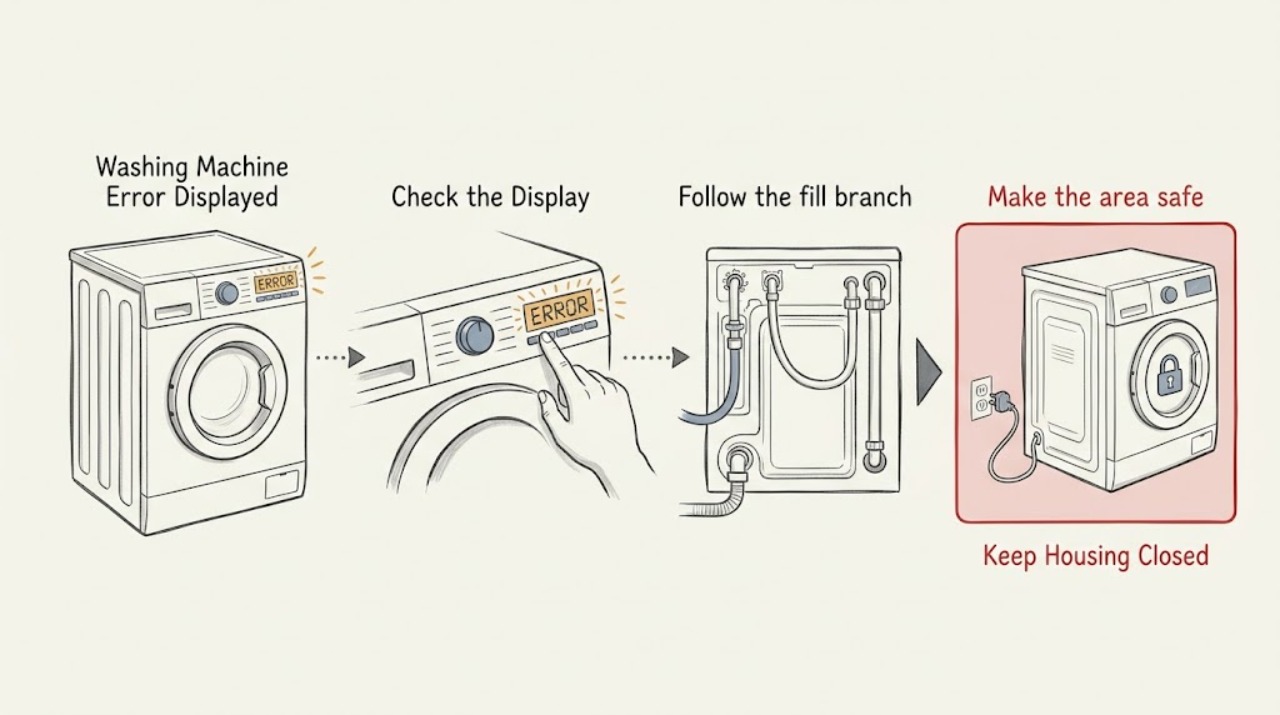
Make the area safe and capture the complete error
Stop the program and photograph or write the entire display, including the leading E, zeroes, decimal points, lock or tap icons, and any flashing lights. Record the model and product code from the appliance plate, the selected program, the stage at which it stopped, whether the drum contains no water, clean water, or dirty water, and whether the door is locked. Inspect only the dry visible exterior and floor.
Expected result: The area is dry and the code is readable; or there is a leak, standing water near the plug or outlet, a hot or discolored connection, burning smell, smoke, spark, arcing, abnormal heat, or a repeated trip.
Next step: If safe, continue with the model-specific code branch. If a hazard is present, leave the washer off and arrange qualified appliance or electrical service without another test.
Stop if: Stop immediately for a leak reaching electrics, wet plug or outlet, burning smell, smoke, sparks, arcing, abnormal heat, or repeated breaker trip.
Why this matters
Why: The code, model, stage, and water level determine which Hoover guidance applies. A wet electrical area or heat or smoke symptom changes the task from code diagnosis to an immediate safety stop.
-
Verify the model and code format before interpreting it
Open the Hoover manual or Advice Centre page for the exact model and compare the recorded code or LED pattern. On a machine without a display, count the repeating flashes and the pause exactly as the manual describes; do not turn a partial readout into a guessed E-code. Check whether the code is a normal status indicator, delay setting, or a fault for that model.
Expected result: The exact model page defines the code; only a generic or partial code is available; the display is showing a normal status; or the code is not listed for that model.
Next step: Use the exact model's listed external check when available. If the code is incomplete, not listed, or remains ambiguous, preserve a photo and request service rather than applying another model's code meaning.
Stop if: Do not open panels or test live circuits to identify a code. Stop for wet electrical parts, smoke, sparks, burning smell, overheating, or repeated trip.
Why this matters
Why: Hoover states that its washing-machine troubleshooting is model-specific. The same-looking number cannot safely identify the inlet, pump, door, motor, or control without the applicable model context.
-
Follow the fill branch for E02 or E2 on supported models
If the exact Hoover page identifies E02 or E2 as a fill error, check that the household water tap is open and the visible inlet hose is not twisted, kinked, or trapped. Look for a wet hose connection without touching water near electrics. Only if the model procedure permits it, disconnect power and water before examining an accessible inlet filter; do not force a seized tap or loosen a pressurized connection.
Expected result: The tap is closed, the hose is kinked, water pressure is absent or weak, an accessible filter is obstructed, the machine never fills, or the supply path appears normal.
Next step: Correct one visible tap or hose issue covered by the model instructions and make one supervised attempt. If E02/E2 returns with a known-good supply, stop and give service the exact code, model, and fill observations.
Stop if: Do not work on a wet connection, force a stiff valve, loosen a pressurized hose, or continue after a leak, smoke, sparks, burning smell, overheating, or repeated trip.
Why this matters
Why: Hoover's E02 guidance associates the code with a water-supply problem and identifies low pressure, a closed tap, or a twisted or kinked hose as possible causes. A clear supply does not prove that the inlet valve or sensor has failed.
-
Follow the drain branch for E03, E3, or a supported E20
If the exact model identifies E03/E3 or E20 as a drain issue, note whether dirty or clean water remains. With the floor and electrical area dry, disconnect the washer before examining the model-approved pump filter, emergency drain, rear hose, or sink-waste connection. Use a low container only where the manual procedure allows it, remove visible debris from an accessible filter, and refit it as instructed.
Expected result: Water drains, the filter or sink-waste connection is visibly blocked, the hose is kinked or incorrectly routed, water cannot be drained safely, or the same code returns after the path is clear.
Next step: Correct only the visible obstruction or hose arrangement covered by the exact model procedure and make one supervised drain or cancel-cycle attempt. If the drum fills again, a leak appears, or the code returns, leave the appliance off and request service.
Stop if: Do not open the filter if water may reach electrics, the machine is unstable, or the water is hot. Stop for a leak, wet plug or outlet, smoke, burning smell, sparks, abnormal heat, or repeated trip; do not dismantle the pump.
Why this matters
Why: Hoover says E3 warns that the machine is not draining and that a pump blockage or sink connection can be involved; on some models an obstruction can produce E20. A repeat after the safe external check may involve a pump, sensor, hose, or control and cannot be diagnosed from the code alone.
-
Check detergent suds or load size for supported E04 and E08 codes
If the exact model page identifies E04 as an excess-detergent condition, look through the window for unusually heavy suds and record the detergent type and dose; do not add more detergent. If it identifies E08 as an overload, stop the drum, wait for normal door release, and remove enough clothing to return within the model's load guidance. Do not reach into a moving drum or force the door.
Expected result: There are heavy suds, the load is visibly overfilled or tightly packed, the code clears after the model-approved maintenance or load correction, or the code returns with a normal dose and load.
Next step: For E04, use only the maintenance-cycle procedure specified by the exact model and allow the machine to complete it without a load; for E08, reduce the load as instructed and make one supervised attempt. Persistent code or incomplete operation needs service.
Stop if: Do not open the door against a lock, reach through suds into moving parts, use an improvised chemical treatment, or continue after a leak near electrics, burning smell, smoke, sparks, overheating, or repeated trip.
Why this matters
Why: Hoover associates E04 with too much soap powder and suds that can trigger an alarm, and E08 with an overloaded drum on the models covered by its pages. These observations support a dosing or load branch but do not prove a failed pressure sensor or motor.
-
Check door, child lock, pause, and status indicators
Compare the display with the exact manual and observe whether the door is locked, a child-lock or control-lock icon is present, the program is paused, or the machine is waiting in a hold or delay state. Let the drum stop and follow the model's normal cancel or unlock controls; do not pry the door or bypass its lock. Check only that the visible door opening is free of clothing and closes normally.
Expected result: The machine releases the door after its safety delay, the lock or pause indicator clears, an obstruction prevents closure, water remains, or the door and controls stay locked with no normal status explanation.
Next step: Clear only a visible clothing obstruction, use the documented control sequence once, and then return to the code's fill or drain branch if water remains. If the lock will not release normally or the code persists, leave the washer off and request service.
Stop if: Never force or bypass the lock. Stop if the drum is hot, water is near electrics, the latch is damaged, or there is smoke, burning smell, sparks, overheating, or repeated trip.
Why this matters
Why: A locked door can be a safety state rather than the cause of the displayed code, especially with water remaining or after an interrupted cycle. An obstruction, persistent lock, or code that returns after the normal control sequence requires a model-specific service path.
-
Use one model-approved reset, then hand off a returning code
Only if the area is dry, the machine is cool, the door is safely released or empty of unsafe standing water, and the exact Hoover page permits it, perform the single listed reset. For supported E15 pages this is an unplug-and-retry instruction; other codes may have a different sequence. Record the display, stage, water level, door state, and breaker response after the reset.
Expected result: The code clears and the cycle completes once, the same code returns, a different code appears, the machine remains locked or full of water, or the breaker trips again.
Next step: If the fault returns or operation remains incomplete, leave the washer off and arrange qualified appliance service. Provide the model, exact code or flash pattern, selected program, stop stage, water level, door state, supply and drain observations, detergent/load details, and reset result.
Stop if: Do not repeat the reset or keep restoring power after a leak, wet electrical area, burning smell, smoke, sparks, arcing, abnormal heat, or repeated trip.
Why this matters
Why: Hoover specifically gives an unplug-and-retry instruction for E15 on listed models and directs owners to service if it persists. A reset can clear a transient state but cannot prove that an inlet, pump, lock, sensor, motor, or control is healthy.
Use your observations
Decision map
Find the observation that best matches what you see, then follow the next safe action.
-
PATH 01Next step
What you see
Leak or standing water reaches electrics, or there is a hot or damaged connection, burning smell, smoke, spark, arcing, abnormal heat, or repeated trip
Do this next
Leave the washer off, avoid wet electrical parts and repeated switching, and arrange qualified appliance or electrical service.
-
PATH 02Next step
What you see
The code or flash pattern is incomplete, not listed for the exact model, or may be a normal status indicator
Do this next
Preserve a photo, model and product code, stage, and water-level observation; do not borrow a code meaning from another Hoover model, and request service if the state persists.
-
PATH 03Next step
What you see
The exact model identifies E02/E2 or another fill or water-supply error
Do this next
Check the visible water tap and non-kinked hose once; persistent failure with a sound supply requires service.
-
PATH 04Next step
What you see
The exact model identifies E03/E3 or a supported E20 drain error and water remains
Do this next
With power disconnected and the area dry, follow the model-approved filter, hose, emergency-drain, or sink-waste check once; a repeat or unsafe drain requires service.
-
PATH 05Next step
What you see
The exact model identifies E04 with heavy suds or E08 with an overloaded drum
Do this next
Use the model's maintenance-cycle or load-reduction instruction once; a returning code needs service rather than a guessed part.
-
PATH 06Next step
What you see
A lock, pause, delay, or door state prevents the normal program transition
Do this next
Follow the exact model's normal cancel, delay, or unlock sequence without forcing the door; visible water or a persistent lock moves to drain or service.
-
PATH 07Next step
What you see
The same or a different code returns after one model-approved external check or reset
Do this next
Leave the washer off and provide service with the exact code, model, stage, water level, door state, and results of each safe check.
Helpful context
Understand the symptom
A code is a decision point, not a part number
Hoover's Advice Centre organizes washing-machine help by model and lists several code branches, but a code can have different coverage or controls on a different model. Preserve leading letters, zeros, punctuation, and the repeating flash count on machines without a display. The stage matters too: a fill code with an empty drum leads to a different check from a drain code with dirty water still inside.
Safe observations come before clearing a fault
Keep the machine still while you photograph the display and inspect only dry, visible areas. Disconnect it before examining a filter, drain hose, or inlet screen, and follow the exact manual for any emergency-drain step. Do not remove electrical covers, probe live wiring, force the door, or repeatedly reset a breaker. A code that returns after its one model-approved check is service evidence, not permission to guess a replacement part.
When checks do not resolve it
Need a professional?
Request qualified appliance service when the exact model's safe code check and one permitted reset do not restore operation. Use qualified electrical service for a damaged connection, outlet, breaker, or household-supply concern.
Safety scope: Do not force or bypass the door lock, reach into a moving drum, dismantle the pump or inlet, loosen a pressurized hose, remove electrical covers, probe live wiring, or operate after a leak near electrics, wet plug or outlet, burning smell, smoke, sparks, arcing, abnormal heat, or repeated trip.
Have this ready
- Provide the exact model and product code, complete code or LED pattern, selected program, point of failure, clean or dirty water level, door state, visible supply and drain findings, detergent and load details, reset result, and breaker behavior.
Common questions
FAQ
Does an E02 or E2 code always mean the Hoover inlet valve is bad?
No. On supported Hoover models, E02/E2 is associated with a fill problem, and Hoover first points to the water tap, low pressure, or a twisted or kinked hose. Check only the visible supply path covered by the exact model instructions; a returning code does not identify a part by itself.
What should I do if my Hoover shows E03, E3, or E20?
Preserve the exact code and check whether water remains. Hoover associates E3 with failure to drain and says a pump blockage or sink-waste connection can be involved; it notes that an obstruction can cause E20 on some models. Disconnect first, keep the electrical area dry, follow the model-approved accessible drain check once, and request service if the code returns.
Can too much detergent cause a Hoover error code?
On models covered by Hoover's E04 guidance, excess detergent and heavy suds may trigger E04. Do not add more detergent; use only the exact model's maintenance-cycle instruction once. If E04 persists, arrange service rather than assuming a sensor or pump is defective.
Is it safe to unplug a Hoover washing machine showing an error?
Only when the area is dry and free of smoke, heat, sparks, burning smell, and water near electrics, and only according to the exact model's instructions. Hoover specifically documents an unplug-and-retry step for E15 on listed models; a different code may require another path. Never unplug or reset repeatedly after a safety hazard or breaker trip.
Read the exact guide
Official sources
- Error message E03 - Hoover Advice CentreHoover Service · Hoover models listed on the page; confirm the exact model and safe drain procedure
- Unplug the appliance for a few minutesHoover Service · Hoover models listed on the page; apply only when the exact model and safe conditions match
- Washing Machine Appliance Advice CentreHoover Service · Hoover washing machines; exact code and control coverage varies by model
- Error message E04 - Hoover Advice CentreHoover Service · Hoover models listed on the page; confirm exact model and cycle instructions
- Door won't open - Hoover Advice CentreHoover Service · Hoover washing machines and washer dryers; model behavior varies
- Washing Machine Appliance Advice CentreHoover Service · Hoover washing machines; use the product code to select the applicable model
- Check the drain pump is not blocked | Hoover ServiceHoover Service · Hoover models listed on the page; E20 meaning is not universal across models
- Error message E02 - Hoover Advice CentreHoover Service · Hoover models listed on the page; confirm the exact model before applying the code meaning
- Check you have not overloaded the drum | Hoover ServiceHoover Service · Hoover models listed on the page; load limits vary by model
Community feedback
Share a repair observation
Share a plain-text repair observation. Accepted observations are published automatically; this page may take a moment to update.