
On this page
Start here
Quick answer
Do not treat every long program as a failed cycle. Note the exact point where the Hotpoint dishwasher stops, whether the display or LEDs show a code or pattern, whether water remains in the tub, and whether the dishes are warm or dry. With the appliance switched off and isolated, make only the model-allowed external checks: confirm the door is fully latched, the water tap is on and the fill hose is not kinked, and the accessible filter and drain hose are clear. Hotpoint's official guidance links failure to fill with the water supply and hose, and failure to empty with the waste hose, sink connection, or base filter; its error-code meanings are model-specific. If there is standing water, a leak, repeated tripping, smoke, burning odor, damaged wiring, or an internal pump, valve, heater, sensor, or control fault is suspected, stop and arrange qualified service.
Before you begin
Safety first
- The owner may record the model and cycle state, check the door and settings from outside, isolate power, inspect an accessible filter, visually check the waste and inlet hose routing, confirm the external tap and socket, and follow the exact model's user instructions. Qualified personnel must handle pump, valve, heater, sensor, interlock, wiring, control, enclosure, plumbing disconnection, and live testing.
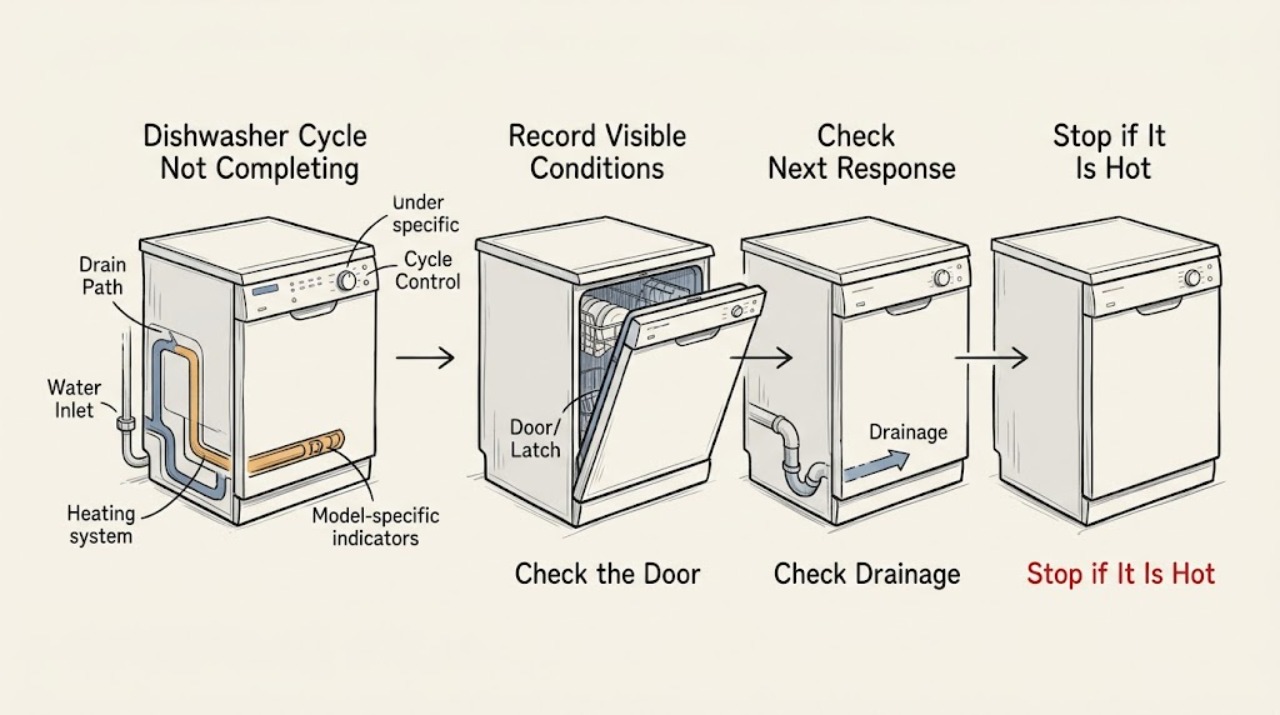
Work through in order
Diagnostic checks
Use only checks that match the exact appliance or system and its official guide.
-
Check 1
Before resetting the dishwasher, record the exact Hotpoint model or product code, selected program, elapsed behavior, the last visible stage or sound, any display code or flashing LEDs, whether water remains in the tub, and whether the dishes are warm or dry.
Expected result: The dishwasher is still running or delayed; it stops early; it ends with standing water; it ends with wet but drained dishes; or it shows a code, icon, or light pattern.
Next step: Use the matching branch below and keep the exact model information with the appliance. Check the model manual before interpreting any code or selecting a reset sequence.
Stop if: Do not repeatedly restart the dishwasher, erase a code before recording it, or assume an unfamiliar LED pattern has the same meaning as a code from another Hotpoint model.
Why this matters
Why: A delay or a program that has not reached its normal end is different from an early stop. Standing water makes a drain-path issue more likely, while a fill pause points toward supply. Wet dishes after the tub drains may reflect program or drying behavior rather than an incomplete cycle. A code or flashing pattern is model-specific evidence.
-
Check 2
With the dishwasher stopped, verify from the outside that the door closes and latches normally, no rack or dish projects into the door path, the intended program is selected, and no delay or control-lock indication is active. Use the exact Hotpoint manual for the model's cancel, pause, or restart behavior.
Expected result: The door cannot latch; an item interferes; a delay or lock symbol is active; the program is not the intended one; or the door and settings appear normal but the cycle still stops at the same stage.
Next step: Correct only the visible rack, dish, latch, or setting condition documented for the model, then run the model-approved program test. If the door hardware or interlock requires disassembly, arrange service.
Stop if: Do not force the door, bypass the latch or interlock, insert tools into the lock, or run the machine with a damaged seal or door that will not remain closed.
Why this matters
Why: A door that is not fully latched or a model-specific lock/delay state can interrupt or defer operation without proving a failed pump or heater. A normal latch and correct program make a repeated stage-specific fault more likely.
-
Check 3
If water remains in the tub, switch the dishwasher off and disconnect it before inspecting only the accessible base filter and visible drain path. Check that the waste hose is not kinked or trapped and that the under-sink connection is installed as the exact Hotpoint instructions show; a blanked sink spigot is a specific connection issue to check after installation work.
Expected result: The filter is visibly obstructed; the hose is kinked or trapped; the sink connection or spigot is visibly incorrect; the accessible path is clear; or water is near electrical components or leaking beyond the tub.
Next step: Clean or correct only the accessible condition using the exact model instructions, refit everything securely, and do not run the machine until pooled water and removable parts are safely handled. Escalate a clear path with persistent standing water.
Stop if: Do not reach into a powered or leaking appliance, dismantle the pump, remove sealed plumbing under pressure, use sharp tools to clear hidden passages, or continue if water has contacted electrical parts.
Why this matters
Why: Hotpoint identifies the filter, waste-hose routing, and sink connection as external causes of failure to empty. A clear, correctly routed path makes an internal drain pump, impeller, wiring, or control fault more likely. Water near electrical parts is a stop condition.
-
Check 4
If the cycle pauses before or during filling, check from outside the appliance that the water tap is fully open and the inlet hose is not kinked, crushed, or trapped. Confirm whether the tap/fill indication or a recorded fill-timeout code returns; do not remove the inlet valve or hose from the appliance body.
Expected result: The tap is closed or partly open; the inlet hose is visibly restricted; the tap and hose are normal; the dishwasher fills after correction; or it still times out or shows a fill-related indication.
Next step: Open the tap or remove a visible hose kink only if safe and model-consistent, then follow the exact manual's restart procedure. If the supply is normal but fill failure persists, stop and arrange qualified service.
Stop if: Do not work on a hose that is leaking, disconnect a pressurized connection, test a valve live, or bypass a fill sensor or control.
Why this matters
Why: Hotpoint links failure to fill with the water tap, pipe condition, and water-supply path, and separately lists model-specific fill solenoid or timeout faults. A normal external supply with repeated failure shifts suspicion to an internal valve, filter, sensor, wiring, pressure, or control issue.
-
Check 5
If the entire dishwasher loses power, check the socket with another suitable device and inspect the plug, cord, and accessible switch or breaker without opening the appliance. If the panel remains lit but the program stops, record the exact code or flashing pattern and compare it only with the exact Hotpoint model documentation.
Expected result: The socket is dead; the plug or cord is damaged; the breaker trips; the panel is lit with no code; or a specific code or light pattern repeats at the same stage.
Next step: Restore only an external supply issue that can be handled safely and is consistent with the manual. For a repeated code, damaged power hardware, tripping, or a stage-specific stop after the external checks, provide the model and recorded evidence to qualified service.
Stop if: Stop immediately for smoke, sparks, burning smell, a hot or damaged cord/plug, repeated breaker trips, water near electrical parts, or any need to open the electrical enclosure or perform live testing.
Why this matters
Why: Hotpoint's guidance starts a no-power diagnosis at the socket, fuse rating, extension-lead use, and on/off/start controls. A lit panel does not identify a failed board, and a repeated code may represent drain, fill, temperature, heater, pump, communication, or another model-specific condition.
Use your observations
Decision map
Find the observation that best matches what you see, then follow the next safe action.
-
PATH 01Safety boundary
What you see
The dishwasher has no standing water, no hazard sign, and the selected program or display shows a delay, pause, or a program whose documented phases do not include the expected drying result.
Do this next
Use the exact model's cancel or delay procedure and select a program whose documented phases match the desired result. If it stops repeatedly at a defined stage, move to the corresponding water, heat, or error branch.
Why this path and its safety boundary
Why it matters: A delay or program characteristic is more likely than a failed drain or heater. Hotpoint's symbols and program guidance are model-dependent, so the display must be read against the exact manual.
Safety stop: Do not force a delayed program to start, defeat a control lock, or call a wet-dish result a heating failure without confirming the selected program.
-
PATH 02Safety boundary
What you see
The cycle stops or ends with water left in the tub, especially with a drain indication or a recorded drain-related code.
Do this next
Isolate power, perform only the accessible filter, hose, and sink-connection checks, and arrange service if water remains or a drain code returns.
Why this path and its safety boundary
Why it matters: A blocked or incorrectly routed waste path, sink connection, or base filter is more likely than a fill fault. If those accessible checks are clear, an internal drain pump, impeller, wiring, or control fault remains possible; Hotpoint's code meanings must be matched to the model.
Safety stop: Stop for leaks, water near electrical parts, a pump that would need dismantling, or any need for powered or live testing.
-
PATH 03Safety boundary
What you see
The tub remains empty or the dishwasher pauses during fill, with a tap/fill indication or a model-specific fill-timeout code.
Do this next
Confirm the tap is fully open and the hose is not kinked, then use the exact model's guidance. Escalate persistent failure or a leak to qualified service.
Why this path and its safety boundary
Why it matters: The external water tap and inlet-hose path should be considered first. Hotpoint separately identifies fill solenoid and timeout faults, so a normal tap and hose do not justify replacing a valve without diagnosis.
Safety stop: Do not disconnect a pressurized inlet, open the valve housing, bypass the fill circuit, or continue with a leaking connection.
-
PATH 04Safety boundary
What you see
The dishwasher drains and fills but stops during washing, heating, or a temperature-related stage, or it completes with unexpectedly cold results.
Do this next
Record the selected program, water-temperature result, sound pattern, and exact code; compare with the exact model manual and arrange qualified diagnosis for the heater, sensor, pump, wiring, or control.
Why this path and its safety boundary
Why it matters: A program phase, temperature timeout, heater, thermostat/sensor, wash pump, suds, or limescale-related condition may be involved. The official Hotpoint code page distinguishes these categories but does not make them safe owner tests.
Safety stop: Do not open panels, touch a heater, measure live voltage, add chemicals to force a test, or repeatedly run a cycle that overheats, trips, smells, or stops at the same stage.
-
PATH 05Safety boundary
What you see
The door does not remain latched, the whole machine loses power, the breaker trips, the panel is lit but control stops recur, or a board/communication-related code or flashing pattern repeats.
Do this next
Correct only a safe external obstruction or supply issue, preserve the code and model information, and arrange service when the latch, power hardware, control, wiring, or repeated trip would need diagnosis.
Why this path and its safety boundary
Why it matters: A visible loading or external supply condition may interrupt the program, but persistent faults can involve the door interlock, supply, wiring, control, or display. Hotpoint's power and error guidance supports professional escalation rather than a generic control-board replacement.
Safety stop: Stop immediately for smoke, sparks, burning odor, hot or damaged power hardware, water near electrical parts, repeated trips, or any need to bypass an interlock or open the control enclosure.
Helpful context
Understand the symptom
First decide whether the cycle is delayed, incomplete, or simply finished wet
Record the program selected, the elapsed behavior, the last sound or display change, and whether the machine eventually shows its normal end indication. A delay option can postpone a program, and a program without a drying phase can finish with wet dishes. Hotpoint's symbol guide shows that delay is represented by a clock and cannot be set once a cycle has already begun, but the exact controls and program behavior remain model-dependent. If the machine has stopped with water inside or stopped while trying to fill, use the corresponding water-path branch rather than assuming the timer or main board failed.
A cycle that stops with water left points to the drain path
Standing water after an interrupted or apparently finished program makes a drain restriction, hose routing problem, sink connection, or drain fault more likely. Hotpoint's dishwasher guidance specifically calls out the waste-hose installation, a blanked sink spigot, the base filter, and a trapped or kinked waste hose. These are visual or accessible checks only: the pump, impeller, wiring, and internal drain assembly are not generic owner repairs. Keep the machine isolated before examining the filter, and do not reach into pooled water if it may have contacted electrical parts.
A cycle that stops while filling needs a water-supply check
If the tub is empty or the appliance pauses at the beginning and a tap or fill indication appears, confirm from outside the appliance that the water tap is fully open and the inlet hose is not kinked, crushed, or trapped. Hotpoint's error guidance describes fill-timeout and fill-solenoid faults, but those are not interchangeable owner diagnoses. A restricted filter, valve, pressure problem, flow sensor, wiring fault, or control issue needs the exact manual and qualified testing. Do not remove the inlet valve or test it live.
Heat, wash, and drying symptoms should not be collapsed into one fault
A program that advances but leaves dishes cold, a program that pauses during heating, and a program that completes with wet dishes describe different observations. Hotpoint's official code guide distinguishes temperature timeout, heating-element, and wash-pump faults, while the symbols guide shows that program selection changes what the cycle is intended to do. Record whether water was warm, whether spray or pump sounds were present, and whether the selected program includes the expected phase. Do not remove panels or probe a heater, thermostat, pump, or control.
An exact code or flashing pattern is more useful than a guessed universal repair
Photograph or write down every code, icon, and flashing sequence before switching the dishwasher off. Hotpoint publishes separate meanings for several F-codes and LED patterns, including drain, fill, temperature, heater, pump, and board-related conditions; the applicable display and sequence vary by model. Use the exact model manual or Hotpoint support page to confirm the meaning. If the machine has no code but repeatedly stops at the same stage after the safe external checks, treat the remaining cause as a service diagnosis rather than replacing a generic part.
Safety boundary
Stop conditions
- Stop using the dishwasher for smoke, sparks, burning or electrical odor, a hot or damaged plug or cord, repeated breaker trips, exposed wiring, or water near electrical components.
- Switch off and disconnect the dishwasher before inspecting an accessible filter, hose, or sink connection. Do not reach into pooled water if the water may have contacted electrical parts.
- Do not bypass the door latch, control lock, water-level protection, anti-flood protection, heater thermostat, or any other safety device; do not perform live voltage or continuity tests.
- Do not open panels or dismantle the pump, inlet valve, heater, sensor, wiring, or control board. A Hotpoint code or flashing pattern is not a universal diagnosis across models.
- If a clear, correctly routed drain and fill path does not resolve a repeated stage-specific stop, or if the machine leaks or remains full of water, keep it out of service and arrange qualified Hotpoint dishwasher repair.
Only after diagnosis
Potential parts
- Hotpoint dishwasher drain filter or drain-pump assembly
Consider a replacement only if the exact model and qualified diagnosis show that the accessible drain path is clear but the pump or filter assembly is damaged or failing. Standing water alone does not identify a part.
Filter shape, pump design, wiring, and fit vary by Hotpoint model and region. Confirm the full product code and manufacturer fit information before ordering. - Hotpoint dishwasher inlet valve or fill component
Consider only after the tap and inlet hose are confirmed open and unrestricted and qualified testing identifies an internal fill-valve or related component fault.
Valve connectors, flow sensing, hose fittings, and pressure specifications are model-specific. Do not infer compatibility from a fill-timeout symptom or install it as a generic fix. - Hotpoint dishwasher heating or temperature-sensing component
Consider only when the exact Hotpoint model documents the component and qualified diagnosis confirms a heating or temperature fault after program selection and water-path checks.
Heater, sensor, mounting, insulation, and control interfaces vary by model. Enclosed or mains-connected parts require qualified installation and exact product-code verification.
When checks do not resolve it
Need a professional?
Arrange qualified Hotpoint dishwasher service when the cycle repeatedly stops at the same stage after safe door, program, drain-path, fill-supply, and external power checks; when an exact-model error code or flashing pattern returns; or when diagnosis could involve the pump, inlet valve, heater, thermostat/sensor, door interlock, wiring, display, or control. Stop immediately for smoke, sparks, burning odor, damaged power hardware, repeated trips, leaks near electrical parts, or standing water that cannot be safely cleared.
Safety scope: The owner may record the model and cycle state, check the door and settings from outside, isolate power, inspect an accessible filter, visually check the waste and inlet hose routing, confirm the external tap and socket, and follow the exact model's user instructions. Qualified personnel must handle pump, valve, heater, sensor, interlock, wiring, control, enclosure, plumbing disconnection, and live testing.
Common questions
FAQ
Why does my Hotpoint dishwasher stop before the cycle finishes?
Record the stage where it stops and whether water remains. Water in the tub points first to the accessible drain path; an empty tub with a fill indication points to the tap or inlet hose; a stop during heating or washing needs the exact program and model-specific error guidance. A delay, door latch, or control-lock state can also interrupt or defer operation.
What should I check when a Hotpoint dishwasher stops with water inside?
Switch it off and disconnect it before checking only the accessible base filter, visible waste-hose routing, and under-sink connection. Hotpoint specifically identifies a trapped or kinked waste hose, a blanked sink spigot, and a blocked base filter as possible emptying problems. If the path is clear and water remains, arrange service rather than dismantling the pump.
Can I use a Hotpoint dishwasher error-code list from another model?
No. Hotpoint's official page covers different drain, fill, temperature, heater, pump, board, and flashing-light conditions, but the applicable code and display behavior must be matched to the exact model. Record the code or LED pattern and use the matching manual before deciding what it means.
Why are the dishes wet if the Hotpoint dishwasher reached the end?
Wet dishes do not by themselves prove that the cycle failed. Confirm the selected program and its documented drying phase, and check whether the machine drained and displayed its normal end indication. Hotpoint's symbol and program information is model-dependent; a program that includes a heating or drying fault, or a cycle that stopped early, needs a different diagnosis.
When should I stop trying to restart a Hotpoint dishwasher?
Stop for smoke, sparks, burning odor, a hot or damaged cord or plug, repeated breaker trips, a leak near electrical parts, or standing water that cannot be handled safely. Also stop when the same stage-specific stop or exact-model code returns after the safe external checks; the pump, valve, heater, sensor, interlock, wiring, or control needs qualified diagnosis.
Read the exact guide
Official sources
- Hotpoint Dishwasher Error Codes - HotpointHotpoint · Hotpoint dishwasher error-code and LED-pattern guidance; meanings and display behavior must be matched to the exact model.
- Dishwasher Troubleshooting & Repair ServiceHotpoint · Hotpoint dishwasher fill, emptying, and electrical symptom guidance; use the exact model manual for controls and model-specific procedures.
- Hotpoint’s Essential Guide to Dishwasher SymbolsHotpoint · Hotpoint dishwasher display and symbol interpretation; exact symbols and programs vary by model.
Community feedback
Share a repair observation
Share a plain-text repair observation. Accepted observations are published automatically; this page may take a moment to update.