
On this page
Start here
Quick answer
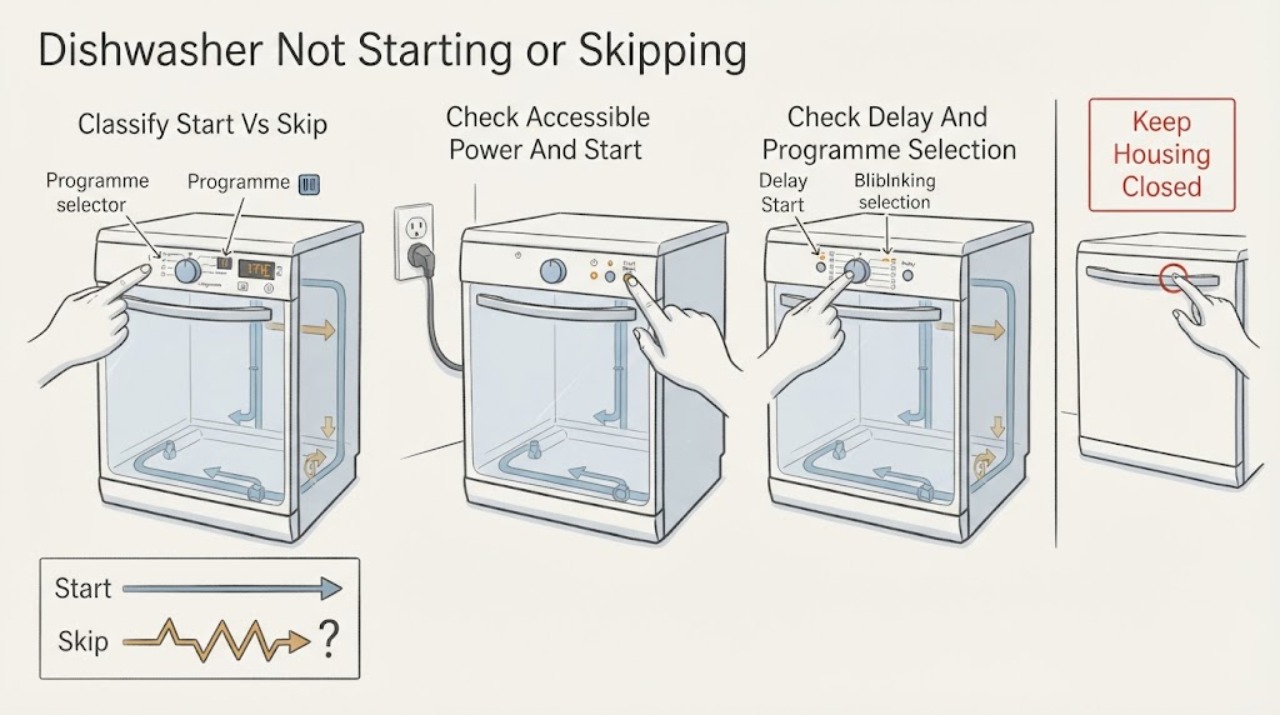
“Will not start” and “skips programmes” are two observations, not proof of one failed part. First separate no power from a powered control that does not begin, a selected delay, and a cycle that starts then advances or stops. Check the accessible supply and the dishwasher's on/off/start state, then use the exact model manual for the interface and any code. Hotpoint documents model-dependent dishwasher error/LED patterns and separate water-fill and drain checks; a programme selector that changes by itself has no universal Hotpoint meaning, so do not call it a failed board or keep retrying it. Stop for a leak, burning smell, water near electrics or recurring code and arrange service.
Work through in order
Diagnostic checks
Use only checks that match the exact appliance or system and its official guide.
-
Check 1
With the dishwasher idle and viewed from a dry, safe position, note whether the display and indicators are completely off, the selected programme remains visible but Start does nothing, the display shows a delay/countdown, the selection changes without another button being pressed, or a cycle starts and then advances/stops. Photograph or write down the exact indicators before pressing more buttons.
Expected result: The appliance is unpowered, powered but waiting, delayed, changing selection by itself, or stopping after water/cycle activity begins.
Next step: Follow the matching branch below; do not repeat Start presses if the programme changes without input or an error pattern appears.
Why this matters
Why: These are different diagnostic states. “Not starting” does not prove a selector or control-board fault, and “skipping” is not a universal Hotpoint code.
-
Check 2
For a blank display or no response, check the accessible socket with a small appliance, verify the dishwasher plug/lead and the correctly rated fuse, and confirm the dishwasher's on/off or Start control is in the intended position. Do not remove panels or test exposed wiring.
Expected result: The socket is dead, the fuse/lead or extension arrangement is abnormal, the on/off or Start control was not selected, or external power and controls appear normal.
Next step: Correct only an obvious, safe supply or control-position issue. If the display stays dead with a confirmed supply, stop and arrange service rather than opening the cabinet.
Why this matters
Why: Hotpoint lists the socket, fuse/lead, extension arrangement and on/off/start state as external checks for a dishwasher with no electrical power. A normal socket does not prove the dishwasher electronics are sound.
-
Check 3
If the display is live, read the selected programme, any delay/countdown indicator and the exact manual instructions for cancelling or starting it. Some Hotpoint dishwasher ranges advertise a delay timer, but features vary by model; do not assume a delayed start is a skipped programme.
Expected result: A delay/countdown is active, the selected programme stays fixed but does not begin, or the selection changes with no user input.
Next step: Cancel or change a delay only as the exact model manual permits. If the selection keeps changing without input, stop repeated attempts and book service with a video/photo and model number.
Why this matters
Why: A confirmed delay is a scheduling state. A fixed selection that will not begin needs the exact model start/door/control instructions. A selection that changes without input is an unresolved model-specific control or input symptom, not a confirmed board failure.
-
Check 4
If the dishwasher actually begins but then advances, stops or appears to skip a programme stage, observe whether it filled and drained. With the appliance safe and power controlled before touching accessible filters, check that the water tap is open, the visible fill hose is not kinked, and the visible waste hose is correctly installed and not trapped; check the base filter only as the model manual allows.
Expected result: No water enters, water remains because draining fails, a hose is kinked/trapped, a filter is visibly blocked, or water fill and drain appear normal.
Next step: Fix only a clearly accessible tap, hose position or user-cleanable filter issue when dry and safe. If the stage still stops/advances, request service with the cycle stage and observations.
Why this matters
Why: Hotpoint links no-fill conditions to the accessible tap/hose and says the dishwasher must drain before filling; it links non-empty conditions to drain-hose installation, the sink spigot and a clear base filter. These observations do not diagnose an internal valve, pump or board.
-
Check 5
Record the complete model/12NC, whether the dishwasher is freestanding, integrated or slimline, the selected programme, the point where it stops or changes, and every flashing LED or displayed code. Compare only with the matching Hotpoint manual and error-code family page.
Expected result: The exact model page explains the LED pattern or user reset, or the pattern is absent, returns, or belongs to a different interface/family.
Next step: Use a documented model-specific user action once. If the pattern returns or remains unmatched, leave the appliance off and arrange Hotpoint or qualified appliance service; do not diagnose or replace an internal part from the symptom alone.
Why this matters
Why: Hotpoint publishes separate dishwasher-family pages and interface layouts; its codes include water fill, drain, software, pump and communication faults. A code from another model or a generic reset cannot be transferred.
-
Check 6
Stop using the dishwasher immediately for a burning smell, smoke, active leak, water near electrical equipment, repeated breaker trips, or a programme selector that changes by itself; isolate water/power only from a safe, dry location and do not open the cabinet.
Expected result: The hazard clears only after isolation, cannot be isolated safely, or the no-start/skip symptom persists without a documented user-level fix.
Next step: Keep it off and arrange service. If there is smoke, fire or an unsafe electrical condition, leave the area and use appropriate emergency help; give service the model, code and symptom timeline.
Why this matters
Why: These conditions exceed a safe external check. Continuing to run the appliance can worsen water or electrical damage, and the public Hotpoint pages do not support live internal testing for an unidentified model.
Use your observations
Decision map
Find the observation that best matches what you see, then follow the next safe action.
-
PATH 01Next step
What you see
The display and indicators are completely off and the socket or supply arrangement has not yet been confirmed.
Do this next
Perform only the accessible socket, fuse/lead and on/off/start checks Hotpoint lists. If external power is confirmed but the display remains dead, leave the dishwasher off and arrange service.
Why this path and its safety boundary
Why it matters: This is a power/start-state branch, not evidence that the programme selector is skipping.
-
PATH 02Next step
What you see
The display is live and shows a delay/countdown or the selected programme remains unchanged while Start has not begun the cycle.
Do this next
Use the exact model manual to cancel or start it once. If it still will not begin, record the model and arrange service instead of cycling through programmes.
Why this path and its safety boundary
Why it matters: A delay or model-specific start sequence can look like a failed start; Hotpoint notes that delay timers vary across dishwasher models.
-
PATH 03Next step
What you see
The displayed programme changes or jumps while no button/selector input is being made.
Do this next
Stop repeated attempts, capture the display sequence, and book service with the complete model/12NC and interface type. Do not open the control panel or substitute a code from another model.
Why this path and its safety boundary
Why it matters: Hotpoint's public dishwasher pages do not assign one universal meaning to this symptom; it is a model-specific control/input observation rather than a confirmed main-board failure.
-
PATH 04Next step
What you see
A cycle begins with water or pump activity, then advances, stops or appears to skip a stage.
Do this next
Check the visible tap, fill/drain hose and user-accessible filter as the exact manual allows; if the stage still fails or a code returns, leave it off and request service.
Why this path and its safety boundary
Why it matters: This is different from a dead start. Hotpoint documents accessible fill, drain-hose and filter observations plus model-dependent LED faults, so the symptom alone does not identify a failed pump, valve or board.
-
PATH 05Next step
What you see
There is a leak, burning smell, water near electrics, repeated breaker trip, or a flashing LED/code that returns or does not match the exact model page.
Do this next
Isolate water and power from a safe location, do not restart or open the cabinet, and arrange Hotpoint or qualified appliance service with the model and recorded pattern.
Why this path and its safety boundary
Why it matters: This is a stop/service condition. Hotpoint's error pages route unresolved or component faults to an engineer, and the exact family/interface determines the meaning.
Helpful context
Understand the symptom
Do not treat both descriptions as the same diagnosis
A dishwasher with no display is a power path observation. A dishwasher with a display that changes the selected programme is a control/input observation. A machine that begins filling or washing and then advances or stops is a cycle-stage observation. These can share a user-facing “not starting” complaint, but Hotpoint does not publish one universal “skipping programmes” meaning for all dishwasher interfaces. Record which state occurs before applying a branch.
Use the exact model before interpreting a code or control behaviour
Hotpoint's manual finder asks for the first five model digits or the appliance 12NC, and the dishwasher error pages list different LED layouts for different interfaces and dishwasher families. With no model in the task, the checks below remain external and symptom-led; do not transfer a code, button sequence or selector behaviour from another Hotpoint dishwasher.
When to stop testing
Do not keep starting cycles when there is a leak, burning smell, water near electrical parts, a recurring error pattern or a control that changes programmes without input. Hotpoint routes unresolved dishwasher faults to its repair/service path; provide the exact model, interface, programme selected, what changed and any LED pattern.
When checks do not resolve it
Need a professional?
Arrange service if the dishwasher remains dead after a confirmed external supply, if a programme changes without input, if the cycle repeatedly stops/advances, or if a model-matched LED/code persists., Leave the dishwasher off for a leak, burning smell, smoke, water near electrical parts, repeated breaker trips or any condition that cannot be isolated safely., Do not remove panels, bypass a door or safety device, perform live electrical tests, or replace a board, pump, valve or selector based only on this symptom.
Have this ready
- complete model number or 12NC and whether the dishwasher is freestanding, integrated or slimline
- whether the display is blank, delayed, fixed at a programme, changing without input, or stopping after fill/drain activity
- selected programme, timing and exact LED/display pattern
- socket/fuse, tap, visible hose and accessible-filter observations
- whether there was a leak, burning smell, smoke, water near electrics or a breaker trip
Common questions
FAQ
Is a Hotpoint dishwasher that skips programmes the same as one that will not start?
Not necessarily. A blank display, a powered unit waiting on a delay, a selection that changes without input and a cycle that advances after filling are different observations. Use the matching branch and the exact model manual instead of treating “skip” as a universal error code.
Could a delay timer make a Hotpoint dishwasher look like it will not start?
Yes, some Hotpoint dishwasher models advertise a delay timer, but features vary by model. Confirm a delay/countdown in the exact manual and cancel or start it only as documented; a fixed selection that still will not begin needs service if external checks are normal.
What should I do if the programme changes by itself?
Stop repeatedly pressing Start or selecting programmes, record the display sequence and complete model/12NC, and arrange service. Hotpoint does not publish one universal meaning for an uncommanded programme change across all dishwasher interfaces, so do not diagnose a board or use another model’s reset.
What if the dishwasher starts and then stops or advances?
Treat it as a cycle-stage issue rather than a dead-start fault. Check only the accessible tap, visible fill/drain hose and user-cleanable filter as the exact model manual allows, and record any LED/code. Persistent failure or a recurring code belongs with service.
Read the exact guide
Official sources
- Dishwasher Troubleshooting & Repair ServiceHotpoint UK Appliances Limited · Official Hotpoint UK dishwasher troubleshooting page. Supports external power/start checks, water-tap and hose checks, drain installation, filter access and model-manual/service escalation for the Hotpoint dishwasher entity.
- Hotpoint Dishwasher Error CodesHotpoint UK Appliances Limited · Official Hotpoint UK dishwasher error-code page opened directly. Supports model/interface-specific LED interpretation, water fill/drain, software, pump and display communication categories and service escalation; it does not define an uncommanded programme change universally.
- Silver Slimline Freestanding Dishwashers | HotpointHotpoint UK Appliances Limited · Official Hotpoint UK product-range page opened directly. Used narrowly to establish that some Hotpoint dishwasher models advertise a delay timer and that options vary by model; it is not used to diagnose a fault.
- Get Hotpoint Appliance Manuals - Quick & Easy DownloadsHotpoint UK Appliances Limited · Official Hotpoint UK manual portal opened directly. Supports the exact-model gate: lookup uses the first five model digits or 12NC; the portal is a lookup route, not generic proof of a button sequence or code meaning.
- How to Clean Your Hotpoint Dishwasher FilterHotpoint UK Appliances Limited · Official Hotpoint UK care article opened directly. Supports only the user-accessible filter safety and cleaning boundary when a cycle starts then stops/advances; it does not identify a control fault.
- Integrated Dishwasher Troubleshooting & RepairHotpoint UK Appliances Limited · Official Hotpoint UK integrated-dishwasher page opened directly. Used to confirm the same entity-specific external fill/drain/power boundaries for the integrated family; exact model remains controlling.
- Hotpoint Integrated Dishwasher Error CodesHotpoint UK Appliances Limited · Official Hotpoint UK integrated-dishwasher error page opened directly. Used to show that LED layouts and meanings are family/interface scoped and that unresolved faults route to service.
- Hotpoint Slimline Dishwasher Error CodesHotpoint UK Appliances Limited · Official Hotpoint UK slimline-dishwasher error page opened directly. Used only to demonstrate that another Hotpoint dishwasher family has a different LED mapping, so codes must not be transferred across models/families.
- Official Hotpoint Appliance Service RepairHotpoint UK Appliances Limited · Official Hotpoint UK service hub opened directly. Supports dishwasher-family routing and trained service escalation, not a technical claim about the programme selector.
Community feedback
Share a repair observation
Share a plain-text repair observation. Accepted observations are published automatically; this page may take a moment to update.