
On this page
Start here
Quick answer
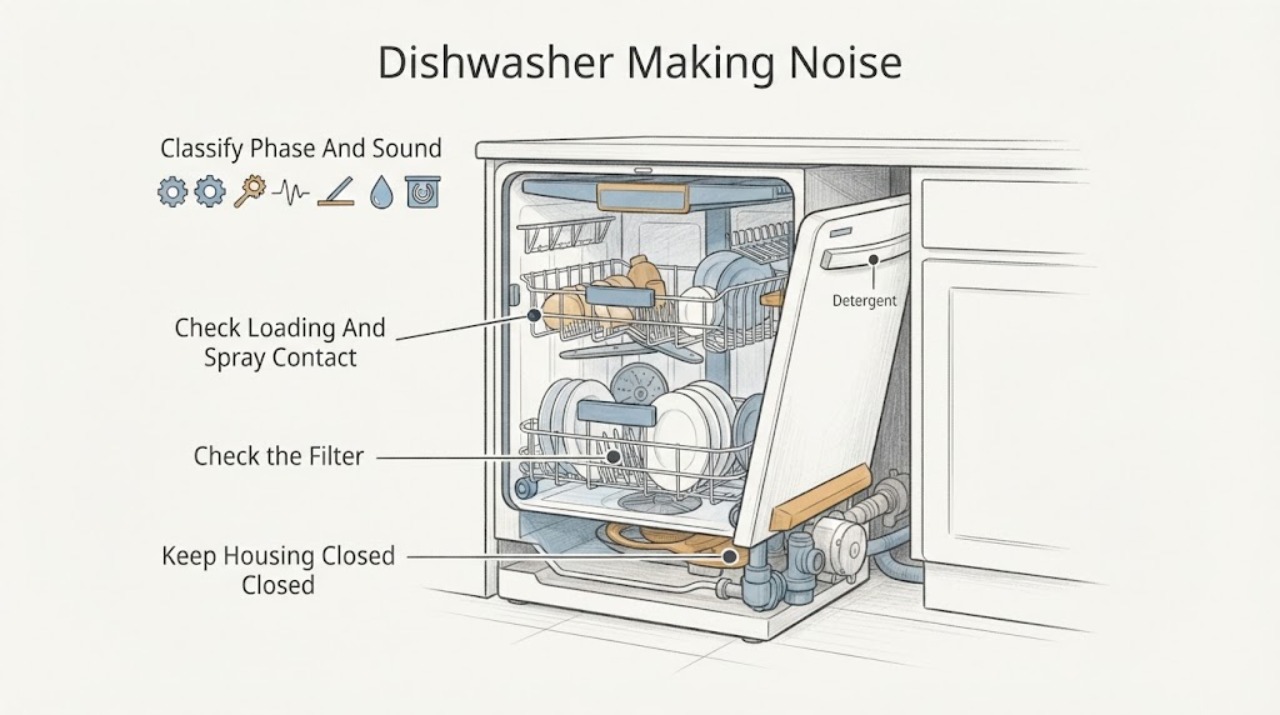
First note when the noise occurs and whether it is a swish or hum tied to water movement, a brief rattle when spray arms meet a dish, a repeated knock, or a new grinding/buzzing sound. Some operating noise can be cycle-related, and Hotpoint lists models with a Super Silent setting, but the exact manual is needed for model-specific behavior. Switch the dishwasher off and disconnect it from mains power before examining the racks, spray arms, filters, or accessible debris. Check for dishes touching the spray arms, an overloaded or unstable rack, visible food debris in the filter area, excessive foam, and whether the appliance is level without moving an integrated unit. Hotpoint says rattling dishes or spray arms and excessive unsuitable foam can cause excessive noise; its parts guidance says grinding or rattling may indicate a pump or motor issue. Stop use for grinding that persists, scraping, burning odor, smoke, leaking water, electrical symptoms, or a loose installation, and arrange Hotpoint or qualified service rather than opening the pump or electrical housing.
Before you begin
Safety first
- This article covers sound classification, safe loading/filter/foam observations, and visible stability checks only. Disconnect mains before examination. Do not pull an integrated unit, open panels or pump protection, touch wet wiring, or perform internal repair.
Work through in order
Diagnostic checks
Use only checks that match the exact appliance or system and its official guide.
-
Check 1
Without opening the appliance, record the exact model/industrial code and listen from a safe position for the phase: fill, wash/spray, drain, drying, or end-of-cycle. Describe the sound as a swish/hum, brief rattle, repeated knock, grinding, scraping, or electrical buzz, and note whether cleaning, draining, leaks, or error lights changed.
Expected result: The noise is phase-linked and brief, follows a dish or spray-arm movement, repeats during a pump phase, or is harsh/new and independent of the cycle phase.
Next step: Use the matching branch below and the exact Hotpoint manual. Do not run extra cycles just to reproduce a harsh or hazardous sound.
Stop if: Stop immediately for smoke, burning odor, sparks, a hot plug or cable, leaking water near electrics, severe scraping, or a machine that moves or is unstable.
Why this matters
Why: Timing separates loading or water-flow-related noise from a possible pump/motor or mechanical fault, but sound alone cannot identify a part. Model-specific manuals and support routes are needed.
-
Check 2
Switch off and disconnect mains power. Remove or reposition only accessible dishes and racks so no plate, pan handle, cutlery, or rack component can touch a spray arm; rotate each spray arm gently by hand only as the exact manual permits, without forcing it.
Expected result: A dish, handle, cutlery item, rack, or spray arm is visibly contacting or obstructing another part; or the arms and load have clearance.
Next step: Correct the accessible loading or clearance issue, refit the racks, and run one normal cycle only if there is no safety symptom. Escalate persistent noise for service.
Stop if: Do not reach into a running dishwasher, force a spray arm, remove guards, or continue if a component is cracked, loose, or rubbing severely.
Why this matters
Why: Hotpoint's manual identifies dishes rattling against each other or the sprayer arms as a cause of excessive noise. If clearance is good and the noise remains, a pump, motor, bearing, installation, or internal fault becomes more likely.
-
Check 3
With the dishwasher off, cool, and disconnected, inspect the accessible filter area for food residue and look for an unusual layer of foam or suds. Clean and refit the filter only with the model's documented procedure; do not remove the wash-cycle pump protection or pour unapproved chemicals into the tub.
Expected result: The filter is dirty or loose, food debris is visible, excessive foam is present, or the filter and tub are clear with no unusual foam.
Next step: Remove accessible food residue, secure the filter, and follow the exact detergent instructions. If foam is excessive, stop the cycle and follow the manual or Hotpoint service guidance; do not use chemical mixtures.
Stop if: Do not operate without a correctly fitted filter, use harsh chemical mixtures, or reach toward pump protection or wiring.
Why this matters
Why: A clogged or loose filter can affect water circulation and a manual identifies excessive unsuitable detergent foam as a source of excessive noise. A clear filter and foam-free tub make a mechanical or pump/motor diagnosis more important if noise persists.
-
Check 4
From outside the appliance, observe whether the dishwasher rocks, contacts a cabinet or wall, or vibrates excessively. Do not pull an integrated dishwasher forward; inspect only visible installation and floor contact, and use the exact installation instructions for any permitted levelling adjustment.
Expected result: The cabinet is stable and clear, or the appliance rocks, contacts surrounding cabinetry, or vibration changes with the rack/load.
Next step: Stop the cycle if the appliance moves or contacts cabinetry and arrange qualified installation/service. If stable, continue only with the phase and accessible-load diagnosis.
Stop if: Do not lift, tilt, slide, or disconnect water/electricity connections yourself, especially on an integrated installation.
Why this matters
Why: Hotpoint's manual explains that correct levelling makes the appliance more stable and less likely to move or cause vibration and noise. An installation vibration does not prove a pump fault, while severe movement can damage hoses or connections.
-
Check 5
If the dishwasher is stable, dry externally, correctly loaded, and free of excess foam, note whether the sound is a soft phase-linked water or motor hum, a brief spray-arm rattle that disappeared after loading was corrected, or a repeated grinding/rattle during wash or drain. Do not remove panels or run a cycle with guards or filters missing.
Expected result: The sound is brief and disappears after load correction, remains a consistent low-level cycle sound without other symptoms, or persists as grinding, scraping, or harsh rattling with poor cleaning or drainage.
Next step: Use the appliance only if the exact manual treats the remaining sound as expected and no abnormal symptom exists. Otherwise leave it off and provide the timing, recording, and model code to Hotpoint service.
Stop if: Do not keep operating to see whether grinding improves, force the pump, or open the wash/drain assembly.
Why this matters
Why: A corrected dish-contact sound is consistent with the manual's loading explanation. A persistent grinding or rattling sound is a service symptom; Hotpoint's parts guidance says unusual grinding/rattling may indicate a pump or motor malfunction, without identifying which part.
-
Check 6
Document the model, cycle phase, sound description, load/filter/foam observations, water level or drainage symptom, error indication, and whether the appliance is stable. Contact Hotpoint support or a qualified appliance technician; do not intentionally reproduce a hazardous noise.
Expected result: The noise returns after safe loading and filter checks, involves grinding/scraping, coincides with poor washing or drainage, or is accompanied by leak, odor, smoke, electrical, or movement symptoms.
Next step: Leave the appliance disconnected when the noise is harsh or hazardous and arrange model-specific Hotpoint service. A technician should inspect internal pumps, motors, wiring, and mounting; use the exact model number for any part decision.
Stop if: Do not open panels, touch wiring, remove pump protection, handle live or wet electrical parts, or substitute a pump/motor by appearance.
Why this matters
Why: Possible causes include dish/spray contact, filter or drain restriction, foam, installation vibration, pump, motor, impeller, bearing, spray arm, or internal control fault. The observed pattern routes service but does not safely select a replacement part.
Use your observations
Decision map
Find the observation that best matches what you see, then follow the next safe action.
-
PATH 01Safety boundary
What you see
The sound is a brief rattle during washing and a dish, pan handle, cutlery item, or rack can touch a spray arm.
Do this next
Disconnect power, reposition the accessible load, confirm spray-arm clearance by the manual, and run one normal cycle only if no hazard remains.
Why this path and its safety boundary
Why it matters: The manual's loading/sprayer-contact explanation is more likely than a failed pump, provided the sound disappears after the load is corrected.
Safety stop: Do not force the arm or reach into the running appliance; arrange service if the rattle continues with an empty, correctly loaded rack.
-
PATH 02Safety boundary
What you see
The noise is accompanied by unusual suds, repeated splashing, or foam visible at the door area.
Do this next
Stop the cycle, disconnect power if safe, and follow the exact manual or Hotpoint service guidance for clearing the condition. Do not add chemical mixtures.
Why this path and its safety boundary
Why it matters: Hotpoint identifies excessive foam from incorrectly measured or unsuitable detergent as a cause of excessive noise; leakage risk takes priority.
Safety stop: Do not continue a foaming cycle, open the door into escaping hot water/steam, or use non-dishwasher detergent.
-
PATH 03Safety boundary
What you see
A low-level hum or swish occurs only during a documented fill, wash, drain, or drying phase, with stable installation, no leak, no harsh contact, and normal cleaning/draining.
Do this next
Check the exact model manual and monitor for a change in character. Stop and seek service if the sound becomes grinding, scraping, repeated knocking, or is joined by poor performance.
Why this path and its safety boundary
Why it matters: The phase relationship makes normal water or motor operation more plausible, but Hotpoint model features and sound levels differ; volume alone is not a diagnosis.
Safety stop: Do not dismiss a new or worsening sound as normal, and do not open the appliance to identify its source.
-
PATH 04Safety boundary
What you see
Grinding, harsh rattling, scraping, or a repeated knock persists after the accessible load and filter checks, especially during wash or drain.
Do this next
Leave the dishwasher off and arrange Hotpoint or qualified service with the model number and phase timing. Do not order or fit a pump or motor from the sound alone.
Why this path and its safety boundary
Why it matters: Hotpoint's official parts guidance makes a pump or motor malfunction possible, while the manual's dish-contact explanation has not resolved the symptom. The exact part remains model-dependent.
Safety stop: Do not run repeated cycles, remove the pump cover, or touch internal mechanical/electrical parts.
-
PATH 05Safety boundary
What you see
Noise occurs with leaking water, smoke, burning odor, sparks, a hot plug/cable, error symptoms, or an appliance that rocks or moves.
Do this next
Stop the cycle and disconnect power only if it can be done without touching water or a damaged electrical part. Close the water tap if safely accessible and contact qualified service.
Why this path and its safety boundary
Why it matters: Water, fire, electrical, or installation hazards override further sound diagnosis.
Safety stop: Do not touch wet electrical parts, pull an integrated appliance, restore power, or attempt an internal repair.
Helpful context
Understand the symptom
The phase and character of the sound matter
A soft, rhythmic swish or hum that follows filling, spraying, or draining can be cycle-related, but do not label a sound normal from volume alone. A brief rattle that changes when dishes or a rack is repositioned points toward loading or spray-arm contact. Repeated grinding, scraping, or a harsh buzz—especially with poor cleaning, standing water, a leak, or a burning smell—needs a stop-and-service decision. Hotpoint's official manual and parts guidance separate dish/sprayer contact and foam from pump or motor concerns.
Use the exact Hotpoint manual and model number
Hotpoint dishwashers include freestanding, integrated, semi-integrated, full-size, and slimline designs, and controls, pumps, spray-arm layouts, and sound insulation vary. Find the model or industrial code on the door frame or inside the door and use the matching manual. A sound from a drain phase on one model is not enough to identify a pump on another.
Only accessible checks belong to the owner
Turn the appliance off and unplug it before inspecting loading, spray arms, filters, or accessible debris. Do not pull an integrated dishwasher out, remove a pump cover, reach into moving machinery, or work on water or electrical connections. Hotpoint's service guidance asks users to disconnect mains power when replacing a part, and the manual states that technical checks should be done by a trained and authorised technician.
Safety boundary
Stop conditions
- Stop the cycle for smoke, burning odor, sparks, a hot or damaged plug/cable, leaking water near electrics, or severe scraping and movement.
- Disconnect mains power before examining dishes, spray arms, filters, or accessible debris; do not reach into a running dishwasher.
- Do not remove pump protection or panels, touch internal wiring, handle wet electrical parts, or attempt pump/motor repair from sound alone.
- Do not use unsuitable detergent or chemical mixtures, operate without a correctly fitted filter, or continue with excessive foam or a loose installation.
Only after diagnosis
Potential parts
- exact-model pump or motor assembly
Consider only when Hotpoint or a qualified technician confirms a persistent grinding/rattle and identifies the failed pump or motor for the exact model.
Hotpoint lists multiple pumps and motors; do not infer fit or replace a whole assembly from sound alone. - exact-model spray arm or rack component
Consider only when inspection confirms a cracked, loose, or damaged spray arm or rack component after mains power is disconnected.
Spray-arm shape and rack fittings vary by model; confirm the industrial code before ordering. - exact-model filter or sump-related part
Consider only when the exact manual or technician confirms a damaged filter or sump-related component rather than removable food residue.
Hotpoint's manual says filters must be correctly fitted; do not remove wash-pump protection or substitute by appearance.
When checks do not resolve it
Need a professional?
Arrange Hotpoint or qualified appliance service when grinding, scraping, harsh rattling, or repeated knocking persists after safe loading and filter checks; when noise is linked to poor washing, drainage, leaks, error indications, or movement; or whenever an internal pump, motor, impeller, wiring, or control issue is suspected.
Safety scope: This article covers sound classification, safe loading/filter/foam observations, and visible stability checks only. Disconnect mains before examination. Do not pull an integrated unit, open panels or pump protection, touch wet wiring, or perform internal repair.
Common questions
FAQ
Is a humming or swishing Hotpoint dishwasher always a fault?
No. A phase-linked low-level sound can be water or motor operation, but the exact model manual controls the interpretation. A new grinding, scraping, harsh rattling, or sound with poor performance needs service.
Why does my Hotpoint dishwasher rattle during the wash?
Check with power disconnected whether dishes, cutlery, a pan handle, or a rack can touch a sprayer arm. Hotpoint's manual lists dishes rattling against one another or the sprayer arms as a cause of excessive noise.
Can detergent foam make a Hotpoint dishwasher noisy?
Yes. The Hotpoint manual lists excessive foam from incorrect measurement or unsuitable detergent as a cause of excessive noise. Stop the cycle and do not add chemical mixtures.
What does grinding or rattling usually mean?
Hotpoint's official parts guidance says unusual grinding or rattling may indicate a malfunctioning pump or motor, but the sound cannot identify which part. Leave the dishwasher off and arrange model-specific diagnosis.
Should I open the dishwasher to find the noisy pump?
No. Disconnect mains power before accessible checks, but leave pump, motor, wiring, and internal technical checks to a trained or qualified technician. Provide the model number and cycle-phase timing instead.
Read the exact guide
Official sources
- Hotpoint Service Dishwasher RepairHotpoint · Official Hotpoint UK dishwasher service page; regional service routes may differ outside the UK.
- Hotpoint Dishwasher Troubleshooting and Instruction ManualHotpoint · Exact Hotpoint UK manual for the identified model family/document; controls, pump layout, and sound behavior vary by model.
- Hotpoint Silver DishwashersHotpoint · Official Hotpoint UK product page; the 39 dB(A) Super Silent statement applies to listed feature-equipped models, not every dishwasher.
- Shop Dishwasher Spare Parts & AccessoriesHotpoint · Official Hotpoint UK parts portal; its pump/motor statement is a triage clue, while exact compatibility requires the industrial code.
Community feedback
Share a repair observation
Share a plain-text repair observation. Accepted observations are published automatically; this page may take a moment to update.