
On this page
Start here
Quick answer
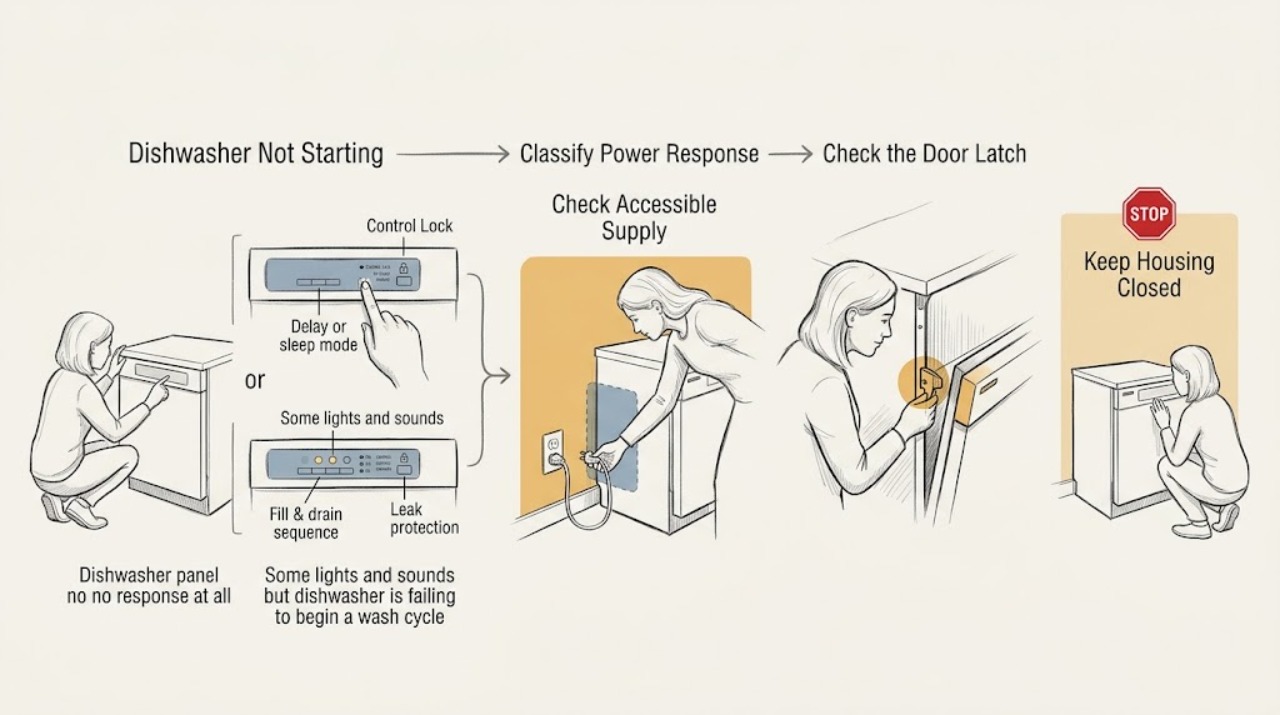
First separate a completely dead Hotpoint dishwasher from one that has lights or sounds. With no display or button response, check the appliance's accessible supply path: a tripped breaker or fuse, a switched outlet, a GFCI reset, or a loose plug where the installation uses a cord. With lights or sounds, check that the door closes and latches without a rack, pan handle, trim, or counter obstruction; then turn off Control Lock and cancel any Delay Start or sleep mode according to the exact model manual. A new installation with no power needs the installer to check the installation. If the dishwasher hums, shows a leak-protection or flood indication, leaves water from a prior cycle, shows a model-specific fault, or still will not run after these checks, stop repeated attempts and arrange qualified service. Do not bypass the door latch, open electrical panels, test live wiring, or keep resetting a breaker that trips again.
Work through in order
Diagnostic checks
Use only checks that match the exact appliance or system and its official guide.
-
Check 1
Record the model or product number, then press the normal power or start control once and classify the response: completely dark and silent, lights or display but no cycle, or a hum, click, pump sound, or fault indication.
Expected result: There is no display or button response; the controls illuminate but the cycle does not begin; or the appliance makes a sound, leaves water, or shows a flashing pattern.
Next step: Use the no-power branch for a dark machine and the powered-but-not-starting branch for lights or sounds. Photograph or write down any exact display or LED pattern before changing settings.
Stop if: Do not guess an error-code meaning without the exact model, and do not start a cycle with a damaged cord, hot outlet, smoke, or burning odor.
Why this matters
Why: No response points first to supply or installation. Lights or sounds make door, lock, delay, sleep, flood, leak-protection, or model-specific control states more likely. A sound or water symptom may indicate that a start was accepted but the sequence stopped.
-
Check 2
If the dishwasher is dark, check only the accessible supply controls: the household breaker or fuse, a nearby GFCI reset if the installation uses one, the wall switch if present, and the plug and outlet in an adjacent cabinet where the dishwasher has a cord. Test an outlet with a small known-working device only when doing so is safe and permitted by the installation.
Expected result: A breaker, GFCI, wall switch, plug, or outlet state is clearly off or reset restores the dishwasher; the machine is a new installation; or supply appears normal but the dishwasher remains dead.
Next step: Restore only an obviously switched-off or tripped accessible control once and try the appliance normally. Have the installer check a new installation; arrange appliance or electrical service when supply is normal but the dishwasher remains unresponsive.
Stop if: Do not remove an access panel, open a junction box, probe wiring, or repeatedly reset a breaker that trips again.
Why this matters
Why: A restored supply makes an external power interruption more likely. A new installation or a normal supply with no response points to installation wiring or an internal fault, not a user-adjustable control setting.
-
Check 3
Open the door and check that the racks are fully pushed in and that no pan handle, tall item, trim, insulation, countertop, or debris prevents the door from closing evenly. Close it firmly once and observe whether the latch engages as the model manual shows.
Expected result: An accessible item prevents full closure; the door now latches and the control accepts Start; or the door will not latch, sits crooked, or the cycle still does not begin.
Next step: Remove only the accessible obstruction and try one normal start. Arrange service for a damaged, loose, misaligned, or non-latching door or for a persistent failure after the door closes correctly.
Stop if: Do not force the door, tape or hold the latch closed, bypass an interlock, or remove the inner door or control panel.
Why this matters
Why: A start after removing an obstruction points to a door-proving problem. A door that will not latch or a persistent no-start with a visibly closed door may involve alignment, latch, interlock, or control hardware.
-
Check 4
With the door latched, inspect the panel for a lock indicator, a delayed-start time, a sleep or Sabbath state, or a cancel/reset instruction. Clear only the feature and button sequence documented for the exact model, then select a normal cycle and press Start as instructed.
Expected result: A lock, delay, sleep state, or documented cancel state is active and clearing it restores normal control; no such state is shown; or the controls remain locked or unresponsive.
Next step: Use the appliance normally if the cycle starts. If the model manual does not identify the state or the control remains blocked, stop changing combinations and arrange service.
Stop if: Do not use a generic button combination from another Hotpoint model, and do not defeat a lock or protection feature.
Why this matters
Why: A successful start after clearing a documented feature indicates an operating mode, not a failed motor. An absent or persistent lock state leaves a model-specific control, keypad, latch, or protection issue possible.
-
Check 5
If the dishwasher has power and accepts Start but does not proceed, note whether water remains in the tub, the machine hums, a flood or leak-protection indication appears, or a model-specific LED or display pattern repeats. Check only accessible signs of a leak and the manual's owner-level filter or drain guidance; do not dismantle the pump or base.
Expected result: The tub is dry and quiet; there is residual water or a hum; a leak or flood indication appears; or an exact fault pattern is displayed.
Next step: Follow only the exact manual's accessible drain or reset guidance. For a leak indication, standing water with repeated failure, or an unresolved fault pattern, stop and arrange qualified service.
Stop if: Do not add water as a test, reach into the pump, remove the lower panel, bypass a float, or continue operating if water is near electrical parts.
Why this matters
Why: A dry, quiet appliance after a valid start keeps door, control, or supply logic in view. Residual water or humming can stop a later fill sequence, while flood protection or a fault pattern may intentionally inhibit operation and needs model-specific diagnosis.
-
Check 6
After the accessible power, latch, control-mode, and protection observations, stop and document the exact model, response state, fault pattern, prior water, and any breaker or GFCI behavior for qualified service.
Expected result: The dishwasher remains dead with verified supply, will not latch, remains locked without a documented cause, hums or stops with water, shows a recurring fault, or has an electrical or water hazard.
Next step: Arrange Hotpoint or qualified appliance service, and qualified electrical service for an unsafe supply connection. Follow the model manual's isolation instruction before any authorized part replacement.
Stop if: Stop immediately for smoke, burning odor, sparking, a hot or damaged plug or outlet, water near electrical parts, or a breaker that trips again. Do not open panels, test live wiring, defeat the door interlock, or repeatedly reset protection.
Why this matters
Why: An internal latch, interlock, pump, valve, float, leak-protection, control, wiring, or installation issue is more likely; the specific component cannot be identified safely from the broad symptom alone.
Use your observations
Decision map
Find the observation that best matches what you see, then follow the next safe action.
-
PATH 01Safety boundary
What you see
The controls are dark and silent, and a breaker, GFCI, wall switch, plug, or outlet is off; or the dishwasher is newly installed with no response.
Do this next
Restore one clearly off accessible control and try once. Have the installer inspect a new installation; otherwise arrange qualified service if the dishwasher stays dead.
Why this path and its safety boundary
Why it matters: An external supply or installation issue is more likely than a cycle-selection problem. If the accessible supply is normal, an internal electrical fault remains possible.
Safety stop: Do not open wiring compartments or repeatedly reset a tripping breaker.
-
PATH 02Safety boundary
What you see
Lights or sounds are present, but a rack, pan handle, trim, insulation, countertop, or a misaligned door prevents a firm latch.
Do this next
Remove only the accessible obstruction and close the door once. Service is needed for a door that still will not latch or for a persistent no-start.
Why this path and its safety boundary
Why it matters: The start command may be inhibited by the door-proving path; this does not establish a failed motor or board.
Safety stop: Never tape, press, or bypass the latch or interlock.
-
PATH 03Safety boundary
What you see
The door latches, the display works, and a lock, Delay Start, Sleep/Sabbath mode, or model-specific cancel state is active; clearing the documented state restores Start.
Do this next
Use the exact model manual to clear the mode and run one normal cycle. If no documented state explains the behavior, stop experimenting and arrange service.
Why this path and its safety boundary
Why it matters: A control mode was blocking the cycle rather than proving a hardware failure.
Safety stop: Do not apply another model's button combination or defeat a protection feature.
-
PATH 04Safety boundary
What you see
Start is accepted but the machine hums, leaves water, shows a flood or leak-protection indication, or repeats a model-specific LED or display fault.
Do this next
Use only the model manual's accessible guidance, then arrange qualified service for standing water, a leak indication, a recurring fault, or a persistent hum.
Why this path and its safety boundary
Why it matters: A fill, drain, pump, float, leak-protection, or control sequence may be stopping the cycle. The broad symptom does not identify one part, and protection may be intentionally preventing operation.
Safety stop: Do not reach into the pump, bypass a float, remove panels, add water as a test, or operate with water near electrical parts.
-
PATH 05Safety boundary
What you see
Supply, door, and documented control checks do not restore operation, or there is smoke, burning odor, sparking, a hot connection, water near electrical parts, or repeated breaker tripping.
Do this next
Stop using the appliance and arrange qualified appliance or electrical service with the model and observations.
Why this path and its safety boundary
Why it matters: An internal or installation fault is more likely, and the safety symptom overrides further troubleshooting.
Safety stop: Do not open panels, test live wiring, defeat the latch, or keep resetting the breaker.
Helpful context
Understand the symptom
Start by identifying the response state
A dishwasher that is entirely dark and unresponsive has a different first check from one whose display, buttons, or motor hum respond. The North American Hotpoint-branded models listed in GE Appliances owner support use model-specific manuals and features, while Hotpoint's UK support pages cover regional model families. Record the product model before applying a lock, delay, reset, or fault-code instruction.
A closed door is part of the start command
The control may light up while the cycle is inhibited because the door is not proving closed. Check for an incompletely pushed rack, a pan handle, trim, insulation, or the countertop interfering with the latch. Do not press, tape, or defeat the latch or its interlock; a damaged or misaligned latch needs service.
Controls can look normal while a feature blocks starting
Control Lock, Delay Start, and Sleep or Sabbath mode are not present or cleared the same way on every Hotpoint dishwasher. Follow the exact manual rather than holding random buttons. A model with an LCD may also prevent operation when leak protection has been activated, so a wet base or leak indication should be treated as a service decision rather than a command to bypass protection.
A pause or hum is not the same as no power
Some models may make a slight hum without progressing, and older or regional models may delay water entry after the start command. If the motor only hums, water remains from a previous cycle, an error indication appears, or the cycle never advances, do not infer a failed part from sound alone. Treat the symptom as a model-specific fill, drain, pump, flood, or control path that needs the manual and possibly service.
Stop at the electrical and internal boundary
Hotpoint advises disconnecting the appliance from the mains before replacing a part, and its error-code support sends unresolved faults to an engineer. An owner can inspect accessible controls, the door opening, and an identified outlet or switch, but should not remove panels, probe terminals, defeat a latch, or keep resetting a breaker. Give service the exact model, response state, displayed pattern, prior water, and what changed.
When checks do not resolve it
Need a professional?
Arrange qualified Hotpoint appliance service when the dishwasher remains unresponsive after the accessible supply check, will not latch, stays blocked by an unexplained control or protection state, hums or stops with water, or shows a recurring model-specific fault. Use qualified electrical service for a hot or damaged connection or repeated breaker trips. Do not open panels, test live wiring, bypass the door interlock, or replace a part without the exact model's instructions and safe isolation.
Have this ready
- Exact model or product number, region, whether the panel is dark or lit, latch behavior, lock or delay indicators, displayed LED or error pattern, residual water or hum, and any breaker, GFCI, leak, odor, heat, or sparking observation.
Common questions
FAQ
Why does my Hotpoint dishwasher have lights but not start?
Check the exact model's Control Lock, door-latch obstruction, Delay Start, and Sleep or Sabbath mode first. A leak-protection or flood indication can also inhibit operation. If the door latches and the documented controls are clear but the cycle still will not start, arrange service rather than bypassing the latch.
What should I check when a Hotpoint dishwasher is completely dead?
Check the accessible breaker or fuse, GFCI reset, wall switch, and cord or outlet where the installation uses them. A new installation with no power should be checked by the installer. If the supply is normal and the dishwasher remains dark, qualified service is needed.
Can I bypass the Hotpoint dishwasher door latch to make it run?
No. The latch is part of the operating safety path. Remove only an accessible rack or cookware obstruction; do not tape, press, or defeat the latch or interlock. A door that will not close and latch needs model-specific service.
Why does my Hotpoint dishwasher hum but not run?
A hum can occur when a start sequence is accepted but does not progress; residual water, a pump or drain condition, flood or leak protection, or a model-specific fault may be involved. Note the sound and water state, follow only the exact manual's accessible guidance, and arrange service if it persists.
Read the exact guide
Official sources
- Hotpoint Integrated Dishwasher Error CodesHotpoint UK · Official Hotpoint UK support for integrated-dishwasher LED fault indications and model-specific escalation.
- Troubleshooting for HDF310PGRBBGE Appliances · Official owner-support page for the Hotpoint HDF310PGRBB dishwasher model.
- Dishwasher Troubleshooting & Repair ServiceHotpoint UK · Official Hotpoint UK dishwasher troubleshooting for the regional models covered by the page.
- Dishwasher - Not Running But Has Lights or SoundGE Appliances · Official GE Appliances support for dishwasher models, including model-dependent guidance applicable to Hotpoint-branded North American dishwashers.
- Dishwasher - Won't Run and Has No PowerGE Appliances · Official GE Appliances support for dishwasher power and protection checks, including model-dependent Hotpoint-branded North American units.
Community feedback
Share a repair observation
Share a plain-text repair observation. Accepted observations are published automatically; this page may take a moment to update.