
On this page
Start here
Quick answer
Do not assume every foam-looking piece is the same part. First unplug the Hotpoint dryer and photograph the material in place without opening the cabinet. A visible seal at the condenser or door can perish, but Hotpoint's own parts pages cover selected models and require the model number before any replacement is chosen. If the material is loose, crumbling, melted, blocking airflow, rubbing the drum, or accompanied by a burning smell, smoke, overheating, sparks or repeated trips, keep the dryer disconnected and arrange qualified service. Clean only the user-accessible lint filter or condenser when the exact manual permits it; do not pull out internal foam, glue a seal, substitute generic foam or run the dryer to see what happens. Use the model number or 12NC to retrieve the matching Hotpoint manual and safety notice before discussing a part.
Before you begin
Safety first
- Limit owner work to unplugging, photographing, reading the model/12NC, using Hotpoint's lookup tools and cleaning only the user-accessible filter/condenser allowed by the exact manual. Do not open panels, remove internal foam, glue or substitute seals, bypass safety devices, test live circuits or run the dryer to reproduce deterioration.
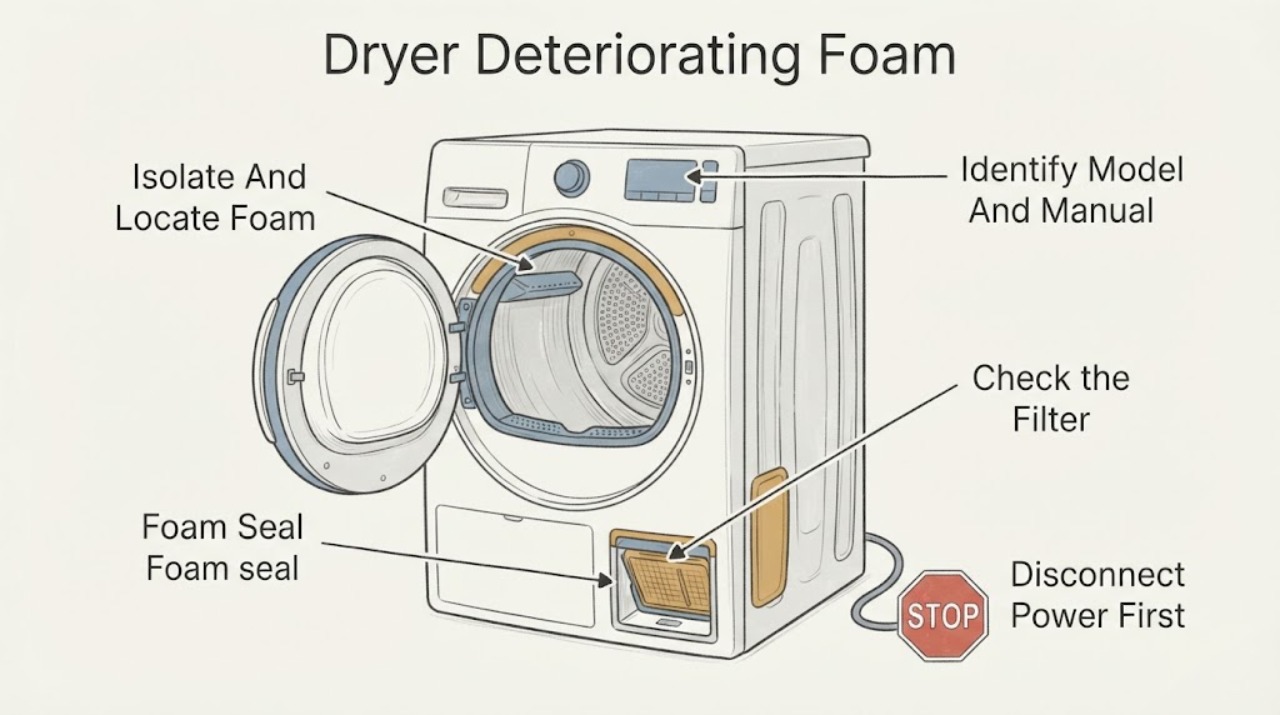
Work through in order
Diagnostic checks
Use only checks that match the exact appliance or system and its official guide.
-
Check 1
Switch the dryer off, unplug it, and photograph the deteriorating material in place without removing panels; record whether it is at the door, condenser cassette, lint-filter housing, drum edge or an already-open accessible area.
Expected result: The material is clearly visible in an owner-accessible location, or it is loose/crumbly/melted, hidden behind a panel or rubbing the drum.
Next step: Use the location branch and keep the dryer disconnected if material is loose, melted, internal or rubbing.
Why this matters
Why: Location separates a possible selected door/condenser seal from an unidentified internal component; appearance alone cannot establish the part.
-
Check 2
Read the model label or 12NC and enter the first five model digits or 12NC in Hotpoint's manual lookup and safety-notice tools.
Expected result: A matching manual and safety result are found, or the model/12NC cannot be read or no exact manual is available.
Next step: Follow only the exact manual's user-level instructions; otherwise stop at photos and arrange model-qualified service.
Why this matters
Why: Hotpoint requires model identification for the correct manual and says its seal pages apply only to selected models; an unknown model leaves the component and procedure unresolved.
-
Check 3
Only after the dryer is unplugged and the exact manual permits it, clean the lint filter and, for a condenser model, the user-accessible condenser; do not pull out foam or bonded seals.
Expected result: The filter/condenser is clear and undamaged, or foam fragments remain, the airflow path is blocked, or the component is damaged.
Next step: Reinstall only clean, dry user-removable parts; keep the dryer out of use and arrange service if fragments, damage or restriction remain.
Why this matters
Why: Hotpoint supports regular filter care and condenser cleaning for applicable models, but those checks do not repair a deteriorating seal or identify an internal failure.
-
Check 4
Before any future use, check for loose fragments, drum rubbing, melted or scorched material, burning odor, smoke, sparks, an unusually hot cabinet or repeated electrical trips without energizing the dryer to reproduce the symptom.
Expected result: Any hazard sign is present, or the foam is stable but its identity and fit remain uncertain.
Next step: For any hazard sign, keep the dryer unplugged and use qualified service; for uncertain material, continue only with model-specific documentation and service.
Why this matters
Why: A hazard sign makes continued testing unsafe; stable appearance still does not prove that a generic seal or foam substitute is suitable.
-
Check 5
Give the qualified engineer the exact model/12NC, photos of the material in place, its location, when deterioration appeared, any airflow or drying change and any heat or odor symptom.
Expected result: The repair would require removing a drum, cabinet panel, bonded seal or unidentified foam, or a Hotpoint safety notice applies.
Next step: Do not glue, cut, bypass or substitute the material; keep an affected or hazardous dryer disconnected until repaired or cleared.
Why this matters
Why: Hotpoint's official pages support model-specific parts/manual lookup and professional repair, not a universal foam replacement procedure.
Use your observations
Decision map
Find the observation that best matches what you see, then follow the next safe action.
-
PATH 01Next step
What you see
The material is an intact, visible seal at the condenser or door, with no heat, odor, rubbing or loose fragments.
Do this next
Use the exact model/12NC and manual or service channel to confirm the seal; do not run with a visibly perished or displaced seal.
Why this path and its safety boundary
Why it matters: A seal may be a model-specific replaceable item, but Hotpoint's pages cover selected models and do not prove that a particular part fits this dryer.
-
PATH 02Next step
What you see
Foam is loose, crumbling, melted, scorched, inside the cabinet or rubbing the drum, even if the dryer still starts.
Do this next
Keep the dryer unplugged and arrange qualified service; do not vacuum through panels, glue the foam, run an empty cycle or use substitute packing material.
Why this path and its safety boundary
Why it matters: The component identity and safety condition are unresolved, and fragments or rubbing can affect the air path or moving drum.
-
PATH 03Next step
What you see
The only issue is lint or dirt at a user-accessible filter/condenser, and no foam damage or hazard sign is present.
Do this next
Clean only as the exact manual directs, reinstall dry parts and stop if foam fragments or damage are exposed.
Why this path and its safety boundary
Why it matters: Hotpoint supports regular fluff-filter care and condenser cleaning for applicable models; this does not establish that the reported foam is harmless.
-
PATH 04Next step
What you see
The model/12NC returns a Hotpoint safety notice or the dryer has smoke, burning odor, sparks, unusual heat or repeated trips.
Do this next
Unplug and refrain from use, then follow the Hotpoint safety notice or qualified service instruction; do not attempt internal testing.
Why this path and its safety boundary
Why it matters: The condition is a safety/service issue rather than a routine seal-cleaning decision.
-
PATH 05Next step
What you see
No model/12NC can be read, no matching manual is available, or the foam location cannot be identified without opening the cabinet.
Do this next
Keep the dryer isolated if deterioration is active and provide photos and identification data to a qualified Hotpoint servicer; do not improvise a repair.
Why this path and its safety boundary
Why it matters: A universal replacement part or removal procedure cannot be supported from the symptom wording alone.
Helpful context
Understand the symptom
Locate the material without dismantling the dryer
With the dryer off and unplugged, note whether the foam is visible at the door opening, condenser cassette, lint-filter housing, rear edge of the drum or only after a panel has been removed. Photograph its position and any crumbs, flattening, melting, staining or rubbing. The word foam does not identify a Hotpoint part, and the selected seal pages show that similar-looking seals are model-specific.
Use the exact model before choosing a seal
Find the model label or 12NC and use Hotpoint's manual lookup. Hotpoint says its manual tool needs the first five model digits or 12NC, while its condenser and door-seal pages require model-fit verification and cover only selected tumble dryers. Do not order or install a foam, rubber or adhesive seal from a photograph alone.
Limit owner care to accessible areas
After the appliance is isolated, follow the matching manual for the lint filter and, if the dryer is a condenser model, the user-accessible condenser. Hotpoint says to clean the fluff filter regularly and gives condenser-cleaning guidance for applicable models. Do not remove internal foam, drum seals or panels, scrape away bonded material, glue a deteriorated seal or use substitute packing foam.
Treat fragments, heat and airflow as stop signs
Do not run the dryer if foam is shedding into the drum, rubbing the drum, blocking an air path or appears melted. Stop immediately for a burning smell, smoke, sparks, an unusually hot cabinet, repeated electrical trips or visible damage. These observations do not prove a particular heater, motor or seal failure, but they make continued testing unsafe.
Check the model safety notice and hand off the repair
Enter the exact model in Hotpoint's safety-notice process. Hotpoint says to unplug and refrain from using an appliance identified as affected until it has been modified or replaced. For a perished condenser or door seal, internal foam, melted material or any repair requiring the drum or cabinet to be opened, give the model, 12NC, photographs and symptom timing to a qualified Hotpoint or appliance engineer.
When checks do not resolve it
Need a professional?
Use Hotpoint or qualified appliance service for any deteriorating seal/foam that is not clearly an intact user-removable part, any internal access, model-specific fitment, hazard sign or continuing performance problem.
Safety scope: Limit owner work to unplugging, photographing, reading the model/12NC, using Hotpoint's lookup tools and cleaning only the user-accessible filter/condenser allowed by the exact manual. Do not open panels, remove internal foam, glue or substitute seals, bypass safety devices, test live circuits or run the dryer to reproduce deterioration.
Common questions
FAQ
Can I keep using a Hotpoint dryer if a foam seal is deteriorating?
Do not continue if the material is loose, crumbling, melted, scorched, rubbing the drum or associated with heat, odor, smoke or airflow changes. Unplug it and obtain model-qualified service; a photograph cannot confirm a safe seal replacement.
Is all Hotpoint dryer foam the same part?
No. Hotpoint publishes different selected door and condenser seals and requires the appliance model for fit. Identify the model or 12NC and use the matching manual or service channel before choosing a part.
What can I safely clean while investigating deteriorating foam?
With the dryer unplugged, clean only the lint filter and, where the exact model manual permits it, the user-accessible condenser. Do not remove internal foam, open panels, glue a seal or run the appliance to test the condition.
Read the exact guide
Official sources
- Hotpoint Appliances Safety NoticesHotpoint · Official Hotpoint safety-notice page; it directs users to check the product type and model and says to unplug and stop using an affected appliance until modified or replaced.
- Tumble Dryer Troubleshooting - Quick Fixes & Tips - HotpointHotpoint · Official Hotpoint family-level troubleshooting for tumble dryers without an exact model; it supports unplugging before repairs and accessible filter/condenser checks.
- Tumble Dryer Condenser Seal J00111372Hotpoint · Official Hotpoint product page for a selected tumble-dryer condenser seal; it supports the existence of a perishing seal condition but does not establish fit for an unspecified model.
- Hotpoint Appliance ManualsHotpoint · Official Hotpoint manual lookup entry page; it explains that the first five model digits or 12NC are needed to retrieve the correct manual, without supplying a model-specific procedure for this task.
- Hotpoint Service Tumble Dryer RepairHotpoint · Official Hotpoint repair page for its tumble-dryer family; it directs unresolved conditions and internal repairs to trained engineers and points users to model manuals.
- Tumble Dryer Door Seal J00655167Hotpoint · Official Hotpoint product page for a selected dryer door seal; it describes mould, grime, splits, tears and wear but requires model verification and does not apply to every Hotpoint dryer.
Community feedback
Share a repair observation
Share a plain-text repair observation. Accepted observations are published automatically; this page may take a moment to update.