
On this page
Start here
Quick answer
Record the exact code or flashing-light sequence before resetting a Hotpoint tumble dryer. Use the manual for the exact model because the same symptom can represent a control, motor, heating, pump, door-lock, software, or internal-data fault. For a code that Hotpoint identifies as resettable, disconnect the dryer from the mains only when it is dry and safe, wait the interval in the model guidance, reconnect once, and try one supervised cycle. Do not open panels or bypass a door lock. If the code returns, the dryer will not select a programme, the drum will not rotate, water remains in the machine, heat or airflow is abnormal, or there is smoke, burning smell, sparking, flooding, or a hot or damaged cord, stop using it and arrange qualified appliance service.
Work through in order
Diagnostic checks
Use only checks that match the exact appliance or system and its official guide.
-
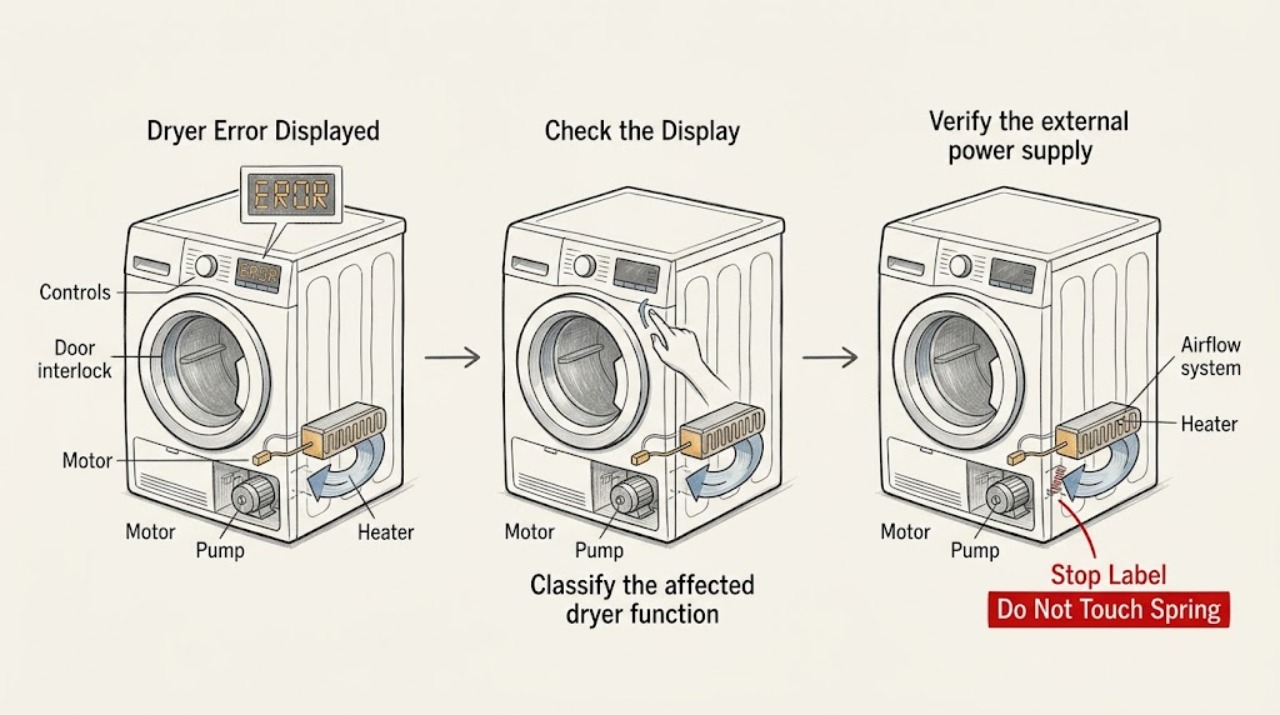
Capture the exact code or light pattern
From a dry, safe position, photograph the complete display and note each code character, the order of any flashing LEDs, whether the drum is turning, whether the dryer is heating, whether water is present, and the point in the programme where the message appears. Record the exact model identifier from the rating label without removing panels.
Expected result: A stable code, a repeating LED pattern, or multiple unavailable controls is more useful than the broad description that the dryer is not working. No code with a dark panel points to a power or control branch, while a code during a cycle points to the function that stopped.
Next step: Match the exact code or LED arrangement to the model manual and the Hotpoint error-code guide. If the display is blank, move to the safe power check instead of guessing a code.
Why this matters
Why: Error meanings are model and interface dependent; preserving the original pattern prevents a reset from erasing the evidence needed for the next decision.
-
Classify the affected dryer function
Without opening the cabinet, note whether the dryer powers on, accepts a programme, starts the drum, heats, drains collected water, and completes a cycle. Do not restart a machine showing smoke, sparks, a burning smell, a leak, or a hot or damaged cord.
Expected result: A no-start or unavailable-control pattern aligns with control or software branches; no drum rotation aligns with a motor branch; no heat aligns with temperature or heater branches; retained water aligns with pump or drain branches; and a door that will not latch aligns with the door-lock branch.
Next step: Use the function and recorded code together when checking the exact model guidance. Stop and arrange service when the fault is electrical, recurs, or requires a cover to be removed.
Why this matters
Why: The function that failed narrows the code interpretation, but it does not prove that a particular replaceable part is defective.
-
Verify the external power supply once
Confirm the wall switch is on and the plug is fully seated, then check the outlet from a dry position with another suitable appliance. If the outlet or breaker is abnormal, stop there. If the outlet is known good and the model guide permits a reset, disconnect the dryer from the mains for the guide's stated interval, reconnect once, and wait for the control to initialize.
Expected result: If the other appliance also lacks power, the household supply or isolator is the likely cause. If the outlet works but the dryer remains dark, or the same error returns after one permitted reset, an internal control or supply fault remains.
Next step: Use qualified electrical help for a dead, hot, damaged, or repeatedly tripping supply. Arrange appliance service for a dryer that stays dark or returns the same error on a known-good outlet.
Why this matters
Why: An external check separates a supply problem from a dryer fault without live electrical testing. A reset clears some temporary states but does not prove a board or wiring fault is repaired.
-
Check the door and programme controls
Close the door normally and inspect the opening for clothing or debris that is visibly preventing the latch from engaging. Confirm the selector and Start control respond, and check the manual for any model-specific child lock or control-lock state. Do not force the door or bypass its switch.
Expected result: Hotpoint associates door-lock faults with a door that cannot close or a programme that will not start when the door is closed. A door that latches normally but leaves an error displayed suggests a different code branch or an interlock/control fault.
Next step: Remove only the visible obstruction and follow the exact manual's documented control-unlock step. If the latch is damaged, the door will not stay closed, or the error returns, keep the dryer out of use and arrange service.
Why this matters
Why: The dryer must detect a safe closed door before it can start; a lit display does not prove that the interlock is working.
-
Perform only the accessible airflow and water-container checks
With the dryer stopped and disconnected, clean the user-accessible fluff filter as directed by the model manual. On a condenser model, empty and refit the water container; on a vented model, inspect the visible vent hose for crushing or an obvious blockage. Clean an accessible condenser only if the manual describes that user operation, and do not dismantle the duct or pump.
Expected result: Hotpoint states that a blocked filter, vent, or condenser can reduce performance and that a full water container can prevent heating on applicable models. An error that remains after the accessible path is clear is not evidence that the heater, sensor, motor, or control board should be replaced by the user.
Next step: Refit all user-accessible parts correctly and perform one supervised test only if the model guide allows it. Stop for abnormal heat, a persistent code, restricted airflow, or water leakage and arrange service.
Why this matters
Why: Airflow and water handling are model-dependent external conditions that can trigger poor drying or protective stops, but they do not explain every displayed code.
-
Use the code family to choose the next branch
Compare the recorded code with the official Hotpoint code list and the exact model manual. Treat the listed meaning as a branch: F01, F09, F12, or F18-style control or data symptoms require the model's reset and service guidance; F02 points to drum-rotation symptoms; F03 or F08 to temperature or heating symptoms; F05 or F11 to water or pump symptoms; F06 to the door lock; and F16 to a top-loading drum-position sensor. Do not assume every model supports every code.
Expected result: A code that matches the observed symptom and returns after the documented user step is an unresolved fault. A code that does not match the appliance's behavior, or an LED sequence not found in the list, requires the exact model manual rather than a guessed interpretation.
Next step: Save the code, model, serial number, programme, and observed behavior for service. Do not order a control, motor, heater, pump, or sensor solely from a generic code description.
Why this matters
Why: The code family identifies where qualified diagnosis should begin, not a guaranteed failed part or a safe DIY repair.
-
Apply one documented reset, then test once
If the exact model guide or official Hotpoint code entry specifies a power-off recovery and there is no water, heat, smoke, or electrical hazard, complete that sequence once. Reconnect the dryer, select a short model-approved programme, and remain nearby to observe the door, drum, heat, airflow, display, and any renewed code.
Expected result: A complete cycle with no renewed message supports a temporary control or external-condition event, but it does not establish a permanent repair. An immediate return of the code, a repeated stop, no drum movement, abnormal heat, or retained water confirms that the fault remains.
Next step: Stop after the failed test, disconnect only if safe, and arrange qualified appliance service. Preserve the original and renewed code patterns instead of repeatedly resetting the dryer.
Why this matters
Why: A controlled single test distinguishes a cleared transient state from a recurring fault while limiting repeated operation of a possibly unsafe appliance.
-
Prepare a useful service handoff
Before arranging service, collect the model and serial number, the exact display or LED pattern, when it occurs, programme selected, whether the drum turns or heats, filter and water-container status, visible hose condition, outlet result, reset performed, and any unusual sound, odor, heat, leak, or breaker event. Do not remove covers to gather more evidence.
Expected result: A complete symptom history lets the technician distinguish control, motor, heating, pump, door, airflow, and supply branches. Missing or inconsistent codes make a generic diagnosis less reliable.
Next step: Use Hotpoint's official service and support route or a suitably qualified appliance technician. Keep the dryer disconnected until the professional confirms it is safe to operate.
Why this matters
Why: The most useful next step after a recurring error is qualified diagnosis, not another speculative reset or part substitution.
Use your observations
Decision map
Find the observation that best matches what you see, then follow the next safe action.
-
PATH 01Next step
What you see
The panel is dark, the outlet is dead, the breaker repeatedly trips, or the cord, plug, or outlet is hot or damaged.
Do this next
Stop using the dryer and seek qualified electrical or appliance service. Do not repeatedly reset the breaker, use an adapter or extension, or test live wiring.
-
PATH 02Next step
What you see
The code or LED pattern matches a control, software, or internal-data family and remains after one model-documented reset.
Do this next
Keep the dryer disconnected and arrange qualified appliance service with the exact code, model, serial number, and reset result.
-
PATH 03Next step
What you see
The door will not latch, the drum will not rotate, or the dryer will not select or start a programme.
Do this next
Check only visible door obstructions and the model-specific control-lock state. Do not bypass the interlock; arrange service for a persistent door, motor, or control symptom.
-
PATH 04Next step
What you see
The code points toward heat, temperature sensing, airflow, pump, or water handling, or the dryer shows abnormal heat or retained water.
Do this next
Perform only the model-approved filter, vent, condenser, or water-container check. Stop for persistent error, leak, restricted airflow, or abnormal heat and arrange service.
-
PATH 05Next step
What you see
Smoke, burning odor, sparks, flooding, water near electrical parts, or a hot appliance connection is present.
Do this next
Stop immediately, disconnect only if it is safe to do so, keep clear, and seek qualified emergency, electrical, or appliance help. Do not restart, open panels, or bypass a safety device.
Helpful context
Understand the symptom
Treat the display as a diagnostic clue, not a universal code
Hotpoint dryers may show an alphanumeric code or communicate a fault with a repeating LED pattern. The code list is model and interface dependent, so write down the characters, light order, and when the fault appears before clearing it. A code that appears while the drum is not turning leads to a different next check than one associated with heat, water, or a locked door. The exact model manual takes priority over a general list.
Keep the reset and inspection boundary safe
Only perform external checks and the reset that the exact model guide permits. Disconnect the dryer before cleaning an accessible filter, condenser, or water container, and keep hands and floors dry. Do not probe live terminals, remove covers, defeat the door interlock, reach into a moving drum, or repeatedly cycle a fault. Smoke, a burning odor, sparks, flooding, a hot outlet, or a damaged cord is an immediate stop condition.
Only after diagnosis
Potential parts
- door latch or door interlock
Consider this only when the door closes correctly but qualified testing confirms that the safety interlock is not enabling the programme.
Door interlocks are model-specific and safety-critical; never bypass one or assume fit from a code alone. - drive motor or motor-control component
Consider this only when the exact model code and qualified testing support a motor or motor-control fault after external checks.
Confirm the exact model and use qualified service because motor circuits require safe electrical testing. - heater or temperature sensor
Consider this only when the observed no-heat symptom and exact model guidance are followed by qualified confirmation of a heater or sensing fault.
Heating components vary by model and can remain hot; verify model fitment and safety before any replacement. - drain pump or internal water path
Consider this only when the water container and visible drain path are correct but qualified diagnosis confirms an internal pump or water-path fault.
Water and mains electricity can be present together; use qualified service and model-specific fitment information. - electronic control or display module
Consider this only after the exact error pattern and qualified testing identify an unresolved control or data fault.
Control modules are model-specific and should not be ordered from a generic error description.
When checks do not resolve it
Need a professional?
Arrange qualified appliance service when a Hotpoint dryer error returns after one model-specific reset, the code is not listed for the exact model, controls remain unavailable, the drum will not turn, the door will not latch, water remains, heat or airflow is abnormal, or the dryer repeatedly stops. Seek qualified electrical help for a dead or repeatedly tripping supply, and stop immediately for smoke, burning odor, sparks, flooding, water near electrical parts, or a hot or damaged cord, plug, or outlet. Do not open panels, probe live wiring, bypass the door lock, or replace a part from a generic code alone.
Common questions
FAQ
What should I do when my Hotpoint dryer displays an error code?
Record the complete code or flashing-light pattern and model number, then use the exact model manual and Hotpoint's official code guide. Perform only one reset that the guide permits; arrange service if the message returns.
Can I reset a Hotpoint tumble dryer error?
Some Hotpoint entries specify a limited power-off recovery, but it is model and code dependent. Disconnect only when the dryer is dry and safe, follow the model's interval once, and stop if the code returns or any hazard is present.
Why does my Hotpoint dryer show an error but still have power?
Power only proves that the control is receiving supply. The code may indicate a door interlock, motor, heater, temperature, pump, airflow, software, or control issue. Use the observed function and exact code together rather than replacing a part by guesswork.
Could a blocked filter or full water container cause a Hotpoint dryer error?
A blocked filter, restricted vent or condenser, or full water container can affect drying and may trigger protective behavior on applicable models. Clean or empty only the user-accessible items described by the exact manual; persistent errors need service.
When should I stop using a Hotpoint dryer with an error displayed?
Stop immediately for smoke, burning odor, sparks, flooding, water near electrical parts, abnormal heat, or a hot or damaged cord, plug, or outlet. Also stop after a code returns following one documented reset, and arrange qualified help without opening panels or bypassing the door lock.
Read the exact guide
Official sources
- Why Is My Hotpoint Tumble Dryer Not Working? Troubleshooting GuideHotpoint · Power, start, filter, condenser, water container, vent, moisture sensor, and safe troubleshooting boundaries
- What Do Hotpoint Tumble Dryer Error Codes Mean?Hotpoint · Code meanings, LED patterns, limited reset guidance, and escalation for control, motor, heater, temperature, pump, door, software, drum-position, and data symptoms
- Hotpoint Service Tumble Dryer RepairHotpoint · User-accessible fluff-filter and water-container checks, error-code context, manuals, and trained-service escalation
Community feedback
Share a repair observation
Share a plain-text repair observation. Accepted observations are published automatically; this page may take a moment to update.