
On this page
Start here
Quick answer
A Hotpoint dryer can make normal operating sounds, such as the drum turning, a brief start-up squeak, or on a gas model a valve click, buzz, or low burner roar. A thump, persistent hum, heat-related squeak, repeating chirp, metal scrape, or noise that began after an object entered the drum needs a check. Stop the dryer, unplug it before any cleaning, identify whether the sound follows the drum, cabinet, or heat cycle, then check the load, level, accessible lint-filter opening, and loose exposed screws. Do not run it with a damaged belt, scraping drum parts, gas odor, smoke, scorching, or an electrical fault; discontinue use and arrange qualified service.
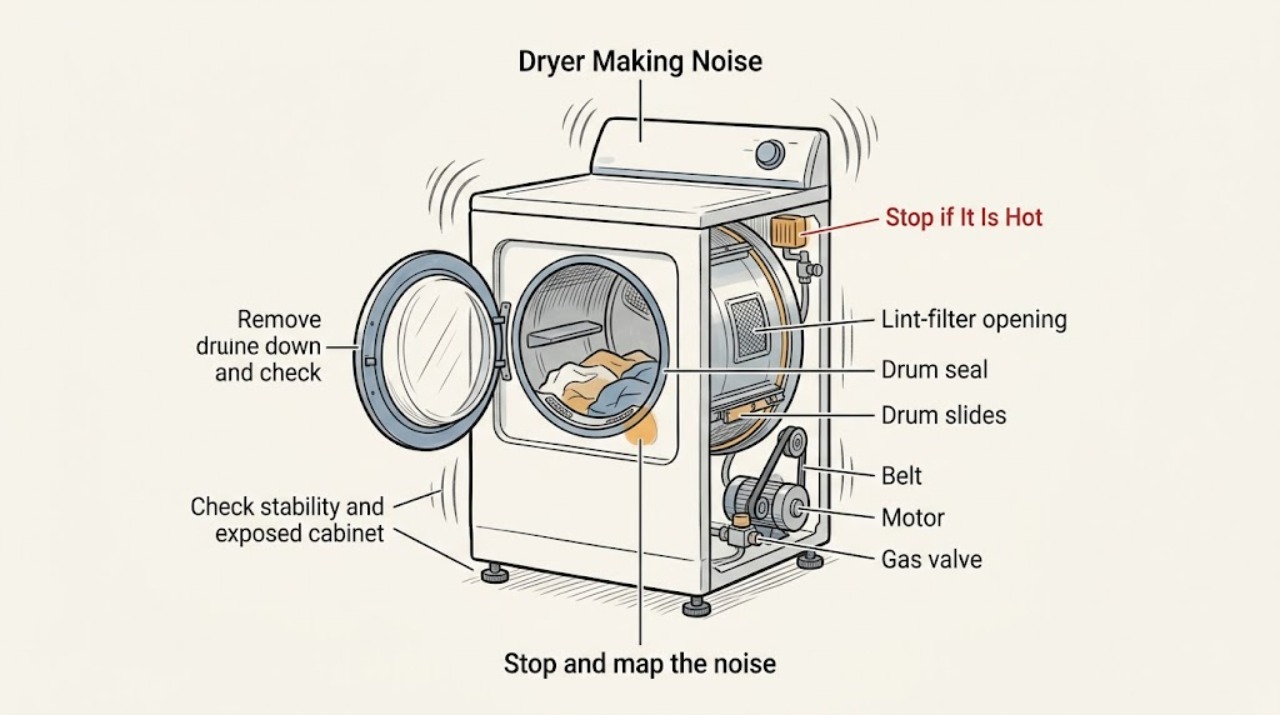
Work through in order
Diagnostic checks
Use only checks that match the exact appliance or system and its official guide.
-
Stop and map the noise to the cycle
Stop the dryer and note the sound without opening any service panel. Record whether it is a brief squeak at start-up, a thump or scrape that repeats with each drum turn, a rattle that changes when garments move, a hum, a chirp every few seconds, or a click/buzz/low roar during heat on a gas model. Also note smoke, burning odor, gas odor, scorching, a hot cabinet, a Check Vent message, or a tripped breaker.
Expected result: The sound is one of the manufacturer's expected sounds, a persistent abnormal sound, a noise tied to drum rotation, a noise tied to the heat cycle, or a noise accompanied by a hazard.
Next step: If there is gas odor, smoke, burning, scorching, a hot or damaged cord, repeated breaker trips, or a Check Vent warning with overheating, stop using the dryer and arrange appropriate emergency, gas, electrical, or appliance help. Otherwise continue with the unplugged external checks.
Why this matters
Why: A brief start-up squeak and drum-turning sound can be normal, while thumping, humming, heat-related squeaking, and repeating chirps require diagnosis. Gas valve and burner sounds can be normal only when there is no gas odor or other hazard. A hazard overrides all further testing.
-
Remove the load and check for loose objects
Unplug the dryer. Remove the clothes and inspect the drum for coins, paper clips, buttons, zippers, or other objects that could rattle or scrape. Check the accessible area below the lint filter for a foreign object, using gloves and a light touch because the opening may have sharp edges. Do not reach farther into the cabinet or drum seal than the model instructions allow.
Expected result: An object is found in the drum or accessible lint-filter opening, nothing is found, or fabric is caught at the drum edge, filter, or sensor area.
Next step: Remove only an object that is loose and safely reachable, reinstall the lint filter, and make one brief empty-drum observation after restoring power. If fabric is caught, the sound is metal-on-metal, or the object cannot be removed without disassembly, leave the dryer unplugged and arrange service.
Why this matters
Why: Loose objects can roll with the drum and create rattling or scraping; a caught garment or item at the filter, sensor, or drum edge is not a normal operating condition. If no accessible object explains the sound, an internal drum-support, belt, motor, or seal issue remains possible.
-
Check stability and exposed cabinet hardware
With the dryer empty and unplugged, gently check whether it rocks or shifts on the floor and whether anything is leaning against it. Look only at exposed screws and accessible exterior fasteners; do not remove covers. If the unit is unstable, have an adult follow the exact model installation instructions to correct the leveling legs, keeping the dryer upright and secure.
Expected result: The dryer rocks, the floor or legs are unstable, an exposed screw is visibly loose, or the dryer is level and clear of contact with nearby objects.
Next step: Correct only an accessible stability or exposed-hardware issue using the model instructions, then perform one short test. If the noise remains or the dryer cannot be safely leveled, discontinue use and request qualified service.
Why this matters
Why: A solid, level floor reduces vibration and prevents tipping, while a loose cabinet screw or an object leaning against the cabinet can create squeaking or rattling. If stability and external hardware are normal, the noise is less likely to be caused by the cabinet or floor.
-
Separate drum-related and heat-related patterns
After the loose-object and stability checks are complete, run one short, supervised test only if there is no hazard. Observe whether the sound starts immediately with drum rotation, appears only after the dryer heats, or occurs only when a particular garment or load is tumbling. Stop the test at once if the sound becomes scraping, thumping, or louder, or if the cabinet or cord becomes unusually hot.
Expected result: The noise follows every drum rotation, appears only after heating, disappears with an empty drum, or returns regardless of the load.
Next step: If the noise persists with an empty drum, becomes metallic, or returns after the external corrections, stop using the dryer and arrange service. If it occurs only with one item, remove that item and follow its care label rather than repeatedly testing it.
Why this matters
Why: A noise that follows rotation points toward the drum, seal, slides, belt, or motor area; a heat-related squeak can indicate a component that changes as it warms; and a load-specific rattle can be an item or garment interaction. These observations narrow service diagnosis but do not justify opening the cabinet.
-
Check accessible lint and vent conditions before service
If the dryer has a Check Vent alert, excessive heat, or unusually slow exhaust, unplug it and clean the removable lint filter and accessible lint-filter opening as the model instructions allow. Inspect the visible duct and outside wall cap for a kink, obstruction, or damper that cannot open freely; do not enter the duct or dismantle the dryer. Restore use only after the vent is clear and no abnormal noise remains.
Expected result: Lint or a visible vent obstruction is present, the vent warning clears after safe cleaning, or the noise and heat remain with a clear accessible vent.
Next step: If the warning, overheating, or abnormal sound returns, discontinue use and arrange service. Do not operate the dryer without its filters in place or continue a cycle to see whether a hot or noisy condition worsens.
Why this matters
Why: Restricted airflow can retain heat and humidity and create a safety concern, but clearing lint does not repair a mechanical thump, scrape, or belt fault. Persistent noise after airflow checks needs qualified diagnosis.
Use your observations
Decision map
Find the observation that best matches what you see, then follow the next safe action.
-
PATH 01Next step
What you see
The sound is only the normal drum-turning sound, a brief start-up squeak, or a gas valve/burner sound with no gas odor or hazard.
Do this next
Continue using the dryer only if it remains stable and the sound stays within that normal pattern. Stop and reassess if the sound persists after start-up, changes, or is joined by heat, smoke, scraping, or a fault.
-
PATH 02Next step
What you see
A coin, button, zipper, paper clip, or other foreign object is loose in the drum or safely reachable below the lint filter.
Do this next
Unplug the dryer, remove only the safely reachable object, reinstall the filter, and run one brief supervised retest. If the object is caught at the seal or cannot be reached safely, use qualified service.
-
PATH 03Next step
What you see
The dryer rocks, vibrates, contacts a nearby object, or has a visibly loose exposed screw.
Do this next
Correct the accessible leveling or contact issue using the exact installation instructions, keeping the appliance upright and secure. If vibration or squeaking remains, discontinue use and arrange service.
-
PATH 04Safety boundary
What you see
The sound is a metal scrape at the front seal, clothes catch at the drum edge, or the thump suggests a damaged belt or drum-support component.
Do this next
Leave the dryer unplugged and arrange qualified service. Do not reach into the seal, remove panels, adjust a belt, or continue running it to compare sounds.
Why this path and its safety boundary
Safety stop: True
-
PATH 05Safety boundary
What you see
There is gas odor, smoke, burning odor, scorching, a hot or damaged cord, repeated breaker trips, overheating, or a persistent abnormal sound after the external checks.
Do this next
Stop using the dryer immediately. For gas odor, leave the area and contact the gas supplier or emergency service from a safe location; for electrical or fire symptoms, keep clear and use qualified emergency or appliance service. Do not restart the dryer.
Why this path and its safety boundary
Safety stop: True
Helpful context
Understand the symptom
Classify the sound before looking for a part
The noise pattern changes the next check. A brief squeak only at start-up can be normal; a thump often tracks drum rotation or a belt; a rattle may be a coin, button, or zipper; and a scrape at the drum edge can indicate an object at the front seal or a worn drum slide. A gas dryer can also click or buzz as its valve operates and make a low roar while the burner is lit. Do not diagnose an internal part from sound alone.
Use only external, de-energized checks
Before removing the lint filter or cleaning its opening, unplug the dryer. The filter opening and cabinet edges can be sharp, so use care and stop if an object cannot be reached without probing inside. Do not remove panels, reach into the drum seal, adjust a belt, or test gas or electrical components. A damaged belt, metal scraping, caught fabric, or persistent abnormal noise is a service boundary.
Leveling matters for vibration and tipping
Hotpoint dryer leveling guidance says the appliance should sit level from side to side and front to back on a solid, secure floor. A dryer that rocks or vibrates can amplify a normal drum sound and may be unsafe if it is not stable. Use the model's installation instructions for the exact leg arrangement; do not lift or tilt a heavy dryer alone.
Do not ignore heat or vent warnings
A noise accompanied by a hot cabinet, burning odor, smoke, scorching, or a Check Vent indication should not be treated as a simple rattle. Manufacturer guidance says restricted exhaust airflow can retain heat and humidity and can allow lint to build up in the vent. Stop, unplug when it is safe, and address the vent or service issue before another cycle.
Only after diagnosis
Potential parts
- drum support, slide, or front seal component
Consider an internal drum-support or seal component only when qualified diagnosis confirms a repeat scrape or rotation-linked noise after loose objects and leveling are ruled out.
Confirm the complete Hotpoint model and manufacturer fit information before ordering; do not reach into or modify the drum seal from the sound alone. - dryer belt or idler component
A belt or related drive component is conditional on a qualified inspection of a persistent thump or rotation-linked noise; the sound alone cannot distinguish it from other drive faults.
Verify the complete model and exact manufacturer-compatible part information; belt and drive work should be performed by qualified service. - motor, bearing, or gas-valve component
Consider an internal motor, bearing, or gas-valve component only after qualified diagnosis links the noise to the drive or heat cycle and all safe external checks are complete.
Do not infer a component or fuel-system fitment from the noise; confirm the complete model and manufacturer service information.
When checks do not resolve it
Need a professional?
Request qualified appliance service when an abnormal Hotpoint dryer noise persists after removing accessible objects and correcting stability, or when the sound suggests the front seal, drum slides, belt, motor, bearing, burner, valve, or internal cabinet.
Common questions
FAQ
Which Hotpoint dryer noises can be normal?
A brief squeak when the dryer starts and the sound of the drum turning can be normal. On a gas dryer, valve clicks or buzzing and a low burner roar can also occur during the heat cycle. A persistent squeak, thump, hum, repeated chirp, or metal scrape should be checked.
Why does my Hotpoint dryer thump or rattle?
Check for loose coins, buttons, zippers, or other objects in the drum or safely reachable below the lint filter, and check whether the dryer rocks or contacts nearby items. A thump that persists with an empty drum can indicate a belt or drum-support problem and needs service.
Can I keep using a Hotpoint dryer that is scraping?
No. A metal scrape, clothing caught at the drum edge, worn drum slides, or a damaged belt can worsen with continued operation. Unplug the dryer and arrange qualified service rather than opening the cabinet or reaching into the seal.
What should I do if noise comes with heat or a Check Vent alert?
Stop the cycle and unplug the dryer when safe. Clean the accessible lint filter and vent path only as the model instructions allow, and do not resume use if the cabinet is hot, the warning returns, or the noise persists. Restricted airflow can retain heat and create a safety concern.
Read the exact guide
Official sources
- Dryer - NoisesGE Appliances · Manufacturer guidance distinguishing normal and abnormal dryer noises, external checks, gas dryer sounds, foreign objects, drum slides, belts, and the stop-use service boundary.
- Dryer - Clothes Catching Around Filter, Sensor or DrumGE Appliances · Manufacturer guidance that clothing or items caught around the filter, sensors, or drum indicate a need for repair service.
- Dryer - How to Clean Lint FilterGE Appliances · Manufacturer guidance for removing and cleaning the lint filter and unplugging before cleaning the lint-filter opening.
- Dryer - Leveling LegsGE Appliances · Manufacturer guidance that a dryer should be level on a solid, secure floor and that the exact installation instructions govern leg adjustment.
- Dryer - Check Vent Sensor AlertGE Appliances · Manufacturer guidance on low airflow, retained heat and humidity, safe vent cleaning, and model-specific vent instructions.
Community feedback
Share a repair observation
Share a plain-text repair observation. Accepted observations are published automatically; this page may take a moment to update.