
On this page
Start here
Quick answer
First separate a no-start problem from a drum-drive problem: make sure the door closes fully, there is no visible obstruction at the latch, and the dryer has power, then stop and unplug it before any inspection. If the dryer hums while the drum stays still, Hotpoint says a capacitor may be involved on selected models; Hotpoint also identifies a loose or snapped belt, worn belt or motor as possible explanations for a drum that will not spin, but fitment and diagnosis are model-specific. Do not remove panels or order a part from the symptom alone. If the drum still will not tumble, or there is burning smell, scraping, smoke, exposed damage or repeated electrical tripping, leave the dryer off and arrange qualified Hotpoint service.
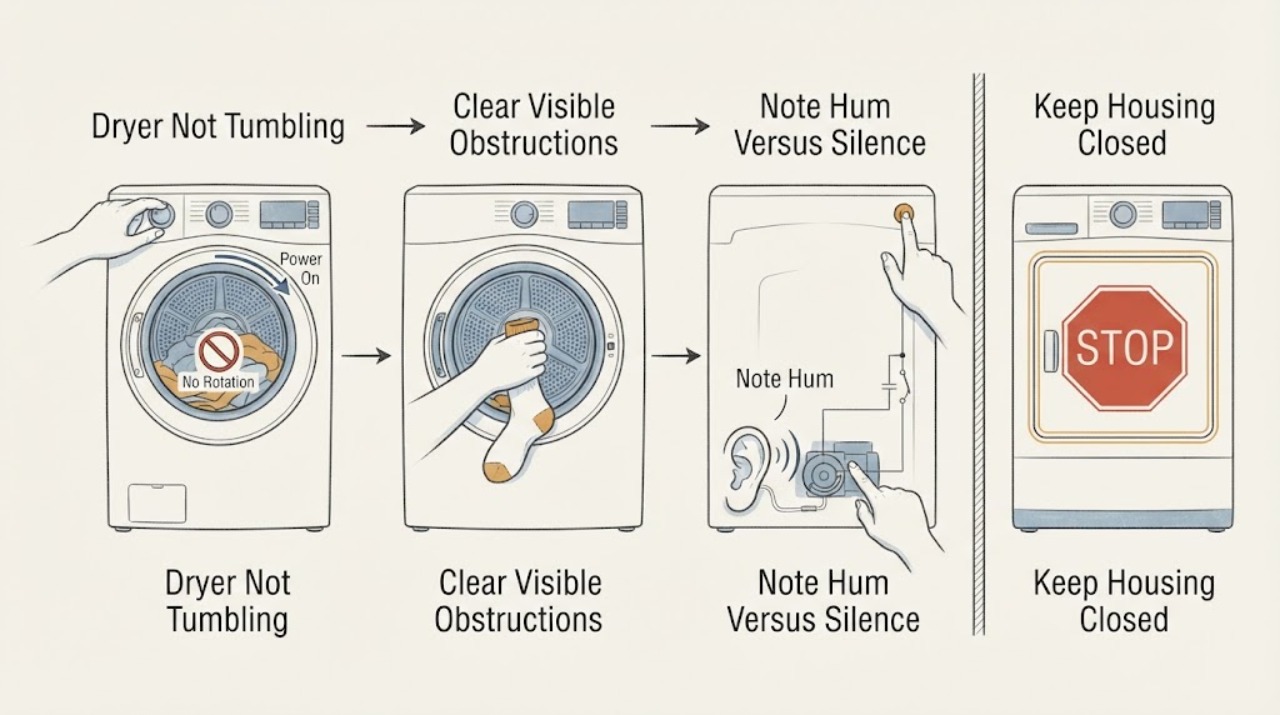
Work through in order
Diagnostic checks
Use only checks that match the exact appliance or system and its official guide.
-
Check 1
Select the intended cycle once and observe the display, start response, door-latch engagement and drum movement; do not keep restarting the appliance.
Expected result: The dryer is completely unresponsive, the door will not latch, or the cycle starts and the drum remains still.
Next step: Record the exact model and the observed pattern. If the dryer is unresponsive or the door cannot close, stop and use the model-specific service guidance rather than diagnosing a belt.
Why this matters
Why: No display or a door that cannot close points to a power/control or start-interlock path; a running cycle with a still drum is a distinct drive symptom.
-
Check 2
Switch the dryer off and check only the visible door opening and latch area for clothing or another obstruction; confirm the door closes normally without forcing it.
Expected result: An obstruction is visible, the latch does not engage, or the door closes normally.
Next step: Remove only a loose, visible obstruction with the appliance off. If the latch remains damaged, misaligned or unable to engage, keep the dryer off and arrange service; never bypass the door interlock.
Why this matters
Why: Hotpoint says an obstruction in the door lock can prevent a programme from starting; a normally closing door does not prove the drive system is healthy.
-
Check 3
If the cycle appears to start, note whether the dryer produces a low hum while the drum stays still, or whether it is silent; do not remove a panel or perform a live electrical test.
Expected result: There is a low hum with no drum rotation, or there is no hum and no rotation.
Next step: Unplug the dryer and keep the observation for the exact-model service request. Do not order a capacitor or motor without model fitment and professional diagnosis.
Why this matters
Why: Hotpoint associates the hum/no-rotation pattern with a possible capacitor on selected models. Silence can be consistent with a different start, motor or control path, but neither pattern identifies a failed component by itself.
-
Check 4
With the appliance unplugged, look only through accessible openings for a loose object, scorching, smoke residue, burning smell, scraping damage or a repeatedly tripped supply; do not open the cabinet.
Expected result: There is visible damage, a burning smell, smoke, abnormal scraping, or repeated electrical tripping; or there is no such warning sign.
Next step: For any warning sign, leave the dryer unplugged and obtain qualified appliance service. With no warning sign, continue only to model identification and a service/manual decision; do not run repeated tests.
Why this matters
Why: A warning sign raises an immediate electrical, mechanical or fire risk and makes further operation unsafe. The absence of a warning sign does not prove that the belt, motor or capacitor is sound.
-
Check 5
Read the complete Hotpoint model or industrial code from the appliance label and compare it with the exact Hotpoint manual or parts fit checker before considering any drive repair.
Expected result: A complete model match is available, or the model is missing/ambiguous.
Next step: If the model cannot be matched, stop at professional diagnosis. If it can be matched, follow only the model manual or qualified service instructions, with the appliance unplugged before any permitted maintenance.
Why this matters
Why: Hotpoint states that its capacitor and belt listings apply only to selected models and require model-fit verification; a generic symptom cannot establish part compatibility or a repair procedure.
Use your observations
Decision map
Find the observation that best matches what you see, then follow the next safe action.
-
PATH 01Next step
What you see
The display does not respond, the programme will not start, or the door cannot latch while the drum is not moving.
Do this next
Check only the visible latch area with power off. If the door or controls remain abnormal, leave the dryer off and use the exact-model service route.
Why this path and its safety boundary
Why it matters: The observation is a start/interlock or power/control symptom rather than proof of a broken belt or motor.
-
PATH 02Next step
What you see
A cycle appears to start and a low hum is heard, but the drum remains stationary.
Do this next
Unplug the appliance, record the model and arrange a model-matched diagnosis. Do not open the cabinet, test live parts or fit a generic capacitor.
Why this path and its safety boundary
Why it matters: Hotpoint identifies a capacitor as a possible cause on selected tumble dryers; belt or motor trouble may also be involved, so the sound does not select one part.
-
PATH 03Next step
What you see
The controls respond but there is no hum and no drum rotation, with no visible door obstruction.
Do this next
Keep the dryer unplugged, capture the full model/industrial code and request the matching manual or qualified service rather than repeating start attempts.
Why this path and its safety boundary
Why it matters: The symptom remains under-scoped: the motor, belt, control path or another model-specific condition may be involved, and Hotpoint's general pages do not identify the failed component from silence alone.
-
PATH 04Next step
What you see
There is smoke, burning odor, visible scorching or damage, scraping that suggests mechanical damage, or repeated electrical tripping.
Do this next
Stop using it, disconnect power only if safe to do so, keep the area clear and arrange qualified appliance service. Do not bypass protection or run another test cycle.
Why this path and its safety boundary
Why it matters: The dryer may present a fire, shock or mechanical hazard; safe public guidance stops before cabinet removal or electrical diagnosis.
Helpful context
Understand the symptom
Identify what is actually failing
Watch the control response without repeatedly restarting the dryer. If the display or indicators never respond, the issue is a power or control/no-start path rather than a confirmed drum-drive fault. If the cycle starts but the drum stays still, note whether there is a low hum, an error indication, scraping or a burning smell. Hotpoint's service material treats a door that will not close and a dryer that will not operate as separate service questions, so keep those observations separate when looking up the exact model manual.
Do the limited external checks first
With the dryer switched off, confirm the plug and supply are secure and check that the door closes without clothing or another visible object obstructing the latch. Do not bypass the door switch. Hotpoint says an obstruction at the door lock can prevent a programme from starting; if the door cannot close correctly or the dryer remains unresponsive, stop at that check and use the model-specific support route.
Use the sound and visible symptom only as a service clue
After the safe external checks, leave the dryer unplugged before looking through the door or filter opening for loose objects, scorching or visible damage. A low hum with no rotation is a pattern Hotpoint associates with a possible capacitor on selected models. Hotpoint's parts guidance also says a loose or snapped belt can stop the drum and that unusual noise or a drum that does not spin may involve a belt or motor. These are conditional clues, not permission to open the cabinet or identify a replacement from a generic search.
Match any repair decision to the exact model
Record the full model or industrial code from the appliance label and use Hotpoint's model manual or parts fit checker. The capacitor and belt pages each state that the listed component is suitable only for selected Hotpoint tumble dryers and that the model fit must be checked. Because no model was supplied here, do not use a belt, capacitor, motor or control part number as a universal answer, and do not attempt an internal replacement from this symptom alone.
Only after diagnosis
Potential parts
- tumble-dryer drive belt
Consider only if a qualified diagnosis or exact model documentation confirms a loose or snapped belt is preventing drum rotation.
Hotpoint lists belts for selected models and requires the complete model or industrial code; do not treat a listed belt as universal. - tumble-dryer motor capacitor
Consider only when the exact model and a qualified diagnosis support the hum-without-rotation pattern and capacitor involvement.
Hotpoint says its capacitor listing is for selected tumble dryers and requires model-fit verification; no part number is assigned to this model-free topic.
When checks do not resolve it
Need a professional?
Arrange qualified Hotpoint appliance service when the dryer still will not tumble after the visible door/power checks, when the door or controls do not start a cycle, when a hum occurs without rotation, or when the model-specific manual cannot be matched. Stop immediately for smoke, burning smell, scorching, exposed damage, scraping or repeated electrical tripping. Do not remove panels, bypass the door interlock, perform live tests or replace a belt, motor or capacitor from the symptom alone.
Common questions
FAQ
Does a Hotpoint dryer that hums but does not tumble need a capacitor?
Not necessarily. Hotpoint says a low hum with a drum that fails to turn may indicate a capacitor on selected models, while its parts guidance also identifies belt or motor issues as possible explanations. Unplug the dryer, record the full model and obtain a model-matched diagnosis before ordering a part.
Can I use any Hotpoint drive belt for a dryer that is not tumbling?
No. Hotpoint's belt listings say they fit selected tumble dryers and require checking the appliance model. A no-tumble symptom alone does not prove that the belt is broken or that a listed belt fits.
Should I keep restarting the dryer to see whether the drum begins turning?
No. After one safe observation of the controls and door, unplug the dryer before inspection. Stop completely if there is smoke, burning odor, scorching, scraping, exposed damage or repeated electrical tripping, and arrange qualified service.
Read the exact guide
Official sources
- Shop Laundry Appliances Spare Parts - HotpointHotpoint · Official Hotpoint parts guidance; it gives possible component categories but does not establish fit or diagnosis for an unspecified dryer.
- Tumble Dryer Capacitor J00221191 - Hotpoint - HotpointHotpoint · Official Hotpoint part page for selected models only; the low-hum/no-rotation clue is conditional and cannot be generalized as a diagnosis or fitment.
- Tumble Dryer Troubleshooting - Quick Fixes & Tips - HotpointHotpoint · Official Hotpoint family-level guidance for tumble dryers when no exact model is supplied; it does not identify a failed internal component for a no-tumble symptom.
- Tumble Dryer Drive Belt J00137846 - Hotpoint - HotpointHotpoint · Official Hotpoint part page for selected models only; it supports a conditional belt explanation but not universal compatibility or DIY installation.
- Hotpoint Tumble Dryer Error Codes - HotpointHotpoint · Official Hotpoint code lookup; the article does not generalize a code because no code or exact model was supplied.
- Hotpoint Service Tumble Dryer Repair - HotpointHotpoint · Official Hotpoint service guidance for tumble dryers; door-latch and no-operation observations are applicable at family level, while any repair remains model-dependent.
Community feedback
Share a repair observation
Share a plain-text repair observation. Accepted observations are published automatically; this page may take a moment to update.