
On this page
Start here
Quick answer
Do not keep forcing the KitchenAid KEYS850JQ1 to run and do not reach inside or remove its panels. First record whether the controls or drum light respond, whether the door closes and latches normally, and whether a breaker or the external cord/outlet looks abnormal. The KitchenAid manual for the KEYS850J family lists power, a firmly closed door, a selected cycle, and the START button among the first checks; its installation guidance also says to clean the exhaust vent when installing the dryer in a new location. If the dryer has power and the controls respond but you have already heard the motor while the drum stayed still, stop testing and arrange qualified appliance service rather than guessing a belt, motor, roller, or thermal part.
Before you begin
Safety first
- Do not run repeated test cycles, hand-spin the drum as a diagnostic, reach through a moving opening, bypass the door switch, remove the belt or rear panel, adjust gas components, or measure live voltage. If there is smoke, gas odor, sparking, scorching, or water near electrical parts, leave it off and obtain help from a safe location.
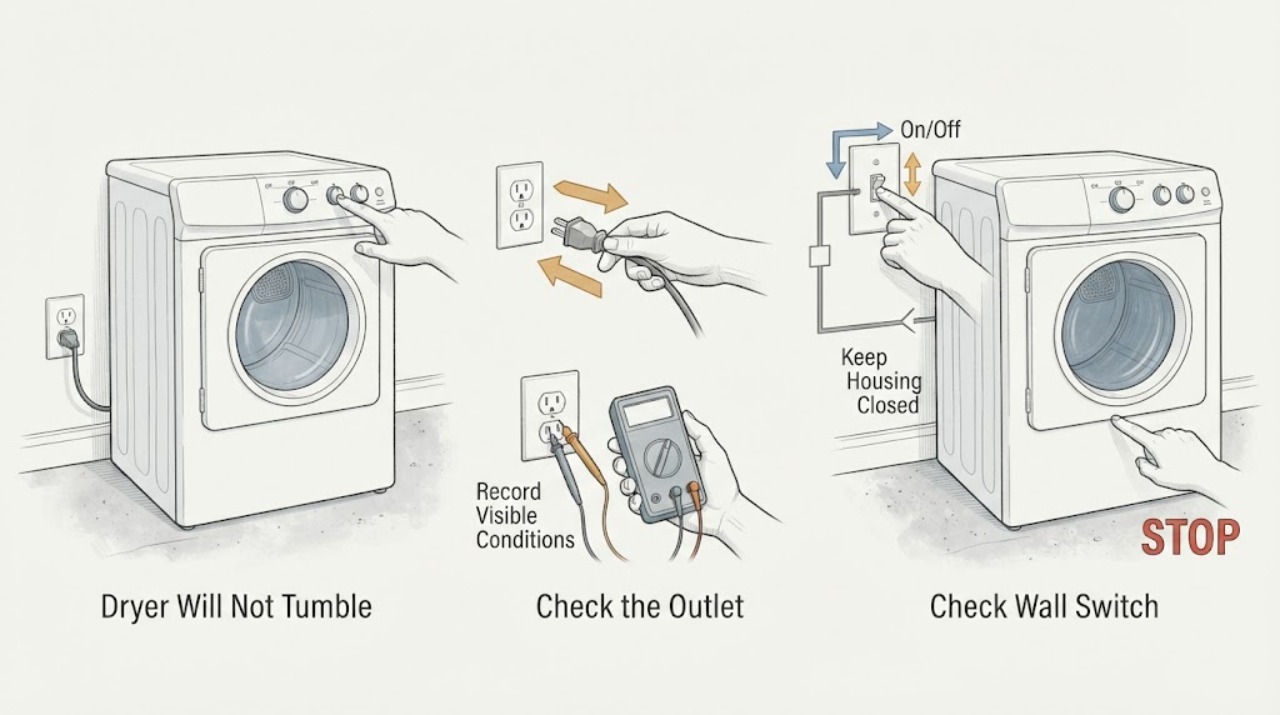
Work through in order
Diagnostic checks
Use only checks that match the exact appliance or system and its official guide.
-
Check 1
Leave the dryer off and make the area safe. If there is smoke, burning or gas odor, sparking, a scorched plug or outlet, damaged wiring, or a repeated breaker trip, move away and obtain emergency or qualified help; otherwise, once the unit is cool and the area is dry, identify the external plug, cord, outlet, and breaker without opening the cabinet or measuring voltage.
Expected result: The controls or drum light are completely dark; the breaker is tripped or will not remain on; the cord, plug, or outlet is visibly damaged; or the unit has normal external power indications.
Next step: Keep the dryer disconnected or switched off. Ask a qualified electrician to assess the house circuit, outlet, cord connection, or breaker when the external supply is uncertain; do not repeatedly reset protection.
Why this matters
Why: No lights or an abnormal supply points to an external power or electrical-safety branch before drum mechanics. Visible damage or a repeated trip is not a troubleshooting invitation; it is a stop condition.
-
Check 2
Read the rating plate and record the complete model and serial numbers, then document the move-in setup from outside: whether the unit is electric or gas, whether it is level and stable, whether the cord is pinched, and whether the visible exhaust hose is crushed, kinked, disconnected, or made of an unsuitable material. Do not pull out a heavy dryer or disturb a gas connection just to inspect it.
Expected result: The plate confirms KEYS850JQ1; the cord, vent, or position changed during the move; the visible vent route is crushed or disconnected; or the installation history is unknown but the exterior looks intact.
Next step: Photograph the rating plate and accessible installation. Have the installer, landlord, electrician, or appliance technician correct an unsafe connection, gas issue, crushed vent, or unstable placement before any operation; otherwise continue with the symptom record without opening the machine.
Why this matters
Why: The exact suffix is needed for service and parts identification. A new location can introduce a supply, vent, clearance, or stability problem, but an external check cannot prove an internal drum-drive fault.
-
Check 3
With the dryer not running, inspect the door and controls externally. Confirm that the door closes without force and that the cycle selector is not visibly between settings; note whether the control panel responds and whether a normal START command was already tried once. Do not hold the door switch closed, bypass it, or keep repeating start attempts.
Expected result: The panel is dark; the panel is lit but a normal start is ignored; the door does not latch or sits out of alignment; or the controls respond but the drum remains still.
Next step: Stop using the dryer if the door cannot latch normally or the controls do not start it after the documented single attempt. Arrange model-specific service; never defeat the door safety circuit or dismantle the control area.
Why this matters
Why: A dark panel keeps the power branch primary. A lit panel with no start response makes door-latch, cycle-selection, or start-control behavior more relevant. If the controls respond and the drum is still stationary, the observation has moved beyond a simple no-power check, but it does not name an internal part.
-
Check 4
If you already observed a motor hum, click, or other running sound while the drum did not turn, record the sound, when it began, and whether it stopped on its own; do not create another run to reproduce it and do not hand-spin, unload through a moving opening, or remove the belt or rear cover.
Expected result: A sound was present with a stationary drum; there was only a click or no operating sound; or the dryer previously started and then stopped after a short time.
Next step: Keep the dryer off and give the technician the exact sound and timing. Do not order a motor, belt, roller, or thermal component until the technician confirms the failed component for KEYS850JQ1.
Why this matters
Why: A motor-like sound with no drum movement is a distinct drum-drive symptom and may require internal service, but it cannot distinguish a belt, motor, support, obstruction, or protection device from sound alone. No sound returns the decision to power, door, start, or control checks.
-
Check 5
After the dryer is fully cool, record whether the prior event involved a tightly packed or unusually heavy load, an overheated cabinet or laundry area, an earlier protection trip, or a blocked-looking exhaust. Inspect only the accessible lint screen and visible vent opening; do not run another cycle to test airflow or thermal protection.
Expected result: The symptom followed a dense load or heat event; the lint screen is loose, damaged, blocked, or missing; the vent is visibly restricted; or the drum simply never tumbled without a heat symptom.
Next step: Leave the dryer off when heat, restriction, damage, or a recurring stop is present and request qualified dryer/vent service. If there was no heat history, give the technician the no-tumble and control observations rather than substituting a thermal diagnosis.
Why this matters
Why: Load and airflow history can explain a stop or protection response and must be separated from a primary no-tumble complaint. A clear screen or vent does not rule in a motor or belt, and a warm cabinet does not justify repeated tests.
-
Check 6
Prepare a service handoff containing the complete model and serial numbers, the move-in date, whether the dryer was moved or reconnected, power and door observations, any prior sound, load or heat history, and photographs of only safe external damage. Keep the unit out of service until the cause is established.
Expected result: The technician can see a complete identity and a reproducible symptom history, or the model suffix, installation, and prior behavior remain uncertain.
Next step: Request a qualified appliance diagnosis; involve an electrician for the house supply and a qualified vent professional for concealed or restricted exhaust. Do not perform live tests, bypass safety devices, or open panels as a homeowner.
Why this matters
Why: A complete identity prevents cross-model part or wiring assumptions. Missing history is a reason to inspect and document, not a reason to guess a drive component or continue running an inherited appliance.
Use your observations
Decision map
Find the observation that best matches what you see, then follow the next safe action.
-
PATH 01Next step
What you see
The controls and drum light are dark, the breaker or outlet is abnormal, or the cord/plug shows damage after the move.
Do this next
Keep the dryer off and have a qualified electrician assess the supply, breaker, outlet, and cord connection. Do not repeatedly reset protection or open the cabinet.
Why this path and its safety boundary
Why it matters: The first decision is an external electrical or installation problem, not a drum-belt diagnosis; a repeated trip or visible damage may indicate a shock or fire hazard.
-
PATH 02Next step
What you see
The panel is lit, but the door will not latch normally or a normal start command is ignored.
Do this next
Stop after the safe external observation and arrange model-specific service; do not hold the door switch closed, bypass an interlock, or dismantle the control panel.
Why this path and its safety boundary
Why it matters: Door-latch alignment, cycle selection, or start-control behavior is more relevant than a confirmed drum-drive failure, especially if the dryer was moved or the door was disturbed.
-
PATH 03Next step
What you see
The controls respond and a motor-like sound was already heard, but the drum remained stationary.
Do this next
Leave the dryer off and give the technician the sound and timing. Do not hand-spin the drum as a test, run another cycle, or buy a guessed part.
Why this path and its safety boundary
Why it matters: This is a drum-rotation symptom that needs an internal diagnosis, but sound alone cannot identify a belt, motor, support, obstruction, or thermal device.
-
PATH 04Next step
What you see
The dryer previously stopped after a heavy load or heat event, or the accessible screen/vent is damaged or restricted.
Do this next
Do not restart. Arrange qualified appliance and, when needed, vent-system service, especially if heat damage, repeated stopping, or concealed restriction is possible.
Why this path and its safety boundary
Why it matters: Overload, airflow, or thermal-protection context must be considered alongside the no-tumble symptom; cleaning one accessible item does not establish that a thermal component failed.
-
PATH 05Next step
What you see
The dryer was moved or reconnected, and the visible vent, cord routing, level, clearance, or gas connection is uncertain.
Do this next
Keep it off until a qualified installer, electrician, or appliance technician verifies the safe setup. Do not pull out a heavy unit or disturb a gas connection yourself.
Why this path and its safety boundary
Why it matters: The installation history is a live diagnostic branch: the move can change supply and vent conditions without proving a mechanical failure.
Helpful context
Understand the symptom
Why moving into a house changes the first check
A dryer inherited with a house has an unknown history: it may have been left unplugged, connected to a different supply, moved against a vent, or already had a start or drum-drive fault. The move-in detail is therefore a reason to document the external installation and controls before anyone proposes an internal part. The supplied KitchenAid manual identifies the KEYS850J family and notes that manuals cover several models, so exact suffix-specific parts or service procedures should be confirmed from the rating plate rather than inferred from a similar dryer.
What not tumbling does not prove
A stationary drum can accompany a completely dead dryer, a start or door-latch problem, a supply or installation issue, or a motor/drum-drive fault. A hum heard during an earlier attempt narrows the observation but does not identify a belt, motor, roller, or thermal device. Do not hand-spin the drum as a test, bypass the door switch, remove the rear or belt cover, or take live electrical measurements.
When checks do not resolve it
Need a professional?
Arrange qualified appliance service when the dryer has power but will not tumble, when a motor-like sound occurs without drum movement, when the door or start control does not operate normally, or when the dryer stops after a heat or overload event. Use an electrician for abnormal house power, a repeated breaker trip, or damaged cord/outlet, and qualified vent service for concealed or restricted exhaust.
Safety scope: Do not run repeated test cycles, hand-spin the drum as a diagnostic, reach through a moving opening, bypass the door switch, remove the belt or rear panel, adjust gas components, or measure live voltage. If there is smoke, gas odor, sparking, scorching, or water near electrical parts, leave it off and obtain help from a safe location.
Common questions
FAQ
Could the move into the house itself have caused the dryer not to tumble?
It can change the first checks by leaving the appliance unplugged, altering the cord or breaker connection, pinching the vent, disturbing the door alignment, or changing the installation position. Those are possibilities to document, not proof that moving damaged a belt or motor.
What if the dryer makes a humming sound but the drum does not move?
Treat that as a stop-and-service observation. It narrows the symptom to a running-sound plus stationary-drum pattern, but it does not identify which internal drive or protection component is at fault.
Should I try a smaller load or spin the drum by hand?
Do not hand-spin the drum as a diagnostic and do not keep forcing cycles on an inherited appliance that already failed to tumble. Record the previous load and heat conditions for the technician instead.
Does a lighted control panel rule out a power problem?
No. It makes a completely dead control path less likely, but a lit panel with no start response still needs the door, selected cycle, start control, and model-specific service branches kept separate from an internal drum diagnosis.
Read the exact guide
Official sources
- Owner's ManualKitchenAid · KitchenAid dryer manual listing the KEYS850J family; the assigned KEYS850JQ1 suffix is not listed separately, so only the manual's family-level operation, safety, vent, and service checks are used.
- Installation InstructionsKitchenAid · KitchenAid dryer installation instructions used only for safe external move/installation context, vent routing, leveling, and the instruction to use two or more people when moving a dryer; not a KEYS850JQ1 internal repair guide.
- Not Tumbling or Spinning - Dryer - Product HelpWhirlpool · Whirlpool Corporation manufacturer product-help guidance for dryer not-tumbling symptoms; used only for general external power, START, and cord-installation checks, not for KitchenAid KEYS850JQ1 parts or code claims.
Community feedback
Share a repair observation
Share a plain-text repair observation. Accepted observations are published automatically; this page may take a moment to update.