
On this page
Start here
Quick answer
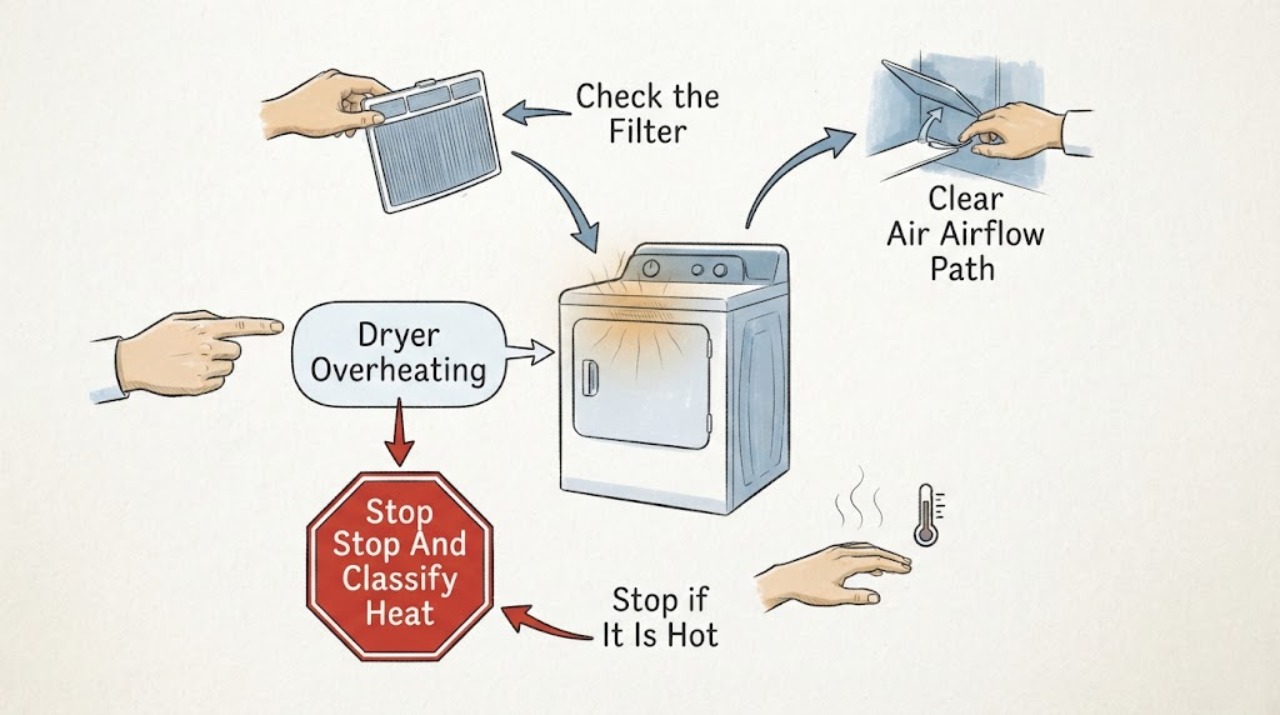
A Hotpoint dryer that feels hotter than usual may have restricted airflow from a lint filter, condenser, evaporator filter, or vent hose, an overloaded drum, or an internal heating, thermostat, sensor, or motor fault. Stop the programme, unplug the dryer when safe, and let it cool before checking only the accessible filter, container, condenser or evaporator filter, and visible vent path for the model. Hotpoint recommends regular filter and airflow maintenance, but cleaning does not make it safe to continue if the cabinet is unusually hot, the cycle stops, a burning smell or smoke appears, wiring is damaged, or a breaker trips. In those cases keep it unplugged and arrange qualified service; do not remove panels or make live electrical measurements.
Work through in order
Diagnostic checks
Use only checks that match the exact appliance or system and its official guide.
-
Check 1
Stop the drying programme and note whether the heat is ordinary warm air, an unusually hot cabinet or door, a cycle that stops unexpectedly, a hot or burning odor, smoke, visible scorching, or electrical crackling. Unplug the appliance only if the plug, cord, and surrounding area are safe to reach; do not touch hot internal parts.
Expected result: The dryer cools normally with no odor or damage, the cabinet remains unusually hot, the cycle stops from heat, or smoke, burning odor, scorching, damaged wiring, or a breaker trip appears.
Next step: For any smoke, burning odor, scorching, damaged cord or wiring, repeated breaker trip, or heat that does not reduce after stopping, keep the dryer unplugged and arrange qualified service; use local emergency guidance for active smoke or fire. Otherwise continue only after the dryer is completely cool.
Why this matters
Why: Normal drying heat is different from uncontrolled or excessive heat. A burning or electrical symptom can indicate a fire or shock hazard and cannot be cleared by cleaning alone.
-
Check 2
After the dryer has cooled and is unplugged, remove the accessible lint or fluff filter as the exact manual describes. Remove lint by hand or with a soft cloth, and clean the filter housing only with the permitted method; ensure a washable filter is fully dry before refitting it.
Expected result: The filter is heavily covered or the housing is packed with lint, the filter is clean and correctly seated, or lint returns unusually quickly with persistent heat.
Next step: Refit the clean, dry filter and do not run the dryer without it. If overheating returns or lint is accumulating inside inaccessible areas, stop using the appliance and request service rather than opening the cabinet.
Why this matters
Why: Hotpoint says the filter catches lint to prevent internal damage and keep the dryer efficient, and recommends cleaning it after each use. A clean filter with recurring overheating suggests a deeper airflow or internal fault.
-
Check 3
Identify the dryer type from its manual and inspect only the matching accessible airflow component: condenser on a condenser model, evaporator filter on a heat-pump model, or vent hose and outlet on a vented model. Look for lint, crushing, blockage, or a filter that is wet when the manual requires it to be dry; avoid sharp fins and do not dismantle the duct or cabinet.
Expected result: A condenser, evaporator filter, or vent hose is visibly blocked or dirty; the hose is crushed; the airflow path is clear; or the component cannot be accessed without disassembly.
Next step: Clean or refit only the component covered by the model manual and allow it to dry as required. If the path needs disassembly, the evaporator fins are damaged, or the dryer remains hot, keep it off and arrange qualified service.
Why this matters
Why: Hotpoint recommends regular cleaning of the applicable condenser, evaporator filter, or vent hose and says lint or debris can reduce airflow and increase drying time. A clear accessible path does not prove the internal fan, heater, or thermal protection is working.
-
Check 4
Review the load size, fabric type, and selected programme against the exact Hotpoint manual. Remove excess clothing and confirm that the heat setting and programme are intended for the load; do not use an overloaded drum or a programme outside its documented purpose to test an overheating dryer.
Expected result: The drum is overfilled, the programme is unsuitable or unusually long for the load, the load is normal and the selected programme is correct, or heat remains excessive with a light, appropriate load.
Next step: Use a smaller, model-appropriate load only after the dryer is cool and no safety symptom is present. If the cabinet still overheats or the cycle stops, discontinue use and provide the load and programme details to service.
Why this matters
Why: Hotpoint states that overfilling impairs performance and that programme and sensor behavior vary by model. Correcting a load or setting can reduce operating time, but persistent excessive heat with an appropriate load points to service.
-
Check 5
Record every error code or flashing-light pattern, the programme, load, filter and airflow observations, and when the heat symptom begins. If the exact Hotpoint code guide permits a single power-cycle step, follow it only after the dryer is cool and safe; do not repeatedly reset a returning fault or open the cabinet.
Expected result: No code appears and the dryer operates normally after maintenance, a code returns, the dryer stops during heat, or a motor, temperature, electronic, or control fault is indicated.
Next step: If a code returns, the dryer stops, or excessive heat remains after accessible maintenance, keep it unplugged and arrange qualified service with the model, code, programme, and observations. Do not replace a heater, thermostat, sensor, or control based on the code alone.
Why this matters
Why: Hotpoint's code guidance assigns some patterns to motor, temperature, electronic, pump, or control faults and directs owners to service. A one-time reset does not establish that a heat-related fault is repaired.
Use your observations
Decision map
Find the observation that best matches what you see, then follow the next safe action.
-
PATH 01Next step
What you see
The dryer is warm during normal operation, cools after the programme, and has no unusual odor, damage, or abnormal stopping.
Do this next
Keep the lint filter and the model-specific airflow parts clean and monitor the pattern. Use the exact manual for programme and load limits.
-
PATH 02Next step
What you see
The lint filter or its accessible housing is heavily blocked.
Do this next
Let the dryer cool, unplug it, clean the filter with the permitted method, and refit it dry. Stop and request service if lint quickly returns or overheating persists.
-
PATH 03Next step
What you see
The condenser, evaporator filter, or vent hose is dirty, crushed, or visibly blocked.
Do this next
Clean or refit only the model-specific accessible part according to the manual. Do not disassemble the cabinet or sharp heat-pump fins; request service if airflow remains restricted.
-
PATH 04Next step
What you see
The load is too large or the selected programme is unsuitable, but there is no smoke, burning odor, or abnormal cabinet heat.
Do this next
After cooling, use a smaller, appropriate load and the documented programme once. If excessive heat returns, stop using the dryer and arrange service.
-
PATH 05Next step
What you see
A code or flashing-light pattern returns, or overheating remains after the accessible filter, airflow, load, and programme checks.
Do this next
Keep the dryer unplugged and provide the exact code, model, programme, and maintenance observations to qualified service. Do not repeatedly reset it or replace internal parts without diagnosis.
-
PATH 06Next step
What you see
Smoke, a burning smell, visible scorching, damaged cord or wiring, unusual uncontrolled heat, water near electrical parts, or a repeated breaker trip appears.
Do this next
Stop immediately, disconnect power only if safe, keep clear of the dryer, and arrange qualified service. Use local emergency guidance for active smoke or fire.
Helpful context
Understand the symptom
Treat unusual heat as a safety symptom
Warm air and a warm load can be part of normal drying, but a cabinet that is suddenly much hotter than before, a cycle that stops from heat, or a hot or burning odor is not a normal maintenance reminder. Stop the programme and let the dryer cool. Smoke, visible scorching, electrical crackling, damaged wiring, or a repeated breaker trip requires immediate stop and service rather than another test cycle.
Airflow depends on the dryer type
Hotpoint's cleaning guidance separates a lint filter from the condenser on condenser models, the evaporator filter on heat-pump models, and the vent hose on vented models. A restricted path can lengthen drying and raise heat. Use only the maintenance points your exact manual identifies; do not dismantle a duct, heater, fan, or cabinet as a generic fix.
A clear filter does not clear an internal fault
If accessible filters and the visible airflow path are clean but the dryer still overheats, the likely cause may be an internal control, heater, sensor, motor, or airflow problem. Hotpoint's error guidance also directs recurring motor, temperature, electronic, or other fault indications to service. Preserve the model and code information for the technician.
Only after diagnosis
Potential parts
- lint or airflow filter assembly
Consider this category only if qualified service confirms damaged or incorrectly seated filtration after the accessible filter and housing are cleaned and the correct airflow path is verified.
Confirm the complete Hotpoint model information and authorized fitment before ordering any filter component. - heater or thermostat assembly
Consider this category only if qualified service confirms uncontrolled or incorrect heating after airflow, load, and programme causes are excluded.
Heating and thermal-protection components are model-specific and require qualified safety and compatibility checks before replacement. - temperature sensor or control module
Consider this category only if service confirms that the dryer continues heating or stops abnormally because of sensing or control behavior rather than restricted airflow.
Verify the exact Hotpoint model and have a qualified technician diagnose and install any sensor or control component.
When checks do not resolve it
Need a professional?
Arrange qualified service when a Hotpoint dryer remains unusually hot after the model-specific filter, airflow, load, and programme checks, when a recurring code or heat-related shutdown appears, or when the internal fan, heater, sensor, motor, or control may be involved. Stop immediately for smoke, burning odor, scorching, damaged cord or wiring, water near electrical parts, uncontrolled heat, or a repeated breaker trip. Unplug only when safe; do not remove panels, bypass thermal protection, or make live electrical measurements.
Common questions
FAQ
Can a blocked lint filter make a Hotpoint dryer overheat?
Restricted lint and airflow can reduce efficiency and increase drying time. Let the dryer cool, unplug it, clean the accessible filter as directed, and request service if excessive heat or lint returns.
What should I check on a Hotpoint condenser dryer that is overheating?
After cooling and unplugging, check the lint filter, empty and refit the water container, and clean the condenser only as the model manual permits. Persistent heat requires qualified service.
Should I keep running a Hotpoint dryer with a burning smell?
No. Stop immediately, unplug only if safe, keep the dryer clear, and arrange qualified service. Do not run another test cycle or open the cabinet.
When does Hotpoint dryer overheating need service?
Request service when heat remains abnormal after accessible maintenance, a code returns, the dryer stops from heat, or an internal heater, sensor, motor, or control may be involved. Stop immediately for smoke, burning odor, scorching, damaged wiring, or a repeated breaker trip.
Read the exact guide
Official sources
- Hotpoint Service Tumble Dryer RepairHotpoint · Hotpoint dryer maintenance, model-specific display behavior, and service escalation
- What do your tumble dryer error codes mean?Hotpoint · Hotpoint tumble-dryer error-code meanings and service boundaries for electronic, motor, pump, door-lock, and heating faults
- Why Is My Hotpoint Tumble Dryer Not Working? Troubleshooting GuideHotpoint · Hotpoint dryer safety, filter, water container, vent, load, programme, heat, and service troubleshooting
- Step-by-Step Guide on How to Clean Your Tumble DryerHotpoint · Hotpoint tumble-dryer lint filter, drum, sensor, condenser, evaporator filter, and vent-hose maintenance
Community feedback
Share a repair observation
Share a plain-text repair observation. Accepted observations are published automatically; this page may take a moment to update.