
On this page
Start here
Quick answer
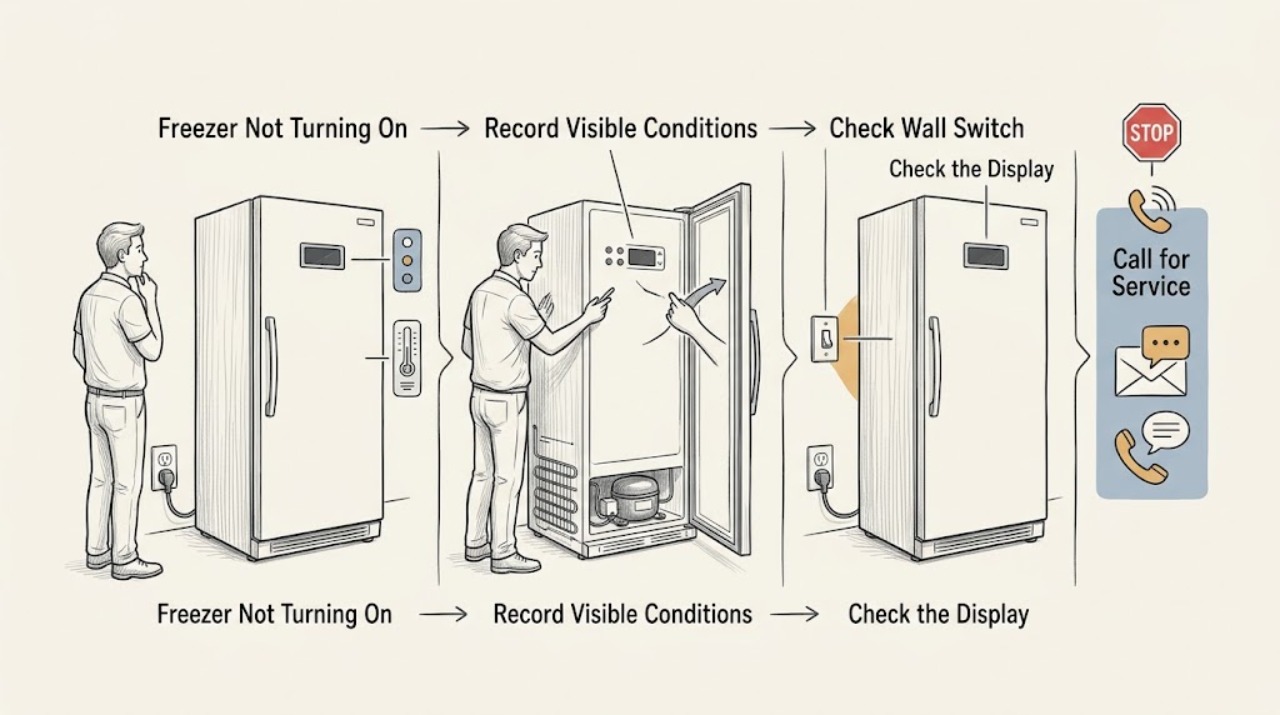
Keep the Hotpoint freezer door closed and protect the food before repeated checks. From a dry, safe position, confirm the plug is firmly seated, the supply switch is on, the accessible outlet works, and the fuse or breaker has not tripped. Check the model's control is not off and note the indicator lights; Hotpoint manuals use the green mains light to show electrical supply, while a red high-temperature light can remain on after installation or a large load until the correct temperature is reached. Do not repeatedly reset a breaker, use an extension cord, remove covers, or work on the compressor or sealed system. If the outlet is dead, the breaker trips again, the cord is hot or damaged, the freezer smells burnt, there is smoke or a suspected refrigerant leak, or the freezer stays warm with correct power and settings, stop and arrange qualified service while following food-safety guidance.
Work through in order
Diagnostic checks
Use only checks that match the exact appliance or system and its official guide.
-
Keep the freezer closed and record the immediate symptom
Keep the door closed and observe the freezer from a dry position. Note whether the interior light or any mains indicator is on, whether the compressor or fan can be heard, whether food is softening, and whether the cabinet or cord is unusually hot. Stop for smoke, burning odor, a hot or damaged cable, arcing, water near electrical parts, or a suspected refrigerant leak.
Expected result: The freezer is completely dark and silent, a mains light is on but cooling is absent, food is thawing, or an immediate hazard is present.
Next step: For a hazard, do not switch the freezer on; isolate power only from a safe position, ventilate and leave the area for a suspected refrigerant leak, and arrange qualified service. Otherwise continue with the external supply check while keeping the door closed.
Why this matters
Why: Dark and silent suggests a supply or control issue; power with no cooling points beyond the indicator to a cooling-system diagnosis. Warming food needs protection before appliance troubleshooting. A hazard overrides all further checks.
-
Check the plug, supply switch, outlet, fuse, and breaker
From a dry position, confirm that the plug is firmly seated and the supply switch is on. Test the outlet with a known-safe appliance only if doing so does not require exposing wiring or using an extension cord. Check the accessible fuse or breaker once; do not increase fuse capacity or repeatedly reset a breaker that trips.
Expected result: The plug was loose, the supply switch was off, the outlet is dead, a fuse or breaker is open, or the supply appears normal but the freezer remains dark or silent.
Next step: Restore only a loose plug, switched-off supply, or single accessible breaker reset when safe. If the outlet is dead or the breaker trips again, leave the freezer disconnected and arrange qualified electrical service. If power is normal but it remains off, continue without opening the cabinet.
Why this matters
Why: Hotpoint's troubleshooting instructions treat a loose plug, switched-off supply, dead outlet, and fuse or breaker as the first no-operation causes. A dead or repeatedly tripping circuit is a household electrical fault; normal power with no operation points to the freezer.
-
Check the control and indicator-light meaning
If the model has a temperature control wheel, display, or fast-freeze switch, check that it is in a cooling position and use only the model manual for adjustments. Note the indicator lights: on some Hotpoint models, a green mains light indicates an uninterrupted supply, an amber light indicates fast freeze, and a red light indicates high temperature.
Expected result: The control was off or set incorrectly, an amber fast-freeze light is on, a red warning remains after a recent start or large load, or controls and lights appear normal but the freezer does not run.
Next step: Make one model-approved control correction and close the door. Allow the freezer to recover without repeated opening. If the control and lights are normal but the compressor never starts, or the warning remains while food warms, arrange qualified service.
Why this matters
Why: An off control can make a powered freezer appear dead. Fast freeze is a temporary mode on some models. A red warning can be normal during recovery after installation or a large load, but a persistent warning with no cooling is not proof of a simple light fault.
-
Check closure, ventilation, and temperature recovery
Briefly confirm that the door closes fully, packages do not hold it open, and the external ventilation space is not blocked by a wall, heat source, or stored items. If the freezer was recently installed or loaded with a large amount of food, keep the door shut and allow recovery. Use the model's manual and a suitable appliance thermometer rather than judging temperature by touch.
Expected result: The door is not sealing, the freezer is near a heat source or lacks ventilation, it was just installed or heavily loaded, or closure and ventilation are normal but it remains warm.
Next step: Remove only the accessible obstruction, improve clearance according to the manual, close the door, and monitor one recovery period. If the freezer remains warm, the door cannot seal, or the compressor or fan does not operate, protect food and arrange service.
Why this matters
Why: Hotpoint identifies door closure, ventilation, nearby heat, recent installation, and a large fresh load as conditions that affect temperature and warning lights. These conditions can make the appliance appear not to be working even when it is running; persistent warmth after correction points to a cooling fault.
-
Escalate persistent no-operation or cooling failure
After the safe supply, control, closure, and ventilation checks, do not remove a rear cover or test the compressor, fan, thermostat, wiring, or sealed circuit. Record the model, indicator-light state, outlet result, control position, temperature, and when the freezer stopped. Keep the door closed and transfer food if the temperature is unsafe.
Expected result: The freezer starts and cools after one external correction, remains dark with a working outlet, runs without cooling, makes an abnormal sound, or repeatedly trips the circuit.
Next step: Monitor only if the temperature is falling and no hazard is present. Otherwise stop using the freezer, isolate power only if safe, protect the food, and arrange qualified Hotpoint service. Do not order or replace a part from the symptom alone.
Why this matters
Why: Recovery after a safe correction supports an operating-condition issue. Persistent no-operation or running without cooling requires diagnosis of the control, compressor, fan, thermostat, or sealed system; repeated trips or abnormal heat may be hazardous.
Use your observations
Decision map
Find the observation that best matches what you see, then follow the next safe action.
-
PATH 01Safety boundary
What you see
Smoke, burning odor, a hot or damaged cable, arcing, water near electrical parts, repeated breaker trips, or a suspected refrigerant leak is present.
Do this next
Stop immediately. Do not switch on a freezer with a suspected leak; isolate power only from a safe position, ventilate and leave the room if appropriate, and arrange qualified or emergency service.
Why this path and its safety boundary
Safety stop: True
-
PATH 02Safety boundary
What you see
The outlet is dead or the fuse or breaker will not remain on, while the freezer and cord are otherwise intact.
Do this next
Leave the freezer disconnected and have the household circuit checked by a qualified electrician. Keep the door closed and move food to a safe cold-storage option.
Why this path and its safety boundary
Safety stop: True
-
PATH 03Next step
What you see
The control was off, the supply switch was off, the plug was loose, or a door or ventilation obstruction was corrected and the freezer begins to recover.
Do this next
Keep the door closed and monitor the temperature through one recovery period. If cooling does not return or the warning persists while food warms, arrange service.
-
PATH 04Next step
What you see
A red high-temperature warning remains after recent installation or a large load, but the freezer is running and the temperature is falling.
Do this next
Allow recovery with minimal door opening and follow the model manual. If the temperature stops falling or food begins to thaw, protect the food and call for service.
-
PATH 05Safety boundary
What you see
Power and controls are normal but the freezer remains dark, silent, warm, or runs without cooling after the safe checks.
Do this next
Stop user troubleshooting and arrange qualified Hotpoint service for the control, compressor, fan, thermostat, or sealed-system diagnosis. Do not remove covers or work on refrigerant.
Why this path and its safety boundary
Safety stop: True
Helpful context
Understand the symptom
Protect food and check for hazards first
Keep the door closed as much as possible while you investigate. Move food to a working freezer or insulated cooler if the appliance is warming. Stop immediately for smoke, burning odor, a hot or damaged cable, visible arcing, water near electrical parts, repeated breaker trips, or a suspected refrigerant leak. Hotpoint's manual says not to switch on a freezer when a leak is suspected and to ventilate the room.
No light and a warning light are different symptoms
A completely dark freezer starts with the supply and control. A freezer with power but a red temperature warning may be recovering from installation or a large load. A green mains indicator, when fitted, shows that electricity is reaching the appliance; it does not prove that the compressor or cooling system is operating correctly.
Do not open the electrical or sealed system
Hotpoint requires the appliance to be disconnected before a repair or part replacement. Do not remove covers, probe the outlet, test live voltage, add refrigerant, or work on a compressor or fan. If the safe external checks do not restore operation, record the model and symptoms for service.
When checks do not resolve it
Need a professional?
A technician is required for persistent no-operation, running without cooling, a failed control or indicator condition, compressor or fan symptoms, recurring temperature warnings, a damaged seal, repeated electrical trips, or any suspected leak.
Common questions
FAQ
Why is my Hotpoint freezer completely dark?
Check the plug, supply switch, working outlet, accessible fuse or breaker, and control setting from a dry position. If the outlet works but the freezer stays dark and silent, arrange qualified service.
What does the red light on a Hotpoint freezer mean?
On some models it is a high-temperature warning and may remain on after installation or a large load until the correct temperature is reached. Keep the door closed and monitor recovery; persistent warmth needs service.
Should I keep resetting the breaker if my Hotpoint freezer will not turn on?
No. Check the accessible breaker once, but stop if it trips again. Leave the freezer disconnected and have the household circuit or appliance checked by a qualified professional.
What should I do with food while a Hotpoint freezer is not working?
Keep the door closed as much as possible and move food to a working freezer or insulated cooler if it is warming. Use an appliance thermometer and follow food-safety guidance rather than judging food by smell alone.
Read the exact guide
Official sources
- Hotpoint Service Help and AdviceHotpoint · Escalating unresolved Hotpoint freezer operation, temperature, sensor, or control symptoms to qualified service
- FREEZER - MODELHotpoint · Opened Hotpoint freezer manual example for plug, outlet, fuse or breaker, door, controls, indicator lights, ventilation, temperature recovery, food protection, and leak boundaries
- Hotpoint Freezer Troubleshooting & RepairHotpoint · No-operation, control, indicator-light, door, ventilation, temperature, installation, and service decisions for Hotpoint freezers
Community feedback
Share a repair observation
Share a plain-text repair observation. Accepted observations are published automatically; this page may take a moment to update.