
On this page
Start here
Quick answer
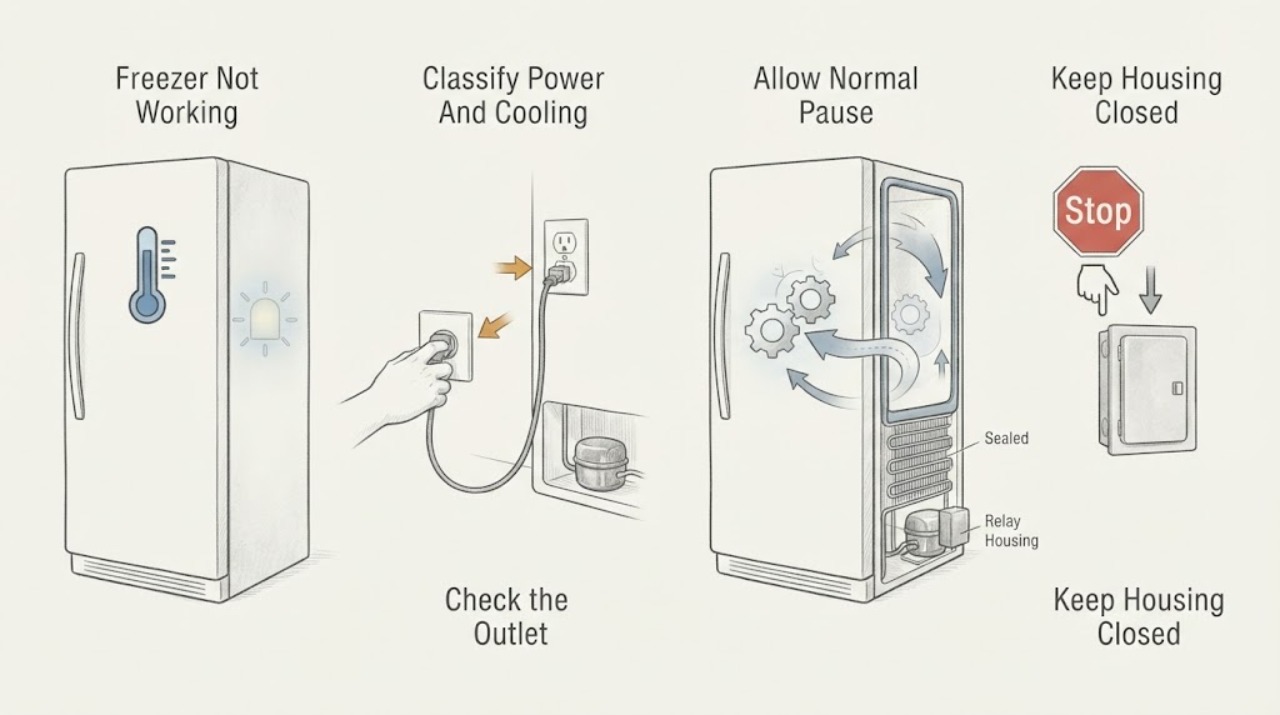
Start by separating a freezer with no power from one that has lights but is not cooling. Check the outlet and plug only from a safe, dry position, confirm the temperature control was not set to Off or a demo mode, and listen for the normal pause of a defrost cycle or the short delay after a power interruption. Then check door closure, gasket contact, blocked vents, heavy frost, and the temperature of the installation area. GE Appliances notes that compressors and fans can pause during defrost and that a short outage can trigger an automatic compressor-protection delay; repeated unplugging is not required. If the freezer is warm, food is soft, frost returns, the control does not respond, there is a burning smell or water near electricity, or it still does not run after these non-invasive checks, keep it safe and arrange qualified appliance service. Do not remove panels, test live wiring, pierce a sealed system, or force a compressor or control to run.
Before you begin
Safety first
- A homeowner may check visible power indications, controls, door closure, loading, airflow, and manual-approved maintenance only from a safe position. Live electrical diagnosis, sealed-system work, compressor or relay access, and internal control or defrost repair require qualified service.
Work through in order
Diagnostic checks
Use only checks that match the exact appliance or system and its official guide.
-
Check 1
From a dry, safe position, check whether the freezer has interior light or control-panel power and whether the complaint is no operation, no cooling, or both; do not open panels.
Expected result: Record whether lights work, controls respond, the compressor or fan is audible, the freezer is cold, and whether there is a burning smell, water near electricity, damaged cord, or tripped protection.
Next step: For a safe appliance with no visible hazard, continue to the outlet and control check. For electrical or water hazards, keep the freezer off as appropriate and arrange qualified service.
Stop if: Stop for smoke, burning odor, sparking, a hot plug, damaged cord, standing water near electrical parts, or an electrical panel that trips again.
Why this matters
Why: No lights or controls suggest a power or supply issue. Lights with a warm cabinet point toward cooling or control diagnosis. Burning odor, wet electrical areas, or damaged wiring is a safety stop.
-
Check 2
Verify that the plug is fully seated in the intended wall outlet and that the temperature control is not Off; use the exact Hotpoint manual to identify any demo or showroom mode.
Expected result: Note whether another safe indication of the outlet is present, whether the control changes the displayed or dial setting, and whether the unit was recently moved, serviced, or affected by an outage.
Next step: Correct only a clearly Off control or documented demo setting. If the outlet, plug, or control remains questionable, stop and have the supply or appliance checked by a qualified person rather than using adapters or extension cords.
Stop if: Do not pull the appliance out, use a damaged outlet, bypass grounding, use an extension cord, or remove an electrical cover.
Why this matters
Why: A loose connection, Off control, or demo mode can make a sound freezer appear dead without proving a component failure. A normal outlet and responsive control move the diagnosis to operating cycles and cooling conditions.
-
Check 3
If the unit has power and no hazard, observe it for the model's normal operating pattern instead of repeatedly unplugging it; note whether it recently entered defrost or lost power.
Expected result: Record whether the compressor and fans resume after a normal pause, whether the cabinet is still cooling, and whether the pause follows a short outage or immediate power reconnection.
Next step: Allow the documented cycle or protection delay to complete. If the freezer remains warm or never resumes, continue to the door, airflow, and frost checks and prepare for service.
Stop if: Stop waiting and arrange service for a continuing warm cabinet, repeated protection trips, smoke, unusual noise with no cooling, or a protection delay that does not clear.
Why this matters
Why: GE Appliances says compressors and fans can stop during defrost and that a short outage can activate automatic compressor protection while the refrigerant system equalizes. Repeated power cycling can obscure the symptom.
-
Check 4
Inspect the closed freezer door, gasket contact, interior loading, cold-air passages, and the installation area without dismantling the unit.
Expected result: Look for a package or ice holding the door open, a loose or damaged gasket, tall items blocking an air passage, inadequate clearance, or an ambient location outside the model's permitted range.
Next step: Reposition only items that clearly block closure or airflow and follow the model guide for gasket and clearance checks. If the gasket will not seal, the cabinet is damaged, or the installation conditions cannot be corrected, arrange service.
Stop if: Do not force the door, pull the gasket from its channel, move a heavy appliance alone, or alter cabinetry or ventilation without the installation instructions.
Why this matters
Why: Warm air entering through a poor seal or blocked airflow can raise the freezer temperature. GE Appliances also notes that installation temperature and clearance vary by style and model.
-
Check 5
Look for heavy frost on the freezer interior and consult the exact Hotpoint manual before any defrost or condenser-cleaning procedure.
Expected result: Record whether frost is concentrated around the door edge or air path, whether it returns after an approved defrost, and whether the manual identifies user-accessible coils or cleaning points.
Next step: Follow only the model-approved manual defrost or cleaning procedure and keep sharp tools and direct heat away from the liner and tubing. If frost returns, the unit remains warm, or internal access is required, arrange qualified service.
Stop if: Stop for a puncture, hissing, refrigerant-like odor, water near electrical parts, a damaged liner, or any need to remove panels or work around wiring.
Why this matters
Why: Frost can indicate warm-air entry or a defrost problem. GE Appliances says coil-cleaning access varies by model and that the appliance should be unplugged before maintenance that requires it.
-
Check 6
If the freezer still does not run or cool after the safe checks, leave it in the safest condition that preserves the symptom and prepare a service handoff without opening the appliance.
Expected result: Document the model and serial information, interior temperature, light and control state, compressor or fan sounds, frost pattern, door and gasket condition, outage or service timing, and any visible damage.
Next step: Arrange qualified Hotpoint appliance service and provide the notes and safe photographs. Follow the service provider's instructions about whether to leave the unit powered for diagnosis.
Stop if: Do not test live wiring, jumper a thermostat or defrost control, remove the rear cover, pierce tubing, add refrigerant, or force the compressor to run.
Why this matters
Why: This pattern helps distinguish a power or control issue from a defrost fault, relay, compressor, sealed-system, gasket, or airflow problem.
Use your observations
Decision map
Find the observation that best matches what you see, then follow the next safe action.
-
PATH 01Safety boundary
What you see
There is smoke, burning odor, sparking, a hot or damaged plug, repeated protection trips, or water near electrical parts.
Do this next
Keep away from the hazard, do not touch unsafe controls or wiring, and arrange qualified service or the appropriate emergency response.
Why this path and its safety boundary
Safety stop: Do not continue outlet testing, move the appliance, or remove covers.
-
PATH 02Safety boundary
What you see
The interior and controls are dark and there is no safe evidence of power.
Do this next
Check only the visible plug and intended outlet from a dry, accessible position, then have the electrical supply or appliance assessed if power is not restored.
Why this path and its safety boundary
Safety stop: Do not use an extension cord, bypass grounding, or open the electrical compartment.
-
PATH 03Safety boundary
What you see
The freezer has power and is cold, but the compressor or fan is temporarily quiet after defrost or a short outage.
Do this next
Allow the normal defrost or automatic compressor-protection delay to complete and observe whether cooling resumes.
Why this path and its safety boundary
Safety stop: Arrange service for a continuing warm cabinet, repeated pauses, or a protection delay that does not clear.
-
PATH 04Safety boundary
What you see
The unit runs but is warm and there is a poor door seal, blocked airflow, heavy frost, or an unsuitable installation area.
Do this next
Correct only accessible loading or documented settings and follow the model manual for approved defrost or maintenance.
Why this path and its safety boundary
Safety stop: Do not chip frost, apply direct heat, pull the gasket, or work behind panels.
-
PATH 05Safety boundary
What you see
Power and controls are normal, the door and airflow are acceptable, but the freezer remains warm or the compressor never resumes.
Do this next
Keep the appliance safe and arrange qualified service for temperature or defrost controls, relay, compressor, or sealed-system diagnosis.
Why this path and its safety boundary
Safety stop: Do not bypass controls, test live wiring, pierce tubing, or add refrigerant.
Helpful context
Understand the symptom
Define what not working means
A dark interior, silent controls, and no response point first to power or control state. Lights with a warm freezer point to cooling, airflow, door-seal, frost, or control trouble. A brief pause does not necessarily mean failure: GE Appliances says compressor and fan operation can stop during defrost, and a short outage can trigger an automatic delay while the refrigeration system equalizes. Record the temperature and symptoms before changing several settings at once.
Check the easy cooling conditions without opening the cabinet
Make sure the freezer door closes fully, the gasket contacts the cabinet, large items do not hold the door open, and food or containers do not block cold-air passages. Heavy frost can result when warm air enters through a loose door seal. Installation clearance and ambient temperature also vary by model, so use the Hotpoint documentation for the installed unit.
Treat frost and electrical access as different boundaries
If the owner manual permits a user defrost procedure, follow it exactly and protect the floor from water; do not chip frost with a sharp tool or apply a heat source. Condenser cleaning is also model-dependent, and GE Appliances says to unplug before maintenance when the manual requires coil access. Any internal wiring, relay, defrost control, compressor, refrigerant, or sealed-system diagnosis belongs to a qualified technician.
When a warm freezer is a service problem
A freezer that remains warm after the controls, door, airflow, frost, and normal-cycle checks can have a failed temperature or defrost control, relay, compressor, or sealed system. Keep the unit in the condition that best preserves the symptom if it is safe to do so, and provide the technician with temperature readings, timing, frost pattern, and any outage or installation history. Do not repeatedly reset it or remove the rear cover to find the cause.
Only after diagnosis
Potential parts
- temperature control or thermostat
Consider only when the control does not respond correctly or a qualified diagnosis links the warm cabinet to temperature sensing or control behavior.
Confirm the exact Hotpoint model and control type before any replacement decision. - defrost control or heater assembly
Consider only when heavy frost returns or a technician confirms a defrost-system fault after safe door and airflow checks.
Defrost components and access vary by model; internal electrical diagnosis requires qualified service. - start relay or overload protector
Consider only when the unit has power but the compressor repeatedly clicks, fails to start, or a technician confirms a start-circuit fault.
Do not remove the compressor cover or substitute a relay without model-specific diagnosis. - compressor or sealed-system component
Consider only after qualified diagnosis of persistent no-cooling with correct settings, intact door sealing, clear airflow, and no user-serviceable cause.
Sealed-system work is not a routine homeowner repair and requires qualified service and model-specific evaluation. - door gasket
Consider only when the gasket is visibly damaged or cannot seal after accessible obstruction and alignment checks.
Verify the exact model and gasket profile before any part decision; do not pull the installed gasket from its channel as a test.
When checks do not resolve it
Need a professional?
Arrange qualified appliance service for smoke, burning odor, repeated protection trips, water near electricity, a warm freezer, heavy frost that returns, a damaged gasket or cabinet, no recovery after a normal defrost or outage delay, or any need to access controls, wiring, compressor, refrigerant, or sealed-system components.
Safety scope: A homeowner may check visible power indications, controls, door closure, loading, airflow, and manual-approved maintenance only from a safe position. Live electrical diagnosis, sealed-system work, compressor or relay access, and internal control or defrost repair require qualified service.
Have this ready
- Provide the exact Hotpoint model and serial information, interior temperature, light and control state, compressor or fan sounds, frost pattern, door and gasket condition, installation and outage timing, and safe photographs of visible symptoms.
Common questions
FAQ
Why is my Hotpoint freezer not working but the light is on?
Power is reaching at least part of the appliance, so check the temperature control, normal defrost pause, door seal, blocked airflow, frost, and installation conditions. If it remains warm after those checks, arrange qualified service rather than opening the cabinet.
Could a defrost cycle make a Hotpoint freezer seem stopped?
Yes. GE Appliances says the compressor and fans can pause during defrost. Observe whether they resume and cooling returns; a cabinet that stays warm or repeatedly pauses needs service.
Should I keep unplugging a Hotpoint freezer that is not running?
Do not repeatedly cycle power as a diagnostic. GE Appliances says a short outage can trigger an automatic compressor-protection delay while the refrigeration system equalizes. If the freezer does not resume or remains warm, arrange service.
Can a bad door gasket make a Hotpoint freezer stop cooling?
A poor seal can let warm air enter and contribute to frost and weak cooling. Check for packages holding the door open and visible gasket damage. Do not pull the gasket or force the door; arrange service if it will not seal.
What if there is heavy frost inside the freezer?
Frost can follow warm-air entry or a defrost problem. Follow only the exact model manual's approved defrost procedure, never chip frost or apply direct heat, and arrange service if frost returns or the freezer remains warm.
Read the exact guide
Official sources
- Refrigerator - Does Not Run or CoolGE Appliances · Use for Hotpoint models supported through the GE Appliances service family; confirm the exact Hotpoint manual for controls and modes.
- Hotpoint SupportHotpoint · Hotpoint appliance support page; regional coverage and model documentation vary.
- Refrigerator - Not Cooling EnoughGE Appliances · Use for Hotpoint cooling symptoms through the GE Appliances family; clearance, controls, coils, and modes vary by model.
- Upright & Chest Freezer - Not WorkingGE Appliances · Use when the Hotpoint product is a standalone upright or chest freezer; combination refrigerator-freezer models may require their own manual.
Community feedback
Share a repair observation
Share a plain-text repair observation. Accepted observations are published automatically; this page may take a moment to update.