
On this page
Start here
Quick answer
First identify whether the Hotpoint oven is gas or electric and whether it is completely dead, powers on but will not start, or runs without producing normal heat. Check the model manual for the required function, temperature, clock or timer, Start action, and any special mode, then check the household supply and any self-clean latch without opening the appliance. An electric oven may need service for a visibly damaged or concealed element; on a gas model, observe only the normal igniter and flame behavior described by the manual and never adjust gas parts. A gas odor, delayed ignition or flare, smoke, sparks, arcing, burning smell, overheating, damaged wiring, or repeated breaker trip is a stop condition: turn the controls off, keep clear, and arrange qualified service.
Before you begin
Safety first
- Do not open panels, probe live wiring, bypass a latch, adjust gas valves or regulators, repeatedly reset protection, or operate with gas odor, delayed ignition, smoke, sparks, arcing, burning smell, overheating, or damaged wiring.
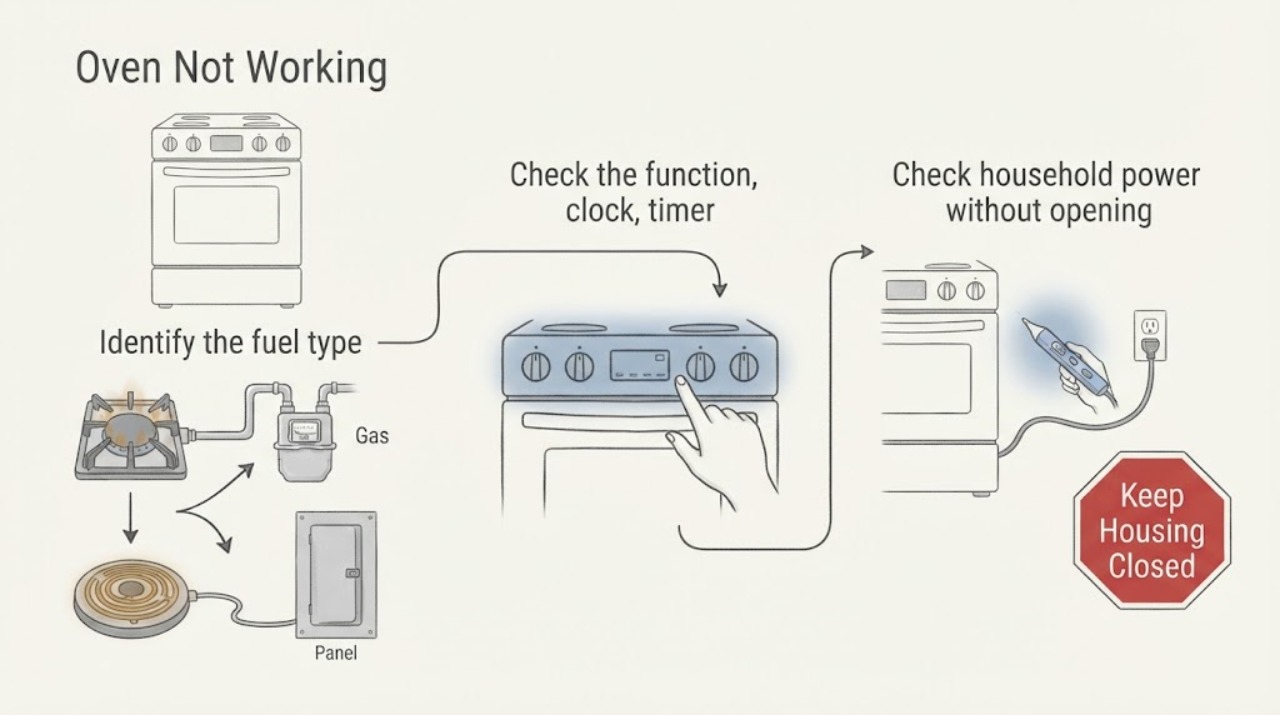
Work through in order
Diagnostic checks
Use only checks that match the exact appliance or system and its official guide.
-
Identify the fuel type and exact failure
From outside the oven, use the model information and manual to identify electric, gas, or dual-fuel operation. Note whether the clock or display is blank, whether the controls respond, whether the oven light works, whether the cavity stays cold, whether only one function fails, and whether there was any odor, smoke, spark, unusual flame, or error indication.
Expected result: The oven is completely dead, the display works but no function starts, it starts but does not heat, only Bake or Broil fails, or an abnormal gas or electrical symptom is present.
Next step: Follow the common controls and supply checks, then use only the electric or gas observation branch matching the model. If a stop condition is present, leave the oven off and arrange qualified service.
Stop if: Stop for gas odor, delayed ignition, flare, smoke, sparks, arcing, burning smell, overheating, damaged wiring, or repeated breaker trip.
Why this matters
Why: A dead display points first to supply or control state. A powered oven that will not start points to settings, timer, mode, latch, or controls. A running cold oven points to the fuel-specific heating path. A safety symptom overrides all routine branches.
-
Check the function, clock, timer, and special mode
Using the exact Hotpoint manual, select the intended Bake, Broil, or other function and temperature, press Start when required, and confirm the clock or timer is set after a power interruption. Check that a delay-start, automatic programme, or special mode is not preventing immediate heating. Close the door normally and verify that a self-clean latch is not engaged.
Expected result: The function or temperature was not selected, the clock is flashing, a delay or special mode is active, the latch is locked, the controls respond correctly, or the oven remains cold with the correct settings.
Next step: Correct one obvious setting from the manual and make one supervised preheat attempt. If the clock will not retain its state, the latch will not release, or the oven remains cold, continue to the supply and fuel-specific branches or request service.
Stop if: Do not force a latch, remove controls, or continue after smoke, sparks, gas odor, burning smell, overheating, or a breaker trip.
Why this matters
Why: A control or timer state can prevent an otherwise powered oven from receiving a heat command. A correct setting shifts the diagnosis to supply, element, igniter, sensor, or internal control rather than proving a particular part has failed.
-
Check household power without opening the oven
Check the household breaker or fuse visually and inspect the visible plug, cord, and receptacle for moisture, scorching, looseness, or heat damage. Do not slide a built-in oven or remove a cover to reach wiring. If a protection device is clearly off and the area is dry and safe, restore it once only; do not repeatedly reset it.
Expected result: The breaker or fuse is off, the display is dead, the clock works but heat does not, the cord or receptacle is damaged, or the breaker trips again.
Next step: If one safe restoration does not return normal operation, leave the oven off and arrange qualified electrical or appliance service. Do not test live voltage or repair the supply yourself.
Stop if: Stop for moisture, a hot or discolored connection, smoke, sparks, arcing, burning smell, exposed conductors, or a repeated trip.
Why this matters
Why: A supply interruption can stop the controls or heating circuit, while a working clock does not prove that every oven circuit is healthy. A hot or damaged connection or recurring trip indicates an electrical fault boundary, not a normal operating condition.
-
For an electric oven, observe only a de-energized visible element
Turn the oven off and remove power using the model-approved disconnect before any visual inspection; wait until it is cool. Inspect only an exposed, visible bake or grill element for a crack, blister, or break, and do not touch terminals or remove a concealed floor. If the manual describes normal element cycling, use that behavior rather than expecting a constant glow.
Expected result: A visible element is cracked or broken, the element appears intact but does not heat, the model has a concealed element, or the cavity warms but cooks unevenly.
Next step: Restore power only when the oven is complete and safe, then make one supervised test if no hazard was found. Request qualified service for a damaged, concealed, or persistently cold element; use the model manual to identify any replacement part.
Stop if: Do not inspect or touch energized parts, remove hidden panels, or continue after smoke, arcing, burning smell, overheating, or damaged wiring.
Why this matters
Why: A visible break is evidence for a model-specific part or service diagnosis, not a safe DIY wiring test. An intact or concealed element can still have a control, sensor, supply, or internal fault. Warm but uneven cooking can instead involve rack, pan, door-seal, or airflow conditions.
-
For a gas oven, observe ignition without adjusting gas components
Only when there is no gas odor or abnormal ignition, select Bake as the exact manual describes and observe from the safe position specified for the model. Note whether the igniter or pilot behaves normally and whether a stable burner flame follows. Check only a clearly visible shutoff state when the manual identifies it; do not adjust a regulator, valve, burner, or ignition wiring.
Expected result: The igniter or pilot does not respond, it responds but no stable flame follows, the flame goes out, the surface burners work but the oven does not, or ignition is delayed, loud, smoky, or abnormal.
Next step: Leave the oven off and request qualified gas or appliance service for an abnormal igniter or flame result. If gas odor, delayed ignition, flare, smoke, or an unusual flame occurs, stop immediately, avoid flames and switching, and follow local gas-emergency guidance.
Stop if: Stop for gas odor, delayed ignition, flare, soot or smoke, unstable flame, sparks, or burning smell; do not relight or keep cycling the oven.
Why this matters
Why: Surface-burner operation does not establish that the oven burner or ignition path is healthy. A missing ignition response can involve the igniter, controls, gas supply, or another internal component. Delayed, loud, smoky, or abnormal ignition is a hazard rather than a troubleshooting result.
-
Separate a warm uneven oven from a no-heat oven
Let a correctly set oven preheat without repeatedly opening the door, then note whether the cavity becomes warm and whether the problem is uneven cooking or no heat at all. Keep food centered on a shelf with room for circulation and avoid covering the entire shelf with foil. If a fan runs after shutdown, note it separately rather than treating it as a heat command.
Expected result: The cavity warms but cooking is uneven, the oven stays cold, the fan runs after the oven is off, or a door seal or rack position is visibly abnormal.
Next step: Correct one obvious rack, pan, or airflow issue and make one supervised test. If the cavity remains cold, the door or seal is damaged, or the symptom returns, request qualified service.
Stop if: Do not continue if the oven overheats, the door glass or seal is damaged, smoke or sparks appear, burning smell is present, or the breaker trips.
Why this matters
Why: Hotpoint says a cooling fan can run after shutdown to protect controls, and its cooking guidance identifies food placement, shelf position, airflow, and pan shape as factors in results. A cold cavity after correct settings and supply checks points to service rather than a recipe adjustment.
-
Use one model-approved reset, then hand off the evidence
If the oven is cool, dry, and free of hazards, use at most the single reset procedure described in the exact manual. Re-enter the clock or timer only as the manual requires, then record the function, temperature, fuel type, display state, element or ignition observation, and any code. Do not keep cycling power to hide a returning fault.
Expected result: The oven works once, remains dead, returns the same no-heat symptom, loses the clock again, displays a code, or trips protection again.
Next step: Leave the oven off and arrange qualified appliance service; use qualified electrical or gas service when the supply or fuel path is implicated. Provide the model, fuel type, settings, clock state, observed heating or ignition result, and any code.
Stop if: Do not continue after gas odor, delayed ignition, smoke, sparks, arcing, burning smell, overheating, damaged wiring, or repeated breaker trip.
Why this matters
Why: A reset can clear a temporary control state but cannot prove the heating element, igniter, sensor, latch, control, or household supply is sound. A returning fault is useful evidence for a model-specific service diagnosis.
Use your observations
Decision map
Find the observation that best matches what you see, then follow the next safe action.
-
PATH 01Next step
What you see
Gas odor, delayed ignition, flare, smoke, sparks, arcing, burning smell, overheating, damaged wiring, or repeated trip
Do this next
Turn the oven controls off, keep clear, avoid flames or electrical switching when gas is suspected, and arrange qualified emergency or appliance service.
-
PATH 02Next step
What you see
Function, temperature, Start, clock, timer, special mode, or latch is not in the required state
Do this next
Use the exact model manual or Hotpoint timer instructions to correct the state, then make one supervised preheat attempt.
-
PATH 03Next step
What you see
Breaker or fuse is off, display is dead, or a visible cord or receptacle is damaged
Do this next
Restore a clearly off protection device once only when safe; persistent no power, damage, or another trip needs qualified service.
-
PATH 04Next step
What you see
Electric oven remains cold or a visible element is cracked or broken
Do this next
Keep power isolated for a visual check and arrange qualified appliance service; do not test live terminals or dismantle a concealed element.
-
PATH 05Next step
What you see
Gas ignition does not produce a normal stable flame or the flame goes out
Do this next
Leave the oven off and arrange qualified gas or appliance service; abnormal or delayed ignition is an immediate stop condition.
-
PATH 06Next step
What you see
The cavity warms but cooking remains uneven or the fan runs after shutdown
Do this next
Check only rack, pan, door-seal, airflow, and normal cooling-fan clues once; persistent incorrect heating needs qualified service.
Helpful context
Understand the symptom
Not working can mean no power, no command, or no heat
Record the exact model, fuel type, display or clock state, selected function, and whether the cavity is cold or merely cooking unevenly. A cooling fan that runs after the oven is switched off can be normal on modern Hotpoint appliances, so fan noise alone does not prove that the oven is still heating or that it has failed.
Use the manual for model-specific controls
Hotpoint provides manuals and videos for different oven controls, timers, delay-start features, doors, knobs, and maintenance. Use the manual identified by the model or product number before changing a setting or inspecting a part. Keep electrical and gas repairs for qualified service; a visible clue is not permission to work inside the oven.
When checks do not resolve it
Need a professional?
Request qualified appliance service when safe external checks do not restore operation or heat, a heating element or igniter is suspect, the clock or latch fault returns, or the oven heats incorrectly. Use qualified electrical service for supply or repeated breaker problems and qualified gas service for gas odor or ignition faults.
Safety scope: Do not open panels, probe live wiring, bypass a latch, adjust gas valves or regulators, repeatedly reset protection, or operate with gas odor, delayed ignition, smoke, sparks, arcing, burning smell, overheating, or damaged wiring.
Have this ready
- Provide the exact model or product number, fuel type, function and temperature selected, clock or mode state, display status, whether the cavity warmed, whether an element or igniter responded, and any code or safety symptom.
Common questions
FAQ
Why is my Hotpoint oven completely dead?
Record whether the clock or display and oven light work, then check the visible household supply and model-required controls once. A dead display, damaged connection, or protection device that trips again needs qualified service; do not remove the oven cover.
Why does my Hotpoint oven power on but not start?
Use the exact manual to check function, temperature, Start, clock or timer, delay-start or special mode, and a self-clean latch. If correct settings do not start heating, arrange service rather than bypassing the latch or repeatedly resetting power.
What should I do if my Hotpoint gas oven will not ignite?
Do not keep cycling the oven or adjust gas components. If there is no gas odor or abnormal ignition, record the igniter and flame behavior only as the manual permits and then request qualified gas or appliance service. Gas odor, delayed ignition, flare, smoke, or an unstable flame is an immediate stop condition.
Read the exact guide
Official sources
- Hotpoint Service Oven RepairHotpoint UK · Hotpoint ovens; confirm regional and model-specific instructions
- Hotpoint Appliance ManualsHotpoint UK · Hotpoint ovens and other appliances; retrieve the manual using the model or product number
- Hotpoint Oven Troubleshooting & RepairHotpoint UK · Hotpoint ovens; verify exact model before changing settings
- How To Videos - Ovens RepairHotpoint UK · Hotpoint ovens; video and control details vary by model
- Shop Oven Heating Elements Parts & Accessories - HotpointHotpoint UK · Hotpoint ovens; no part should be selected without confirming the exact model
Community feedback
Share a repair observation
Share a plain-text repair observation. Accepted observations are published automatically; this page may take a moment to update.