
On this page
Start here
Quick answer
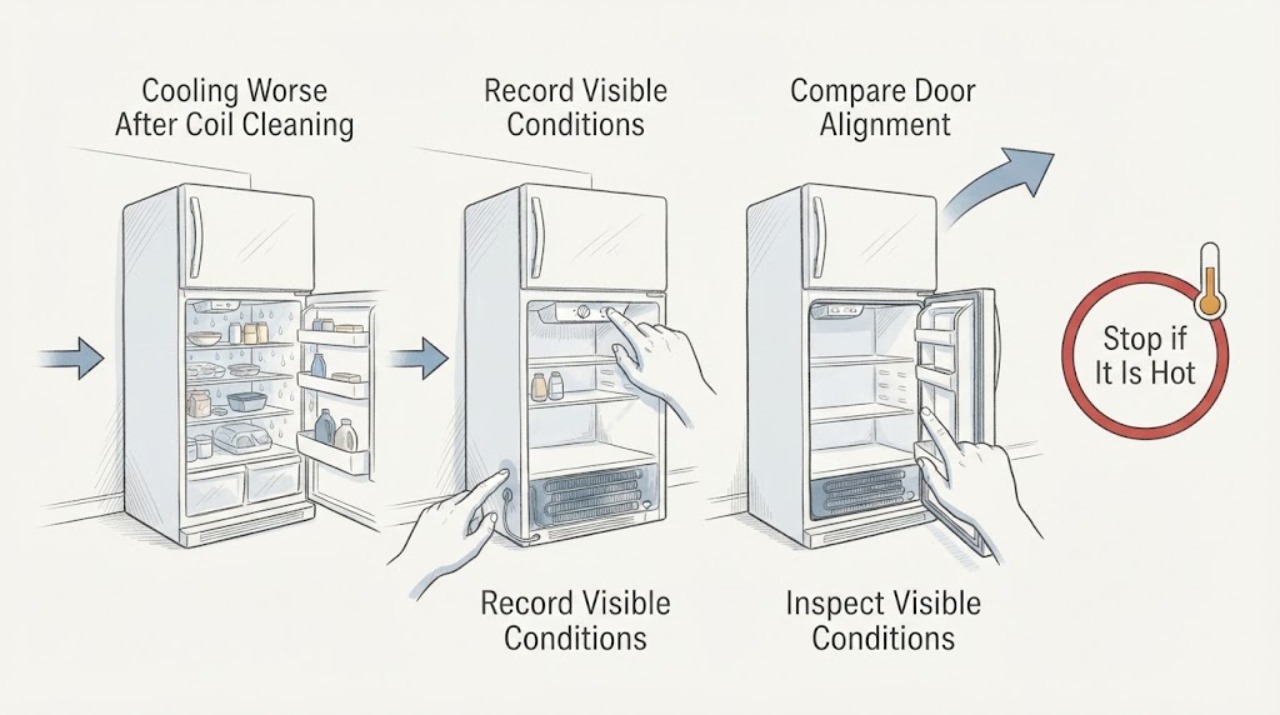
Do not pull the Hotpoint HTR16ABSARCC away from the wall or keep cleaning parts behind it. The exact-model GE/Hotpoint parts page identifies this as a 15.6-cubic-foot top-freezer refrigerator, and the product information describes its condenser as a sealed, never-clean compartment. After cleaning, first check from the front that the temperature control was not moved to 0, the doors and gaskets close normally, and food is not blocking the visible air paths. Note whether the freezer is still cold or both sections are warm, and protect perishable food while the unit recovers. If cooling does not stabilize after the manual's recovery period, or if a cord, outlet, cabinet, or rear area was disturbed, have the landlord, installer, or qualified Hotpoint/GE service inspect it; do not guess that the compressor failed or perform a live test.
Work through in order
Diagnostic checks
Use only checks that match the exact appliance or system and its official guide.
-
Check 1
Keep both doors closed as much as practical, move perishable food to a safe alternative if cooling is clearly inadequate, and record whether the freezer is still cold, the fresh-food section is warm, or both sections are warm. Do not move the appliance.
Expected result: The freezer remains cold while the refrigerator section is warm, both sections are warm, or the temperature change is uncertain.
Next step: Continue with the front-accessible setting, door, and airflow checks that match the pattern. Keep the doors closed and arrange service if food cannot be kept safely cold.
Stop if: Stop for smoke, burning odor, sparks, water near electrical parts, a hot or damaged plug, or a breaker that trips again.
Why this matters
Why: A cold freezer with a warm fresh-food section keeps airflow, door sealing, loading, and control settings in the first branch. Both sections warm after a recovery period makes a cooling, fan, defrost, or power problem more concerning, without identifying a part.
-
Check 2
Look at the temperature control from the front and confirm it has not been turned to 0 or a warmer setting while the coils were being cleaned. Make only one correction described by the manual, then leave the control steady while the refrigerator recovers.
Expected result: The dial is at 0, is warmer than before cleaning, or matches the prior setting; note whether the interior light still works.
Next step: Return the control only to the intended manual setting and allow the documented recovery period. If the setting was already correct or cooling remains poor afterward, continue to the door and airflow checks.
Stop if: Do not keep rotating the control to force cooling, open the control housing, or assume that a working light proves the cooling system is healthy.
Why this matters
Why: On the linked manual, 0 stops cooling in both compartments but does not remove electrical power. A moved setting can explain an immediate cooling change without a component failure.
-
Check 3
Inspect the door gasket, door alignment, shelves, and visible air openings from ordinary access. Look for a package holding a door open, a gasket pulled out of its channel, food against a rear wall, or an accessible vent blocked after cleaning.
Expected result: A door does not close squarely, the gasket has a visible gap or tear, food blocks an air opening, or the doors and visible airflow paths appear normal.
Next step: Rearrange only accessible items and close the door normally. Report a damaged gasket, hinge, or cabinet alignment to the landlord or service provider instead of forcing it.
Stop if: Do not remove trim, pry a gasket, force a hinge, or reach behind the refrigerator.
Why this matters
Why: A door leak or blocked airflow can make one compartment warm and can create frost or moisture. Clear doors and visible paths make an installation, fan, defrost, sensor, control, or cooling-system issue more likely if the symptom persists, but do not select a part.
-
Check 4
Without moving the refrigerator, look from the front and sides for a displaced grille, unusual heat or sunlight, blocked clearance, moisture, or evidence that the cord or icemaker line was pinched when someone cleaned or shifted the appliance. Do not reach behind it.
Expected result: The refrigerator was pulled or tilted, a cord or line may have been pinched, a visible grille or clearance changed, or no installation change is visible.
Next step: Tell the landlord, installer, or maintenance team what movement occurred and have them inspect the installation from a safe position. If no movement occurred, continue monitoring after the setting and door checks without repeating coil cleaning.
Stop if: Do not pull, tilt, roll, or wedge the appliance yourself in an apartment, and do not touch a wet, hot, loose, or damaged connection.
Why this matters
Why: A change immediately after movement makes an installation or power/airflow disturbance worth checking before an internal cooling diagnosis. The manual specifically warns about damage to the cord and icemaker line when moving the refrigerator.
-
Check 5
After the manual's recovery period, record the control setting, freezer/fresh-food temperature pattern, door and gasket condition, frost or moisture, compressor or fan sound pattern, and any power event. Use only the exact HTR16ABSARCC documentation when interpreting the record.
Expected result: Cooling stabilizes, only one compartment remains warm, both compartments remain warm, or an abnormal sound, code, odor, or repeated power event appears.
Next step: Arrange Hotpoint/GE service or landlord maintenance with the complete model, before-and-after timeline, and observations. Keep the refrigerator out of service for electrical hazards.
Stop if: Do not remove the rear cover, test energized wiring, handle refrigerant, force a compressor start, or replace an internal part based only on the symptom.
Why this matters
Why: Stable cooling after a corrected setting or clear obstruction supports a user-setting or airflow explanation. Persistent warmth, a new abnormal sound, or a power event needs qualified diagnosis; the cleaning timing alone cannot prove a compressor or sealed-system failure.
Use your observations
Decision map
Find the observation that best matches what you see, then follow the next safe action.
-
PATH 01Next step
What you see
The temperature control was moved to 0 or a warmer position during cleaning, and the freezer and refrigerator improve after one documented correction and recovery period.
Do this next
Leave the control at the intended setting and monitor. Do not keep changing it or clean the sealed condenser again.
Why this path and its safety boundary
Why it matters: A user-setting change is more likely than damage from cleaning itself.
-
PATH 02Next step
What you see
The freezer remains cold while the fresh-food section is warm, and a door gap, blocked visible air path, or food against the rear wall is found.
Do this next
Correct only the accessible obstruction or close the door normally. Escalate a damaged gasket, recurring frost, or persistent warmth to service without accessing a fan or damper.
Why this path and its safety boundary
Why it matters: Airflow, loading, or door sealing is more plausible than concluding that the compressor or sealed system failed.
-
PATH 03Next step
What you see
Cooling worsened immediately after the refrigerator was pulled, tilted, or shifted, or a cord, plug, grille, or icemaker line may have been disturbed.
Do this next
Keep the refrigerator stationary and ask the landlord, installer, or qualified service provider to inspect it. Do not reach behind the appliance or reset a hazardous connection.
Why this path and its safety boundary
Why it matters: An apartment installation or power-path disturbance needs to be ruled out before an internal cooling diagnosis.
-
PATH 04Next step
What you see
The setting, doors, visible airflow, and installation appear normal, but one or both compartments remain warm after recovery, or a new abnormal sound or code appears.
Do this next
Protect food and arrange Hotpoint/GE service with the complete model and timeline. Do not open panels or perform live tests.
Why this path and its safety boundary
Why it matters: A fan, defrost, sensor, control, compressor, or sealed-system problem is possible, but the observation does not identify which component failed.
-
PATH 05Next step
What you see
There is smoke, burning odor, sparking, water at electrical parts, a hot or damaged cord or outlet, or a repeated breaker trip.
Do this next
Stay clear, disconnect power only from a dry safe position if possible, notify the landlord, and obtain qualified electrical and appliance help. Do not restart the refrigerator to reproduce the symptom.
Why this path and its safety boundary
Why it matters: The issue has crossed into an electrical or property-safety boundary and cooling troubleshooting must stop.
Helpful context
Understand the symptom
Cleaning may not be the cause you think it is
For this Hotpoint family, the product information describes the condenser as a sealed, never-clean compartment. The manual linked from the exact model listing is a shared top-freezer guide and says routine condenser cleaning is not needed in ordinary home conditions. A cooling change after cleaning therefore calls for a before-and-after check: the temperature control may have moved, a door or visible vent may have been disturbed, or the refrigerator may have been shifted enough to affect a cord, airflow, or the apartment installation. It does not establish a compressor failure.
Apartment-safe boundary
Keep the refrigerator in place and make only front-accessible observations. A tenant should not pull a heavy refrigerator, remove a rear cover, or probe wiring. If the appliance was moved during cleaning, tell the landlord or maintenance team exactly what changed and ask them to inspect the installation and power path.
When checks do not resolve it
Need a professional?
Arrange landlord/maintenance or qualified Hotpoint/GE service when cooling remains poor after one correct setting and the manual's recovery period, when a gasket, hinge, cord, grille, or installation was disturbed, or when one compartment remains warm despite clear doors and visible airflow. Do not move the refrigerator, open its rear cover, test live wiring, handle refrigerant, or guess that the compressor failed. For smoke, burning odor, sparks, water near electrical parts, a hot or damaged connection, or a repeated breaker trip, stay clear and obtain qualified electrical help.
Common questions
FAQ
Can cleaning the coils make this Hotpoint refrigerator stop cooling?
The exact-model product information describes a sealed, never-clean condenser, so the cleaning timing does not prove internal damage. Check the setting, doors, visible airflow, and whether the appliance was moved, then arrange service if cooling stays poor.
What does 0 mean on the temperature dial?
The linked owner manual says 0 stops cooling in both compartments but does not remove electrical power. Return the control only to the intended setting and allow the documented recovery period.
Should a tenant pull the refrigerator out to inspect the coils?
No. Keep the appliance in place and ask the landlord or maintenance team to inspect it. The manual warns about damaging the power cord and icemaker line when moving the refrigerator.
What if the freezer is cold but the refrigerator is warm?
Check only the door seal, accessible loading, visible air openings, and setting. That pattern does not by itself prove a compressor failure; persistent warmth or recurring frost needs service.
When should I stop checking and call for help?
Call when cooling remains poor after the correct setting and recovery period, or sooner for a damaged connection, smoke, odor, sparks, water near electricity, or a repeated breaker trip. Do not open panels or run live tests.
Read the exact guide
Official sources
- Hotpoint HTR16ABSRCC Hotpoint® 15.6 Cu. Ft. Top-Freezer RefrigeratorGE Appliances / Hotpoint · Opened the official Hotpoint product page for the closely matching HTR16ABSRCC family. It is used only for the sealed, never-clean condenser design and not to override the exact HTR16ABSARCC identity; verify any suffix-specific detail against the exact rating label.
- 49-60521-1v03GE Appliances · Opened the owner's manual linked from the exact HTR16ABSARCC GE Appliances listing. It is a shared top-freezer manual, so controls and features marked as model-dependent must be confirmed against the appliance label and matching documentation.
- Model Search | HTR16ABSARCCGE Appliances · Opened the official GE Appliances parts site for the exact HTR16ABSARCC identity. It identifies the appliance as a Hotpoint 15.6 Cu. Ft. top-freezer refrigerator and links the owner's manual and installation instructions; it does not diagnose the cooling symptom.
Community feedback
Share a repair observation
Share a plain-text repair observation. Accepted observations are published automatically; this page may take a moment to update.