
On this page
Start here
Quick answer
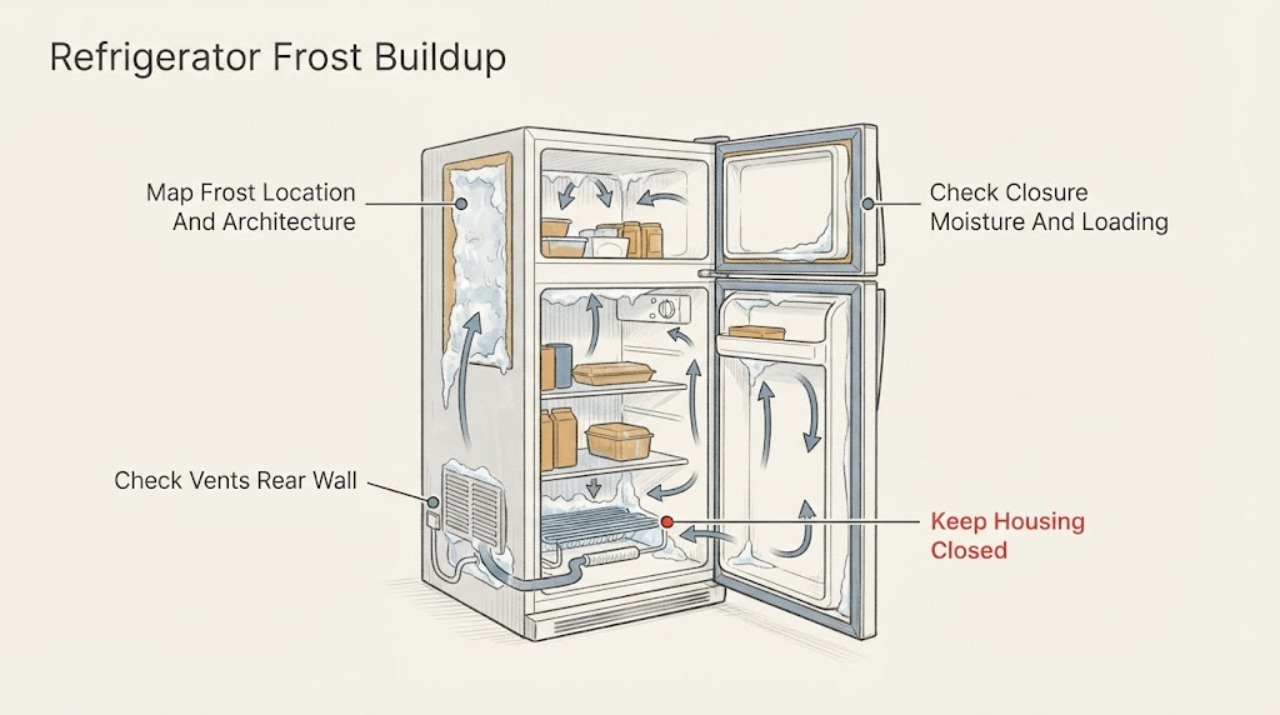
First identify where the frost is and whether the appliance is frost-free, low-frost, or a manual-defrost model; Hotpoint sells multiple refrigerator architectures, so one defrost interval or remedy does not apply to all of them. A light frost at freezer-basket fronts after a door was left ajar can be moisture entering the compartment, while a thick sheet, blocked air path, frost around a door edge, or frost that returns quickly after a complete safe defrost points to a sealing, loading, airflow, drain, or model-specific defrost problem. Keep doors closed, cover food and liquids, and remove items that obstruct vents or touch the rear wall. Check the visible gasket and closure without dismantling anything, confirm the thermostat and any fast-freeze setting against the manual, and measure temperature if you have a suitable appliance thermometer. Only manually defrost when the model manual allows it; unplug first, let ice melt naturally, keep water away from electrics, and dry the cabinet before restoring power. Do not chip ice, use an open flame or high-heat tool, remove interior panels, or test a heater, fan, sensor, or control board. If a frost-free appliance develops a solid recurring ice bank, cooling becomes uneven, the door will not seal, water reaches electrical parts, or frost returns soon after the approved defrost, leave it out of service and arrange authorized Hotpoint appliance repair.
Before you begin
Safety first
- The owner may perform dry, visible closure, loading, accessible gutter, setting, and model-approved natural-defrost checks. Authorized service personnel must handle interior panels, fans, heaters, defrost sensors, controls, wiring, refrigeration lines, live diagnosis, and any repair near water or electrical parts.
Work through in order
Diagnostic checks
Use only checks that match the exact appliance or system and its official guide.
-
Check 1
Photograph the frost and map its location: freezer basket fronts, door perimeter, rear wall, vent, drawer, drip channel, or a solid layer behind an interior cover. Record whether the Hotpoint appliance is a refrigerator-only unit, fridge-freezer, integrated, freestanding, low-frost, frost-free, or manual-defrost model, using the rating plate or manual if available.
Expected result: There is a thin local patch after a door was ajar; frost follows the door gasket; ice is on the rear wall or gutter; vents are covered; or a frost-free appliance has a thick recurring bank.
Next step: Use the exact model manual, then take the door/food/airflow branch that matches the pattern. Do not assume a frost-free appliance can be routinely hand-defrosted as a cure.
Stop if: Stop if the frost is behind a liner, the liner is bulging, water is reaching electrical parts, or inspection would require removing a panel or moving an integrated appliance.
Why this matters
Why: A localized moisture or loading pattern is different from a system-wide ice bank. Architecture matters because Hotpoint's low-frost and frost-free products have different defrost expectations.
-
Check 2
With power left undisturbed and hands dry, check that packages, shelves, drawers, an ice tray, or a cabinet décor door are not preventing complete closure. Inspect the accessible gasket for dirt, tears, flattening, or a visible gap, and note whether uncovered food or liquids and long door-open periods preceded the frost.
Expected result: The door closes evenly and the gasket contacts the cabinet all around; a corner remains open; the gasket is damaged or dirty; or the frost is limited to the front edge after moisture entered.
Next step: Remove only the visible obstruction, cover food and liquids, clean the accessible gasket as directed by the manual, and observe whether new frost stops. Do not bend, glue, or replace the gasket without model fitment guidance.
Stop if: Stop if the door, hinge, cabinet, integrated décor panel, or gasket cannot be aligned without dismantling hardware, or if the seal remains open after the visible obstruction is removed.
Why this matters
Why: An obstruction, gasket gap, or repeated warm-air entry can explain localized frost. If the seal and closure are sound but frost spans the compartment, a deeper airflow or defrost branch becomes more likely.
-
Check 3
Inspect only user-accessible storage areas for packages touching the rear wall or covering a vent. In the refrigerator compartment, look for water or ice around the visible rear gutter outlet; if the manual permits it, clear only a simple surface obstruction with a soft, non-sharp aid and mop up water. Do not probe behind a liner.
Expected result: A package blocks airflow, food touches the rear wall, the visible gutter is obstructed, the channel is clear, or ice is hidden behind a panel.
Next step: Reposition food, keep the rear wall and vents clear, and follow the manual's cleaning instruction. If the gutter refreezes or the ice is behind a cover, stop at external checks and arrange service.
Stop if: Do not push wire, knives, picks, or heated objects into a drain, and stop for standing water near lamps, fans, controls, or other electrical parts.
Why this matters
Why: Loading or a visible gutter blockage can create local ice or moisture without proving a failed defrost component. A clear accessible path with hidden ice points toward a model-specific internal issue.
-
Check 4
Compare the thermostat, fast-freeze, holiday, and other special settings with the exact Hotpoint manual. If available, place an appliance thermometer in the recommended compartment and allow the manual's measurement period without repeatedly opening the door; note whether cooling is even and whether a fan or alarm behaves abnormally.
Expected result: A special mode is active unexpectedly; the measured temperature is within the manual's range; the compartment is warm despite a heavy ice bank; or the setting cannot be confirmed.
Next step: Return settings only as the manual directs and allow the appliance to stabilize. If temperature remains abnormal, a frost-free unit is iced over, or the display shows a model-specific fault, retain the evidence and use authorized service.
Stop if: Do not bridge controls, enter service mode, remove a sensor, test voltage, or continue operating through a burning odor, hot plug, smoke, sparks, or repeated breaker trips.
Why this matters
Why: A mode or setting can change run time and temperature, while warm food beside a heavy bank suggests blocked airflow or an internal defrost/circulation problem. A normal temperature does not make unsafe frost removal appropriate.
-
Check 5
Only when the model manual permits owner defrosting, move food safely, disconnect mains power from a dry position, let the ice melt naturally, collect water, dry the cabinet completely, and restore power according to the manual. Record how long it takes for the frost to return and whether temperatures recover; do not perform this as a substitute for diagnosis on a frost-free model.
Expected result: The approved defrost clears the ice and frost does not return; the same pattern returns quickly; the appliance cannot regain temperature; or ice remains behind a liner.
Next step: Monitor only if the manual's operating conditions return to normal. For recurrence or any frost-free ice bank, leave the appliance off if safe and arrange authorized Hotpoint service with photographs, model details, settings, and temperature observations.
Stop if: Do not chip ice, apply flame or high heat, remove interior panels, touch wet electrical parts, or repeatedly cycle power to force a defrost.
Why this matters
Why: A one-off moisture or manual-defrost condition may be resolved. Rapid recurrence, persistent warm temperature, or hidden ice makes a door-seal, airflow, defrost, fan, sensor, control, or sealed-system fault more likely, but no part can be selected without the model diagnosis.
Use your observations
Decision map
Find the observation that best matches what you see, then follow the next safe action.
-
PATH 01Safety boundary
What you see
Frost is thin and localized at a basket front or door edge, appeared after a door was ajar or moisture was uncovered, and the gasket closes evenly.
Do this next
Cover food and liquids, minimize door-open time, clear visible obstructions, and monitor the area under the exact manual's normal conditions.
Why this path and its safety boundary
Why it matters: Moisture entering during an open-door event is more likely than a confirmed internal defrost failure.
Safety stop: Use service if the frost spreads into a solid layer, the seal no longer contacts, or the pattern returns despite correct closure and loading.
-
PATH 02Safety boundary
What you see
Ice or water is concentrated on the refrigerator rear wall or around the visible gutter, while food is touching the wall or the outlet appears obstructed.
Do this next
Move food clear, follow the manual's surface-cleaning instruction, clear only an accessible obstruction with a non-sharp aid, and dry the base.
Why this path and its safety boundary
Why it matters: A storage or accessible drainage condition is more likely than a freezer defrost part; Hotpoint identifies rear-wall contact and a blocked gutter as causes of inner-base moisture.
Safety stop: Arrange service if the channel refreezes, the obstruction is behind a liner, water approaches electrical parts, or cooling becomes abnormal.
-
PATH 03Safety boundary
What you see
A Hotpoint frost-free appliance has a thick ice bank, blocked internal air path, uneven cooling, or frost that returns soon after an approved manual defrost.
Do this next
Do not remove the liner or keep repeating defrost cycles. Keep doors closed, protect perishable food, and arrange authorized Hotpoint service with the model and frost photographs.
Why this path and its safety boundary
Why it matters: This is not normal routine frost for a frost-free product; a sealing, airflow, defrost, fan, sensor, or control problem is more likely, but the exact component is model-dependent.
Safety stop: Stop operation for water near electrics, smoke, sparks, burning odor, a hot cord or socket, or repeated protective-device trips; isolate only when safe.
-
PATH 04Safety boundary
What you see
The appliance is a low-frost or manual-defrost model, the ice is a visible layer in the freezer, the manual permits defrosting, and there is no water or electrical hazard.
Do this next
Follow the model's natural-defrost procedure, disconnect from mains first, collect water, dry fully, restore power, and allow the documented recovery period before judging cooling.
Why this path and its safety boundary
Why it matters: Accumulated ice may be a maintenance condition rather than proof of a failed part; Hotpoint says defrost timing depends on the model and gives a general thickness guideline.
Safety stop: Do not use sharp tools, flame, high heat, or cabinet access. Escalate if ice returns rapidly, the appliance stays warm, or the manual does not authorize the procedure.
-
PATH 05Safety boundary
What you see
Frost is behind an interior panel, the liner is damaged or bulging, a fan is obstructed internally, the temperature remains unsafe, or the symptom is accompanied by a leak near electrics, smoke, sparks, burning odor, hot plug, or repeated trips.
Do this next
Stop the appliance, keep it out of service, and disconnect power only from a dry safe position; close any water supply if fitted and safe, then arrange authorized appliance or qualified electrical help.
Why this path and its safety boundary
Why it matters: The issue exceeds safe user-level checks; continued operation or improvised melting can cause food loss, water damage, electric shock, or fire.
Safety stop: Do not reconnect to reproduce the fault, open panels, bypass a thermostat or safety device, test live circuits, or handle wet electrical parts.
Helpful context
Understand the symptom
Start with the frost pattern, not a part name
Photograph the frost before clearing it. Note whether it is a thin coating on a freezer basket front, a band around the door opening, ice on the rear wall, a blocked vent, a puddle that refreezes, or a solid layer across the compartment. A small, recent patch after a door was ajar is a moisture-and-closure question. A frost-free cabinet that repeatedly forms a thick internal bank is a service signal, because its normal operating method is not the same as a manual-defrost freezer. Frost in the refrigerator compartment may also be related to items touching the rear wall or a blocked gutter rather than a failed freezer defrost component.
Confirm the product family before defrosting
Find the model or product code and use the matching Hotpoint manual. The product range includes integrated and freestanding designs as well as low-frost and frost-free products. Hotpoint's own guidance says defrost timing depends on the model: a 3-5 mm guideline is not permission to defrost every appliance, and a frost-free model should not be treated like a small freezer box. If the identity is unavailable, limit yourself to visible checks and do not remove trim or panels to find it.
Reduce moisture and restore the air path
Close the door promptly, cover uncovered food and liquids, and check that shelves, drawers, packages, or an ice tray are not preventing the door from closing or covering a visible vent. Inspect the gasket for dirt, tears, or a section that no longer contacts the cabinet; clean only with the appliance isolated as the manual directs. In a fridge compartment, move food away from the rear wall and inspect the visible gutter outlet for a simple obstruction. Do not probe a hidden drain, force a frozen channel, or remove the rear liner.
Use temperature and settings as evidence
Check the thermostat setting, any fast-freeze control, and any holiday or special mode against the exact manual. Hotpoint's published guidance places the refrigerator around 0.5-5 °C and the freezer around -18 °C or colder, but the control markings and operating behavior vary by model. A normal measured temperature with frost limited to a door edge points back toward moisture ingress or sealing. Warm food alongside a growing ice bank, an obstructed vent, or an unusual fan pattern makes airflow or defrost service more likely; it does not identify a particular part.
Defrost only within the manual's boundary
For a model that permits user defrosting, transfer food safely, disconnect the appliance from the mains, leave the doors open so ice melts naturally, collect water, and dry the interior fully before restoring power. Hotpoint notes that natural defrosting can take roughly two to 24 hours and that the cabinet may need additional time to return to operating temperature; follow the model manual for the actual procedure. Never chip ice with a sharp object, pour boiling water into the cabinet, use an open flame or high-heat tool, or reach behind a liner. A frost-free refrigerator that needs repeated full defrosting has not been repaired by the melt-down; it needs model-specific diagnosis.
Safety boundary
Stop conditions
- Do not chip or pry ice, use an open flame, pour boiling water, or apply high heat; these can damage the liner, wiring, seals, or refrigeration circuit.
- Do not remove interior covers, test a heater, fan, sensor, thermostat, control board, or sealed system, or bypass a safety device.
- Only manually defrost when the exact Hotpoint manual permits it; disconnect mains from a dry safe position, collect meltwater, and dry the cabinet before restoring power.
- Stop for water near electrical parts, smoke, sparks, burning odor, a hot or damaged cord or socket, or repeated protective-device trips; isolate only when safe and obtain qualified help.
- Do not repeatedly power-cycle or repeatedly hand-defrost a frost-free unit to hide a recurring ice bank; document the model, pattern, settings, and temperature for service.
Only after diagnosis
Potential parts
- door gasket
Consider this category only if the exact model manual or a technician confirms that the gasket is torn, deformed, or failing a closure test after visible obstructions are removed.
Confirm the complete appliance model and manufacturer fit information before ordering; refrigerator gaskets are not universal. - defrost system component
Consider only after a qualified diagnosis of rapid recurring frost in a frost-free appliance identifies a defrost sensor, heater, or related component; frost alone does not select a part.
Use the exact model and service diagnosis to confirm the component and fit; do not replace a heater or sensor from a generic symptom. - evaporator or circulation fan
Consider only if the model-specific diagnosis confirms an internal fan fault after airflow obstructions and safe external checks have been ruled out.
Verify model-specific fitment and electrical specifications with Hotpoint or an authorized technician before any purchase or repair.
When checks do not resolve it
Need a professional?
Arrange authorized Hotpoint refrigerator service when a frost-free appliance develops a solid or recurring internal ice bank, frost returns quickly after the exact manual's approved defrost, the door or gasket cannot be restored with visible checks, cooling remains uneven or unsafe, a drain or fan is inaccessible, a display shows an unresolved model-specific fault, or internal defrost, heater, fan, sensor, control, or sealed-system work is indicated. Stop immediately for water near electrical parts, smoke, sparks, burning odor, a hot or damaged cord or socket, or repeated protective-device trips; disconnect power only when safe. The owner may document the pattern, identify the model, correct visible loading or closure issues, follow the exact manual for a permitted natural defrost, and monitor temperature. Cabinet access, live testing, component replacement, refrigerant work, and bypassing safety devices require an authorized service agent.
Safety scope: The owner may perform dry, visible closure, loading, accessible gutter, setting, and model-approved natural-defrost checks. Authorized service personnel must handle interior panels, fans, heaters, defrost sensors, controls, wiring, refrigeration lines, live diagnosis, and any repair near water or electrical parts.
Common questions
FAQ
Why is frost building up in my Hotpoint refrigerator?
The pattern matters. A small patch after a door was ajar or uncovered food and liquids can be moisture entering the compartment. Frost around a gasket or blocked vent points to closure or airflow. A thick recurring ice bank in a frost-free model, or ice behind a liner, needs model-specific service rather than a generic replacement part.
Should I defrost every Hotpoint refrigerator when I see ice?
No. Hotpoint says defrost timing depends on the model and states that frost-free appliances should not need routine defrosting. Use the exact manual. A low-frost or manual-defrost model may allow a natural defrost at the stated threshold; a frost-free unit that repeatedly ices over should be assessed for a fault.
Can a door left open cause frost on a Hotpoint frost-free freezer?
Hotpoint says small amounts of delicate frost can appear on basket fronts when the doors are left ajar. Close the door promptly, cover food and liquids, remove visible obstructions, and inspect the accessible gasket. If frost becomes a thick layer or returns after correct closure, stop treating it as a one-time moisture event and use the model-specific service path.
What should I do about ice on the back wall of my Hotpoint fridge?
Move food away from the rear wall and inspect the visible gutter outlet for a simple obstruction, because Hotpoint links rear-wall contact and a blocked gutter with moisture. Follow the manual for cleaning and do not push tools behind the liner. Repeated refreezing, standing water, or ice behind a cover requires service.
Is it safe to remove Hotpoint refrigerator ice with a knife or hair dryer?
No. Do not chip ice, use flame, pour boiling water, or apply high heat. If the exact manual permits owner defrosting, disconnect the appliance from mains from a dry position and let the ice melt naturally, collect water, and dry the cabinet completely. Internal panels and defrost parts require an authorized technician.
When does Hotpoint refrigerator frost buildup need a repair technician?
Use service for a recurring solid ice bank in a frost-free model, frost behind a panel, a gasket or door that cannot be restored with visible checks, persistent temperature problems, or any suspected fan, heater, sensor, control, or sealed-system issue. Stop immediately for water near electrics, smoke, sparks, burning odor, a hot plug or socket, or repeated protective-device trips.
Read the exact guide
Official sources
- FridgesHotpoint UK · Opened official Hotpoint product-range page; used to establish that Hotpoint offers freestanding and integrated products and low-frost and frost-free variants, plus its natural-defrost and recovery-time FAQ.
- Hotpoint Fridge Freezer RepairHotpoint UK · Opened official Hotpoint service page; used for model manual lookup, mains-disconnection safety before part replacement, and the boundary between visible troubleshooting and professional repair.
- Integrated Fridge Freezer Troubleshooting & FAQHotpoint UK · Opened official Hotpoint troubleshooting page; used for model-dependent defrost guidance, frost-free door/moisture behavior, rear-wall/gutter moisture, temperatures, and natural defrost context. The article conditions these instructions because the task has no exact model.
Community feedback
Share a repair observation
Share a plain-text repair observation. Accepted observations are published automatically; this page may take a moment to update.