
On this page
Start here
Quick answer
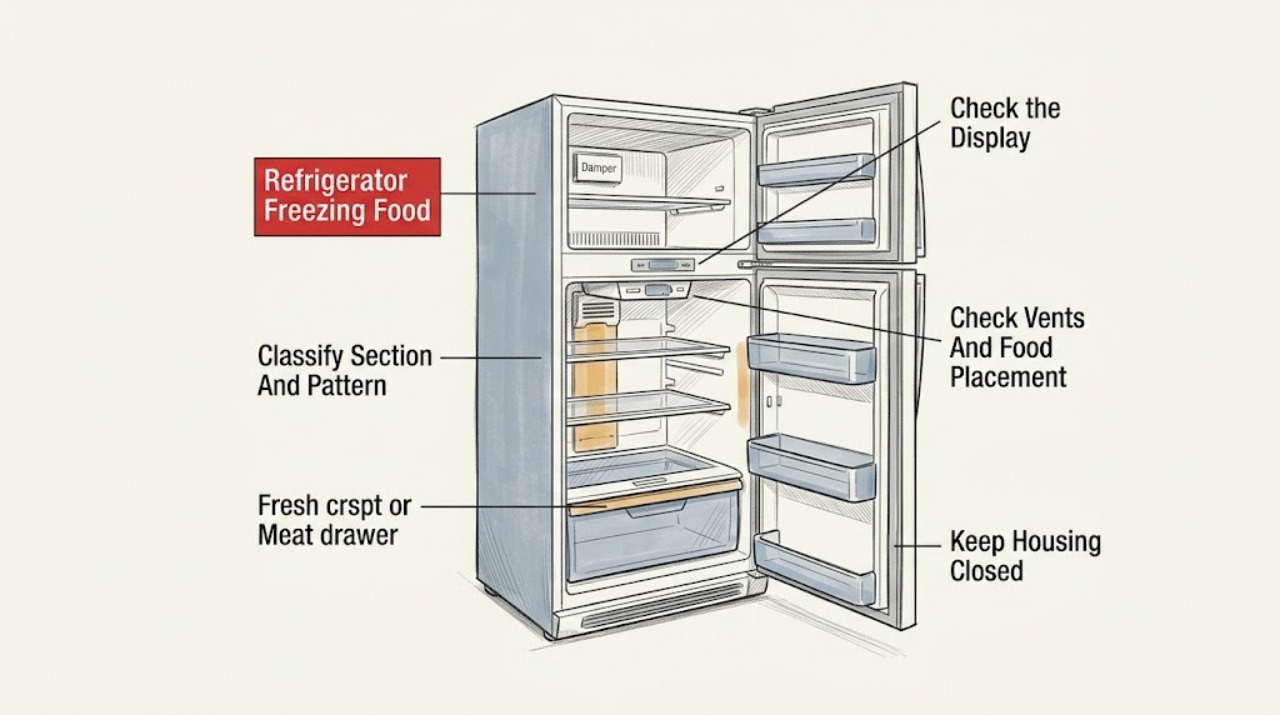
This guide is for food freezing in the fresh-food compartment, not for the freezer doing its normal job. First record the Hotpoint model and refrigerator style—top-freezer, bottom-freezer, or side-by-side—because the cold-air path and controls differ. Use a food or liquid thermometer in the center of the fresh-food section rather than judging a brief air reading; official support uses roughly 37–42°F as a fresh-food target for many digital models and says to allow about 24 hours after a setting change, while the exact Hotpoint manual controls. Set controls to the model's normal or midpoint setting, not its coldest setting. Then map the frozen items: food at the rear/top or beside a freezer-fed damper is a cold-spot pattern; food in a lightly loaded bottom, crisper, or meat drawer can freeze when cold air settles or a drawer setting is too cold; a blocked fresh-food sensor can misread temperature on applicable bottom-freezer designs. Move delicate food away from a documented vent, restore reasonable load and drawer settings, and keep doors closing normally. A dispenser model can also freeze its fresh-food water tank or tubing when the compartment has a low load or an adjustable drawer is set too cold. Do not block vents, scrape ice, remove panels, adjust a hidden damper or sensor, or alter sealed-system controls. If the whole fresh-food section remains below the target after one stable period, temperatures swing widely, frost blocks an air path, the freezer is also abnormal, or food freezes regardless of placement and settings, arrange qualified Hotpoint/GE service.
Before you begin
Safety first
- The owner may identify the style and model, measure stable food temperatures, set documented controls, reposition food away from visible vents, maintain a reasonable load, adjust a documented drawer setting, keep a documented sensor clear, and inspect visible door closure. Qualified personnel must handle panels, dampers, sensors, fans, controls, wiring, water tubing, pumps, refrigerant, and sealed-system work.
Work through in order
Diagnostic checks
Use only checks that match the exact appliance or system and its official guide.
-
Check 1
Identify the Hotpoint model/product code and style, then map exactly what is frozen: freezer contents, one fresh-food item, the rear/top shelf, door bin, crisper/meat drawer, or most of the fresh-food compartment. Record whether the freezer itself is normal and whether the symptom began after loading, a move, or a control change.
Expected result: Only freezer food is frozen; one item is against a vent; several items in one drawer are frozen; the whole fresh-food section is too cold; or the model/style is unknown.
Next step: Use the matching branch and exact Hotpoint manual. Move only food as a temporary diagnostic, keeping vents and sensors clear; do not run the refrigerator colder to test it.
Stop if: Stop and arrange service for frost blocking the liner, water near electrical parts, smoke, sparks, a burning odor, a damaged cord, or a cabinet/panel that would need removal.
Why this matters
Why: Normal freezer freezing is not a fault. A location pattern favors cold air placement or a drawer setting, while whole-compartment freezing points toward a control/airflow or service issue. Unknown style prevents safe assumptions about the damper and sensor.
-
Check 2
Place a food or liquid thermometer in the center of the fresh-food compartment and leave it with the food or liquid long enough to stabilize as the official guidance describes. Check the refrigerator and freezer controls against the exact manual, then return them to the documented normal or midpoint setting rather than the coldest setting.
Expected result: The fresh-food temperature is within the model's target but one location freezes; the section is below target; controls are at coldest; readings change after doors open; or the measured temperature remains too low after a stable period.
Next step: After any documented adjustment, allow about 24 hours before judging the result. Do not keep changing both controls at once; if the section stays too cold at normal settings, use the service branch.
Stop if: Do not remove a control panel, change a hidden thermostat/damper, bypass a sensor, or touch wiring or refrigerant components.
Why this matters
Why: A normal center temperature with a local frozen item favors a cold spot or drawer/placement issue. A below-target whole section makes a setting, damper, sensor, control, airflow, or cooling fault more likely. Air readings taken during door openings or defrost can mislead.
-
Check 3
From inside the fresh-food section, identify the documented freezer-fed vent or damper and keep delicate food away from its outlet, the rear of a top shelf, and any wall-side cold spot described for the model. Do not cover the vent. Check whether the compartment is unusually empty or densely packed in a way that blocks circulation.
Expected result: Frozen items touch a vent or cold wall; the rear/top shelf is affected; the bottom is affected with a low load; vents are blocked; or food is distributed normally and the entire section freezes.
Next step: Reposition only food, preserve the air path, and allow the section to stabilize. If the same items freeze in multiple locations or the measured compartment remains too cold, arrange diagnosis.
Stop if: Do not tape, close, bend, or remove a damper/vent; do not insert objects into an air opening or scrape hidden ice.
Why this matters
Why: A vent-adjacent or low-load pattern is consistent with local cold-air concentration. Blocked circulation can worsen uneven temperatures. Whole-section freezing after placement is corrected shifts concern toward settings or an internal airflow/control fault.
-
Check 4
For a freezing crisper, meat, deli, snack, or convertible drawer, check its visible temperature selector and set it warmer only as the exact manual permits. On an applicable bottom-freezer model, look for the documented dome-shaped fresh-food temperature sensor above the top shelf and keep its specified air clearance; do not remove its cover.
Expected result: Only one adjustable drawer freezes; the drawer is set coldest; a sensor is blocked by food; no such drawer or sensor exists; or multiple areas freeze despite normal settings.
Next step: Correct only the visible setting or move food away from the documented sensor, then allow stabilization. Persistent freezing needs model-specific service.
Stop if: Do not unplug, bypass, relocate, probe, or replace a sensor; do not remove drawer rails or liners to reach hidden components.
Why this matters
Why: A drawer control or blocked applicable sensor can explain local freezing without proving a refrigerator-wide failure. If no model feature matches or the entire section is too cold, do not import another design's procedure.
-
Check 5
Inspect the door gasket and closure from outside for an obvious package obstruction, a door left ajar, or visible damage; do not reshape the seal. If the Hotpoint model has a dispenser, note whether only the water tank/tubing behind the produce drawers freezes and whether the drawer is lightly loaded or set coldest. Do not pull tubing or panels.
Expected result: The door does not close fully; the gasket is visibly damaged; the fresh-food tank/tube is frozen on a dispenser model; the drawer is nearly empty/coldest; or closure and the water feature are normal.
Next step: Remove only an obvious closure obstruction and use the exact manual for an intact drawer setting. Stop using a leaking or split reservoir and arrange service; do not thaw it with heat or force tubing.
Stop if: Do not heat a frozen tank, use sharp tools, disconnect water lines, remove the door liner, or operate with water near electrical parts.
Why this matters
Why: A door problem usually adds warm air and moisture, so it does not by itself explain a stable whole-compartment freeze, but it can disturb temperatures. Official support links low load and cold drawer settings to a frozen water reservoir on applicable dispenser designs.
-
Check 6
After one stable period at the exact model's normal settings, with food repositioned, visible vents clear, drawer settings appropriate, sensor clearance maintained where applicable, and the door closing normally, classify the remaining result. Keep a temperature log and model number for service.
Expected result: Freezing stops after a local correction; only one cold spot remains; the whole section remains below target; temperatures swing widely; frost blocks an air path; or the freezer and fresh-food sections are both abnormal.
Next step: Use the refrigerator only when food temperatures are stable and no hazard is present. Otherwise arrange qualified Hotpoint/GE appliance service with the log, model, settings, locations, and photos; do not recreate the fault by forcing colder operation.
Stop if: Stop for smoke, sparks, burning odor, damaged cord, water near electrical parts, exposed wiring, heavy frost requiring panel removal, or any need to open the sealed system.
Why this matters
Why: A resolved local pattern supports placement, load, drawer, or setting causes. Persistent whole-section freezing can involve a damper, sensor, fan, control, defrost, or sealed-system issue that cannot be selected from symptoms alone.
Use your observations
Decision map
Find the observation that best matches what you see, then follow the next safe action.
-
PATH 01Safety boundary
What you see
Only freezer food is frozen normally, or one fresh-food item is against a documented vent/rear cold spot while the center temperature is in range.
Do this next
Move delicate food away from the vent or cold spot without blocking airflow and monitor after stabilization. Escalate if the whole section becomes too cold or the pattern follows food everywhere.
Why this path and its safety boundary
Why it matters: This is more consistent with normal freezer function or a local cold-air concentration than a refrigerator-wide cooling fault.
Safety stop: Do not cover or adjust a hidden vent/damper.
-
PATH 02Safety boundary
What you see
Controls are at coldest, the compartment is lightly loaded, a crisper/meat drawer is set cold, or the bottom/drawer freezes while other areas are less affected.
Do this next
Return controls and adjustable drawers to the exact manual's normal/midpoint guidance, maintain reasonable load and clear vents, then allow about 24 hours to stabilize.
Why this path and its safety boundary
Why it matters: A setting or low-load cold-air concentration is plausible. It does not prove the control system is healthy.
Safety stop: Do not keep lowering settings, block air outlets, or change several controls repeatedly.
-
PATH 03Safety boundary
What you see
A model-documented fresh-food sensor is blocked, a package prevents closure, or the gasket/door is visibly damaged.
Do this next
Move only the obstruction away, restore normal closure, and keep the documented sensor clearance. Arrange service for a damaged gasket, persistent freezing, or a sensor issue.
Why this path and its safety boundary
Why it matters: The refrigerator may be sensing or circulating incorrectly, or warm air may be entering; the correct feature and repair depend on the model.
Safety stop: Do not remove sensor covers, reshape gaskets, adjust hinges, or open the liner.
-
PATH 04Safety boundary
What you see
Only a dispenser model's fresh-food water reservoir or tubing freezes, especially with a low load or cold adjustable drawer setting.
Do this next
Use the exact manual to set the drawer warmer and maintain normal load; arrange service for a split, leaking, or repeatedly frozen tank. Do not force water flow or heat the tubing.
Why this path and its safety boundary
Why it matters: Official support identifies low food load and an excessively cold drawer setting as contributors to a frozen water tank/tube on applicable designs.
Safety stop: Do not disconnect tubing, use a heat source, or continue with a leaking reservoir or water near electricity.
-
PATH 05Safety boundary
What you see
The center food temperature remains below target after stable normal settings and placement checks, multiple areas freeze, frost blocks an air path, or freezer behavior is also abnormal.
Do this next
Keep a temperature and symptom log and arrange qualified Hotpoint/GE service. Do not remove panels, bypass controls, or alter sealed-system components.
Why this path and its safety boundary
Why it matters: A damper, sensor, fan, control, defrost, or sealed-system problem is possible; official support directs unresolved freezing to service.
Safety stop: Stop for electrical or refrigerant hazards, smoke, sparks, burning odor, exposed wiring, water near electricity, or heavy frost requiring disassembly.
Helpful context
Understand the symptom
Confirm this is a fresh-food freezing problem
Ice cream or frozen food in the freezer is expected; this topic concerns milk, produce, drinks, or other items freezing in the refrigerator section. Hotpoint's official catalog shows both top-mount models and side-by-side models, with different fresh-food and freezer layouts. The place where an item freezes is a diagnostic clue: one package against a cold vent is different from the entire fresh-food compartment measuring too cold.
Use a stable food temperature, not a fleeting air reading
After a control adjustment, official guidance says to wait about 24 hours for the refrigerator to stabilize. Measure with a bulb or food thermometer placed in food or liquid that has been in the compartment, ideally near the center, rather than reading air immediately after a door opening or defrost event. Many official support pages use 37–42°F for fresh food and 0–8°F for the freezer as references, but the exact Hotpoint manual and display design take priority.
A cold spot can freeze food while the rest is normal
Cold air for the fresh-food section originates in the freezer on many Hotpoint/GE designs. Official guidance identifies the rear of a top shelf, a wall-side damper or air vent, and a lightly loaded lower compartment as places where delicate items can freeze. Move only the food, not the vent: keep packages from blocking the air path, and do not pack food against a sensor or outlet. If the whole compartment is too cold, placement alone will not solve it.
Drawers and sensors need model-specific treatment
A crisper, meat, deli, snack, or convertible drawer may have its own temperature control. Hotpoint/GE guidance says a drawer set too cold can freeze food, while a blocked dome-shaped fresh-food sensor on applicable bottom-freezer models can prevent correct temperature control and needs air clearance as the manual describes. Do not assume every Hotpoint has that sensor or drawer. Change only a visible documented setting and avoid removing a sensor cover.
Low load can make the bottom of the compartment too cold
Official guidance notes that a refrigerator with too little food has less mass to absorb incoming cold air. This can make the bottom, crispers, or a water reservoir colder than expected. Restore normal spacing and load without blocking vents, and use the documented drawer setting. A low load is a plausible contributor, not proof that a thermostat or damper is healthy.
Persistent whole-compartment freezing is a service boundary
If normal settings, stable measurement, reasonable load, drawer settings, clear visible air paths, and correct door closure do not resolve the problem, the fault may involve a damper, sensor, fan, control, defrost behavior, or sealed cooling system. A dispenser tank that repeatedly freezes or splits also needs service. Do not open the liner, probe a hidden damper, bypass a sensor, or change refrigerant or control wiring.
Safety boundary
Stop conditions
- This page concerns food freezing in the fresh-food section; normal frozen food and ice production in the freezer are not a fault by themselves.
- Stop for smoke, sparks, burning odor, a damaged or hot cord/plug, exposed wiring, water near electrical parts, a leaking/split dispenser reservoir, or heavy frost that would require panel removal.
- Do not remove liners or panels, probe a damper or drain, bypass a thermostat/sensor/control, alter refrigerant or sealed-system components, or perform live electrical tests.
- Do not block or close a vent, scrape hidden ice, heat a frozen water tank or tubing, reshape a gasket, or force a door, drawer, sensor, or control.
- Do not apply another refrigerator style's sensor, damper, drawer, temperature, or reset procedure. Confirm the full Hotpoint model and use its manual.
Only after diagnosis
Potential parts
- Hotpoint refrigerator temperature sensor or control
Consider only after qualified diagnosis confirms a sensor or control fault once normal settings, stable measurement, placement, load, and model-specific clearance checks are complete.
Sensor type, connector, position, and control logic vary by exact Hotpoint model; do not order from freezing symptoms alone. - Hotpoint refrigerator damper or air-control assembly
Consider only if the exact architecture has a serviceable damper and qualified diagnosis confirms it is not regulating fresh-food airflow.
Damper location and compatibility vary by top-freezer, bottom-freezer, and side-by-side model; do not open the liner to inspect it. - Hotpoint refrigerator water reservoir or tubing
Consider only on a dispenser model after qualified inspection confirms a split, leaking, or failed reservoir/tube rather than low load or a cold drawer setting.
Reservoir shape, tubing, fittings, and service access are model-specific. Do not thaw with heat or disconnect the water path yourself.
When checks do not resolve it
Need a professional?
Arrange qualified Hotpoint/GE appliance service when the fresh-food section remains below the model's target after normal settings, stable measurement, food-placement, load, drawer, sensor-clearance, and visible door checks; when multiple areas freeze, frost blocks an air path, temperatures swing, the freezer is also abnormal, or a dispenser reservoir repeatedly freezes or leaks. Stop immediately for smoke, sparks, burning odor, damaged power hardware, exposed wiring, water near electricity, or any need to remove panels or access the sealed system.
Safety scope: The owner may identify the style and model, measure stable food temperatures, set documented controls, reposition food away from visible vents, maintain a reasonable load, adjust a documented drawer setting, keep a documented sensor clear, and inspect visible door closure. Qualified personnel must handle panels, dampers, sensors, fans, controls, wiring, water tubing, pumps, refrigerant, and sealed-system work.
Common questions
FAQ
Why is my Hotpoint refrigerator freezing food in the fresh-food section?
First map where it freezes and measure a stable food temperature. A vent-adjacent item, low load, cold drawer setting, or blocked applicable sensor can create a local pattern. If the whole fresh-food section stays below the model target at normal settings after about 24 hours, arrange service.
What temperature should a Hotpoint refrigerator be?
Official support commonly uses about 37°F for fresh food and 0°F for the freezer, with many digital fresh-food references in the 37–42°F range. Use the exact Hotpoint manual for the model, measure food or liquid rather than a fleeting air reading, and allow about 24 hours after an adjustment.
Can food placement make my Hotpoint refrigerator freeze?
Yes. Cold air enters the fresh-food section from the freezer on many designs. Food against a damper/vent, at the rear of a top shelf, or in a lightly loaded lower area can freeze while the center is normal. Move food away from the documented outlet without blocking it and monitor after stabilization.
Why is only my Hotpoint crisper or meat drawer freezing?
Check its visible temperature setting and the exact manual. Hotpoint/GE guidance says an adjustable drawer set too cold can freeze food; a low load can also let cold air settle. If multiple compartments freeze or the drawer setting does not change the result, arrange service rather than removing the drawer assembly.
When should I call service for a Hotpoint refrigerator that freezes food?
Call when the whole fresh-food section stays too cold at normal documented settings, several locations freeze, temperatures swing, frost blocks an air path, the freezer is also abnormal, or a dispenser tank repeatedly freezes or leaks. Stop for smoke, sparks, burning odor, exposed wiring, water near electricity, or any need to open panels or the sealed system.
Read the exact guide
Official sources
- Hotpoint CSX26MRDAA 25.6 Cu. Ft. Side-by-Side Refrigerator with DispenserHotpoint / GE Appliances · Official page for CSX26MRDAA; its dispenser and side-by-side airflow should not be generalized to non-dispenser models.
- Refrigerator - Preventing Freeze-Up of Water Storage TankGE Appliances support for Hotpoint/GE refrigerator platform · Official guidance for refrigerator designs with a fresh-food water reservoir and applicable adjustable drawer; not every Hotpoint refrigerator has these features.
- Top Freezer Refrigerator - Too Cold, Freezing FoodGE Appliances support for Hotpoint/GE refrigerator platform · Official style-specific manufacturer guidance; the exact Hotpoint controls and layout still control.
- Hotpoint CTX14CIBLAA 14.4 Cu. Ft. Top-Mount No-Frost Refrigerator with IcemakerHotpoint / GE Appliances · Official page for CTX14CIBLAA; used to establish top-mount and icemaker variation, not to assign its settings to another model.
- Refrigerator - Moisture Inside the Fresh Food SectionGE Appliances support for Hotpoint/GE refrigerator platform · Official manufacturer moisture guidance; model-specific door, drawer, and control designs vary.
- Refrigerator - Too Cold, Freezing FoodGE Appliances support for Hotpoint/GE refrigerator platform · Official manufacturer overview hosted by GE Appliances; it routes users to top-freezer, bottom-freezer, and side-by-side guidance and does not replace a Hotpoint model manual.
- Refrigerator - Adjusting Temperature ControlsGE Appliances support for Hotpoint/GE refrigerator platform · Official manufacturer control overview; exact Hotpoint labels, ranges, and adjustment behavior are model-specific.
- Bottom Freezer Refrigerator - Too Cold, Freezing FoodGE Appliances support for Hotpoint/GE refrigerator platform · Official style-specific manufacturer guidance; the dome sensor and drawer features apply only to models that have them.
- Hotpoint CTX16HABAA 15.6 Cu. Ft. Top-Mount No-Frost RefrigeratorHotpoint / GE Appliances · Official product page for CTX16HABAA; it establishes a Hotpoint refrigerator family and model-specific support, not a universal control procedure.
- Refrigerator - Measuring Internal TemperaturesGE Appliances support for Hotpoint/GE refrigerator platform · Official manufacturer measurement guidance; exact Hotpoint display and manual instructions control.
- Side-by-Side Refrigerator - Too Cold, Freezing FoodGE Appliances support for Hotpoint/GE refrigerator platform · Official style-specific manufacturer guidance; it describes common platform behavior, not every Hotpoint model.
Community feedback
Share a repair observation
Share a plain-text repair observation. Accepted observations are published automatically; this page may take a moment to update.