
On this page
Start here
Quick answer
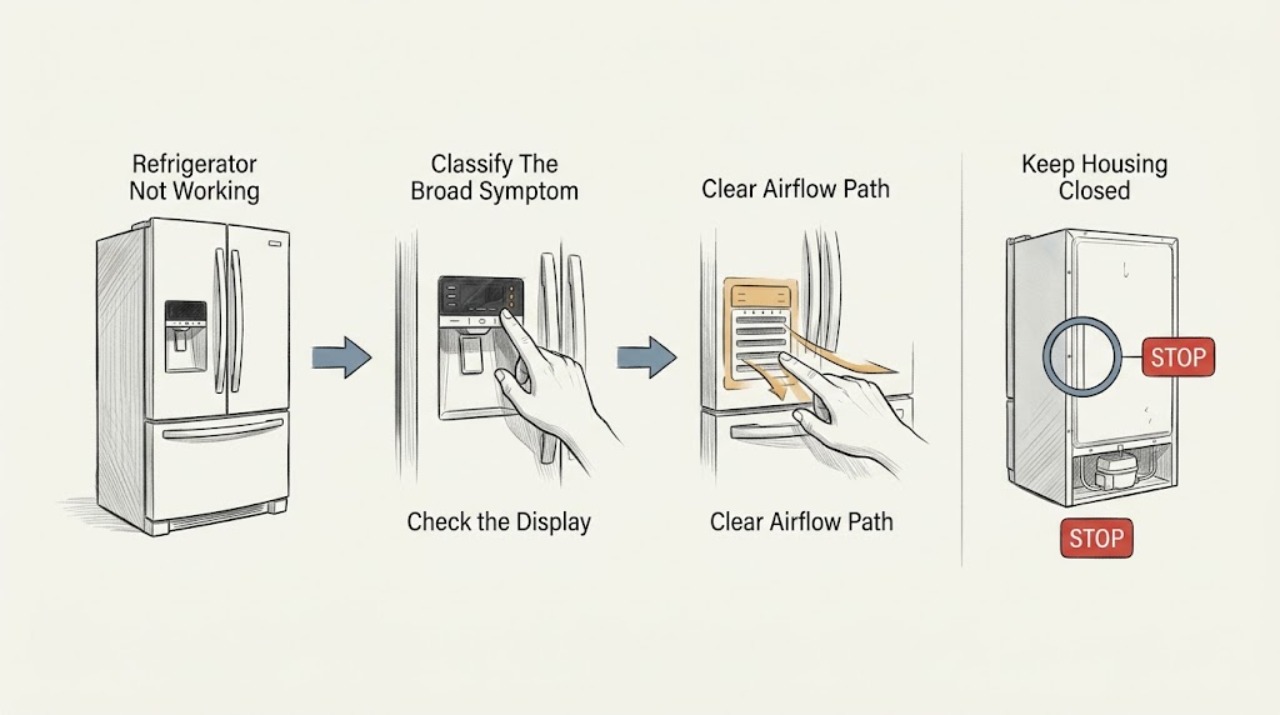
“Not working” is a symptom router, not a diagnosis. First decide whether the refrigerator is completely dead, has power but is not cooling, is cooling unevenly, is noisy, leaking, frosting, or showing a code. Find the exact Hotpoint model/industrial code and manual. From a safe external position, check the plug and household power, door closure, temperature/holiday or fast-freeze setting, blocked vents, heat/clearance, and visible moisture; do not move the cabinet or open panels. Hotpoint's own guidance separates model-specific temperature, moisture, noise, defrost, ice-maker, and control faults. If water reaches electricity, there is smoke/burning odor, the breaker trips, the cord is hot/damaged, refrigerant tubing is damaged, or the appliance needs internal access, leave it off and use qualified service. This page is intentionally broader than “not turning on,” “not starting,” or “not cooling”: use those symptom-specific paths when the observation is already clear.
Before you begin
Safety first
- This article covers symptom classification, dry external power/control observation, visible door/airflow/temperature checks, and limited accessible moisture observation only. Do not move the unit, open panels, disconnect tubing, handle wet wiring/refrigerant, or bypass protection.
Work through in order
Diagnostic checks
Use only checks that match the exact appliance or system and its official guide.
-
Check 1
Read the Hotpoint model or industrial code from the door frame or rating label without moving the appliance. Record whether there is no light/display, the cabinet is warm, one compartment is warm, noise or water is present, frost has built up, the ice maker is affected if fitted, or a code is displayed.
Expected result: The report is primarily no power, no cooling, uneven temperature, water/frost, noise, ice-maker trouble, or a control/error symptom.
Next step: Use the matching branch below and the exact model manual. If the symptom is specifically no display/no motor, switch to a no-turning-on path; if it is specifically warm with normal power, switch to a not-cooling path.
Stop if: Stop for smoke, burning odor, sparks, hot/damaged power parts, water near electricity, a tripping breaker, or damaged refrigerant tubing.
Why this matters
Why: Each pattern has a different diagnostic path. Hotpoint's official pages provide separate guidance for temperature, defrost/moisture, noise, ice-maker, and control/error conditions.
-
Check 2
From a dry position, inspect the plug, cord, outlet, display, interior light, and visible control setting. Check only whether the plug is seated and the household outlet is available; do not remove covers, change protective devices, or access wiring.
Expected result: The display/light is dead, the outlet or cord is suspect, the appliance has power but a holiday/fast-freeze/control setting is active, or power and visible settings appear normal.
Next step: Correct only a loose visible connection or a clearly documented model setting. For a dead, damaged, or electrically abnormal appliance, leave it disconnected and arrange qualified service.
Stop if: Do not touch wet power equipment, open the electrical compartment, bypass a control, change a breaker/fuse rating, or make internal electrical measurements.
Why this matters
Why: No visible power points toward supply, plug, cord, or control input; a working display with poor cooling points away from a total power failure. Hotpoint says some settings are fitted only to certain models and directs unresolved faults to service.
-
Check 3
Without moving the refrigerator, note the exact temperature symptom and check the visible thermostat/setting, door closure, gasket contact, blocked internal vents, direct heat/sunlight, and external ventilation. Do not change a setting repeatedly or remove a gasket.
Expected result: The setting is unusual, a door or gasket is not sealing, vents or exterior clearance are blocked, the appliance is near heat, or these visible conditions are normal but cooling remains poor.
Next step: Correct only an accessible obstruction or documented setting and allow the model's stated recovery time. Arrange service if the refrigerator remains warm, food safety is at risk, or an electrical symptom occurs.
Stop if: Do not move or tilt the appliance, block vents, force the door, open panels, or continue operating with water near electrical parts.
Why this matters
Why: Hotpoint identifies thermostat, door closure/gasket, ventilation, heat, and airflow as model-relevant cooling influences. These observations distinguish a performance condition from a total no-power report but do not prove a compressor or sealed-system fault.
-
Check 4
If the symptom is water or frost, trace the first visible wet or icy point: door edge, inner rear gutter/base, ice tray/ice maker if fitted, or under/behind the cabinet. Check only whether food touches the back wall or the visible gutter is obstructed; do not chip ice or dismantle the liner.
Expected result: Moisture starts at the door/condensation area, rear gutter/base, ice feature, or under/behind the cabinet; frost is confined to a door/basket or covers an inaccessible internal area.
Next step: Remove only an accessible item touching the back wall and mop visible water. Use the exact manual for permitted defrost/drain steps; leave the appliance off and arrange service for a persistent, inaccessible, or electrical leak.
Stop if: Do not use sharp tools or heat, pour chemicals, pull an integrated unit, disconnect tubing, or touch wet electrical parts.
Why this matters
Why: Hotpoint separates door condensation, blocked rear-gutter moisture, defrost collection, and optional ice-maker faults. A puddle or frost pattern does not identify a single failed component.
-
Check 5
If the appliance runs but seems abnormal, record the sound, whether cooling continues, whether an ice maker is actually fitted, and any code or flashing light. Compare only with the exact model manual; do not cycle an ice maker, reset repeatedly, or open the rear cabinet to identify a sound.
Expected result: The sound is a documented operating/defrost pattern, the refrigerator is noisy with poor cooling, E0/EE or another code appears, or the controls/display do not respond correctly.
Next step: Use the exact manual for a documented setting or sound. For a persistent abnormal sound, code, or control failure, keep the appliance off as appropriate and arrange Hotpoint service.
Stop if: Do not bypass controls, force compressor/ice-maker operation, remove covers, handle refrigerant, or make internal electrical tests.
Why this matters
Why: Hotpoint describes some compressor, pipe, gas-circulation, fan, and defrost sounds as normal on specific refrigeration models, while E0/EE indicate fitted ice-maker faults and other codes can indicate sensors or controls. The pattern routes service but does not name a part.
-
Check 6
Summarize the model, configuration, power/display state, temperature, door/airflow, water/frost, noise, ice-maker presence, and codes. Give these observations to Hotpoint support or a qualified technician instead of selecting a part from the broad phrase not working.
Expected result: The fault remains after safe external checks, the source is internal or inaccessible, multiple symptom categories overlap, or a hazard is present.
Next step: Arrange model-specific Hotpoint or qualified appliance service. Leave the unit disconnected for electrical, water-near-electric, smoke, burning, or refrigerant hazards, and protect perishable food if cooling has stopped.
Stop if: Do not open panels, move the appliance, disconnect water lines, handle refrigerant, bypass protection, or restore power after a hazardous symptom.
Why this matters
Why: Possible causes include supply, door/seal, drain/defrost, sensor, fan, compressor, control, ice-maker, water path, wiring, or sealed-system faults. Hotpoint's public guidance is model-specific and routes unresolved or coded faults to trained service.
Use your observations
Decision map
Find the observation that best matches what you see, then follow the next safe action.
-
PATH 01Safety boundary
What you see
There is no interior light/display or the appliance gives no response, and the plug/outlet or cord is suspect.
Do this next
Check only the safe visible connection and household supply. Leave the refrigerator disconnected and use qualified electrical/appliance service for a damaged or unresolved power path.
Why this path and its safety boundary
Why it matters: This is primarily a not-turning-on/no-power intent rather than a cooling-performance diagnosis; supply, cord, or control input is more likely than a blocked drain.
Safety stop: Do not open wiring, change protective ratings, use a damaged cord, or repeatedly restore power.
-
PATH 02Safety boundary
What you see
The display/light works, but the cabinet or one compartment is too warm without a water or electrical hazard.
Do this next
Check visible setting, door, vents, heat, and clearance using the exact model guidance, then arrange service if food safety or cooling does not recover.
Why this path and its safety boundary
Why it matters: This is a not-cooling performance intent. Settings, door/gasket, airflow, heat, defrost, sensor, fan, compressor, or sealed-system causes remain possible.
Safety stop: Do not open the compressor/control area, handle refrigerant, or keep operating after smoke, burning, water near electricity, or a breaker trip.
-
PATH 03Safety boundary
What you see
The main symptom is inner moisture, a puddle, frost, or defrost water rather than no power or simple warmth.
Do this next
Trace the first wet/icy point and remove only an accessible back-wall obstruction. Use the exact manual or service for persistent or inaccessible water/frost.
Why this path and its safety boundary
Why it matters: A door/condensation, rear-gutter, defrost-collection, or optional ice-feature path is more likely than a generic control failure.
Safety stop: Do not chip ice, apply heat, probe a drain, pull an integrated unit, or touch wet electrics.
-
PATH 04Safety boundary
What you see
The refrigerator runs but has a changed sound, unresponsive controls, flashing display, or an error code.
Do this next
Record the code and phase, compare with the exact manual, and arrange Hotpoint service for persistent noise, code, or control failure.
Why this path and its safety boundary
Why it matters: Some model-specific compressor/pipe/fan/defrost sounds may be normal, but control, sensor, or fitted ice-maker codes need exact interpretation and may require service.
Safety stop: Do not force cycles, bypass controls, open panels, or diagnose a component from sound alone.
-
PATH 05Safety boundary
What you see
Not working includes multiple overlapping symptoms, water near electricity, smoke/burning odor, a hot/damaged cord, a tripping breaker, or damaged refrigerant tubing.
Do this next
Stop operating the refrigerator and disconnect power only from a dry, safe position. Arrange qualified appliance/electrical service and provide the model plus observations.
Why this path and its safety boundary
Why it matters: The report cannot be safely reduced to not turning on or not cooling; hazard isolation takes priority over diagnosis.
Safety stop: Do not move the refrigerator, restore power, open panels, handle wet wiring/refrigerant, or attempt a repair.
Helpful context
Understand the symptom
Not working is broader than no power or no cooling
A refrigerator can have no display, power with no cooling, one warm compartment, excessive frost, water, unusual noise, a control problem, or an ice-maker fault. “Not turning on” and “not starting” are no-power/control intents; “not cooling” is a temperature-performance intent. This broader page helps classify an unclear report and then routes it to the appropriate check instead of repeating one generic reset.
Hotpoint behavior is model and feature dependent
Hotpoint support pages distinguish refrigerators, fridge freezers, and integrated variants, and some controls or ice makers exist only on certain models. Hotpoint labels E0 and EE ice-maker faults “if fitted,” and its manual route is based on the model number. Do not apply a freezer, ice-maker, holiday-mode, or error-code procedure to a refrigerator whose exact feature set is unknown.
Use only external, safe checks
Check visible controls, door closure, vents, heat exposure, plug, and moisture without moving the appliance. Hotpoint's service guidance says to disconnect the mains before replacing a part. Internal compressor, fan, sensor, control, wiring, refrigerant, and water-path diagnosis belongs to a qualified technician, especially when water or heat is present.
Safety boundary
Stop conditions
- Stop use for smoke, burning odor, sparks, a hot/damaged cord or plug, water near electricity, a tripping breaker, or damaged refrigerant tubing.
- Disconnect power only from a dry, safe position; do not touch wet electrical parts or restore power to a wet appliance.
- Do not move or tilt the refrigerator, pull an integrated unit, open panels, disconnect water lines, or handle refrigerant.
- Do not chip ice, apply heat, probe drains, bypass controls/protection, or select a part from the broad phrase not working.
Only after diagnosis
Potential parts
- exact-model door gasket or seal
Consider only when the exact model and visible inspection confirm a torn or deformed seal contributing to warmth, frost, or condensation.
Hotpoint lists refrigerator/freezer seals for selected models; verify the model before ordering. - exact-model defrost drain plug or drain component
Consider only when the first wet point and exact service/manual diagnosis identify a selected model's blocked or damaged defrost-hole/drain component.
Drain parts are model-specific and a puddle alone does not prove this component has failed. - exact-model ice-maker or control component if fitted
Consider only when the exact model has the feature and Hotpoint or a qualified technician confirms a fitted ice-maker or control fault.
Hotpoint labels ice-maker faults if fitted; do not cross-fit a module, valve, sensor, or board by appearance.
When checks do not resolve it
Need a professional?
Use Hotpoint or qualified appliance service when the refrigerator remains inoperative after safe external checks, cooling is not restored, multiple symptom categories overlap, a code appears, a fitted ice maker or water path is involved, internal access is needed, or any electrical/water/refrigerant hazard occurs.
Safety scope: This article covers symptom classification, dry external power/control observation, visible door/airflow/temperature checks, and limited accessible moisture observation only. Do not move the unit, open panels, disconnect tubing, handle wet wiring/refrigerant, or bypass protection.
Common questions
FAQ
Is Hotpoint refrigerator not working the same as not turning on?
No. Not turning on is a no-power/control symptom. Not working can also mean warm compartments, water, frost, noise, control codes, or an ice-maker issue. Classify the observed pattern before selecting the model-specific check.
What should I check first when my Hotpoint refrigerator is not working?
Read the exact model, then check the visible power/display state, temperature setting, door closure, vents, heat/clearance, and first wet point without moving or opening the appliance. Use service for persistent or hazardous faults.
Why is my Hotpoint refrigerator warm but still has power?
That is usually a not-cooling performance path rather than a total power failure. Check visible settings, door/gasket, airflow, heat, and clearance using the exact manual; internal fan, sensor, compressor, control, or sealed-system diagnosis belongs to service.
What do E0 and EE mean on a Hotpoint refrigerator?
Hotpoint identifies E0 as an ice-maker fault if fitted and EE as an ice-maker circuit fault if fitted, and recommends engineer help. Do not infer a part or assume the refrigerator has an ice maker without checking the model.
When is a Hotpoint refrigerator problem unsafe to troubleshoot?
Stop for smoke, burning odor, sparks, a hot/damaged cord or plug, water near electricity, a tripping breaker, damaged refrigerant tubing, or a source that requires moving/opening the appliance. Disconnect only from a dry, safe position and arrange qualified service.
Read the exact guide
Official sources
- Hotpoint Service Fridge Freezer RepairHotpoint · Official Hotpoint UK fridge-freezer service page; exact controls, features, and regional support vary by model and market.
- Defrost Hole / Drain Plug J00226437Hotpoint · Official Hotpoint UK parts page; fit is limited to selected models and must be confirmed by model number.
- Refrigerator Freezer Compartment Seal J00114764Hotpoint · Official Hotpoint UK parts page; this listed seal applies to selected refrigerator small freezer compartments only.
- Hotpoint Fridge Freezer Error CodesHotpoint · Official Hotpoint UK fridge-freezer error page; codes and fitted features must be confirmed for the exact model.
- Integrated Fridge Freezer Troubleshooting & FAQHotpoint · Official Hotpoint UK integrated fridge-freezer page; exact drain and ice features vary by model.
- Hotpoint Fridge Troubleshooting & Repair ServiceHotpoint · Official Hotpoint UK fridge troubleshooting page; exact features and internal paths vary by model.
- Hotpoint Service Fridge RepairHotpoint · Official Hotpoint UK fridge service page; model features and regional service routes vary.
Community feedback
Share a repair observation
Share a plain-text repair observation. Accepted observations are published automatically; this page may take a moment to update.